Warehouse operations data, run by agents
WMS, labor and automation data sit in separate systems, so throughput and labor productivity are reported a day late. Here is how Data Workers runs it instead.
Key takeaways
- •The problem today. WMS, labor and automation data sit in separate systems, so throughput and labor productivity are reported a day late.
- •What changes. Agents stream WMS and labor events, reconcile them and keep productivity metrics live.
- •What stays with your people. Labor data tied to pay: people's pay depends on it.
- •The result. Supervisors see throughput by the hour.
The problem today
WMS, labor and automation data sit in separate systems, so throughput and labor productivity are reported a day late.
What changes with Data Workers
Agents stream WMS and labor events, reconcile them and keep productivity metrics live.
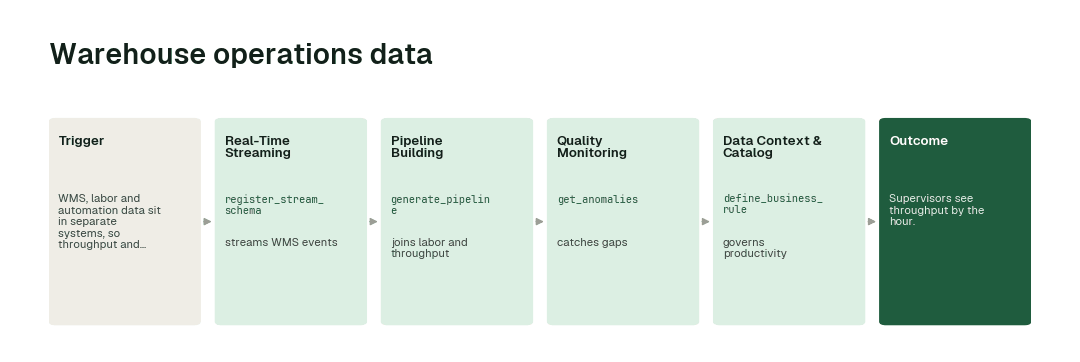
The workflow, step by step
- 1.The Real-Time Streaming agent calls
register_stream_schemaand streams WMS events. - 2.The Pipeline Building agent calls
generate_pipelineand joins labor and throughput. - 3.The Quality Monitoring agent calls
get_anomaliesand catches gaps. - 4.The Data Context & Catalog agent calls
define_business_ruleand governs productivity.
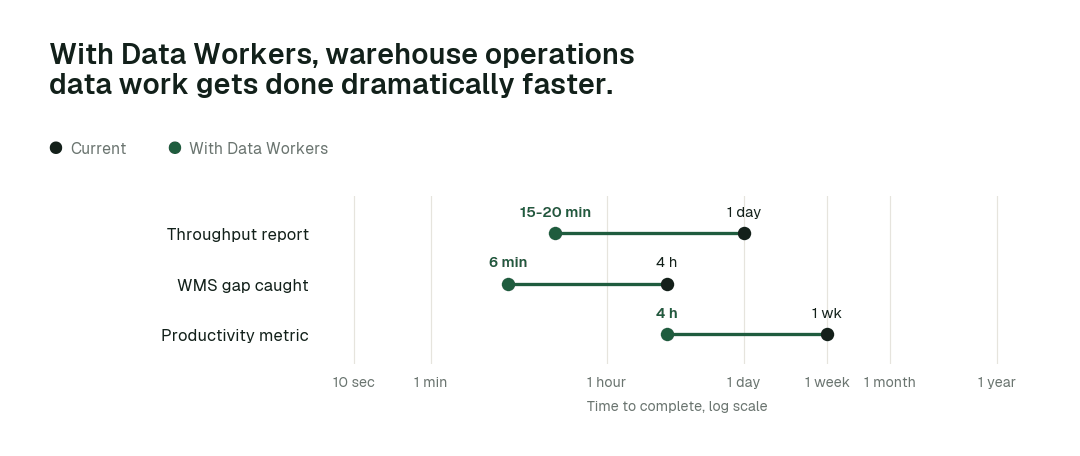
The impact metrics we move
- •Throughput report: from about a day to 15-20 min
- •WMS gap caught: from about 4 hours to minutes
- •Productivity metric: from about a week to 4 h
What goes on autopilot
- •WMS events stream continuously, so throughput is live.
- •Productivity is governed, so sites compare fairly.
Where your people stay in charge
Labor data tied to pay always go to a named approver, because people's pay depends on it. Everything starts at L1, observing only, and autonomy rises only on evidence.
The pilot
- •Scope. Live throughput at one site.
- •First week. Agents run at L1, observing only, and show the fixes they would have made, with receipts.
- •By week two. The routine work above runs on its own; anything sensitive stays with a named approver.
- •At day 30. We review the impact metrics against your baseline:
- •Throughput report: from about a day to 15-20 min
- •WMS gap caught: from about 4 hours to minutes
- •Productivity metric: from about a week to 4 h
- •Cost. Start with a pilot ($7,500 one-time, credited in full against the first year). Scale is from $1,000 a month and Enterprise from $3,000 a month, billed annually, with unlimited seats, no usage meter and no markup on model spend. See pricing.