You're on Lightdash: Your dbt Project Is Your BI. Data Workers Owns Whether the Data in Those Models Is Right
Already on Lightdash? Data Workers checks the models behind every metric and dashboard, traces a wrong number to its cause and fixes it upstream behind a named approval, with a receipt.
Your team picked Lightdash because the semantic layer already existed: it was your dbt project. Metrics sit in YAML next to their models and change through the same review as the SQL. Analysts build dashboards, scheduled deliveries land in Slack every morning, sql_filter and user attributes decide who sees which rows, and AI agents answer in the app and in Slack. Engineers reach the project from Claude, Cursor or Codex through Lightdash's MCP server, and AI writeback turns a request into a pull request. Lightdash turns your dbt project into BI. Data Workers owns whether the data in those models is right: it checks the tables after every run, traces a wrong number to the change that caused it, proposes the fix behind a named approval and verifies it with a receipt.
Key takeaways
- •Lightdash keeps its job. Metrics in dbt YAML, charts, dashboards, scheduled deliveries, data apps and AI agents stay with the people who own them today.
- •When the BI layer is the dbt project, one bad table travels everywhere at once. Data Workers checks those tables after each run and holds key numbers to a baseline.
- •Row filters make some breaks look like good news. A NULL in a
sql_filtercolumn drops the row for every filtered user, so the number shrinks instead of erroring. Data Workers catches the NULLs in the warehouse before the morning delivery is read. - •The fix lands where the cause is. Data Workers proposes the upstream change as a diff for its owner, routes it to a named approver and queues the rerun. It changes nothing in Lightdash.
- •Start with one domain the business acts on, then climb from L0 manual to L4 autonomous per domain.
Lightdash turns your dbt project into BI. Data Workers owns whether the data in those models is right.
One reviewed definition per metric also means a data problem under it reaches every surface together. The query compiles, the chart renders, the agent explains the result in clear sentences, and nothing in Lightdash looks broken, because nothing in Lightdash is.
Row-level security adds a twist. Lightdash implements it with sql_filter on a model, for example ${TABLE}.region IN (${lightdash.attributes.region}). That is the right design for access. But a row whose region is NULL never matches an IN list, so if an upstream change leaves the column empty, those rows quietly vanish for every user the filter applies to. The dashboard reports a smaller number, and smaller often reads as better.
Here is a Friday at a B2B payments software company with support teams in three regions. It runs Lightdash Cloud on Snowflake. Zendesk data lands through a dlt pipeline, and dbt Core runs on Airflow 2. Support managers see their own region through a user attribute. This is an illustrative example. Times are UTC.
| Time | System | What happens |
|---|---|---|
| Thu Oct 1, 16:30 | Zendesk | Support ops replaces EMEA Tier 1 with two new groups, EMEA Billing and EMEA Technical, and a bulk update moves 2,410 open EMEA tickets into them. Nobody outside support ops hears about it |
| 23:00 | Airflow 2, dlt, Snowflake | The zendesk_load DAG run, owned by the platform team, loads tickets and groups into RAW_ZENDESK. The two new groups land with new IDs. The load succeeds |
| Fri 01:00 | Airflow 2, dbt Core, Snowflake | The support_dbt DAG run runs dbt build. stg_zendesk__tickets joins the zendesk_group_regions seed on group_id to set region, and the two new IDs are not in the seed. fct_open_tickets builds with 7,940 rows; 2,410 have a NULL region. Every test passes: the only tests are unique and not_null on ticket_id |
| 01:25 | Data Workers | The post-run run_quality_check on fct_open_tickets (Snowflake) fails: the null rate on region is 30%, above the 10% threshold. The open-tickets-per-region numbers the team records with monitor_metrics show EMEA at 380 against a 30-day baseline of 2,700, while total open tickets, 7,940, sit on their baseline. An incident opens |
| 01:29 | Data Workers | diagnose_incident: the dbt manifest, read natively, shows no model or seed change since Tuesday, and the total is normal, so tickets did not disappear; they lost their region. trace_cross_platform_lineage follows fct_open_tickets back through stg_zendesk__tickets to the zendesk_group_regions seed and the RAW_ZENDESK.TICKETS source. A context-graph note says support ops maintains Zendesk groups and analytics maintains the seed |
| 01:32 | Data Workers, Slack | blast_radius_analysis lists fct_open_tickets, fct_sla_breaches and agg_backlog_daily. Context-graph notes the team recorded add the EMEA Support Ops dashboard, which reads these models through a sql_filter on region, and the Support agent in Lightdash. send_slack_alert posts to #data-incidents with the evidence and a check query for the support ops owner: open tickets by group_id where region is NULL |
| 07:00 | Lightdash, Slack | The scheduled delivery of the EMEA Support Ops dashboard posts to #emea-support: open backlog 380, down from 2,790 on Wednesday; SLA breaches 4, down from 61 |
| 07:40 | Lightdash AI agent, Slack | The EMEA support director asks the Support agent whether the weekend contractor shift can be released. The agent answers from the governed metrics that the backlog fell 86% and the shift looks unnecessary. It is faithful to the semantic layer; the model under it lost 2,410 tickets to a NULL |
| 07:50 | Snowflake, Zendesk | The support ops lead runs the check query: all 2,410 tickets sit in two group_id values first seen in Thursday's load, and the Zendesk audit log shows the change at 16:30. Cause confirmed. The on-call posts the incident link in the thread, and the director holds the decision |
| 08:05 | Data Workers, Spellbook | Proposes the plan. For the dbt owner, a diff to merge: the two new group IDs added to zendesk_group_regions.csv as EMEA, a not_null test on region and a relationships test from ticket group_id to the seed, so the next new group fails the build loudly. After the merge, a rerun of support_dbt. With it: the blast radius, the checks it will repeat and the undo (revert the diff). The approval request reaches the analytics engineering lead in Slack |
| 08:30 | Spellbook, GitHub | The lead reviews the evidence and approves in Spellbook; the dbt owner merges the diff |
| 08:35 | Data Workers, Airflow 2 | trigger_airflow_dag queues the approved support_dbt run |
| 08:52 | Snowflake | The run finishes and the new tests pass. run_quality_check shows a 0% null rate on region, and monitor_metrics records EMEA open tickets at 2,795, inside the baseline |
| 09:00 | Lightdash | This instance runs without results caching, so the next dashboard load queries Snowflake and shows 2,795 open EMEA tickets and 58 breaches. The dashboard owner posts the corrected link |
| 09:05 | Claude, Lightdash MCP server | The director asks Claude, through Lightdash's MCP server and under her own user attributes, to run the open-tickets metric by group with run_metric_query: 2,795, matching the recorded value. The shift stays. Data Workers writes the receipt (cause, diff, approver, rerun, checks, undo) and a graph note that region depends on a hand-kept seed keyed by Zendesk group IDs |
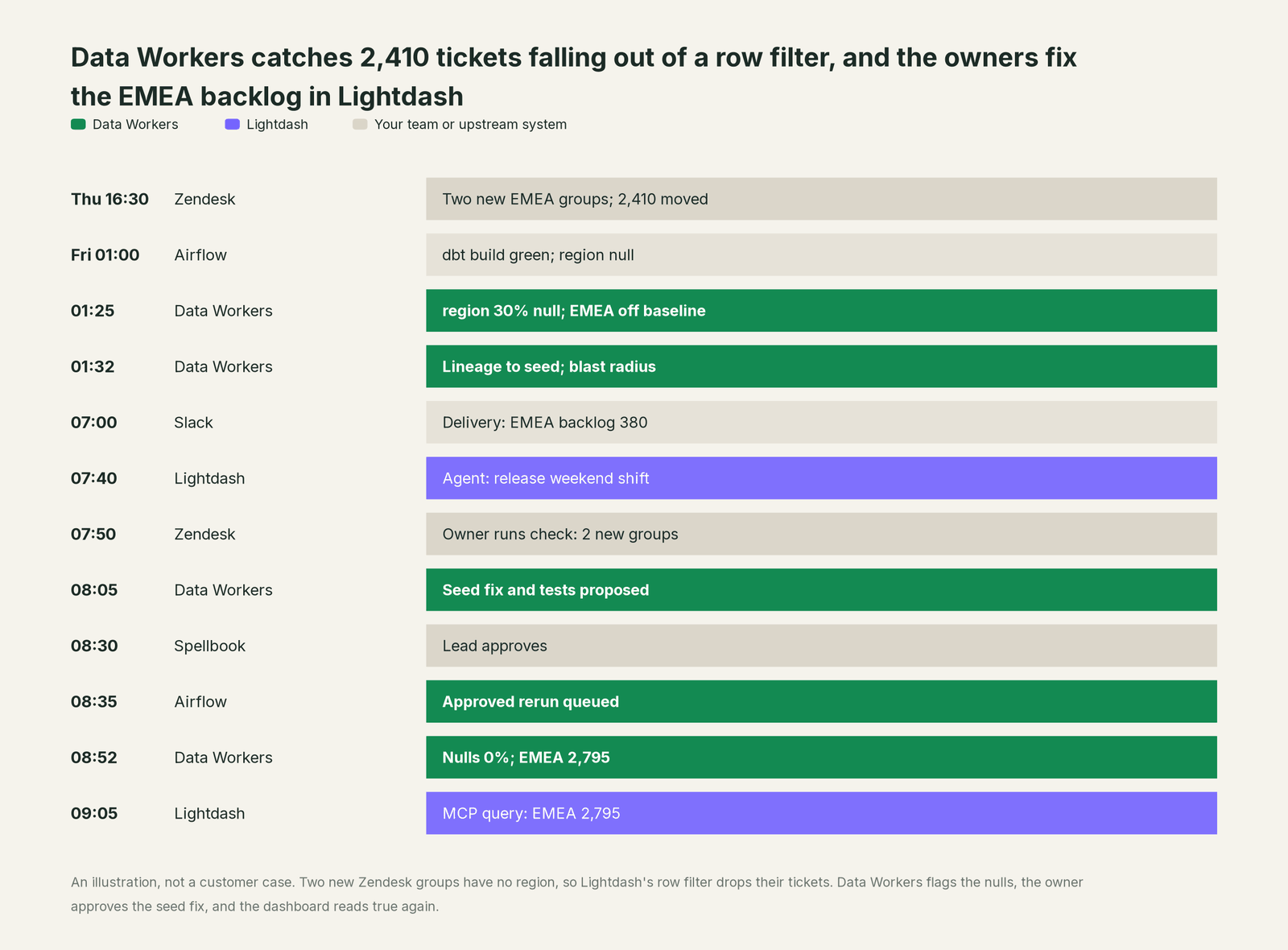
Every system did what it was built to do. The defect lived in a join nobody was watching. Data Workers caught it at 01:25, a named person approved the fix, and the weekend shift kept its people.
| Job | What Lightdash does | What Data Workers does |
|---|---|---|
| The metric | Metrics, dimensions and descriptions in dbt YAML, reviewed in Git; the metrics catalog makes them findable | Keeps the tables and dbt models under those metrics right |
| The access | sql_filter and user attributes decide which rows each person sees; agents and MCP respect them | Catches NULLs in the columns those filters depend on, before the filtered number is read |
| The answer | Charts, dashboards, scheduled deliveries, data apps and AI agents in the app and in Slack | Records the headline numbers people act on and holds them to a baseline |
| The break | Runs whatever the warehouse returns; content validation flags charts broken by YAML changes | Traces a wrong number to the change that caused it and lists every model and recorded dashboard it reaches |
| The fix | Owners change YAML through Git or AI writeback, and edit charts and dashboards | Proposes the upstream fix as a diff for its owner, routes it to a named approver and queues the approved rerun |
| The proof | Answers again from fresh data, in the app, in Slack or through MCP | Re-checks the tables, compares the recorded values and writes a receipt with cause, diff, approver and undo |
Why doesn't Lightdash just do this itself?
Lightdash made a clear bet: the dbt project is the semantic layer, and BI is built and reviewed like code. Agents answer from the semantic layer and respect "the same project permissions and user attributes as the rest of Lightdash". The MCP server runs under each user's own permissions. AI writeback edits dbt or Lightdash YAML, validates it with lightdash compile, opens a pull request and reports which charts, dashboards and deliveries a rename or removal would break. Autopilot (Beta) fixes broken charts, Issues (Beta) tracks the data problems people and agents find, and Lightdash advises read-only warehouse credentials.
All of that protects Lightdash's own surface: the YAML, the content and the answers. Lightdash does not run Zendesk, the dlt load, the Snowflake tables or the Airflow DAGs, and it shouldn't have to. Fixing this incident took a lineage trace through four systems, a seed change, new tests, a named approval, a rerun and a verification. That is a different product with a different liability: cross-system context, blast-radius scoping, approvals, rollback and receipts for changes in systems Lightdash doesn't own. It is the product Data Workers is, and it builds on the Lightdash project your team already trusts.
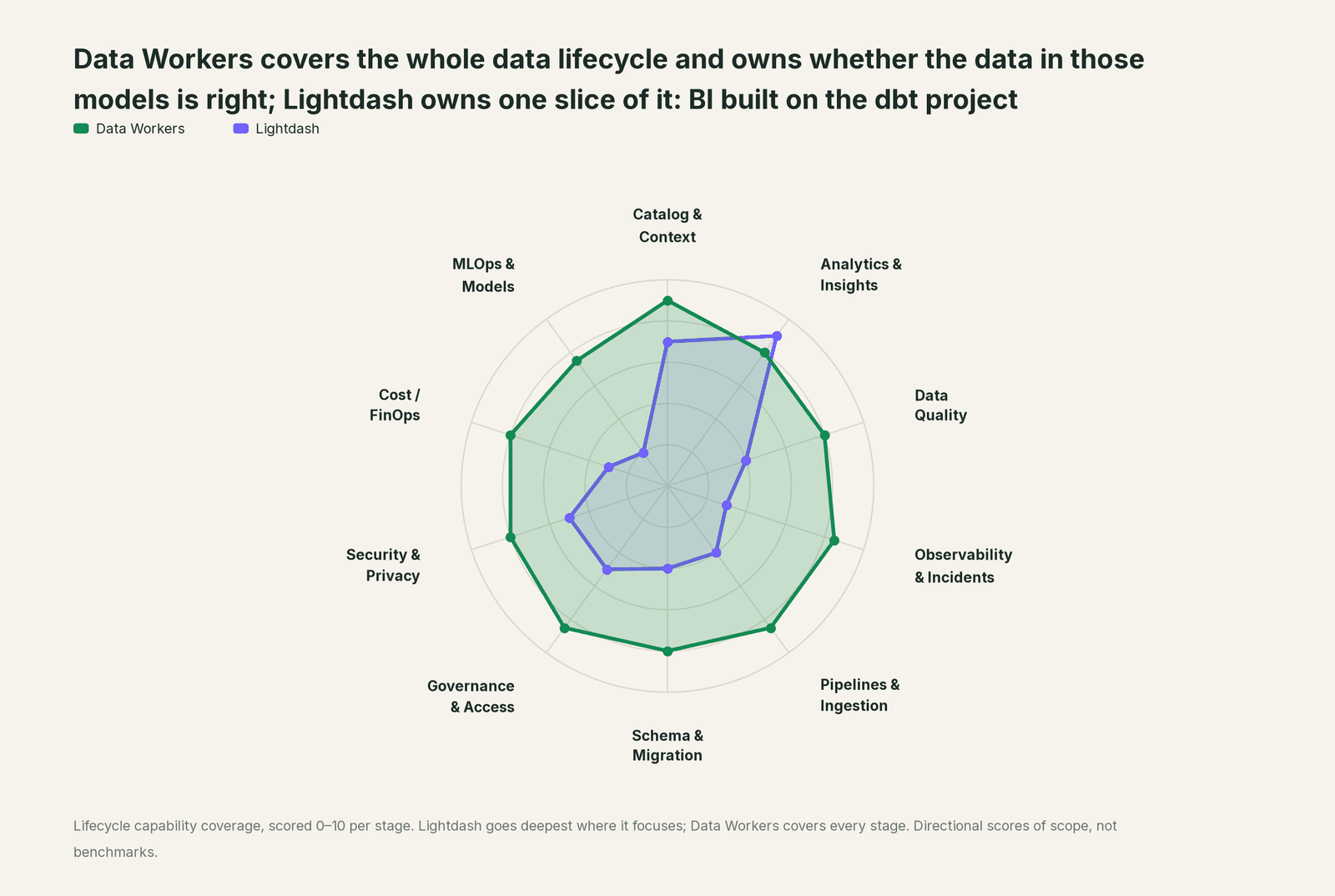
Every tool owns a slice. Data Workers covers the whole lifecycle
Lightdash owns one slice outright: BI built on the dbt project, with governed metrics, dashboards, deliveries and agents. Each point tool adds another console, contract and handoff. Data Workers covers the whole lifecycle with one context, one approval flow and one audit trail, and builds on the Lightdash you already run.
| Stage | Data Workers | Lightdash | Why we scored it this way |
|---|---|---|---|
| Catalog & Context | 9 | 7 | Metrics, dimensions, descriptions and AI hints live in dbt YAML, and the metrics catalog makes them searchable. Data Workers keeps one governed context graph across every platform, joined to lineage, quality and owners. |
| Analytics & Insights | 8 | 9 | Lightdash's home stage: charts, dashboards, scheduled deliveries, data apps and AI agents in the app and in Slack, all on the dbt semantic layer. Data Workers makes sure the tables under them are right. |
| Data Quality | 8 | 4 | Issues (Beta) collects data problems people and agents file; Lightdash does not test the tables behind a metric. Data Workers checks them after every run and holds recorded values to a baseline. |
| Observability & Incidents | 8.5 | 3 | Alerts fire on a chart's result; they do not trace a cause across systems. Data Workers traces a wrong number back to the source, load or model behind it, proposes the fix and verifies it. |
| Pipelines & Ingestion | 8.5 | 4 | dbt write-back lets analysts turn a custom metric or SQL into a dbt pull request. Data Workers queues approved reruns through the orchestrator for the pipelines under Lightdash. |
| Schema & Migration | 8 | 4 | Content validation, preview projects and writeback impact checks keep charts in step with YAML changes. Data Workers reviews dbt changes and scopes the blast radius across models and recorded dashboards. |
| Governance & Access | 8.5 | 5 | Project roles, spaces, agent tags and Git review on writeback govern Lightdash itself. Data Workers routes every data change to a named approver. |
| Security & Privacy | 8 | 5 | Row filtering with sql_filter and user attributes, and MCP scoped to each user's permissions, protect Lightdash's surface. Data Workers leaves a receipt on every data change and proposes masking for the owner to apply. |
| Cost / FinOps | 8 | 3 | Results caching and pre-aggregates cut repeat warehouse queries. Data Workers attributes Snowflake spend per query and per dbt model through query tags, and sums BigQuery spend for the account. |
| MLOps & Models | 7.5 | 2 | Lightdash serves analytics, not models. Data Workers keeps the data under models and agents healthy. |
How Lightdash and Data Workers work together
Your people stay in Lightdash, in Slack and in their AI clients. Alerts and approval requests reach them in Slack or email. Spellbook Data Catalog (in preview) is where the data team looks: each proposed fix, its blast radius, approver and rollback. Underneath, Data Context Wizard keeps one governed context graph, the Data-Agents Swarm (20+ specialist agents) does the work, the Autonomous Data-Conductor runs each fix end to end, and per-domain guardrails hold approvals, receipts and rollback.
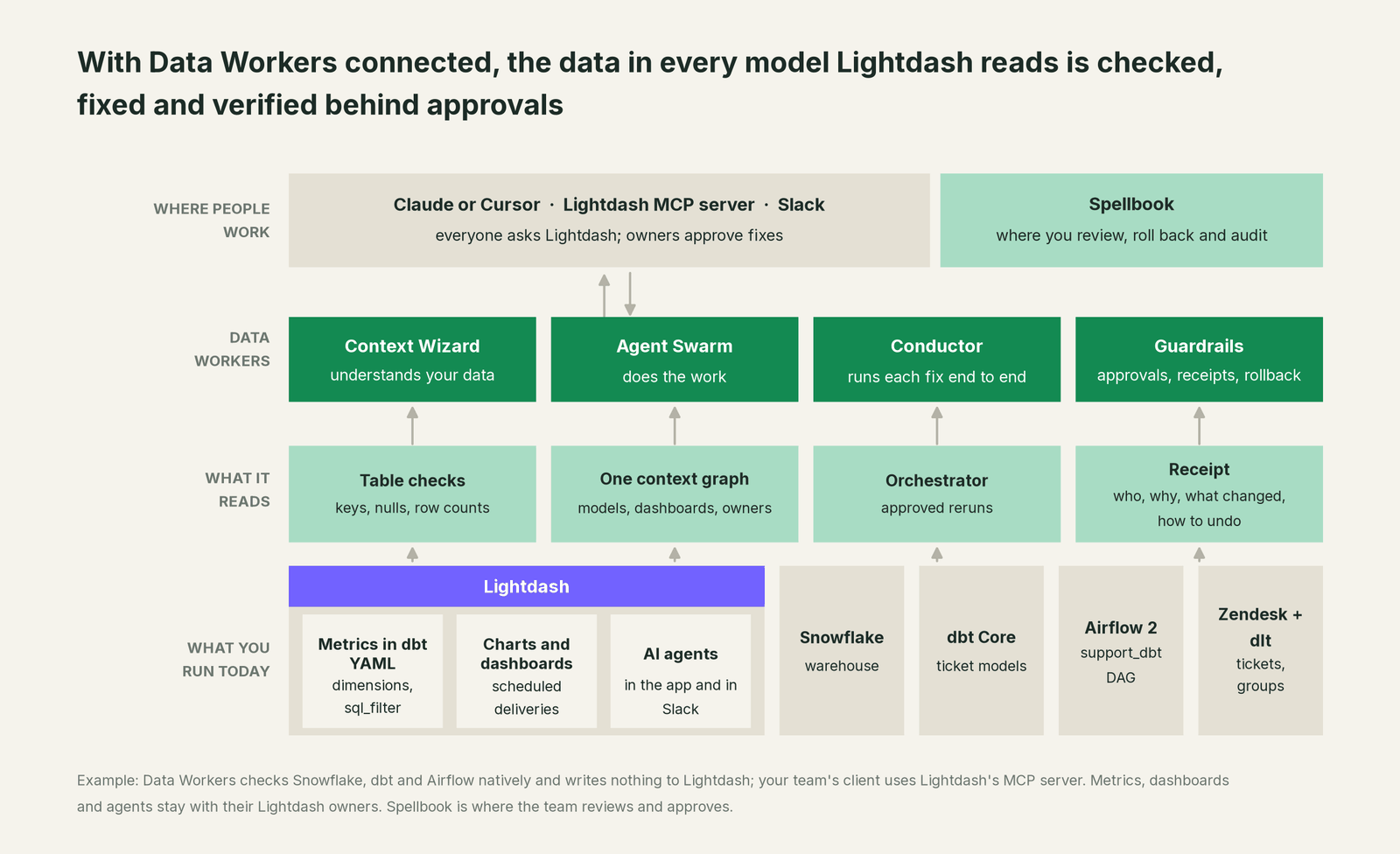
Where Data Workers works. Natively, on what sits under Lightdash: Snowflake, BigQuery or Postgres, the dbt project and the orchestrator. The model behind every metric is already in Data Workers' lineage from the dbt manifest. Which dashboards, agents and row filters read a model is recorded as notes in the context graph. When a fix goes through a pull request, Data Workers' change review reads the lineage diff, including any dbt exposures your team declares. Lightdash itself connects over its API or MCP server today: your team's own client uses Lightdash's MCP server side by side with Data Workers' servers, and Data Workers' agents never call it. Data Workers writes nothing to Lightdash; BI is read by design.
What Data Workers checks under each metric. run_quality_check runs nulls, uniqueness on id columns and minimum row counts on Snowflake and Postgres tables, and on BigQuery with a service-account key; get_quality_score rolls them up. monitor_metrics holds the values your team records, such as open tickets per region, against their baseline, which catches a drop every test allows. trace_cross_platform_lineage and blast_radius_analysis follow a table back to its source and forward to every model and recorded dashboard. diagnose_incident, remediate and get_incident_history run and record the incident. Your data stays in your systems: the agents, warehouse credentials and model key run in your infrastructure, and the hosted Conductor sees workflow metadata only.
Setup over MCP today. Clone the open-source repository and add start-agent.sh entries to your client's MCP config, as the client setup docs show. On Lightdash Cloud the endpoint is https://<instance>.lightdash.cloud/api/v1/mcp (most teams use app or eu1), and each person signs in with OAuth, so every query runs with their own permissions and user attributes. For people who only ask questions, an admin can turn off Allow content changes via MCP (Settings, Ask AI, General), which removes the content-editing tools.
// Example: .cursor/mcp.json. The lightdash entry is your team's own connection
// to Lightdash's MCP server (OAuth on first connect); Data Workers does not call it.
{
  "mcpServers": {
    "lightdash": {
      "url": "https://app.lightdash.cloud/api/v1/mcp"
    },
    "dw-context-catalog": {
      "command": "/path/to/dataworkers-claw-community/start-agent.sh",
      "args": ["dw-context-catalog"]
    },
    "dw-quality": {
      "command": "/path/to/dataworkers-claw-community/start-agent.sh",
      "args": ["dw-quality"]
    },
    "dw-incidents": {
      "command": "/path/to/dataworkers-claw-community/start-agent.sh",
      "args": ["dw-incidents"]
    }
  }
}
List the tools with your client's own command. Ask "is everything behind the EMEA Support Ops dashboard healthy?" and get the charts from Lightdash's server and the lineage, checks and open incidents from Data Workers in one answer.
Where fixes go. Data Workers proposes the change as a diff for the owner to merge (a dbt model, seed, test or source mapping) with its blast radius and undo step. It opens the pull request itself only when your team turns on the dbt GitHub pull-request target. After approval it queues the rerun through Airflow, Dagster or Prefect. Lightdash reads the fresh tables on the next query, or when its cache expires. When a metric or sql_filter should change, Data Workers says which and why; the owner edits the YAML, by hand or with AI writeback.
One request, L0 to L4. The autonomy ladder is set per domain.

- •L0 manual. Data Workers is connected and not acting; someone digs by hand.
- •L1 observe. It checks the models under key dashboards and logs what it would do.
- •L2 propose. It drafts the upstream fix; a named owner approves in Spellbook before anything runs.
- •L3 act reversibly. For proven classes, such as a rerun after an approved seed fix, it acts, verifies and records the undo.
- •L4 autonomous. For a narrow class in one domain, it fixes, verifies and posts the receipt.
Approvals go to a named person; a request nobody answers expires and escalates, and never grants itself. No agent can promote its own work. Read is it safe to let AI agents change production data and where does our data go for the full safety model.
Lightdash teams live in dbt, so You're on dbt covers the loop under the models. Comparing code-first BI tools? See You're on Omni and You're on Metabase. For this example's loader, see You're on dlt, and for the wider picture, semantic layer tools compared.
What changes for your team
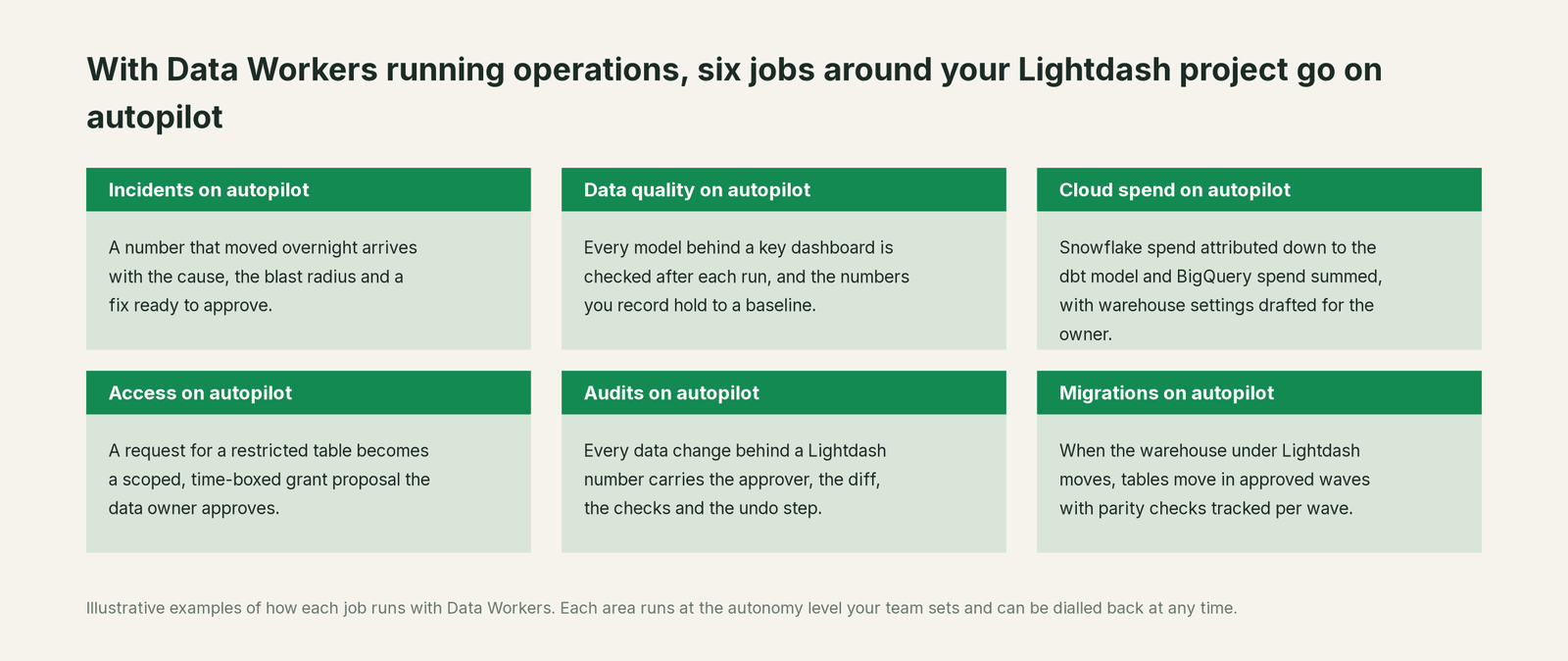
On Lightdash, analytics engineers usually own both the dbt project and the BI layer. With Data Workers, these jobs run on autopilot at the level you set.
- •Incidents. A number that moved overnight arrives with the cause, the blast radius and a fix ready to approve.
- •Data quality. Every model behind a key dashboard is checked after each run, and the numbers you record hold to a baseline.
- •Cloud spend. Snowflake spend is attributed down to the dbt model and BigQuery spend summed for the account, with warehouse settings drafted for the owner.
- •Access. A request for a restricted table becomes a scoped, time-boxed grant proposal the data owner approves.
- •Audits. Every data change behind a Lightdash number carries the approver, the diff, the checks and the undo step.
- •Migrations. When the warehouse under Lightdash moves, tables move in approved waves with parity checks tracked per wave.
Keep Lightdash, or consolidate?
Keep Lightdash if you love it; Data Workers works with it from day one. Many teams consolidate once Data Workers runs that slice too.
For most teams the answer is to keep Lightdash: the metrics, dashboards, deliveries and agents belong there, next to the dbt project. What teams consolidate is the tooling around it: a separate data-quality product, alerting queries and a wiki of which dashboard reads which model. Weighing a build on Lightdash's MCP server and a coding agent? Read build it ourselves with Claude Code and MCP servers: connecting servers is the easy part; cross-system context, approvals and rollback are the work.
The case for your CFO
The outcome: the numbers your company runs on in Lightdash stay right, and when something upstream changes them, the fix arrives with a named approver before anyone staffs, spends or reports on the wrong figure.
The risk story: Data Workers changes nothing in Lightdash. It checks the tables and dbt models under each metric, proposes upstream fixes as diffs, and nothing runs until the named owner approves. Every change is verified and leaves a receipt: what broke, what changed, who approved it and how to undo it. Autonomy is set per domain from L0 manual to L4 autonomous, and an org-wide stop halts all autonomous dispatch. There is zero migration.
Why now: Lightdash agents answer in Slack, deliveries run on schedule, and MCP puts your metrics in every AI client. A broken table now reaches a manager as a confident recommendation before the workday starts.
The first win: one domain the business acts on, with every model under its dashboards checked after each run and its headline numbers held to a baseline. What stays the same: your Lightdash project, metrics, row filters and content, your warehouse, dbt project, orchestrator and review process. For the numbers, see the ROI of agentic data operations.
The sentence to repeat upstairs: "Lightdash turns our dbt project into the dashboards and agents the business uses; Data Workers makes sure the data in those models is right, and a named owner approves every fix with a receipt."
Getting started
Start with a pilot. Pick the Lightdash dashboard behind a weekly decision, connect Data Workers read-only to the warehouse, dbt project and orchestrator under it, record its headline numbers, add context-graph notes for its dashboards and row filters, and let it check those models for a few weeks before turning on the first fix class. The pilot path and plans are on the pricing page, and the pilot is credited in full against the first year.
FAQ
Does Data Workers edit our dbt YAML metrics or Lightdash dashboards? No. Metrics, dimensions, sql_filter rules, charts and dashboards stay with their owners. When a definition should change, Data Workers says which one and why, and the owner edits the YAML through your usual pull request, by hand or with Lightdash's AI writeback. Data Workers' own fixes land upstream as diffs for the owner to merge.
All our dbt tests passed. How did Data Workers catch the missing tickets? The tests checked ticket_id, which was fine. Data Workers' post-run check measures the null rate on every column of the table, so a region column that went 30% empty failed even though no test covered it. The per-region numbers recorded with monitor_metrics confirmed the drop.
How does Data Workers know which Lightdash dashboards a model feeds? The model behind each metric comes from the dbt manifest Data Workers reads natively. Which dashboards, agents and row filters use a model is recorded as notes in the context graph, and those notes appear alongside blast_radius_analysis results. When a change goes through a pull request, the change review's lineage diff also reads any dbt exposures your team declares.
The Lightdash agent gave a wrong answer. Can Data Workers tell why? Usually the agent was faithful to the semantic layer and the data underneath was wrong. Data Workers traces the metric's model back to the source, load or seed that moved, and the receipt records the cause and the fix.
Does this work on BigQuery, Databricks or Redshift instead of Snowflake? Yes. Data Workers works across 50+ connectors. Table checks run natively on Snowflake and Postgres, and on BigQuery with a service-account key; on other warehouses, the dbt manifest, orchestrator runs and recorded baselines carry the loop.
Sources
- •Lightdash, AI agents (surfaces, add-on, permissions and user attributes, Beta labels), https://docs.lightdash.com/agents (checked Oct 3, 2026)
- •Lightdash, Lightdash MCP server (availability, endpoint, OAuth, tools, content-change setting), https://docs.lightdash.com/agents/lightdash-mcp (checked Oct 3, 2026)
- •Lightdash, AI writeback (pull requests, validation, impact checks), https://docs.lightdash.com/agents/ai-writeback (checked Oct 3, 2026)
- •Lightdash, Autopilot (Beta), https://docs.lightdash.com/agents/autopilot (checked Oct 3, 2026)
- •Lightdash, AI agent issues (Beta), https://docs.lightdash.com/agents/issues (checked Oct 3, 2026)
- •Lightdash, User attributes (row filtering with sql_filter), https://docs.lightdash.com/workspace-admin/user-attributes (checked Oct 3, 2026)
- •Lightdash, Metrics reference (metrics in dbt YAML), https://docs.lightdash.com/semantic-layer/metrics (checked Oct 3, 2026)
- •Lightdash, Metrics catalog, https://docs.lightdash.com/explore/metrics-catalog (checked Oct 3, 2026)
- •Lightdash, Caching (results caching not enabled by default), https://docs.lightdash.com/semantic-layer/caching (checked Oct 3, 2026)
- •Lightdash, Scheduled deliveries, https://docs.lightdash.com/explore/create-scheduled-deliveries (checked Oct 3, 2026)
- •Lightdash, Validating your content, https://docs.lightdash.com/workflow/validating-your-content (checked Oct 3, 2026)
- •Lightdash, dbt write-back, https://docs.lightdash.com/integrations/dbt/write-back (checked Oct 3, 2026)
- •Lightdash, Enterprise features for self-hosted instances (AI agents, AI writeback, MCP), https://docs.lightdash.com/self-host/enterprise-features (checked Oct 3, 2026)
- •Lightdash, Pricing (Open Source, Cloud Pro, Enterprise; AI agents and MCP add-on), https://www.lightdash.com/pricing (checked Oct 3, 2026)
- •Lightdash, GitHub repository (release 2.423.2, Oct 2 2026; MIT outside packages/backend/src/ee), https://github.com/lightdash/lightdash (checked Oct 3, 2026)
- •Data Workers, Client setup (open-source docs), https://dataworkers.io/opensource-docs/client-setup/ (checked Oct 3, 2026)
- •Data Workers open-source repository, agent tools and start-agent.sh, https://github.com/DataWorkersProject/dataworkers-claw-community (checked Oct 3, 2026)