You're on Amazon Kinesis and MSK: They Carry Your Events on AWS. Data Workers Owns Whether What Lands Is Right
Kinesis Data Streams, Firehose and Amazon MSK carry your events on AWS. Data Workers owns whether what lands in S3 Tables and the warehouse is right, and gets fixes approved.
Your events run on AWS. Devices and apps write to Kinesis Data Streams, many on On-demand Advantage with warm throughput set ahead of the evening peak. Amazon Data Firehose delivers logs and clickstream to S3, Redshift or Apache Iceberg Tables. Amazon MSK runs your Kafka clusters on Standard or Express brokers, with MSK Connect running the connectors. Amazon Managed Service for Apache Flink sessionizes the stream, and since July 30, 2026, Express brokers can materialize a topic straight into an Iceberg table on S3 Tables for Spark, Trino, Athena or Snowflake to read.
Kinesis and MSK carry your events on AWS. Data Workers owns whether what lands is right, behind approvals: it notices when a correct stream produces a wrong table, finds the change behind it, gets the fix made where it lives and proves the result, on top of the streams you already run.
Key takeaways
- •Kinesis and MSK keep their job. Streams, brokers, connectors, Flink applications and delivery settings stay with your platform team.
- •A correct stream can still land a wrong table. When a producer change breaks a consumer's assumption, Data Workers catches it in the landed data and traces it to the change.
- •Native where your data lands. The Glue Data Catalog and Lake Formation, Snowflake, Databricks, BigQuery and dbt connect natively. Kinesis, Firehose, MSK Connect, Managed Flink, S3 Tables, Athena and Step Functions connect over the AWS API or an MCP server today.
- •Every fix goes through a named person. Owners approve each proposal and run the AWS side; Data Workers queues the approved reruns and verifies.
- •Autonomy is set per domain. Start at L1 observe, move to L2 propose, and open L3 act reversibly for narrow classes once the record supports it.
Kinesis and MSK carry your events on AWS. Data Workers owns whether what lands is right.
Kinesis and MSK take every event, keep it in order where you asked, and hand it to every consumer. The job downstream is noticing that a table built on the stream is wrong while every service reports healthy. Here is one Monday at a scooter and e-bike sharing operator that reports every trip to the cities it runs in. This is an illustration, not a customer case.
| Time | System | What happens |
|---|---|---|
| Mon 13:30 | Kinesis Data Streams | The fleet gateway team upgrades its AWS SDK and stops sending a partition key, opting the on-demand stream vehicle-events into service-managed partition keys (launched September 23 for workloads where record ordering is not required). Throttled ride-start events at evening peak stop. Records for one vehicle now spread across shards |
| 13:35 | Managed Service for Apache Flink | The ride-sessionizer application keys events by vehicle_id but builds rides in arrival order. When a ride_end arrives before its ride_start from another shard, rides split in two or end with zero length. The application stays RUNNING and writes to the MSK topic rides |
| 13:40 | MSK Express + S3 Tables | The streaming table on rides commits the split rides to the Iceberg table fleet.rides on S3 Tables. Snowflake reads it through a catalog integration |
| 15:00 | Step Functions + dbt | The hourly state machine rides_hourly runs dbt build on Snowflake: fct_rides and fct_ride_time_by_zone. Every test passes: each split ride has its own ride_id |
| 15:10 | Data Workers + Snowflake | The hourly metrics the team records with monitor_metrics flag two anomalies against baseline: rides per hour up 23% while ride-start events are flat, and median ride length down from 11 to 6 min. run_quality_check finds no nulls and normal volume, so this is a value problem. Data Workers opens an incident |
| 15:20 | Data Workers + AWS API MCP | Over the AWS API MCP server, Data Workers reads the stream and the Flink application's configuration. The 13:30 gateway release is recorded as the only recent change, and every split ride starts after it. diagnose_incident ranks lost per-vehicle order first. Blast radius: fct_ride_time_by_zone, the Tableau data source behind the fleet utilization review, and the state machine mds_city_report, which sends each city its trip files at 06:00 under the operating permit |
| 15:25 | Slack | The approval request goes to the fleet data owner, with the gateway lead and the streaming application owner copied |
| 16:00 | Spellbook | The owner reviews four proposals: hold the 06:00 city report; restore vehicle_id as the partition key, as a diff for the gateway team to merge; delete the rows written to fleet.rides since 13:30, with the pre-delete Iceberg snapshot, which the table owner confirms, named as the undo; and a sessionizer change that orders each vehicle's events by event time with a watermark, replayed from 13:30. She approves all four |
| 16:10 | Gateway | The gateway team merges the diff and deploys; each vehicle's records share a shard again |
| 16:25 | Step Functions | The owner disables the 06:00 schedule for mds_city_report |
| 16:30 | Managed Service for Apache Flink | The application owner takes a snapshot and stops ride-sessionizer |
| 16:35 | Athena | The owner runs the approved delete on fleet.rides |
| 16:40 | Managed Service for Apache Flink | The application owner deploys the corrected code and starts it fresh, reading vehicle-events from 13:30. Rebuilt rides reach fleet.rides by 17:15 |
| 17:20 | Data Workers + Step Functions | Data Workers queues the approved rides_hourly execution through the Step Functions API; it finishes at 17:34 |
| 17:45 | Data Workers + Snowflake | Data Workers verifies: rides per hour track ride starts again, median ride length is back at 11 min, ride_id is unique, no nulls, load lag on baseline. The receipt records cause, approvals, every step, the checks and the undo |
| 17:50 | Step Functions | The owner re-enables the city report schedule |
| Tue 06:00 | Step Functions | Each city receives trip files built on verified rides. At 08:30 the operations review opens Tableau on the same numbers |
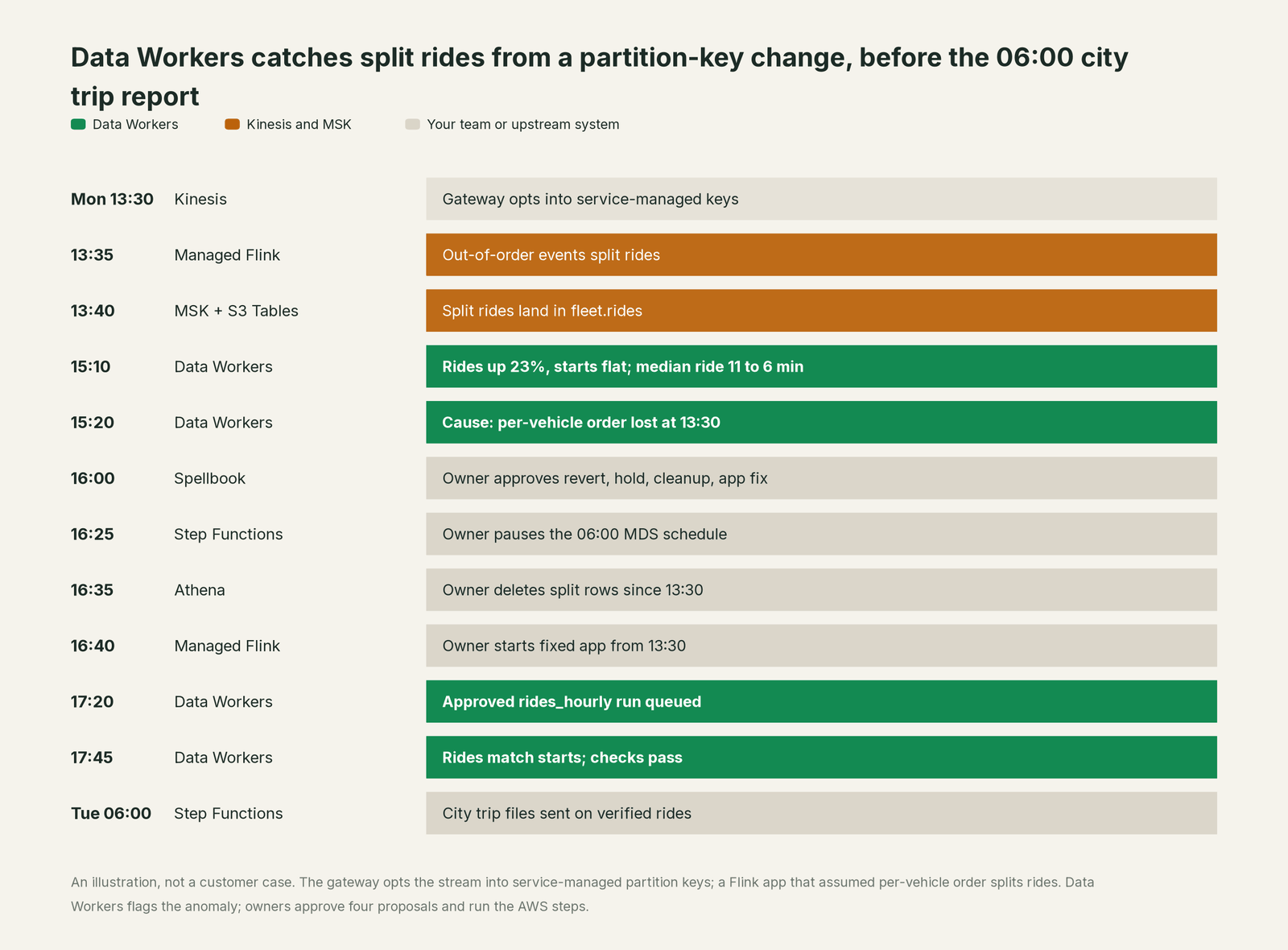
Every AWS service did its job. Service-managed partition keys are built for workloads that don't need ordering, and AWS rightly names IoT telemetry among them. This consumer needed per-vehicle order, and nobody wrote that down. Catching it takes knowledge outside the stream.
| Job | What Kinesis and MSK do | What Data Workers does |
|---|---|---|
| The move | Carry every event durably at any scale: on-demand streams, Express brokers, enhanced fan-out | Reads stream and cluster settings over the AWS API, and the tables the stream lands in |
| The order | Keep order per partition key, or spread records evenly with service-managed keys | Connects a change in how records are keyed to the consumers and tables that assumed order |
| The processing | Run Flink applications, MSK Connect connectors and Firehose transforms | Reads application and connector configuration over the AWS API and ties each to the tables it feeds |
| The tables | Firehose and MSK streaming tables write Iceberg tables to S3 and S3 Tables | Checks those tables in Snowflake or BigQuery for volume, nulls, uniqueness and freshness, and watches the team's metrics against baseline |
| The fix | Apply whatever partition, application, connector or table change the owner makes | Proposes the hold, the gateway diff, the cleanup and the application change to named owners, then queues the approved reruns |
| The proof | CloudWatch metrics and CloudTrail record what the services did | Re-checks the numbers and writes a receipt: what changed, who approved it, how it was checked, how to undo it |
Why doesn't AWS just do this itself?
Because each AWS streaming service is built to do one thing extremely well, and its checks are scoped to that service. Kinesis knows shards, throughput and iterator age; MSK knows brokers, partitions and replication; Firehose knows buffering, delivery and failed records. None of them is meant to know that a Flink application builds rides from ordered pairs or that a city expects a trip file at 06:00. Those facts live in other systems and other teams.
AWS's AI work follows the same careful scope. MSK AI Agent Skills, launched June 22, give coding assistants such as Kiro, Claude Code and Cursor expert guidance for sizing, configuring, troubleshooting and migrating clusters. The AWS API MCP server can run read-only, or ask consent before any operation that isn't read-only. All of it helps you operate AWS resources, exactly where a cloud provider should act.
Owning whether the numbers are right from a stream through Flink, S3 Tables, Snowflake and dbt to a regulator feed is a different product with a different liability: a context graph from stream to report, blast-radius scoping, named approvals, a recorded undo and receipts an auditor can read. That is Data Workers. More in is it safe to let AI agents change production data.
Every tool owns a slice. Data Workers covers the whole lifecycle
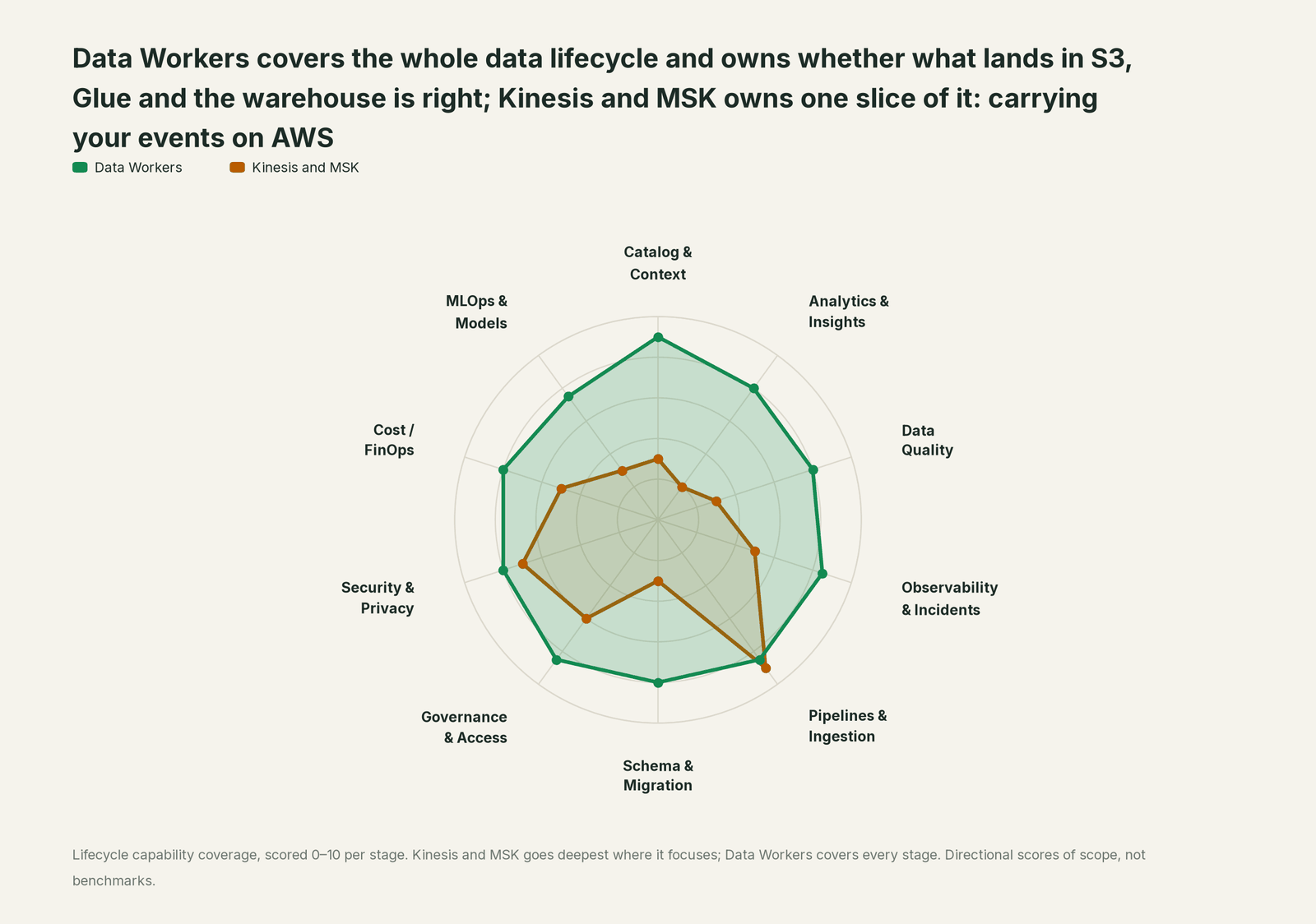
Kinesis and MSK own carrying your events on AWS. Each point tool adds another console, contract and handoff. Data Workers covers the whole lifecycle with one context, one approval flow and one audit trail, and builds on the streams already there.
| Stage | Data Workers | Kinesis and MSK | Why we scored it this way |
|---|---|---|---|
| Catalog & Context | 9 | 3 | Stream and topic names, shard counts and tags describe the pipes. Data Workers keeps one governed context graph from the stream to the Iceberg table, the dbt model and the report. |
| Analytics & Insights | 8 | 2 | Not the streaming services' job: they carry and deliver events, while numbers live in BI. Data Workers answers data questions from governed definitions with lineage behind every number. |
| Data Quality | 8 | 3 | Delivery guarantees, retries and Firehose error output protect the records in flight. Data Workers checks the landed tables in Snowflake or BigQuery for volume, nulls and uniqueness, and tracks lateness against a baseline your team records. |
| Observability & Incidents | 8.5 | 5 | CloudWatch metrics and alarms show iterator age, throttling and broker health. Data Workers diagnoses the data incident across services, proposes the fix and verifies it. |
| Pipelines & Ingestion | 8.5 | 9 | Home stage: On-demand Advantage streams warmed to 10 GB/s, Express brokers, MSK Connect, Firehose and streaming tables on S3 Tables. Data Workers plans the reprocessing and queues the reruns. |
| Schema & Migration | 8 | 3 | Glue Schema Registry and Kafka 4.2 on Express brokers cover the stream's own formats. Data Workers traces a change through the Flink app, the table and every model that reads it. |
| Governance & Access | 8.5 | 6 | IAM, resource policies and Kafka ACLs control who touches each stream. Data Workers routes every data change to a named approver and records the decision. |
| Security & Privacy | 8 | 7 | KMS encryption, private networking, IAM auth and CloudTrail protect the stream. Data Workers leaves a receipt on every data change. |
| Cost / FinOps | 8 | 5 | On-demand Advantage pricing and warm throughput scale-down keep streaming spend in line. Data Workers reads AWS Cost Explorer and traces Snowflake credits to the dbt model through query tags. |
| MLOps & Models | 7.5 | 3 | Streams feed SageMaker and agents with live events. Data Workers keeps the data under models and agents healthy. |
How Kinesis, MSK and Data Workers work together
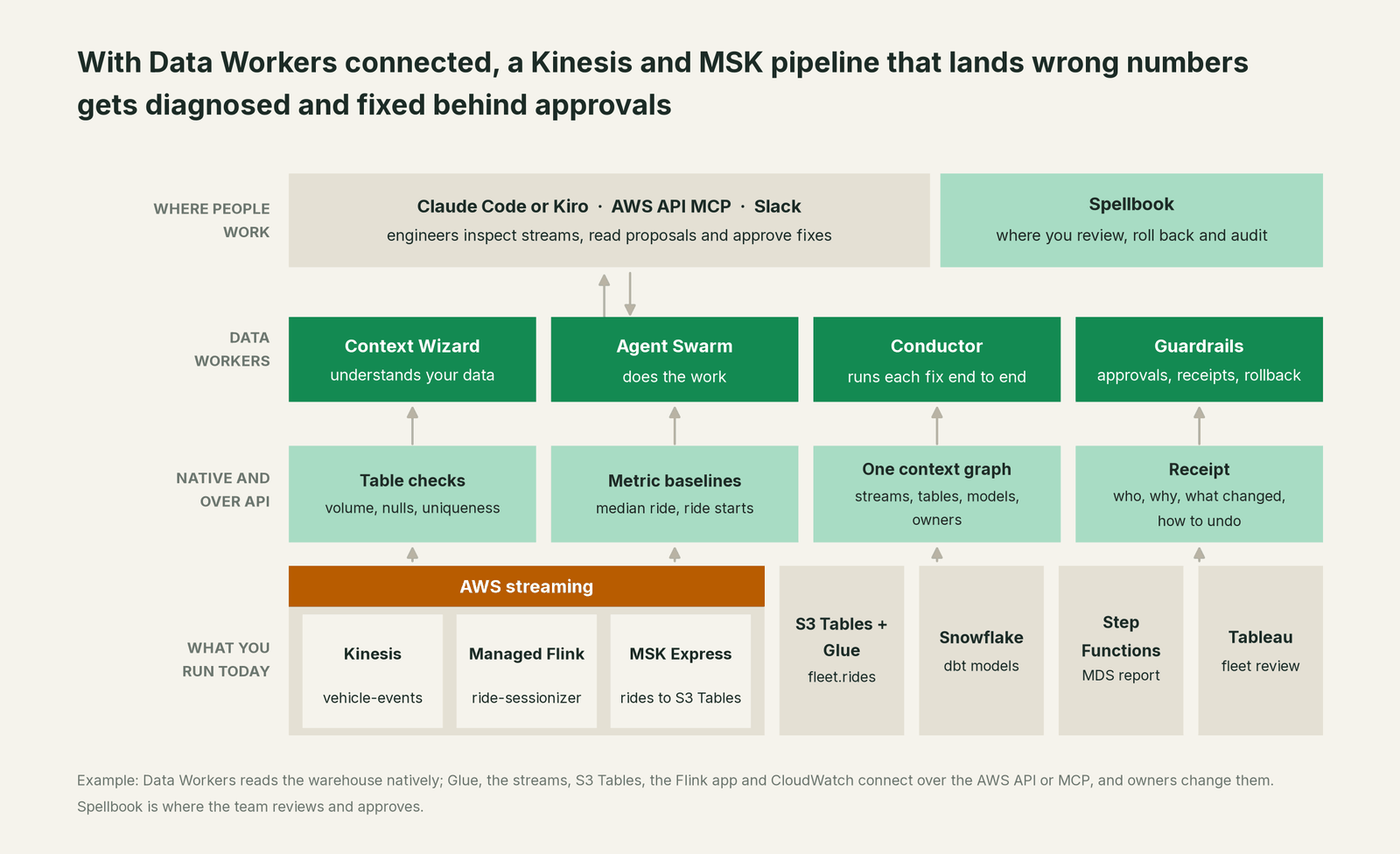
Data Workers reads where your streams land natively: Snowflake, BigQuery, dbt, Tableau data sources (read), Datadog, Slack and AWS Cost Explorer, among 50+ connectors. Kinesis Data Streams, Firehose, MSK Connect, Managed Service for Apache Flink, the Glue Data Catalog and Lake Formation, Glue Schema Registry, S3 Tables, Athena, Step Functions and CloudWatch connect over the AWS API or an MCP server today. Where your team runs its own Kafka Connect and a Confluent-compatible Schema Registry against MSK, Data Workers reads connector status with get_connector_status and registers an approved schema version with register_stream_schema.
What stays with your team is clear, by design: partition keys, shards, warm throughput, brokers, topics, MSK Connect restarts (added August 31), Flink deployments, Firehose settings and row deletes. Owners do those steps; Data Workers proposes them in order, scopes what they touch and verifies afterwards. Iterator age and consumer lag come from CloudWatch or Datadog.
Engineers run the AWS MCP servers and the Data Workers agents side by side: the AWS servers describe streams and alarms and make the owner's changes; Data Workers answers "what did this stream do to the numbers, and what's the fix". The Data Workers side follows the documented client setup: clone the open-source repo and add each agent's start-agent.sh entry.
# Example: AWS MCP servers plus Data Workers agents in Claude Code
# AWS API MCP server, limited to read-only operations
claude mcp add aws-api -e AWS_REGION=us-east-1 -e READ_OPERATIONS_ONLY=true \
  -- uvx awslabs.aws-api-mcp-server@latest
# CloudWatch MCP server for iterator age, lag and alarms
claude mcp add cloudwatch -e AWS_REGION=us-east-1 -- uvx awslabs.cloudwatch-mcp-server@latest

# Data Workers agents, from a clone of the open-source repo
claude mcp add dw-incidents -- /path/to/dataworkers-claw-community/start-agent.sh dw-incidents
claude mcp add dw-quality -- /path/to/dataworkers-claw-community/start-agent.sh dw-quality
claude mcp add dw-catalog -- /path/to/dataworkers-claw-community/start-agent.sh dw-context-catalog
claude mcp add dw-schema -- /path/to/dataworkers-claw-community/start-agent.sh dw-schema
claude mcp add dw-connectors -- /path/to/dataworkers-claw-community/start-agent.sh dw-connectors
List the tools with /mcp in Claude Code. In this incident: monitor_metrics flags the team's hourly metrics against baseline; run_quality_check runs the null and uniqueness checks on Snowflake; diagnose_incident and get_incident_history rank the cause and show whether this feed broke before; blast_radius_analysis and trace_cross_platform_lineage map what the split rides reached; assess_impact (dw-schema) sizes a change downstream; remediate re-checks the assertions and escalates any failure to a person. For a consent prompt instead of read-only mode, set the AWS API server's mutation-consent option in a client that supports elicitation.
In production the agents run in your infrastructure, such as your AWS account, and hold the credentials and model key; the hosted Conductor sees workflow metadata only. More in where does our data go. For the full AWS picture, see Data Workers on AWS and the AWS data leader's guide.
One incident, L0 to L4, set per domain:

- •L0 manual. On Wednesday a city analyst asks why trip counts jumped, after two wrong reports.
- •L1 observe. Data Workers flags the anomaly at 15:10 with the likely cause and blast radius. Nothing changes.
- •L2 propose. Data Workers proposes the four changes. Nothing reaches production until the named owner approves; an unanswered request expires and escalates, never auto-grants.
- •L3 act reversibly. For a class with a clean record, Data Workers queues approved reruns in the domain you open and sends any failed check to a person. Streams, applications and cleanups stay with their owners.
- •L4 autonomous. For a scoped domain, producer teams send stream changes such as a new keying mode through Data Workers first; it asks every downstream owner to confirm, so the gateway change is flagged before the deploy.
Who sets those levels: who owns the agents, how approvals work for AI data agents and autonomy levels L0 to L4 explained.
What changes for your team
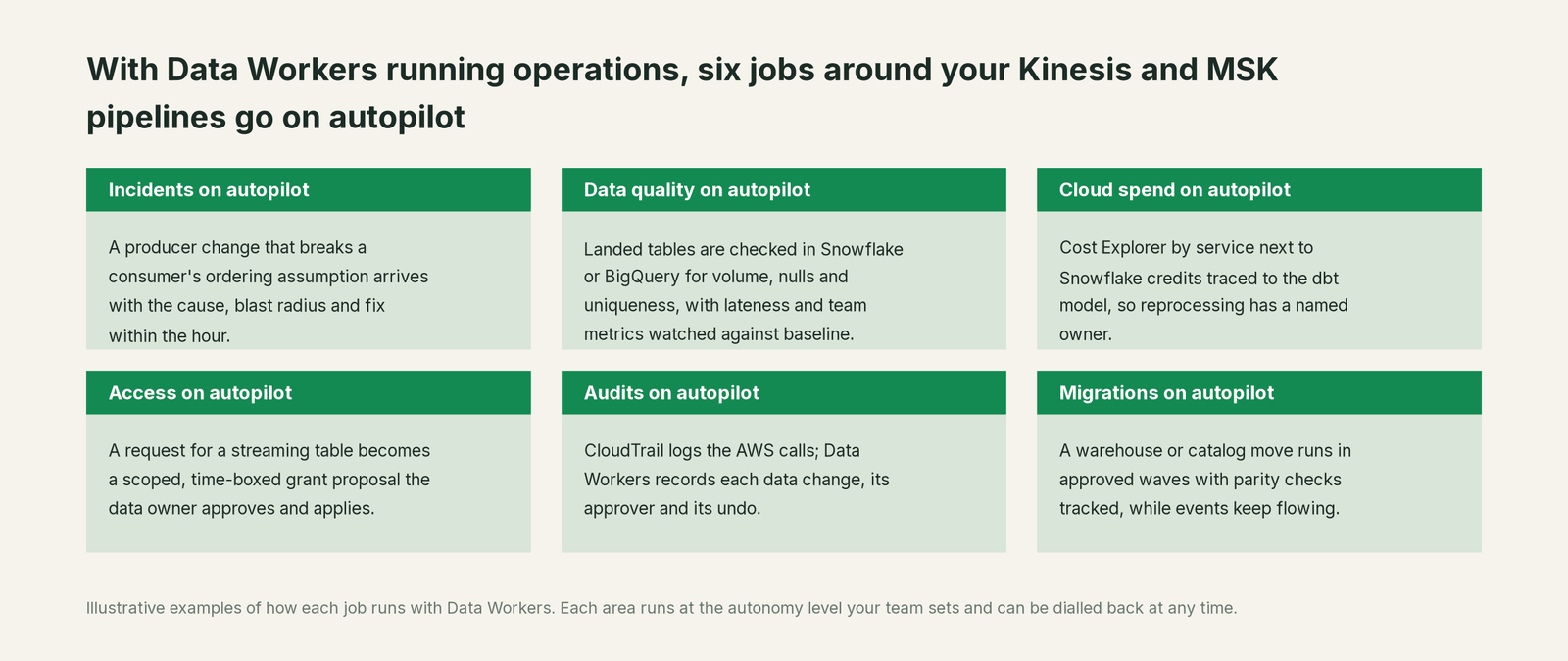
- •Producers and consumers share one record. Gateway, streaming and data teams see the same incident and receipt in Spellbook Data Catalog (in preview).
- •Stream changes come with their consumers. A new keying mode or Firehose transform arrives with the applications and tables that read it, reviewed by the Schema Evolution agent and the Streaming agent.
- •Feeds that leave the company get a guard. When a regulator file reads a table that just went wrong, the hold is proposed before it runs.
- •Reprocessing has a plan. Cleanup, corrected application, start position and reruns arrive as one approved sequence with a recorded undo.
Related reading: Kinesis vs Kafka for analytics pipelines, Kafka vs Kinesis and real-time data quality monitoring for streams.
Keep Kinesis and MSK, or consolidate?
Keep Kinesis and MSK if you love them; Data Workers works with them from day one. Many teams consolidate once Data Workers runs that slice too.
For almost every AWS team the answer is keep them: serverless streams, Express brokers, streaming tables and in-place KRaft migration are hard to beat inside AWS. What teams consolidate is the tooling around the landed data: a separate observability tool, hand-written table checks and "restart and eyeball the dashboard" runbooks. Neighbours: you're on AWS Glue and SageMaker Catalog, Apache Kafka, Apache Flink and Confluent; Data Workers integrations lists what connects natively, and what is an agentic data platform explains the idea.
Building it yourself on the AWS MCP servers? Read build it ourselves with Claude Code and MCP servers: describing a stream from a chat is easy; the context graph, approvals, undo and receipts are the work.
The case for your CFO
The outcome. When a stream change quietly corrupts the numbers behind a regulator report, a bill or a revenue dashboard, it is caught within the hour and corrected before the report goes out, with a record of how it was checked.
The risk story. At L1 agents only read. At L2 a named person approves each change; an unanswered request expires and escalates. L3 covers reversible changes in domains you open. Streams and data cleanups stay with their owners. No agent can promote its own work, an org-wide stop halts all autonomous dispatch, and every change carries a receipt with its blast radius and undo. Your data stays in your systems; the hosted Conductor sees workflow metadata only. Nothing migrates.
Why now. Service-managed partition keys and streaming tables on S3 Tables shorten the path from producer to table. A wrong number travels further before anyone looks.
The first win. L1 on the tables behind outbound feeds and money numbers.
What stays the same. Kinesis, MSK, Firehose, your Flink applications, warehouse, dbt and on-call rota. See the ROI of agentic data operations.
The sentence for upstairs: "Kinesis and MSK carry our events; Data Workers makes sure what lands is right and gets it fixed with our approval when it isn't, before we report or bill on it."
Getting started
Start with a pilot. Pick the streams behind a regulator feed, billing or revenue, give Data Workers read access to the warehouse tables they land in, with the AWS API MCP server in read-only mode in your team's client for the Glue Data Catalog, record the metrics that define "right", and run at L1 for a few weeks. Then turn on L2 for one domain, and open L3 for a narrow class once the receipts show the agents were right. The pilot path is on the pricing page, and the pilot is credited in full against the first year.
FAQ
How does Data Workers connect to Kinesis and MSK? Where your streams land connects natively: Snowflake and BigQuery. Kinesis, Firehose, MSK Connect, Managed Flink, the Glue Data Catalog and Lake Formation, S3 Tables and CloudWatch connect over the AWS API or an MCP server today. A Kafka Connect cluster and Confluent-compatible Schema Registry your team runs against MSK use the native connectors.
Should we use service-managed partition keys? For streams whose consumers don't need order, yes: AWS built them to end hot shards and throttling. Before you switch, ask whether any consumer builds state from ordered events, such as sessions or running balances. Data Workers' lineage shows which tables and reports each application feeds, so you know which owners to ask.
Will Data Workers restart MSK Connect connectors or change our streams? No. It reads their settings; restarts, partition keys, topics, Flink deployments and data cleanups stay with the owner. The one stream-side write Data Workers makes is an approved schema version in a Confluent-compatible Schema Registry.
We use Firehose into Iceberg or Redshift, not Flink. Does this still apply? Yes. When a Firehose transform or a producer schema change alters what lands, Data Workers catches it in the tables: it checks the tables in Snowflake or BigQuery natively, and the Glue Data Catalog, Firehose and Redshift connect over their APIs today, where the owner confirms the catalog entry and the transform settings.
Does this help with an MSK KRaft migration or a Kafka 4.2 upgrade? MSK runs the KRaft migration in place. Data Workers maps what reads each topic's landed tables before you start and checks them afterwards, so a slipped client change shows up as an incident, not a wrong report.
Sources
- •AWS What's New, "Amazon Kinesis Data Streams announces Service-Managed Partition Keys for simplified data ingestion" (Sep 23, 2026), https://aws.amazon.com/about-aws/whats-new/2026/09/kinesis/service-managed-partition-keys/ (checked Oct 3, 2026)
- •AWS What's New, "Amazon Kinesis Data Streams now supports scaling down ingest capacity with warm throughput" (Jul 24, 2026), https://aws.amazon.com/about-aws/whats-new/2026/07/kinesis/on-demand-scale-down/ (checked Oct 3, 2026)
- •AWS What's New, "Amazon Kinesis Data Streams launches On-demand Advantage mode" (Nov 4, 2025), https://aws.amazon.com/about-aws/whats-new/2025/11/amazon-kinesis-data-streams-ondemand-advantage/ (checked Oct 3, 2026)
- •AWS What's New, "Amazon MSK Express brokers now deliver data to streaming tables for Apache Iceberg" (Jul 30, 2026), https://aws.amazon.com/about-aws/whats-new/2026/07/aws-msk-streaming-tables-for-apache-iceberg/ (checked Oct 3, 2026)
- •AWS What's New, "Amazon MSK Express Brokers adds support for Apache Kafka version 4.2" (Jul 15, 2026), https://aws.amazon.com/about-aws/whats-new/2026/07/aws-msk-express-version-42/ (checked Oct 3, 2026)
- •AWS What's New, "Amazon MSK now supports in-place migration from Apache ZooKeeper to KRaft" (Aug 10, 2026), https://aws.amazon.com/about-aws/whats-new/2026/08/aws-msk-zk-kraft-migration/ (checked Oct 3, 2026)
- •AWS What's New, "Amazon MSK Connect now supports restarting connectors" (Aug 31, 2026), https://aws.amazon.com/about-aws/whats-new/2026/08/amazon-msk-connect-restart/ (checked Oct 3, 2026)
- •AWS What's New, "Amazon MSK now offers AI Agent Skills" (Jun 22, 2026), https://aws.amazon.com/about-aws/whats-new/2026/06/amazon-msk-ai-agent-skills/ (checked Oct 3, 2026)
- •Amazon Data Firehose Developer Guide, "What is Amazon Data Firehose?" (destinations), https://docs.aws.amazon.com/firehose/latest/dev/what-is-this-service.html (checked Oct 3, 2026)
- •awslabs/mcp, AWS API MCP Server README (READ_OPERATIONS_ONLY, REQUIRE_MUTATION_CONSENT, uvx launch), https://github.com/awslabs/mcp/tree/main/src/aws-api-mcp-server (checked Oct 3, 2026)
- •awslabs/mcp, CloudWatch MCP Server README, https://github.com/awslabs/mcp/tree/main/src/cloudwatch-mcp-server (checked Oct 3, 2026)
- •Claude Code docs, "Connect Claude Code to tools via MCP" (
claude mcp addwith--env), https://code.claude.com/docs/en/mcp (checked Oct 3, 2026) - •Snowflake docs, Apache Iceberg catalog integrations (Amazon S3 Tables, AWS Glue), https://docs.snowflake.com/en/user-guide/tables-iceberg-configure-catalog-integration-rest-glue (checked Oct 3, 2026)
- •Data Workers open-source repository, https://github.com/DataWorkersProject/dataworkers-claw-community (checked Oct 3, 2026)
- •Data Workers client setup guide, https://dataworkers.io/opensource-docs/client-setup/ (checked Oct 3, 2026)