Best practices for agentic HR data platforms: a field guide for HRIS and people data teams
An HR data platform holds the most sensitive data in the company and is asked for the most slices of it. This field guide sets out seven best practices for HRIS and people data teams moving to an agentic back office: how to version the org hierarchy, tie headcount to finance, absorb Workday changes, classify sensitive columns, route access to named owners, and be ready for a subject access request. Each practice shows the old world, the new world, which agent does what, and where a person approves.
Ask the head of an HR data platform what the week looked like and the answer is rarely the roadmap. It is the reorg that landed on Friday, the Workday report someone renamed, the HRBP who needs attrition for a new population, and the finance partner asking why the board deck and the HR dashboard show different headcounts. People data is read by every manager, edited upstream by HR operations who never talk to the data team, and it contains pay, performance, health leave and protected characteristics.
The mandate has grown with it: people analytics that ties to finance, proof of who can see which population, and assistants that answer from employee data. Without automation, the team spends its time keeping the platform alive and never ships the people data products it exists to build.
Our view: the work that keeps an HR data platform correct is repeatable, and agents should do it, while a named owner keeps every decision about who sees a person's data. This guide covers the practices that make that split work. The full playbook covers the same team in more depth, and the people data teams group covers the neighbouring teams.
The old world
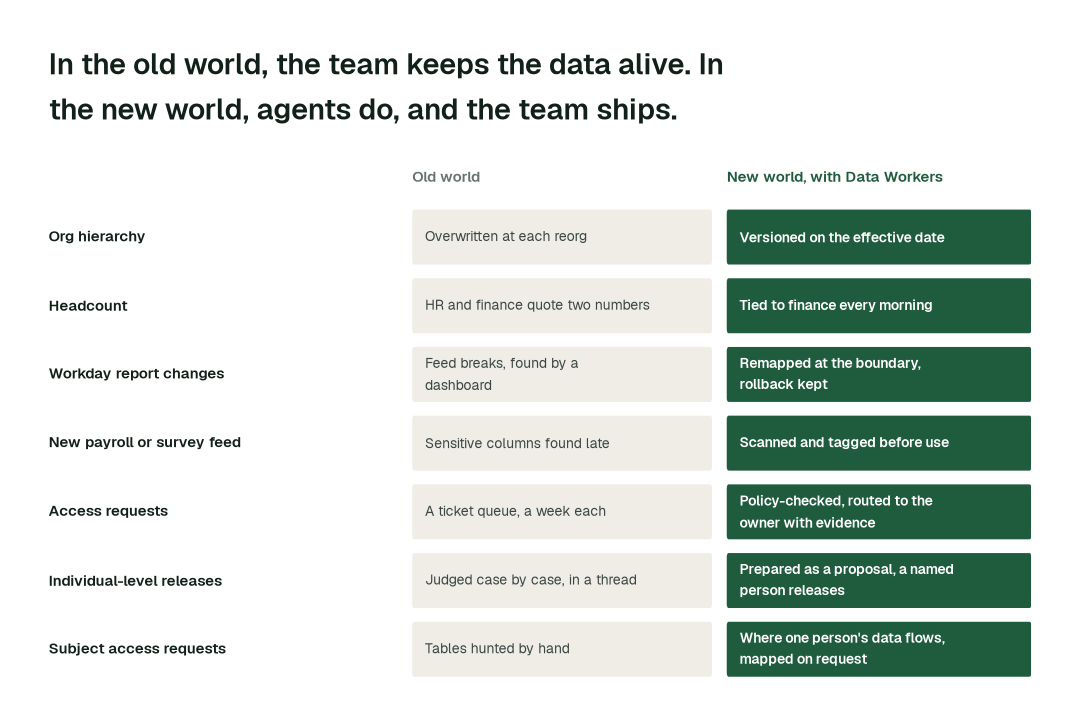
It is the Monday after a reorg. Workday shows the new supervisory organizations, but every dashboard still rolls up by the old ones. Someone patched the hierarchy table on Friday night and overwrote last quarter's structure, so year-over-year comparisons no longer work. A renamed calculated field made a downstream mart quietly drop rows. Finance asks why headcount moved. Three HRBPs ask for access to their new populations, and each request waits in a queue. A payroll file arrived on Thursday and nobody has looked at which columns are sensitive. The team ships nothing new this week.
The new world
Same Monday with Data Workers. The renamed fields were mapped the day Workday changed them. The hierarchy exists as a new effective-dated version next to the old one, with last quarter restated and tested. Headcount ties to finance's cost center mapping, and the two open differences arrive already traced to their causes. The payroll feed was scanned before anyone queried it. Access requests reach the HR data owner with the narrowest scope and the evidence attached, and nothing is granted until the owner says so.
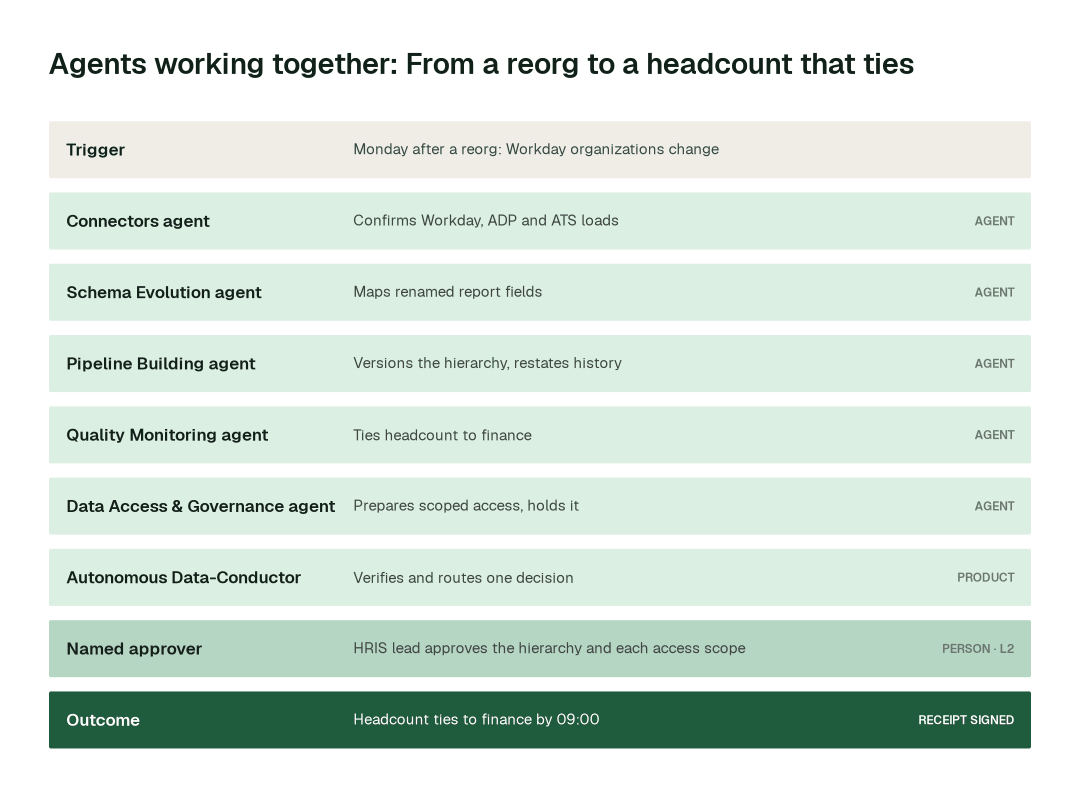
The seven practices in this guide make that Monday possible. At a glance:
The practices, one by one
1. Version the org hierarchy on its effective date, never overwrite it
Every roll-up by manager, cost center or supervisory organization depends on the hierarchy. When it is overwritten, history changes underneath everyone who reads it.
Why it's harder than it looks: Workday effective-dates its own data, but the warehouse copy rarely does. A reorg merges, splits and re-parents units on one date, and each model downstream has its own idea of what "the team" means. Patching one table fixes today and breaks last quarter.
- 1.The Schema Evolution agent runs
detect_schema_changeon the incoming extracts and flags changed organization fields. - 2.The Pipeline Building agent builds a new version of the hierarchy with
generate_pipeline, mapping merged units one to one and splitting divided units by cost center, and checks it withvalidate_pipeline. - 3.The Quality Monitoring agent runs
run_quality_checkto prove the old structure's totals are unchanged, every worker sits in exactly one organization on each date, and manager roll-ups sum to the total. - 4.The HRIS lead sees the full diff and approves the new version before it publishes. Recent periods are restated only after that approval.
2. Tie headcount to finance every morning, on one governed definition
When HR and finance quote different headcounts, every people metric downstream loses credibility, and the argument repeats at every close.
Why it's harder than it looks: the two numbers are usually both right. HR counts workers by effective date, finance by cost center and period close, and contingent workers sit in one count and not the other. A quarter-end tie-out finds differences without knowing their cause.
- 1.The Data Context & Catalog agent records one definition of headcount, FTE and the contingent-worker rule with
define_business_rule, and serves it throughresolve_metric. - 2.The Quality Monitoring agent runs the tie-out against finance's mapping each morning with
run_quality_checkand sets the expectation withset_sla. - 3.The Incident Debugging agent takes each gap to
get_root_cause, so a difference arrives as "31 workers mapped under another legal entity code" and not as a total. - 4.The HRIS lead and the finance partner agree any change to the definition. Agents never choose which definition wins.
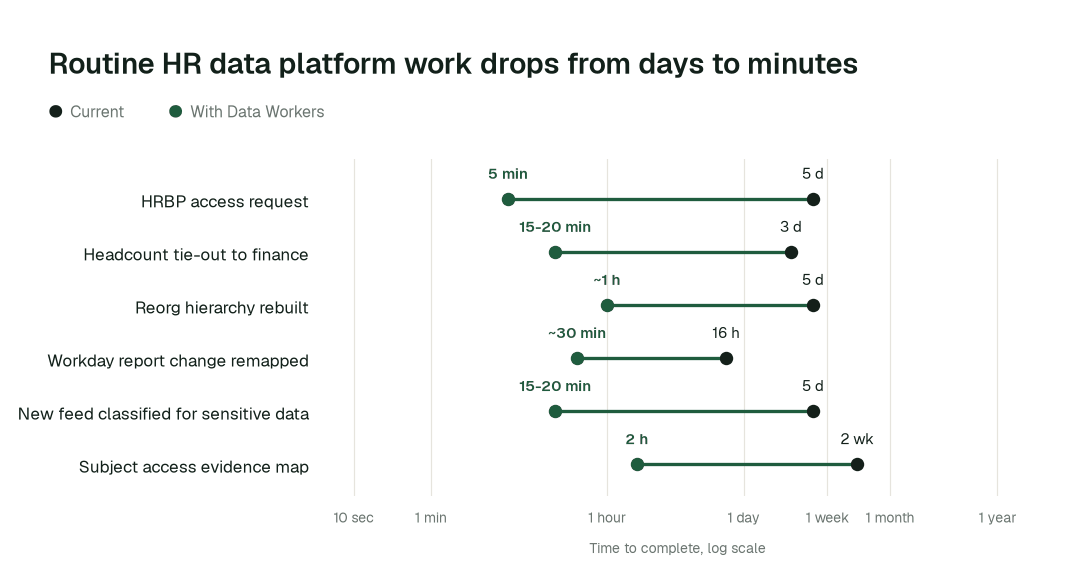
Across routine work like this, the elapsed time changes the most:
3. Absorb Workday report and field changes at the boundary
A renamed calculated field or a changed report output is a small edit for the person making it and an outage for everyone reading the mart.
Why it's harder than it looks: report changes come from HR operations on any day. Most break nothing loudly: a column arrives empty, a join drops rows, and the first signal is a manager asking why a team looks smaller.
- 1.The Connectors agent confirms with
get_connector_statusthat each Workday, ADP and applicant tracking load is complete and on time. - 2.The Schema Evolution agent runs
detect_schema_change, thenvalidate_schema_compatibilityagainst the marts that read the field. See schema drift detection in Snowflake for the pattern. - 3.It prepares the remapping with
generate_migration, with a rollback plan. - 4.The data engineer on call approves the remapping for hierarchy and compensation models. For low-risk marts, the remapping runs on its own once that domain has earned it.
4. Classify sensitive columns before a feed is first used
Pay, health leave, union membership and protected characteristics must not drift into a general-purpose mart because a feed arrived on a Thursday.
Why it's harder than it looks: payroll, survey and applicant tracking exports carry free-text fields, context-dependent codes and vendor-renamed columns. Sensitive data is found when someone asks, after it has already been joined.
- 1.On first load, the Data Access & Governance agent runs
scan_piiover the new feed. Scanning runs in your infrastructure and never sends sample values outside it. See how Data Workers handles PII. - 2.The Data Context & Catalog agent applies tags with
auto_tag_datasetand shows what is downstream withblast_radius_analysis. - 3.The agent proposes a masking or restriction decision for each column, with the models it would affect.
- 4.The HR data owner confirms the classification of any pay, health or protected attribute column. Nothing is exposed while the decision is pending. The PII detection and masking page covers the pattern in detail.
5. Route access requests to the owner with the evidence attached
An HRBP asking for attrition by team is a reasonable request. The work behind answering it is not small.
Why it's harder than it looks: the person granting access has to know what the table holds, whether the requester's population is in scope, whether small groups can be identified and whether a narrower slice would answer the question. That context gathering makes the queue grow, and people ask for more than they need.
- 1.The Data Access & Governance agent runs
check_policyagainst the request and finds the narrowest access that answers it. - 2.The Data Context & Catalog agent shows the sensitive columns and downstream models involved with
get_lineage. - 3.The agent routes the request with
request_governance_reviewto the named data owner, with the evidence in front of them. - 4.The owner approves or narrows. Only then does
provision_accessapply the grant, time-boxed, with an approval record. When someone leaves or moves,enforce_rbacchecks that grants still match what the identity provider says. Okta decides who people are; the warehouse side is covered in RBAC automation for data engineering, and the broader pattern in zero-ticket data access.
6. Keep individual-level releases and protected attributes with a named person
An assistant, an analyst or a manager asking for one person's record, or for a group small enough to identify one, is not a data request. It is a decision about a person.
Why it's harder than it looks: the platform team knows the technical answer to "can we?" and rarely owns the answer to "should we?". Small-group suppression, the purpose for using gender or disability data, and what a manager may see about their reports are policy that belongs to HR, Total Rewards and Legal, applied consistently by every dashboard and assistant.
- 1.The Data Context & Catalog agent marks the approved sources for each purpose with
mark_authoritative, so assistants answer from governed data. - 2.The Quality Monitoring agent turns the group-size rule your privacy office sets into checks with
create_quality_tests_for_pipelineand runs them on each refresh. - 3.When a release crosses a rule, the Data Access & Governance agent holds it with
request_governance_reviewand prepares the case: who asked, for what purpose, what would be shown. - 4.A named person at Total Rewards, HR or Legal approves or declines. Agents never release a person's record on their own. See compensation and pay equity data.
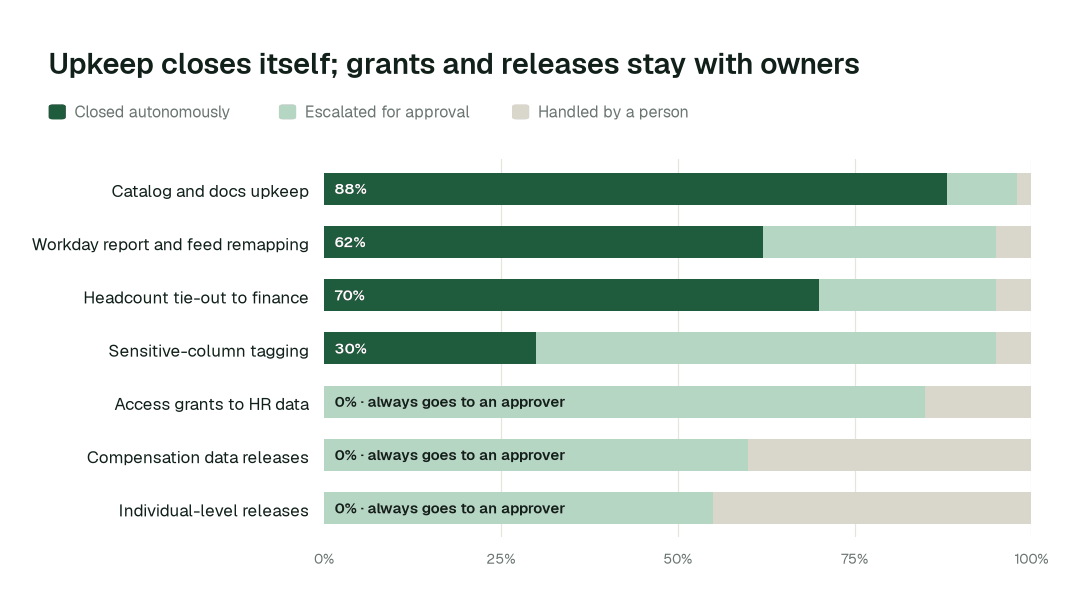
Here is how that balance looks across the task classes of a mature deployment:
7. Know where one person's data lives before the request arrives
An employee in Germany or France can ask what you hold about them, and retention rules say what you may keep. The privacy office needs a complete answer, not a best effort.
Why it's harder than it looks: one person appears in the core model, payroll, applicant tracking, survey exports and analyst copies. The list is complete only if someone maintained it, and a retention schedule on paper says little about what is actually past it. Under the GDPR, the right of access (Article 15) and storage limitation (Article 5) both depend on knowing where data sits.
- 1.The Data Context & Catalog agent maps where a person's identifiers flow with
trace_cross_platform_lineage, from source through marts to analyst copies. - 2.The Quality Monitoring agent runs the retention checks you define with
run_quality_checkand lists what is past its schedule. - 3.The Data Access & Governance agent assembles the evidence with
generate_audit_report. For the full pattern, see GDPR subject access automation. - 4.The privacy office reviews the map, decides what is released and approves any deletion, with Legal. Agents prepare; they do not respond or delete.
Designing the autonomy ladder
Autonomy is set per task class, not per tool. Everything starts at L1. L0 to L2 run today: watch, suggest, and act after a named approval. L3 and L4 are where a domain can go on its own review record, never switched on everywhere at once.
| Task class | L0 to L1: watch and suggest | L2: act after approval | L3 to L4: where it can go |
|---|---|---|---|
| Catalog and docs upkeep | Finds gaps | Writes the change for review | Reversible upkeep, on its own review record |
| Workday report and feed remapping | Flags the change | Proposes the remap with a rollback point | Low-risk marts, on its own review record |
| Headcount tie-out to finance | Reports the gap | Proposes the fix with the cause | Daily tie-out and routine fixes, on evidence |
| Sensitive-column tagging | Lists suspected columns | Proposes tags and masking | Tagging of clear cases only, on evidence |
| Access grants to HR data | Shows the request | Prepares it for the owner | None: stays with a named owner |
| Compensation and individual-level releases | Shows the request | Prepares the case | None: stays with a named person |
The operating model: who owns what
Agents change who does the work, not who is accountable for it.
| Role | Owns | What the agents take off their plate |
|---|---|---|
| Head of People Data or HRIS Director | Standards, autonomy levels per domain, which domain goes next | Assembling status, chasing owners, keeping the catalog current |
| Data owners in HR, Total Rewards and Legal | Access, compensation, protected attributes, individual-level releases | Gathering context for each request before they decide |
| HR data engineers and analytics engineers | Reviewing agent proposals, building new people data products | Hierarchy rebuilds, Workday remapping, headcount tie-outs |
| Privacy office | Subject access responses, retention decisions | Finding every table that holds one person |
The swarm behind the practices
No single agent delivers these practices. Each is a hand-off between specialists, coordinated by the Autonomous Data-Conductor under the autonomy you set per domain.
| Agent | What it does on an HR data platform | Public tools it calls |
|---|---|---|
| Connectors and Data Ingestion | Land Workday, applicant tracking, payroll and survey data and confirm each load | get_connector_status, get_dbt_run_history |
| Schema Evolution | Detects Workday report and field changes and prepares the remap | detect_schema_change, validate_schema_compatibility, generate_migration |
| Pipeline Building | Builds and versions hierarchy and headcount models with tests | generate_pipeline, validate_pipeline |
| Quality Monitoring | Ties headcount to finance, runs one-worker-one-organization and retention checks | run_quality_check, set_sla, create_quality_tests_for_pipeline |
| Incident Debugging | Traces a headcount gap or a broken feed to its cause | get_root_cause, diagnose_incident |
| Data Access & Governance | Scans for sensitive columns, checks requests, routes grants, produces evidence | scan_pii, check_policy, provision_access, generate_audit_report |
| Data Context & Catalog | Holds the governed definition, tags columns, maps where a person's data flows | define_business_rule, auto_tag_dataset, trace_cross_platform_lineage |
| Cost Savings & Data Cleanup | Retires stale snapshots, duplicate extracts and abandoned analyst copies | detect_dead_assets, get_snowflake_usage |
Data Context Wizard holds one governed definition of headcount, FTE, attrition and span of control, so dashboards, the finance feed and every HR assistant answer the same way. Autonomous Data-Conductor verifies the numbers that matter before the board pack and before assistants read them. Spellbook Data Catalog makes each people data product discoverable, with its owner and its sensitivity, in plain English.
What disappears
The clearest sign these practices are working is what stops happening:
- •The Monday-after-reorg scramble to patch hierarchies.
- •Two headcounts in the board deck.
- •Feeds that fail quietly when a Workday report changes.
- •Pay or health columns found in a general-purpose mart after the fact.
- •A ticket queue of access requests, each answered from scratch.
- •A week of searching for every table that holds one person.
What replaces them is quieter: bad data caught where it enters, access that follows policy and a named owner, and a receipt for every action.
An HRIS leader's scorecard
If you own people data as a product, these are the metrics to track, as targets for the deployment to reach:
- •Hours from a reorg effective date to a restated hierarchy that ties: target under a day.
- •Days per month headcount ties to finance: target every working day.
- •Time from a Workday change to a verified model: target minutes to hours.
- •Share of new feeds classified for sensitive data before first query: target all of them.
- •Time from an access request to an owner's decision, with evidence attached: target minutes.
- •Individual-level releases with a named approver on record: target all of them.
- •Share of upkeep closed autonomously, and its model cost: target rising on evidence.
The climb: from assisted to autonomous to agentic
Our thesis is that the data platform climbs the way analytics did, in stages, and that the hard part of data work was never knowing what to do but doing it. For HR data platform teams, the climb looks like this:
- •Assisted. Agents work alongside your team. They read the stack, show what needs doing and propose every fix with a receipt. Access, compensation and individual-level releases always go to a named owner.
- •Autonomous, under your governance. Routine work runs on its own: Workday changes remapped at the boundary, headcount tied to finance every morning, new feeds scanned before first use. Your team governs the agents instead of doing the upkeep.
- •The agentic enterprise. An HR data platform team ships people data products instead of rebuilding hierarchies. People set direction, and the platform carries it out.
You choose the altitude, every step is visible and reversible, and the pilot is the first rung.
The pilot: how HR data platform teams start
The pilot is how your team proves the value on its own data before committing.
- •Scope. Org hierarchy and headcount for one reorg cycle.
- •What we connect. Your Workday or SuccessFactors extracts, applicant tracking and payroll feeds, Snowflake or Databricks, dbt, Airflow and the BI tools HR reads, over MCP, inside your infrastructure. Nothing migrates.
- •First week. Agents run at L1 across the scoped domain. They map every pipeline, definition and lineage path, scan the feeds for sensitive columns and show the fixes they would have made, with receipts, so your team sees the value before anything changes.
- •Week two. Workday change remapping and the daily headcount tie-out start running on reversible work. Hierarchy changes and every access grant stay at L2 with a named owner.
- •Day 30. We review the impact metrics against your baseline:
- •HRBP access request: from about a week to 5 min
- •Headcount tie-out to finance: from about 3 days to 15-20 min
- •Reorg hierarchy rebuilt: from about a week to about an hour
- •the share of catalog and docs upkeep closed autonomously, targeting 88% as the deployment matures
- •Guarantee. In a 90-day pilot, ten engineering hours per data engineer per week are recovered against a baseline both sides sign on day one, or the $7,500 fee is refunded.
- •Cost. Start with a pilot ($7,500 one-time, credited in full against the first year). Scale is from $1,000 a month and Enterprise from $3,000 a month, billed annually, with unlimited seats, no usage meter and no markup on model spend. See pricing.
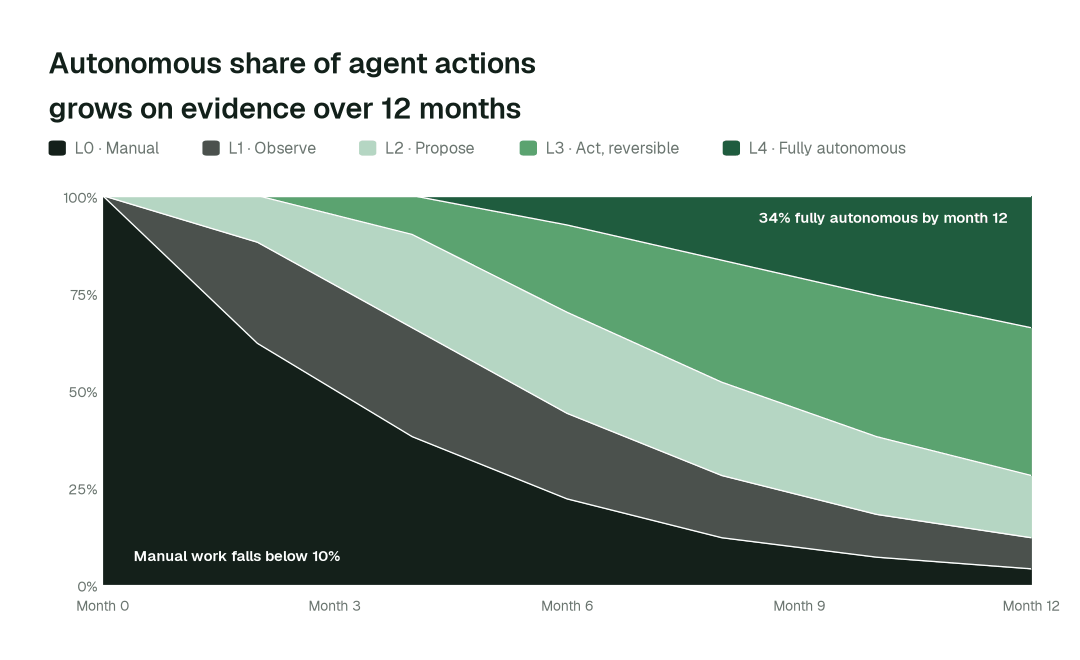
The pilot is the start of a longer curve:
Data Workers supplies controls and evidence; it does not make you compliant. Your people, controls and assessors do. Not legal advice.