Best practices for agentic AI-ready data: a field guide for AI-ready data teams
Making data ready for AI agents is mostly upkeep: one definition per metric, trusted sources marked, tables described for machines, sensitive columns handled, every answer traceable. This field guide shows how to do each of those well, practice by practice, with the old world, the new world, the approvals that stay with your people and the numbers to put on a scorecard.
Ask the team that owns AI data readiness about its week and the answer is rarely a roadmap. It is the third copilot pilot asking which table holds revenue, an access review for an agent that wants a customer table, a column renamed on Thursday and still in the glossary under its old name, and an executive quoting a number that disagrees with the board deck. Gartner has predicted that through 2026 organizations will abandon 60% of AI projects unsupported by AI-ready data. The team sees it one wrong number at a time.
The mandate is clear: make the company's data something an agent can find, understand, trust and be allowed to use. The trap is that every new agent arrives with its own round of definitions, access reviews and PII checks, so the team redoes readiness for the last project and never gets ahead of the next.
Our view, as people who have run data platforms: the work that keeps data ready for agents is repeatable, and agents should own it. When the upkeep runs itself, the team stops being the bottleneck in front of every AI use case and becomes the group that decides what the company's AI may say.
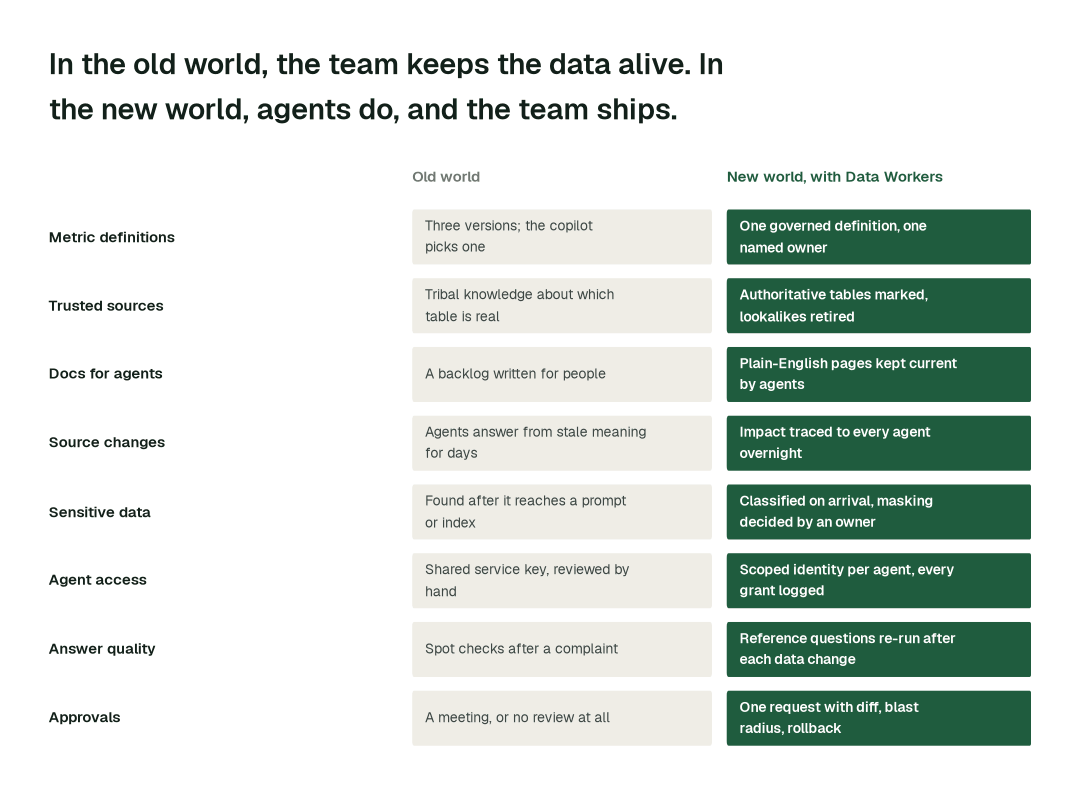
The old world
It is 9:15 on a Friday. Finance restated net revenue on Wednesday night and the glossary was not updated. A revenue copilot answered a regional VP from an old table, the VP pasted the number into a deck, and the CFO's office noticed the gap with the dashboard. By noon an engineer has found three tables that each look like revenue, a steward has found two definitions in two wikis, and a support agent built by another team reads the same column. Nobody can say which answers went out, to whom, with which meaning. The afternoon goes on a retro instead of the next agent's onboarding.
The new world
Same Friday with Data Workers. The Schema Evolution agent caught the rename overnight. Data Context Wizard listed every definition, dashboard and agent that reads the column, and Quality Monitoring tied restated revenue to finance. The reference questions were re-run, and the agent still quoting the old meaning was flagged to the metric owner in one request: old and new definition, tie-out, affected agents, rollback point. The owner approved at 8:10 with one edit. At 9:00 the copilot's answer matched the board dashboard and carried its source, definition and freshness.
Here is that night as a chain of hand-offs between agents:
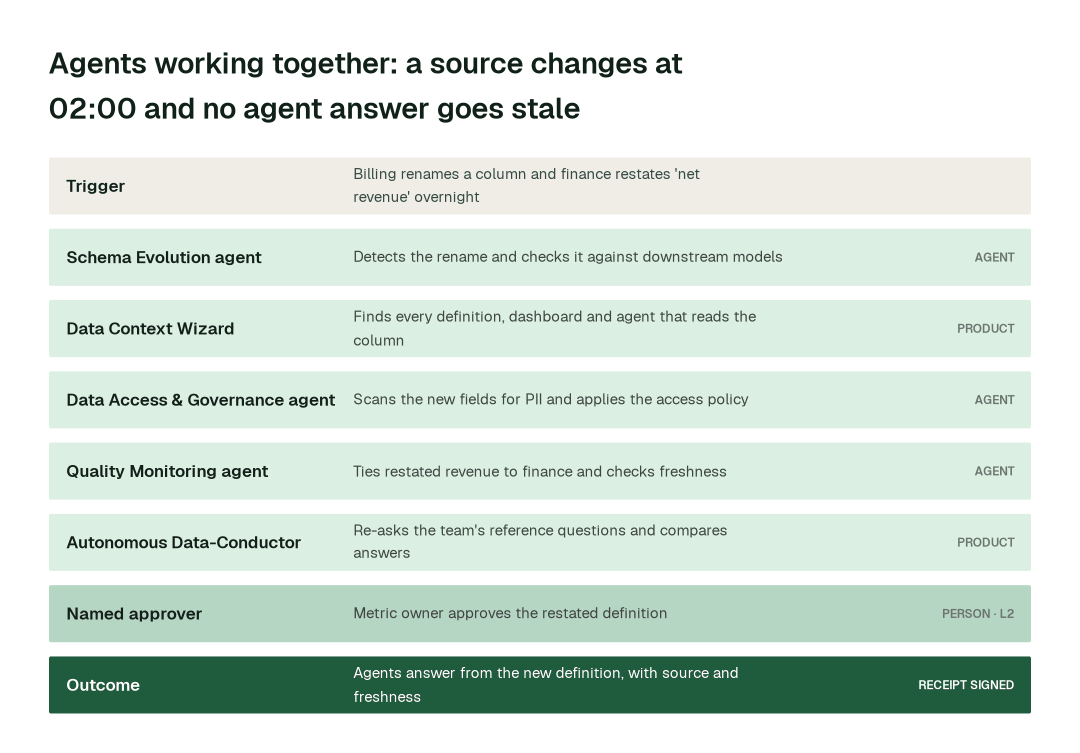
The full playbook walks through this scenario in depth. This report covers the seven practices behind it. At a glance:
The practices, one by one
1. Define each metric once, with a named owner
A copilot that picks whichever "active customer" it finds first is confidently inconsistent, and definitions are the first thing an executive checks. Semantics is a core point of our AI-readiness checklist for a reason.
Why it's harder than it looks: the definitions already exist in several places: a dbt model, the BI layer, a spreadsheet. Rewriting them into a new tool takes a year, and they drift again the week after.
- 1.The Data Context & Catalog agent finds every copy of the metric across dbt, BI, semantic layers and wikis with
list_semantic_definitionsand lays the conflicts side by side. Definitions you already keep in dbt MetricFlow, Cube or Looker are brought in, not rewritten. - 2.It drafts one definition with its owner and trusted source, ready for a decision.
- 3.The metric owner picks, edits and approves.
- 4.Data Context Wizard records it with
define_business_rule, and from then on any agent that asks over MCP gets the same answer, with owner and source, throughresolve_metric.
Where a person approves: the metric owner, for every new or changed definition, with the before-and-after numbers.
2. Mark trusted sources and describe every table for agents
An agent cannot tell the certified table from the analyst's scratch copy, so it picks the one with the friendliest name. A catalog written for humans, with thin descriptions and no join paths, is no better.
Why it's harder than it looks: marking trust is a one-time act, but keeping it true is permanent. Tables are abandoned, copied and restated weekly, and documenting thousands by hand is a backlog that never closes.
- 1.The Data Context & Catalog agent finds the lookalikes and shows usage, owner and freshness for each.
- 2.The data owner names the authoritative one, recorded with
mark_authoritative; later agents are steered withget_authoritative_source. - 3.It writes plain-English pages for every table an agent can reach with
generate_documentation, lists gaps withflag_documentation_gap, and brings in rules like "never use this table for revenue" withimport_tribal_knowledge. - 4.Pages update as the data changes, in Spellbook Data Catalog.
Where a person approves: the data owner, for which source is authoritative and for retiring a trusted one.
Across the routine work these practices cover, here is the difference in elapsed time:
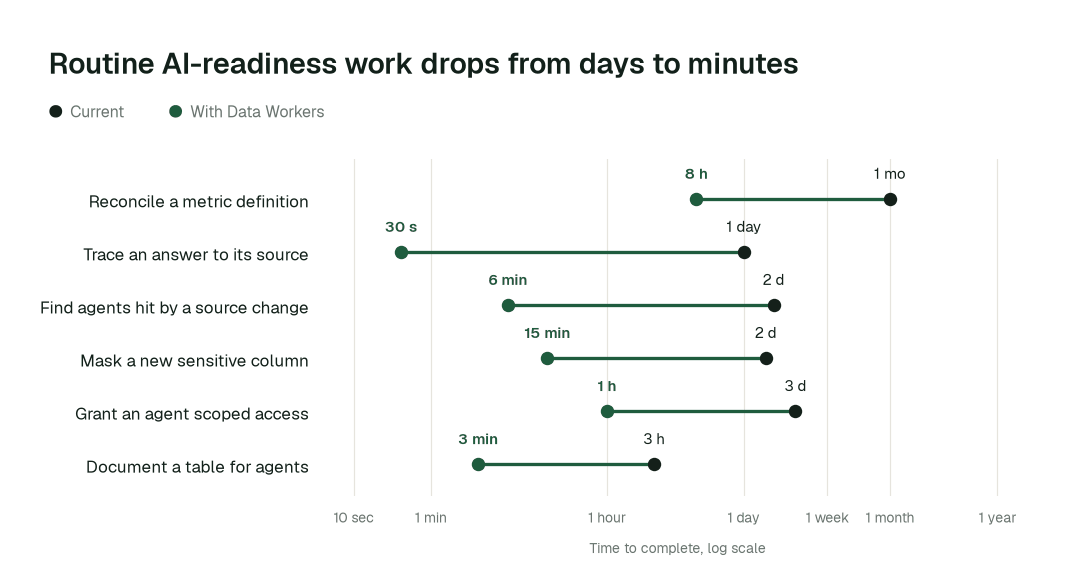
The biggest change is reconciling a conflicting metric definition: from about a month to 8 hours, because agents find every copy and hand one decision to the owner.
3. Trace every source change to every agent that reads it
Agents inherit every upstream surprise. A renamed column or restated metric reaches an agent's answer before anyone updates the glossary.
Why it's harder than it looks: "which agents read this column?" crosses tools. The dependency runs from the warehouse through dbt and the semantic layer to dashboards, RAG indexes and agents built by teams you have never met. Lineage inside one tool covers a slice.
- 1.The Schema Evolution agent catches the change with
detect_schema_changeand checks it against downstream models. - 2.The Data Context & Catalog agent runs
blast_radius_analysis: every definition, dashboard and agent that depends on the column. - 3.It marks affected context stale with
flag_stale_contextand checkscheck_freshness, so answers carry their age instead of passing as current. - 4.The Quality Monitoring agent ties restated numbers to finance with
run_quality_check; the Incident Debugging agent traces any gap withget_root_cause. - 5.Affected owners get one summary, not eight alerts.
Where a person approves: the definition owner, if the change alters a governed meaning. Lineage refresh and freshness flags are reversible upkeep.
4. Classify and handle sensitive data before an agent can see it
PII has three new places to leak: a prompt, an embedding index and a log, each harder to clean than a table. See also how Data Workers handles PII.
Why it's harder than it looks: a free-text notes column looks harmless until someone pastes an email into it. Scheduled scans leak between runs, and a warehouse scan misses what agents write into documentation or tickets.
- 1.The Data Access & Governance agent scans new columns with
scan_pii, by name and by content, without sending sample values outside your network. - 2.The Data Context & Catalog agent tags what is found with
auto_tag_dataset, so other agents treat those columns differently. - 3.It proposes a masking decision per sensitive column, and
check_policyshows how your policy applies. - 4.
enforce_rbackeeps agent identities away from columns not approved for them. Personal data and secrets are scrubbed from anything the agents write.
Where a person approves: the data owner, for any masking decision and for unmasking.
5. Give every agent a scoped identity and a trail
With a shared superuser key, the only honest answer to "what did the agent see?" is "everything."
Why it's harder than it looks: each agent asks for access in a slightly different shape, so reviews are manual and grants are rarely revoked. Months later nobody remembers why the support agent can read the billing schema.
- 1.Each agent gets its own identity under your existing roles.
- 2.The Data Access & Governance agent checks each request with
check_policy, finds the least access that answers it and provisions it withprovision_access, time-boxed by default. - 3.Every grant and tool call is logged. The Observability agent reads the trail with
get_audit_trail, andgenerate_audit_reportcompiles the evidence. - 4.
detect_driftflags an agent whose behaviour shifts before users do.
Where a person approves: the data owner, for any agent's access to sensitive data, with the policy check and trail attached.
6. Re-run your own reference questions after every data change
Accuracy that is assumed decays. A set of the questions the business actually asks, with signed-off answers, is the cheapest regression test an AI program can own. See how to measure AI data agents and how Data Workers avoids hallucinations.
Why it's harder than it looks: questions go stale as the business changes, and a failure is ambiguous. Did the agent err, did the data change or did the answer key age? Without a trace, the team argues instead of fixing.
- 1.The team writes its reference questions once, each with an owner and an expected answer from a certified dashboard.
- 2.After every meaningful data change, the Observability agent re-runs them against each agent with
get_evaluation_report. - 3.The Incident Debugging agent traces any divergence to a source change, a stale definition or a documentation gap.
- 4.When a user catches a bad answer,
correct_responserecords the fix against the definition or source behind it, so the mistake does not return.
Where a person approves: the question owner, when an expected answer changes. A failing question never edits a definition by itself.
7. Hold definitions, sources and sensitive access for a named approver
Three decisions shape what the company's AI says: what a metric means, which source counts, and which agent may see sensitive data. Everything else can move faster because these do not.
Why it's harder than it looks: the choice is usually all or nothing. Either every change waits for a committee, or changes ship and are rolled back after complaints. Both stall the program.
- 1.Autonomy is set per domain, and every domain starts at L1, observing only.
- 2.When a proposal touches a definition, a source or sensitive access, the Autonomous Data-Conductor routes one request to the named owner with the full diff, affected agents, tie-out and rollback point.
request_governance_reviewrecords it. - 3.The owner approves, edits or declines. Unanswered requests do not apply themselves.
- 4.Every approval is signed; anything reverted counts against the domain's record.
Where a person approves: this is the practice: the owner decides, the agents prepare.
Autonomy where work is reversible and a named approver where it matters, by task class:
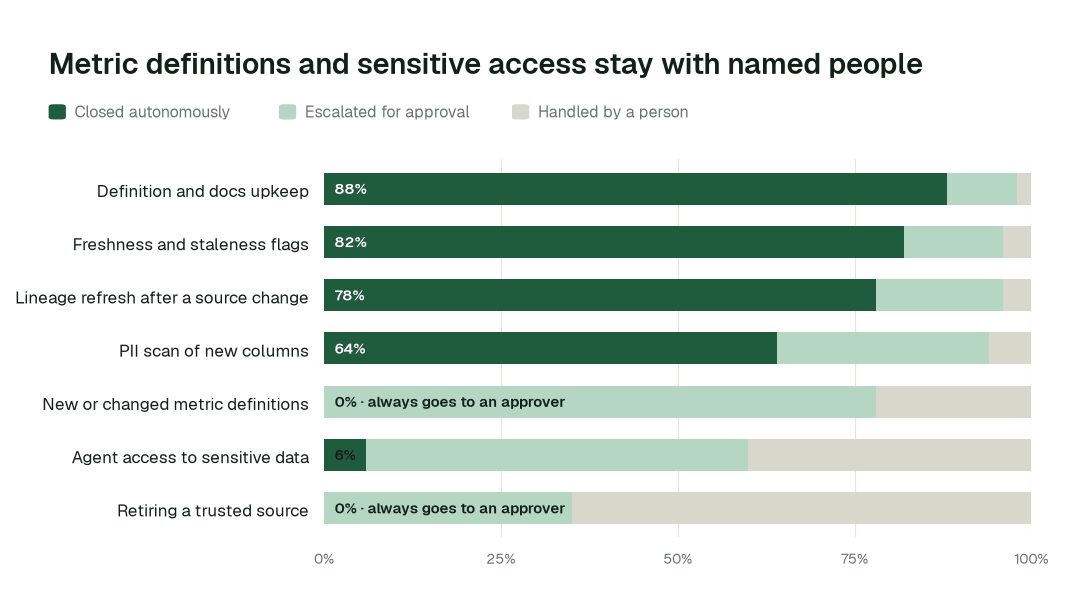
Definition and docs upkeep closes autonomously 88% of the time. For new or changed metric definitions, autonomous closure is 0% by design: every change is proposed with a full diff and approved by a named person.
Designing the autonomy ladder
Autonomy is set per task class, not per tool. L0 to L2 run today; L3 and L4 are where a domain can go once its own record supports it. This is where we would start each class, and what the ceiling looks like:
| Task class | L0 watch | L1 suggest | L2 act after approval | L3 and L4 (where a domain can go) |
|---|---|---|---|---|
| Documentation upkeep | Flag gaps | Draft pages | Publish after review | Candidate on evidence |
| Freshness and staleness flags | Detect | Propose | Apply after review | Candidate on evidence |
| Lineage refresh | Detect | Show blast radius | Apply after review | Candidate on evidence |
| PII tagging of new columns | Scan | Propose tags | Write after approval | Tagging only |
| Metric definitions | Compare | Draft with diff | Owner approves | Stays at L2 |
| Agent access to sensitive data | Review | Recommend | Owner approves | Stays at L2 |
| Retiring a trusted source | Report | Show impact | Owner approves | Stays at L2 |
The operating model: who owns what
Agents change who does the work, not who is accountable for it:
| Role | Owns | What the agents take off their plate |
|---|---|---|
| Head of AI Data Platforms | Standards, autonomy per domain and which domain goes next | Chasing owners, rebuilding readiness for each new agent |
| Metric and data owners | Definitions, authoritative sources and sensitive access | Preparing the diff, blast radius and rollback plan |
| Data governance leads | Policy, classification rules and audit evidence | Scanning, tagging and compiling the trail by hand |
| Data platform engineers | Reviewing proposals and shipping the next agent's context | Tracing source changes, documenting tables, re-checking answers |
The swarm behind the practices
No single agent delivers these practices. Each one is a hand-off between specialists, coordinated under the autonomy you set per domain.
| Agent | What it does for AI-ready data | Public tools it calls |
|---|---|---|
| Data Context & Catalog | Defines metrics, marks sources, documents tables, keeps lineage and freshness current | list_semantic_definitions, define_business_rule, mark_authoritative, blast_radius_analysis |
| Data Access & Governance | Finds PII, applies policy, provisions scoped access | scan_pii, check_policy, enforce_rbac, provision_access |
| Schema Evolution | Catches source changes and checks downstream models | detect_schema_change |
| Quality Monitoring | Ties governed metrics to finance | run_quality_check |
| Observability | Records agent activity, re-runs reference questions | get_audit_trail, get_evaluation_report |
| Incident Debugging | Traces a wrong answer to its cause | get_root_cause |
Data Context Wizard holds one governed definition of each metric, with owner, trusted source and change history, and serves it to every agent over MCP. Autonomous Data-Conductor routes each approval to the right owner and watches whether agents' answers still match the numbers the business trusts. Spellbook Data Catalog, in preview, makes every governed table and metric discoverable in plain English alongside the catalog you already run. To go further, see build your semantic layer and one governed data layer for every AI agent.
What disappears
The clearest sign the practices are working is what stops happening:
- •The meeting to decide which revenue number is right.
- •An agent quoting a column's old meaning for a week after a rename.
- •Access and PII reviews rebuilt from scratch for each pilot.
- •The day of digging to answer "where did that number come from?"
- •An executive learning about a wrong answer before the data team does.
The magic is not any single agent. It is that the context layer keeps itself current, and every action leaves a signed receipt so the team can show what happened and roll anything back. The experience is fewer reviews, quieter Fridays and more time for the agents the business asked for. The data platform and governance teams page covers the wider group.
A Head of AI Data Platform's scorecard
If you own this layer as a product, these are the numbers to set targets for and bring to every quarterly review:
- •Share of governed metrics with one definition, one owner and one trusted source, targeting every metric an agent reads.
- •Time to reconcile a conflicting definition, targeting a working day.
- •Time from a source change to every affected agent identified, targeting minutes.
- •Agent answers that match certified dashboards on the reference question set, tracked per agent and per release.
- •Sensitive columns classified before first agent access, targeting all of them.
- •Share of upkeep closed autonomously, targeting 88% for definition and docs upkeep as the deployment matures.
- •Time from a new agent request to governed context in place, targeting days.
The climb: from assisted to autonomous to agentic
Our thesis is that the data platform climbs the way analytics did, in stages, and that the hard part of data work was never knowing what to do but doing it. For AI-ready data teams, the climb looks like this:
- •Assisted. Agents work alongside your team, show every conflicting definition and sensitive column, and propose every fix with a receipt; definitions and sensitive access always go to a named approver.
- •Autonomous, under your governance. Routine work runs on its own: documentation and lineage stay current, source changes are traced overnight and new columns are classified on arrival. Your team governs the agents instead of doing the upkeep.
- •The agentic enterprise. An AI-ready data team that ships governed context to the next agent in days. People set direction, and the platform carries it out.
You choose the altitude, every step is visible and reversible, and the pilot below is the first rung.
The pilot: how AI-ready data teams start
The pilot is how your team proves the value on its own data before committing.
- •What we connect. Your warehouse, dbt project, semantic layer, catalog and orchestrator, plus one copilot or agent, over MCP, inside your infrastructure. Nothing migrates.
- •Scope. One copilot or agent on one domain, with its top metrics governed at L2.
- •First week. Agents run at L1 across the scoped domain. They map every definition, source and lineage path the agent reads, flag conflicts and unclassified columns, and show the fixes they would have made, with receipts.
- •By week two. Documentation, lineage refresh and freshness flags start running on reversible work, and new columns are scanned for PII. Metric definitions and sensitive access stay at L2 with a named approver.
- •At day 30. We review the impact metrics against your baseline:
- •Conflicting definition reconciled: from about a month to 8 h
- •Agent answer traced to its source: from about a day to seconds
- •Source change traced to every affected agent: from about 2 days to minutes
- •the share of definition and docs upkeep closed autonomously, targeting 88% as the deployment matures
- •What you decide. Whether to expand to the next domain or the next agent. The pilot fee is credited in full against the first year.
- •Cost. Start with a pilot ($7,500 one-time, credited in full against the first year). Scale is from $1,000 a month and Enterprise from $3,000 a month, billed annually, with unlimited seats, no usage meter and no markup on model spend. See pricing.
- •Guarantee. In a 90-day pilot, we recover ten engineering hours per data engineer per week against a baseline both sides sign on day one, or the $7,500 fee is refunded.
The pilot is the start of a longer curve:
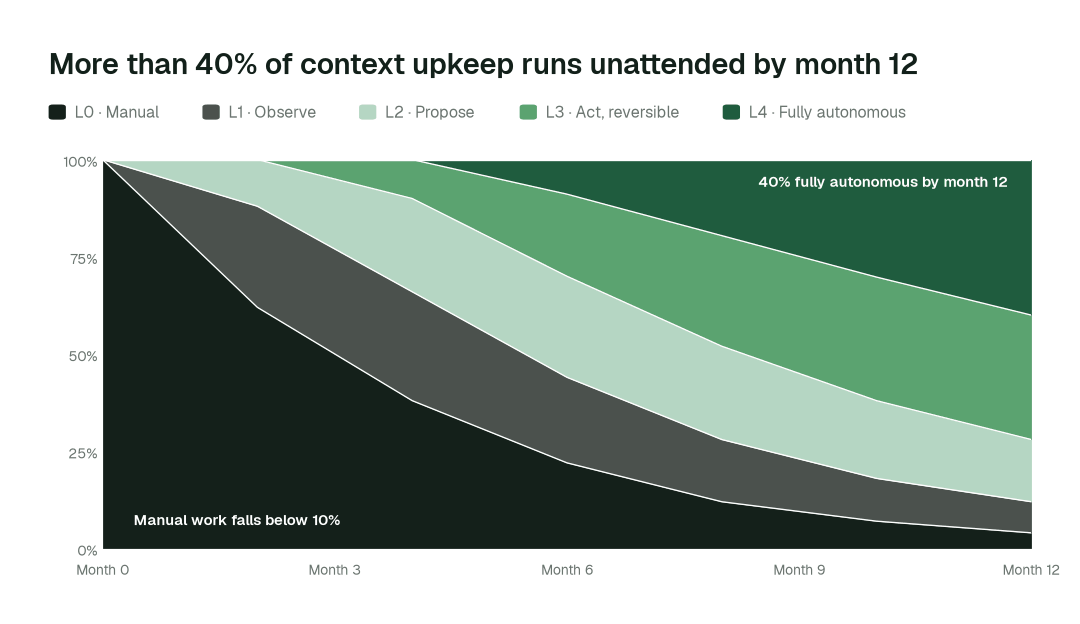
By month 12, more than 40% of agent actions run fully autonomously and manual work falls below 10%, while metric definitions and sensitive access stay with a named approver.