Marketing spend efficiency data, run by agents
Spend lives in ad platforms and invoices, results in CRM and analytics, and ROI is assembled monthly. Here is how Data Workers runs it instead.
Key takeaways
- •The problem today. Spend lives in ad platforms and invoices, results in CRM and analytics, and ROI is assembled monthly.
- •What changes. Agents tie spend to invoices and outcomes daily and flag channels where spend drifts from results.
- •What stays with your people. Budget reallocation: finance approves it.
- •The result. Spend efficiency is visible daily.
The problem today
Spend lives in ad platforms and invoices, results in CRM and analytics, and ROI is assembled monthly.
What changes with Data Workers
Agents tie spend to invoices and outcomes daily and flag channels where spend drifts from results.
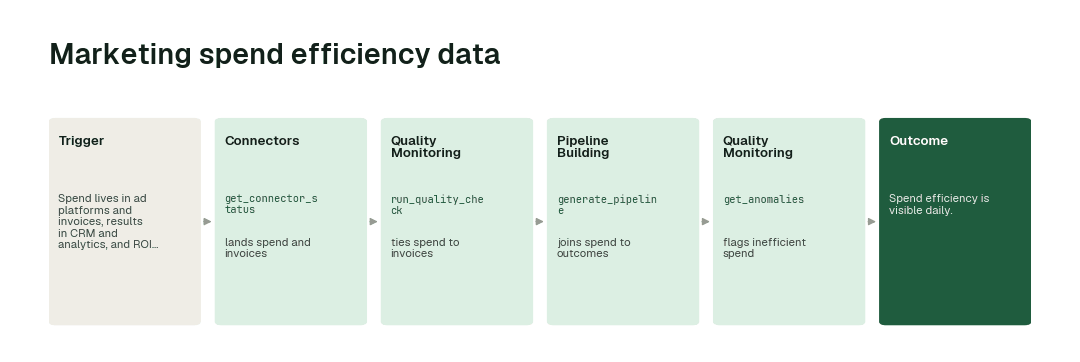
The workflow, step by step
- 1.The Connectors agent calls
get_connector_statusand lands spend and invoices. - 2.The Quality Monitoring agent calls
run_quality_checkand ties spend to invoices. - 3.The Pipeline Building agent calls
generate_pipelineand joins spend to outcomes. - 4.The Quality Monitoring agent calls
get_anomaliesand flags inefficient spend.
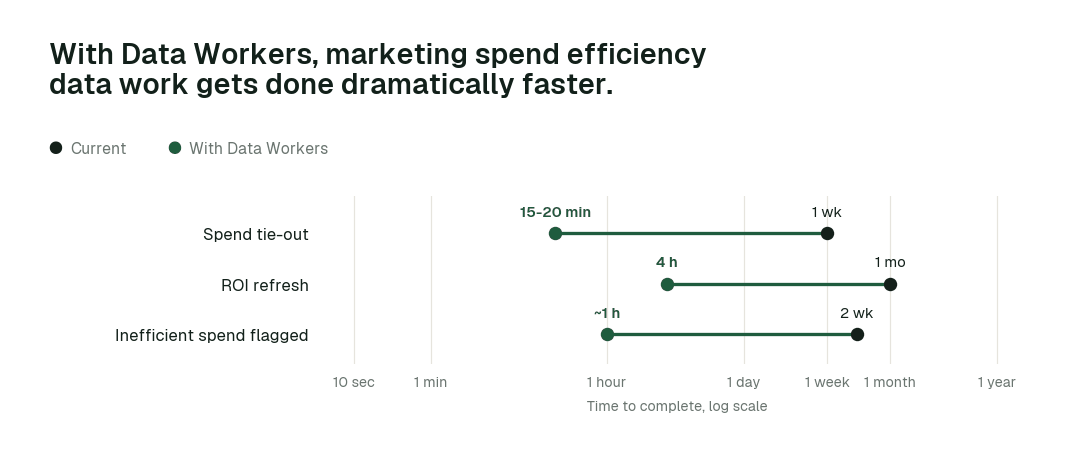
The impact metrics we move
- •Spend tie-out: from about a week to 15-20 min
- •ROI refresh: from about a month to 4 h
- •Inefficient spend flagged: from about 2 weeks to ~1 h
What goes on autopilot
- •Spend ties to invoices daily, so finance and marketing agree.
- •Inefficient spend is flagged, so budgets move faster.
Where your people stay in charge
Budget reallocation always go to a named approver, because finance approves it. Everything starts at L1, observing only, and autonomy rises only on evidence.
The pilot
- •Scope. Spend efficiency for two channels.
- •First week. Agents run at L1, observing only, and show the fixes they would have made, with receipts.
- •By week two. The routine work above runs on its own; anything sensitive stays with a named approver.
- •At day 30. We review the impact metrics against your baseline:
- •Spend tie-out: from about a week to 15-20 min
- •ROI refresh: from about a month to 4 h
- •Inefficient spend flagged: from about 2 weeks to ~1 h
- •Cost. Start with a pilot ($7,500 one-time, credited in full against the first year). Scale is from $1,000 a month and Enterprise from $3,000 a month, billed annually, with unlimited seats, no usage meter and no markup on model spend. See pricing.