Predictable spend on every agent run
Agent cost is hard to plan when it arrives as one invoice line and a surprise. Data Workers prices queries before they run, reports usage and cost per agent and per action, alerts when an agent's usage leaves its normal range, and charges a flat platform fee with no usage meter and no markup on model spend.
Before and after
| Today | With Data Workers |
|---|---|
| Agent cost is one line on a model invoice, with no owner | Usage and cost reported per agent and per action |
| Expensive queries are found after they have run | Queries are priced before they run, and a session can be capped on how much data it scans |
| A spike is noticed when the invoice arrives | An alert when an agent's usage moves outside its normal range |
| Finance asks what the agents cost and engineering estimates | One report both sides read, built from the same numbers |
| Platform fees that rise with seats, credits or agent count | Published tiers, unlimited seats, no usage meter, no markup on model spend |
Every new agent adds a line to the bill, and a multi-agent workflow can cost several times what a single agent does on the same task (the token cost of agent teams is the usual surprise). Budgeting for that needs two things: a platform fee that does not move with usage, and a clear view of the part that does, which is the model and the warehouse. For the model side in detail, see which model Data Workers uses and what it costs to run.
How it works
1. Price the work before it runs
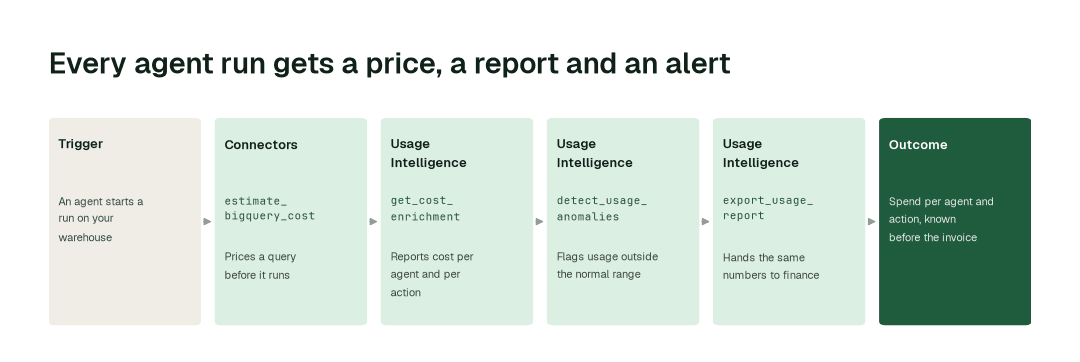
The Connectors agent prices a BigQuery query with estimate_bigquery_cost before it executes, and reads warehouse usage with get_snowflake_usage. A session can be capped on how much data it scans, so a runaway question stops at a limit your platform team chose instead of at the end of the month.
2. See what every agent and action cost
The Usage Intelligence agent reports usage and cost per agent and per action with get_cost_enrichment, tied to the pipelines and teams behind them. export_usage_report hands the same figures to finance, so the monthly agent report is not rebuilt by hand. You pay your model provider directly, and the report sits next to that invoice.
3. Get told before the invoice
detect_usage_anomalies alerts the owner when an agent's usage moves outside its normal range, and configure_usage_alerts is where the platform team decides who is told. Each domain has a named cost owner who reviews the alert and decides what to change; agents propose, people approve.
The impact metrics we move
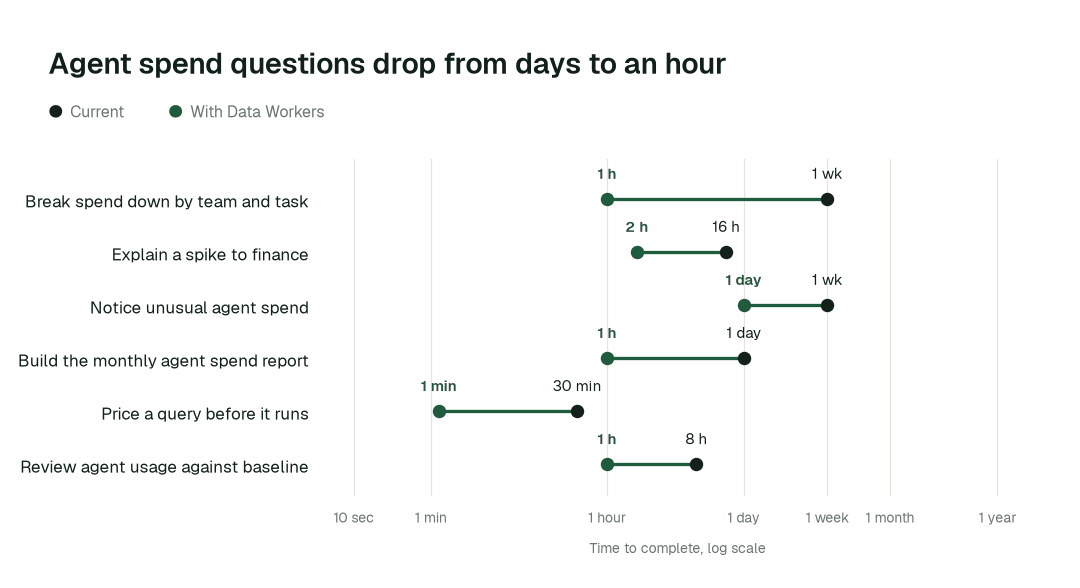
- •Agent spend broken down by team and task: from about a week to 1 h
- •Unusual agent spend noticed: from about a week to under 1 day
- •Monthly agent spend report for finance: from about a day to 1 h
Where teams start
- •Agent queries on BigQuery. Priced with
estimate_bigquery_costbefore they run, with sessions capped on data scanned. - •Warehouse usage on Snowflake and Databricks. Spend tied to the pipelines, teams and agent actions that caused it, using
get_snowflake_usageandget_databricks_query_history. - •One domain's agents. Usage and cost per agent for a single team, read against a week-one baseline.
- •The model invoice. The per-agent report set beside your Claude, GPT or Gemini bill, so each line has an owner.
- •The finance review. A monthly agent spend report exported once, then on a schedule; see Data Workers for FinOps leads.
What powers it
The Data-Agents Swarm does the measuring: the Usage Intelligence agent reports cost per agent and action and flags unusual usage, the Connectors agent prices and reads warehouse spend, and the Observability agent reports how each agent is behaving with get_agent_metrics. Autopilot Routines can run the spend review each week, the Autonomous Data-Conductor keeps each domain inside the autonomy its owner set, and the Spellbook Data Catalog holds the owners and the audit trail of what each agent did. The agent itself is described in inside the Usage Intelligence agent. See it in practice in AI cost management, AI and ML platform data teams and cutting agent token spend with a governed semantic layer.
The climb: from assisted to autonomous to agentic
Every transformation runs on the same ladder from our thesis. Today agents watch (L0), suggest (L1) and act after approval (L2), and each domain's owner decides how far to go. L3 and L4 are where a domain can go on its own record, not something running now.
The pilot
- •Scope. One domain's agents and the warehouse they query, with a named cost owner.
- •First week. Agents start by watching and suggesting: they report usage and cost per agent and action and price the queries they run, with receipts. That is your baseline.
- •By week two. The weekly spend report runs on its own and alerts go to the cost owner; anything sensitive stays with a named approver.
- •At day 30. We review the impact metrics against your baseline:
- •Agent spend broken down by team and task: from about a week to 1 h
- •Unusual agent spend noticed: from about a week to under 1 day
- •Monthly agent spend report for finance: from about a day to 1 h
- •Cost. Start with a pilot ($7,500 one time, a 6 to 12 week pilot, credited in full against the first year). Scale is from $1,000 a month and Enterprise from $3,000 a month, billed annually, with unlimited seats, no usage meter and no markup on model spend. See pricing.
FAQ
Does Data Workers charge by token, run or seat? No. Pricing is published tiers with unlimited seats, no usage meter and no markup on model spend. You bring your own model and pay your provider directly. In a dated census of 21 agentic data engineering vendors on 10 September 2026, 6 published a rate a buyer could read without contacting sales.
Will this lower our model bill? It shows you where the spend goes, so you can change what drives it. We do not quote a savings percentage; you measure against your own week-one baseline.
Who sets the limits and decides what is normal? People do. Your platform and finance owners choose the data-scan cap, who receives alerts and what to change when one fires.
Which stacks does it cover? Snowflake, Databricks and BigQuery, among 50+ connectors. We confirm in week one which connections give full coverage on your account.
What if an alert is wrong? An alert goes to a person, and nothing changes without them. Every agent action sits in a tamper-evident audit trail, so you can check what ran.