Move legacy SQL and stored procedures to Snowflake, reviewed
Years of legacy SQL, stored procedures and scripts decide how fast any move to Snowflake goes, and someone has to read every line. Data Workers inventories the code, shows what each piece touches, helps translate it and flags what needs a person, with approvals and an audit trail.
Before and after
| Today | With Data Workers |
|---|---|
| Nobody knows how many scripts, views and stored procedures exist | Every piece of code inventoried, with what it reads and writes |
| Dialect conversion done by hand, query by query | A first-draft Snowflake translation for each script, ready for review |
| The odd constructs found late, in testing | Constructs that need a person flagged up front, with the reason |
| Impact of moving a job discovered after cutover | What a migration touches shown before it starts |
| Migrated code that skips the normal review | Every translated script reviewed, approved and logged like any other change |
SQL translation is rarely the hard part of a migration. The hard part is the volume: thousands of scripts, years of stored procedure logic and no list of who still depends on any of it. A dialect conversion tool can rewrite syntax, but it cannot tell you which jobs are dead, which feed the board report or which lines need a human who understands the business rule.
How it works
1. Inventory the code and what it touches
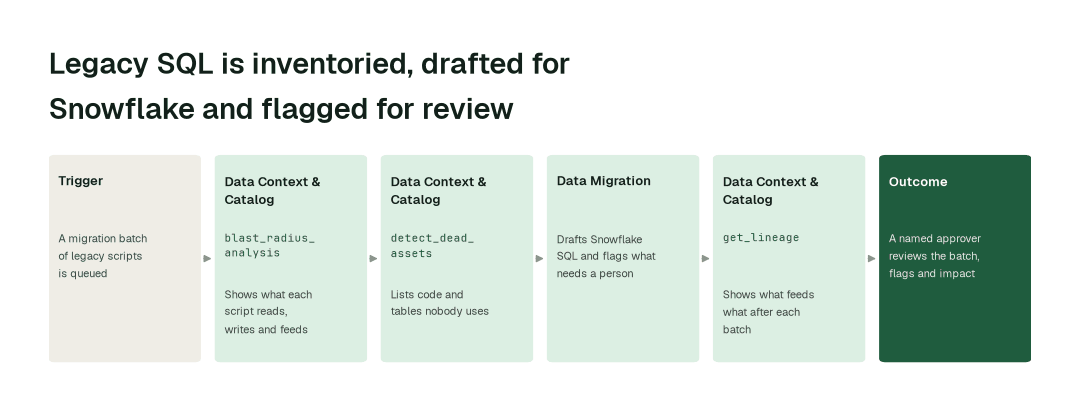
The Data Context & Catalog agent maps every script, view and procedure to the tables and consumers around it. blast_radius_analysis shows what a move will touch before it starts, and detect_dead_assets lists code and tables nobody uses, so you do not translate what you could retire.
2. Translate toward Snowflake and flag what needs review
The Data Migration agent helps translate legacy SQL toward Snowflake in small batches, and flags the statements, procedures and behaviours that need a person's judgment, each with the reason. It drafts; it does not declare anything finished.
3. Review, approve and record
Each batch goes to a named approver with the original code, the Snowflake version and the list of flags side by side. Approved code goes through the same review, approval and audit trail as any other change, and lineage shows the new picture of what feeds what after each batch.
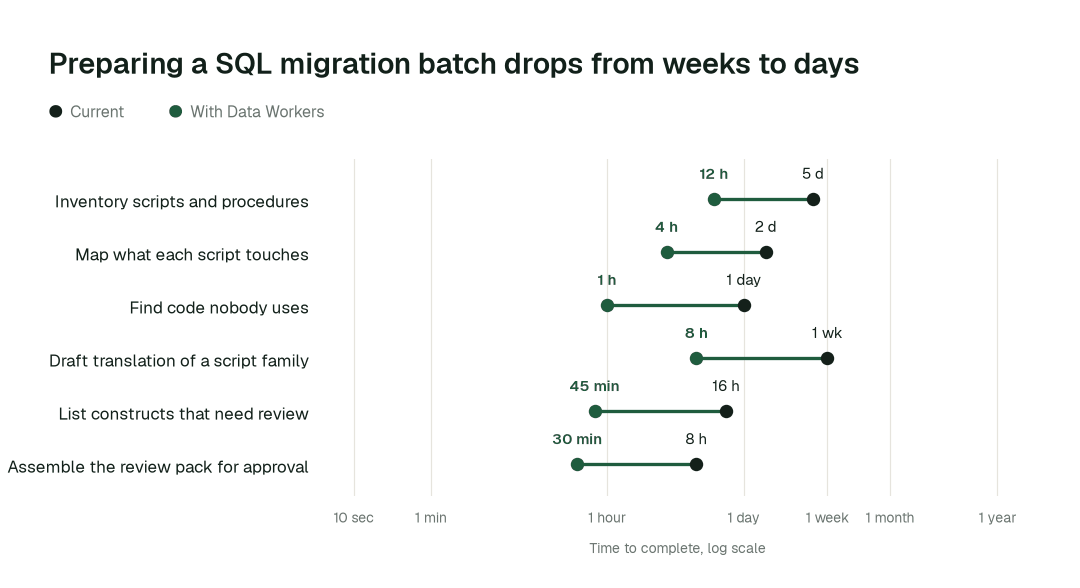
The impact metrics we move
- •Code inventory with dependencies: from about a week to 2 days
- •First-draft translation of one script family: from about a week to 1 day
- •Review list of flagged constructs: from about 2 days to under 1 h
Where teams start
- •Teradata BTEQ and SQL. Scripts and views for one subject area, moving to Snowflake.
- •Oracle PL/SQL and SQL Server T-SQL stored procedures. The procedures nobody wants to open, listed and flagged first.
- •Redshift SQL. Queries and views, as in a Redshift to Snowflake move.
- •Scheduled reporting scripts. The jobs behind finance and executive reports, where review matters most.
- •Dead code first. Scripts with no consumers, retired before anyone translates them.
What powers it
The Data-Agents Swarm does the work: the Data Context & Catalog agent maps the code and its consumers through the Data Context Wizard, and the Data Migration agent drafts translations and flags the rest. The Autonomous Data-Conductor coordinates the hand-offs, and Spellbook Data Catalog keeps the record of what moved, who approved it and what changed. For the program around the code, see warehouse migration in waves and legacy ETL modernization. The same lineage shows up in end-to-end lineage and for AI-ready data teams. The Data Migration agent write-up and a framework for running a migration agent in production go deeper on the operating model; a comparison of Teradata and Informatica migration tools covers the tooling market.
The climb: from assisted to autonomous to agentic
Every transformation runs on the same ladder from our thesis. L0 to L2 run today: agents map, draft and flag, and a person approves. L3 and L4 are where a domain can go on evidence, once its record of approved batches earns it.
The pilot
- •Scope. One source system and one subject area: a few hundred scripts and procedures, with the reports that depend on them.
- •First week. Agents start by watching and suggesting. They inventory the code, map what it touches and show the translation and flags they would have proposed, with receipts.
- •By week two. Inventory and impact mapping run on their own for the whole scope; every translated batch still goes to a named approver.
- •At day 30. We review the impact metrics against your baseline:
- •Code inventory with dependencies: from about a week to 2 days
- •First-draft translation of one script family: from about a week to 1 day
- •Review list of flagged constructs: from about 2 days to under 1 h
- •Cost. Start with a pilot ($7,500 one-time, credited in full against the first year). Scale is from $1,000 a month and Enterprise from $3,000 a month, billed annually, with unlimited seats, no usage meter and no markup on model spend. See pricing.
FAQ
Does it migrate everything on its own? No. It helps translate legacy SQL toward Snowflake and flags what needs review. A named approver decides on every batch, and your team runs its own tests before a consumer moves.
Which source systems and targets? The target is Snowflake. Sources are the legacy warehouses and databases you list in scope, and the scope is agreed in the pilot.
What if a translation is wrong? The reviewer sees the original, the draft and the flags together, and can reject a batch. Every change is logged with how to undo it.
Where does the code go? Through your normal review and release path, with an audit trail of who approved what.