You're on SingleStore: It Runs Real-Time Transactions and Analytics in One Engine for Live Apps. Data Workers Owns Whether the Data Behind Them Is Right
SingleStore runs transactions and analytics in one engine, with Analyst, the Observability Agent and an MCP server. Data Workers owns whether the data behind your live apps is right: it catches silent bad loads, traces them and gets fixes approved.
Your live applications read from SingleStore. Rowstore tables take the writes, columnstore tables hold the history, and one engine answers both in milliseconds, which SingleStore calls HTAP. Pipelines pull events from Kafka, S3 and Kinesis continuously, and Iceberg ingest (a preview feature) brings lakehouse tables in as a speed layer. On SingleStore Helios, Aura Intelligence adds Analyst, generally available in the June 2026 release, which answers plain-English questions on the live database inside governed Domains, and a Context Engine that gives agents a shared map of your data. On September 28, 2026 SingleStore introduced the Observability Agent for workspace health, and it has opened a Query Tuning Agent in preview.
The expensive SingleStore incidents are the ones where every batch loads cleanly: the pipeline is Running, PIPELINES_ERRORS is empty, and a live screen shows a wrong number because a producer changed upstream. SingleStore runs real-time transactions and analytics in one engine for live applications. Data Workers owns whether the data behind them is right: it checks what each load meant, traces a bad value to its cause across the systems around SingleStore, and hands the owner a fix and a run plan, behind approvals.
Key takeaways
- •SingleStore keeps its job. Pipelines, tables, Analyst Domains and your Helios roles stay as they are. Data Workers works on whether the data is right.
- •A clean batch gets checked too. Metrics your team defines are recorded after every load, so zero errors with wrong values becomes a diagnosed incident within the hour.
- •Built around the tools you run. Dagster, Snowflake, dbt, Looker, Opsgenie, Slack and GitHub pull request review connect natively; the SingleStore MCP Server runs in your assistant beside Data Workers.
- •Changes go to a named owner. Pipeline fixes arrive as a diff, replays as a plan the owner runs, reruns queue through Dagster after approval, and every step leaves a receipt.
- •The same loop covers a move. If a workload moves, Data Workers plans each wave with its parity checks and holds the completion gate for the owner's sign-off.
SingleStore runs real-time transactions and analytics in one engine for live applications. Data Workers owns whether the data behind them is right.
Wrong data is a different job from fast queries: notice it, connect it to a change SingleStore never sees, size the damage, hold anything that would pay out on it, fix the cause and prove the result. Here is one Tuesday at a regional ride-hailing company. This is an illustrative example.
The stack: the trip service publishes one trip-completed event per finished trip to a topic on Amazon MSK. A SingleStore Helios pipeline, trips_pipe, loads the JSON into the rowstore table trips, keyed on trip_id, with the mapping distance_km <- fare::distance_km DEFAULT 0. The default is sensible: cancelled trips carry no distance, and one missing field should never stall a live feed. The view trip_earnings computes pay as base plus per-minute plus per-kilometre, and the driver app's earnings screen reads it live. Dagster runs three jobs: trip_health three times an hour, which queries SingleStore with a SELECT-only user and records metrics with monitor_metrics (added during the pilot); trips_to_snowflake at 01:00, feeding the dbt model fct_driver_earnings and the Looker "Driver earnings" Explore; and driver_payouts at 03:00, which reads trip_earnings and sends the day's pay. Alerts go through Opsgenie; approval requests reach people in Slack.
| Time | System | What happens |
|---|---|---|
| Tue 07:40 | Trip service (v8.3) | A release adds airport flat fares. For those trips, distance moves from fare.distance_km to a new route.distance_m, in metres. Other products keep the old field |
| 07:40 | SingleStore Helios | As documented, when a subvalue "cannot be found in the input JSON, the engine will assign the DEFAULT clause literal instead". Every airport trip loads with distance_km = 0. No row fails, PIPELINES_ERRORS stays empty and the pipeline stays Running |
| 07:45 | Driver app | Airport drivers see trips paid with no distance component. Nobody has called support yet |
| 08:05 | Data Workers | trip_health records, per product, the share of completed trips with 0 km and the average km per trip. Airport flat fare reads 100% zero-km against a baseline of 0.1%, and 0.0 km against a band of 21 to 27. Both are flagged and Data Workers opens an incident |
| 08:09 | Data Workers | diagnose_incident classifies the flagged signals with their context (Dagster run history, the product tag on each metric, no failed runs): quality degradation confined to one product, starting between 07:40 and 08:00, most likely an upstream producer change the load accepted. get_incident_history finds no earlier case |
| 08:12 | Data Workers | blast_radius_analysis walks the dbt lineage and the team's context-graph notes: trips feeds trip_earnings, the driver app screen, fct_driver_earnings, the Looker Explore and, through a reader the team recorded in the graph during the pilot, the 03:00 driver_payouts job. At the current rate, about 3,900 airport trips would be underpaid by tonight's payout |
| 08:15 | Opsgenie + Slack | send_opsgenie_alert raises an alert for the data on-call with the diagnosis, and Data Workers recommends holding the 03:00 payout until checks pass. The approval request goes to the trips platform owner in Slack, with driver operations and the payments lead copied |
| 08:25 | Helios | The on-call asks the Observability Agent about the workspace: throughput, resource use and errors are normal. That is correct; the database did exactly what the pipeline told it to |
| 08:30 | SingleStore MCP Server | In her Claude Code session, the on-call runs run_sql with a SELECT-only database user: 412 airport trips since 07:40 have distance_km = 0, all from trip service v8.3. The trip service team confirms the new field |
| 08:55 | Spellbook | The owner reviews the proposal: a pipeline definition diff that maps both fields into variables and sets distance_km to COALESCE(@distance_km, @distance_m / 1000), keeps 0 only for cancelled trips and adds REPLACE so a replayed trip_id overwrites its row; a replay plan (save rows since 07:40 to a holding table, stop the pipeline, apply the definition with CREATE OR REPLACE PIPELINE, which preserves offsets, set the offsets back to the first 07:40 batch, start); a payout hold; and a run plan. She approves |
| 09:00 | Dagster | The payments lead pauses the driver_payouts schedule |
| 09:20 | GitHub + SingleStore | The engineer merges the definition change in the team's repo and runs the approved replay. The pipeline catches up by 09:38 |
| 09:45 | Data Workers + Dagster | Data Workers queues an out-of-cycle run of trip_health with trigger_dagster_job and reads the run's status from Dagster |
| 09:52 | Data Workers | The run completes. Airport zero-km share reads 0.1% and average distance 24.3 km, inside the band. The 412 trips now carry their distance, and the earnings screen shows the corrected pay |
| 10:00 | Spellbook + Dagster | The owner releases the hold and the payments lead resumes the schedule |
| Wed 01:45 | Data Workers + Snowflake | After trips_to_snowflake and the dbt build, run_quality_check on FCT_DRIVER_EARNINGS passes volume and trip_id uniqueness, and the earnings-per-km metric the team records sits in its band |
| 02:00 | Spellbook + Opsgenie | Data Workers writes the receipt (cause, approvals, diff, replay and who ran it, checks passed, undo from the holding table and the previous definition), links it and closes the alert with resolve_opsgenie_alert. The approved fact "airport trips report distance in metres as route.distance_m" lands in the Context Wizard graph |
| 03:00 | Payout provider + Looker | Payouts run on corrected trips. The Driver earnings Explore shows Tuesday's airport pay in line with last week |
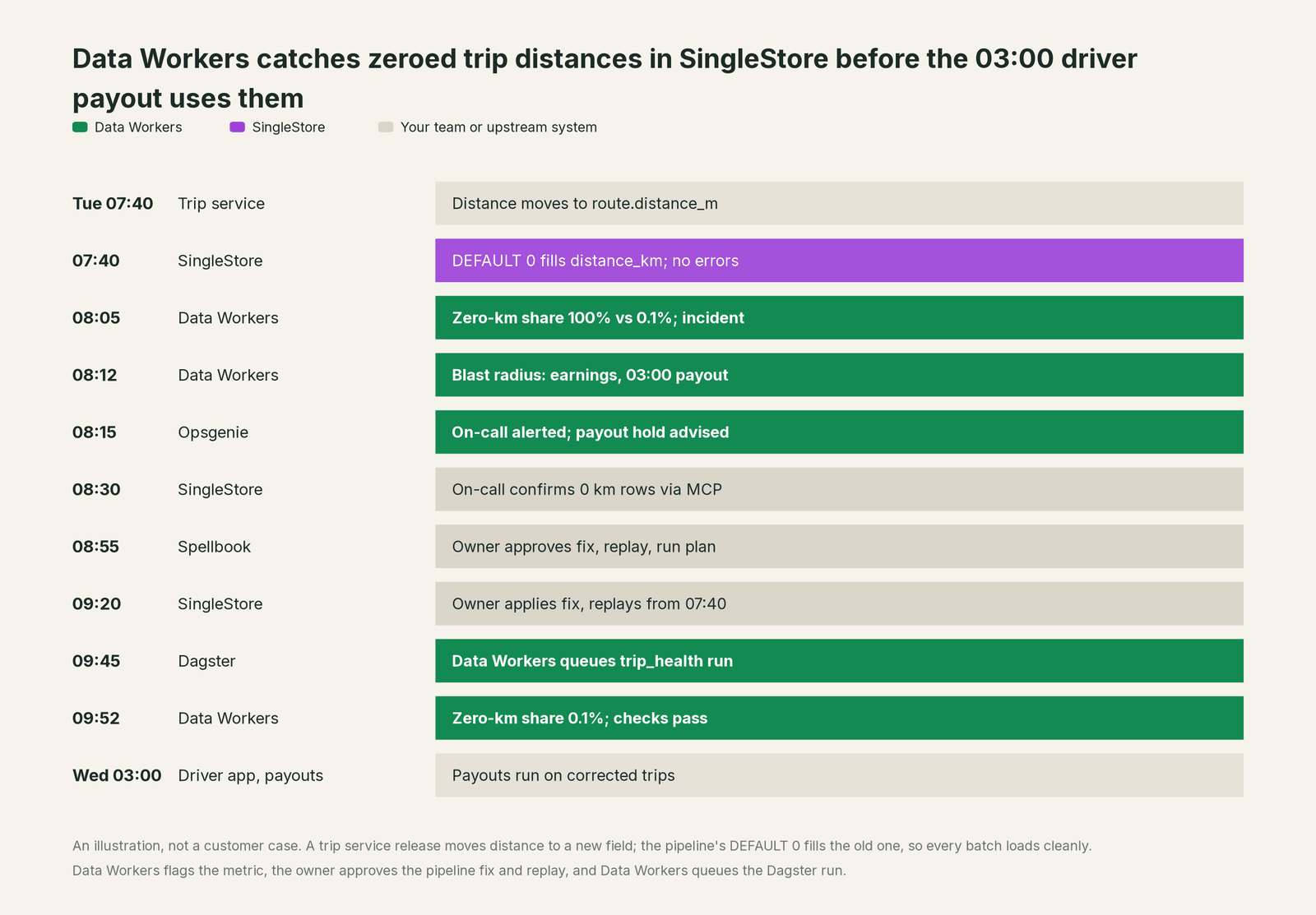
Every system did its job. Catching this took knowledge no engine holds: an airport trip is never zero kilometres, and tonight's pay comes from this morning's rows. A null check would have said nothing; zero is valid, so the value-level metric caught it.
| Job | What SingleStore does | What Data Workers does |
|---|---|---|
| The run | Loads Kafka, S3, Kinesis and Iceberg continuously with pipelines, and serves live reads and writes in one engine | Reads the Dagster runs around SingleStore and the dbt models built from it |
| The signal | Helios monitoring and the Observability Agent show how the workspace and its pipelines are doing | Metrics the team defines, recorded after every load, show the owner whether the data is right |
| The diagnosis | The Query Tuning Agent and query profiles explain how a query ran | Joins the upstream release, the job runs, the metrics and the lineage into one cause, with the blast radius across screens, models, payouts and reports |
| The fix | Runs whatever pipeline definitions and statements the team deploys | Proposes the pipeline change as a diff and the replay as a plan for the owner to approve and run |
| The rerun | Replays from any offset the owner sets | Queues the approved run through Dagster and reads its status |
| The proof | Keeps pipeline batches, offsets and errors in its information schema | Re-checks the recorded metrics and writes a receipt: what changed, who approved it, how it was checked, how to undo it |
Why doesn't SingleStore just do this itself?
Because SingleStore is built to take writes and answer queries on the same data in milliseconds, and it does that very well. Its unit is the table, the pipeline and the query. It knows the 07:40 batch loaded every row; it does not know that an airport trip has a distance, or that a payout job reads the view at 03:00.
SingleStore's agents follow that scope, and are well designed for it. The Observability Agent "diagnoses. It does not act on your behalf. It will not change your data, alter configuration, resize infrastructure, or stop a workload", and runs under the Helios roles you already have. The Query Tuning Agent "explains, it does not execute", and returns any DDL as text for you to review. Analyst answers questions inside a Domain with its own owners, and SingleStore recommends a read-only database attachment for it. The MCP Server lets an assistant run SQL and manage workspaces, notebooks and jobs. Each makes the people who run SingleStore faster at its own job.
Owning whether a number is right across a trip service, Kafka, SingleStore, Dagster, Snowflake, dbt and Looker is a different product: a context graph across every system, blast-radius scoping, named approvals, a recorded undo and receipts. A database that rewrote another team's producer or held payouts would carry liability it was never built for. That product is Data Workers. More in is it safe to let AI agents change production data.
Every tool owns a slice. Data Workers covers the whole lifecycle
SingleStore owns real-time transactions and analytics in one engine. Each point tool adds another console, contract and handoff. Data Workers covers the whole lifecycle with one context, one approval flow and one audit trail.
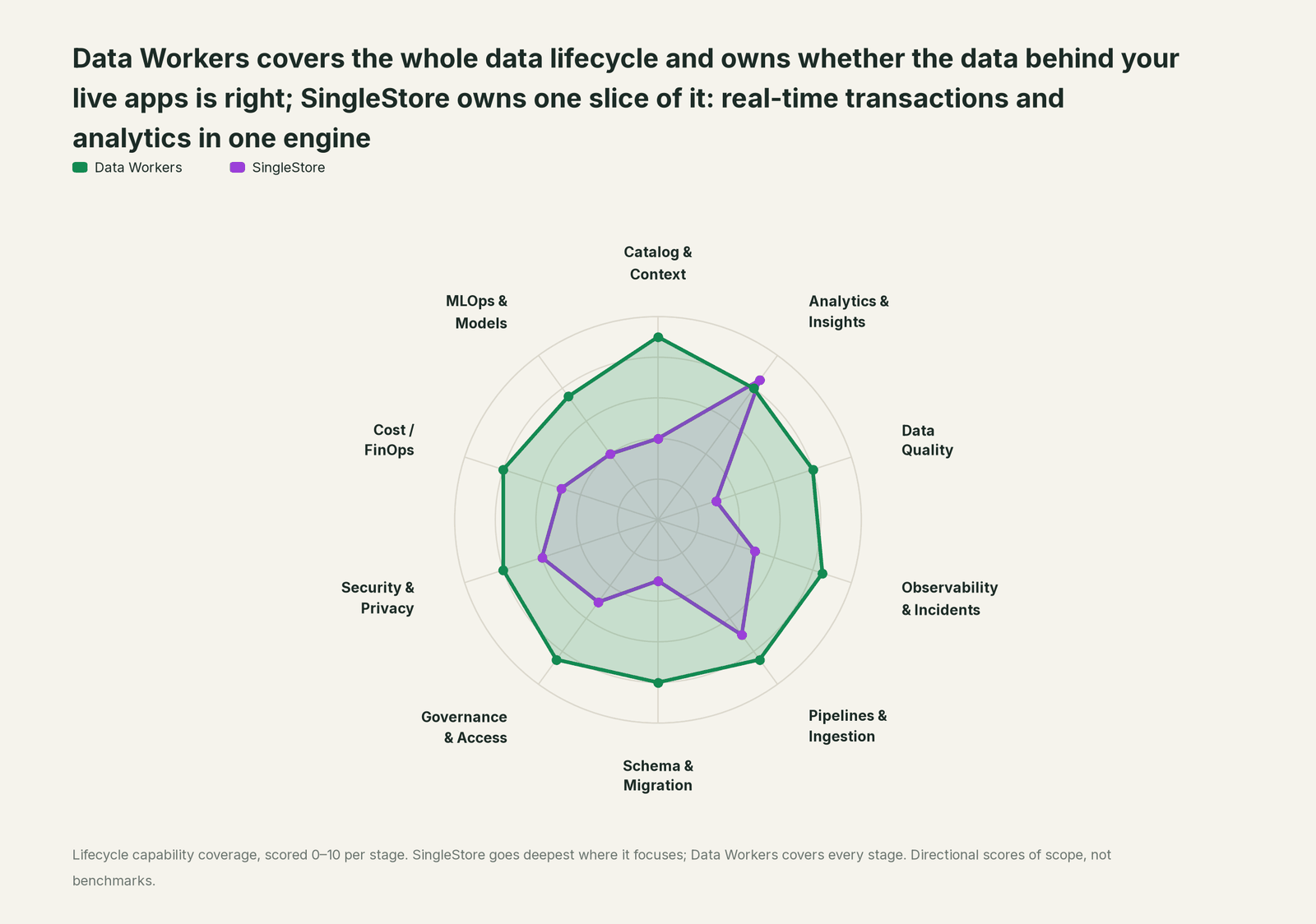
| Stage | Data Workers | SingleStore | Why we scored it this way |
|---|---|---|---|
| Catalog & Context | 9 | 4 | Analyst Domains and the Aura Context Engine describe the tables inside SingleStore for people and agents. Data Workers keeps one governed context graph across SingleStore and every system around it. |
| Analytics & Insights | 8 | 8.5 | SingleStore's home stage: rowstore and columnstore tables in one engine, millisecond queries on live data, vector and full-text search, and Analyst for plain-English questions. Data Workers answers from governed definitions on top. |
| Data Quality | 8 | 3 | Constraints and pipeline error handling decide which rows load. Data Workers checks what each load meant, with metrics the team defines, after every run. |
| Observability & Incidents | 8.5 | 5 | Helios monitoring and the Observability Agent diagnose workspace health, from symptom to cause. Data Workers diagnoses the data incident across the producer, the pipeline, the jobs and the reports, and verifies the fix. |
| Pipelines & Ingestion | 8.5 | 7 | Pipelines load Kafka, S3, Kinesis and Iceberg (preview) continuously, with offsets the team can reset. Data Workers queues the approved rerun of the jobs downstream through the orchestrator. |
| Schema & Migration | 8 | 3 | SingleStore runs the schema and pipeline definitions it is given. Data Workers generates schema migrations with rollback SQL for the owner and plans moves in approved waves. |
| Governance & Access | 8.5 | 5 | Helios RBAC and custom roles govern who reads what inside SingleStore. Data Workers routes every data change to a named approver. |
| Security & Privacy | 8 | 6 | Strong cloud security: Helios RBAC, PCI DSS v4.0.1 for Helios, mTLS to Kafka. Data Workers leaves a receipt on every data change across systems. |
| Cost / FinOps | 8 | 5 | Usage and Forecasting in Helios shows historical use and simulates resources. Data Workers reads AWS spend by service with its forecast and drafts any resize for the owner. |
| MLOps & Models | 7.5 | 4 | Vector search and in-database functions serve AI features. Data Workers keeps the data under the models and features healthy. |
How SingleStore and Data Workers work together
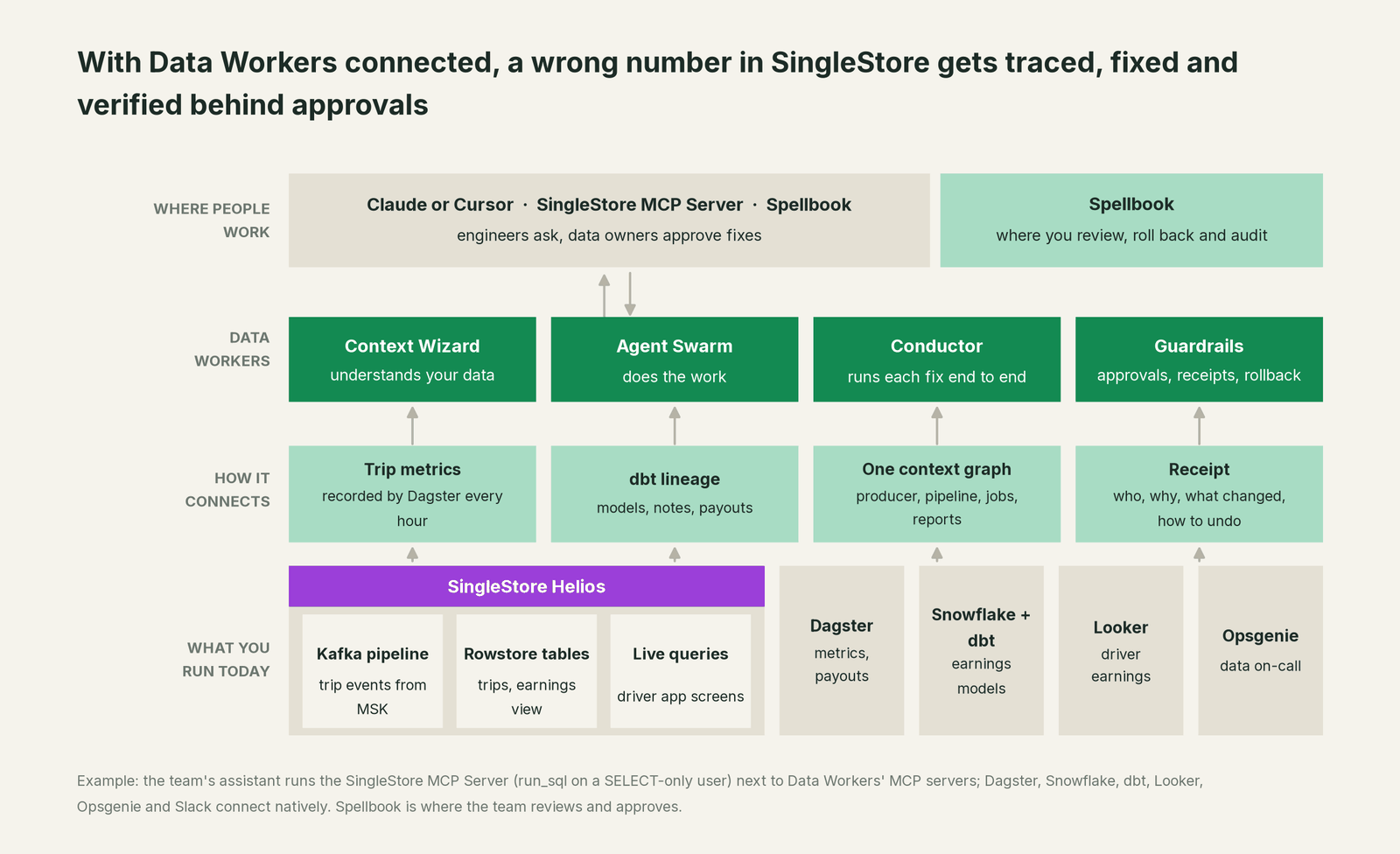
Dagster (runs and approved reruns), Snowflake, dbt (models, lineage, test results), Looker (read), Opsgenie, Slack, GitHub pull request review and AWS Cost Explorer connect natively (full list). SingleStore connects over its MCP server or API today, and through the jobs around it: detection rests on what Data Workers' connectors read plus the metrics your Dagster assets record with monitor_metrics after each load. Your assistant runs the SingleStore MCP Server next to Data Workers' MCP servers; Data Workers' agents never call it. Pipeline definitions, offsets and grants stay with your team. See read-only warehouse access for LLM agents and connecting AI agents to a warehouse via MCP.
The SingleStore MCP Server signs in with browser OAuth and can both read and change workspaces, so hand run_sql a database user with SELECT on the schemas your team investigates. Data Workers follows the documented client setup: clone the open-source repo and add each agent's start-agent.sh entry to your client.
// Example: SingleStore MCP Server (standard config from SingleStore's docs) next to Data Workers agents.
// Pass a SELECT-only database user to run_sql.
{
  "mcpServers": {
    "singlestore-mcp-server": { "command": "uvx", "args": ["singlestore-mcp-server", "start"] },
    "dw-incidents":  { "command": "/path/to/dataworkers-claw-community/start-agent.sh", "args": ["dw-incidents"] },
    "dw-catalog":    { "command": "/path/to/dataworkers-claw-community/start-agent.sh", "args": ["dw-context-catalog"] },
    "dw-quality":    { "command": "/path/to/dataworkers-claw-community/start-agent.sh", "args": ["dw-quality"] },
    "dw-connectors": { "command": "/path/to/dataworkers-claw-community/start-agent.sh", "args": ["dw-connectors"] }
  }
}
List the tools with your client's own command (for example /mcp in Claude Code). In this incident: monitor_metrics, diagnose_incident and get_incident_history (dw-incidents), blast_radius_analysis (dw-context-catalog), run_quality_check (dw-quality), and trigger_dagster_job, send_opsgenie_alert and resolve_opsgenie_alert (dw-connectors). See you're on Dagster and you're on Apache Kafka.
If a workload moves. The Data Migration agent plans each wave with its parity checks from the object inventory your team exports, proposes the comparison queries your team runs on both sides, tracks the results and holds the completion gate for the owner's sign-off. generate_migration writes schema changes with rollback SQL for the owner to apply. When Snowflake is the target, see Data Workers on Snowflake.
The agents run in your infrastructure and hold the credentials and model key; your data stays in your systems, and the hosted Conductor sees workflow metadata only. More in where does our data go.
One incident, L0 to L4, set per domain:

- •L0 manual. On Wednesday driver support fields complaints about airport pay, and three teams spend the week on corrections.
- •L1 observe. Data Workers flags the zero-km share at 08:05 with the cause and blast radius. Nothing changes.
- •L2 propose. The diff, replay plan and payout hold wait for the named owner's approval.
- •L3 act reversibly. For a class with a clean record, Data Workers queues the reruns itself, verifies them and sends any failed check to a person. Pipeline definitions and replays stay with the owner.
- •L4 autonomous. For a scoped domain, the fix waits for the owner before the next payout reads the table.
What changes for your team
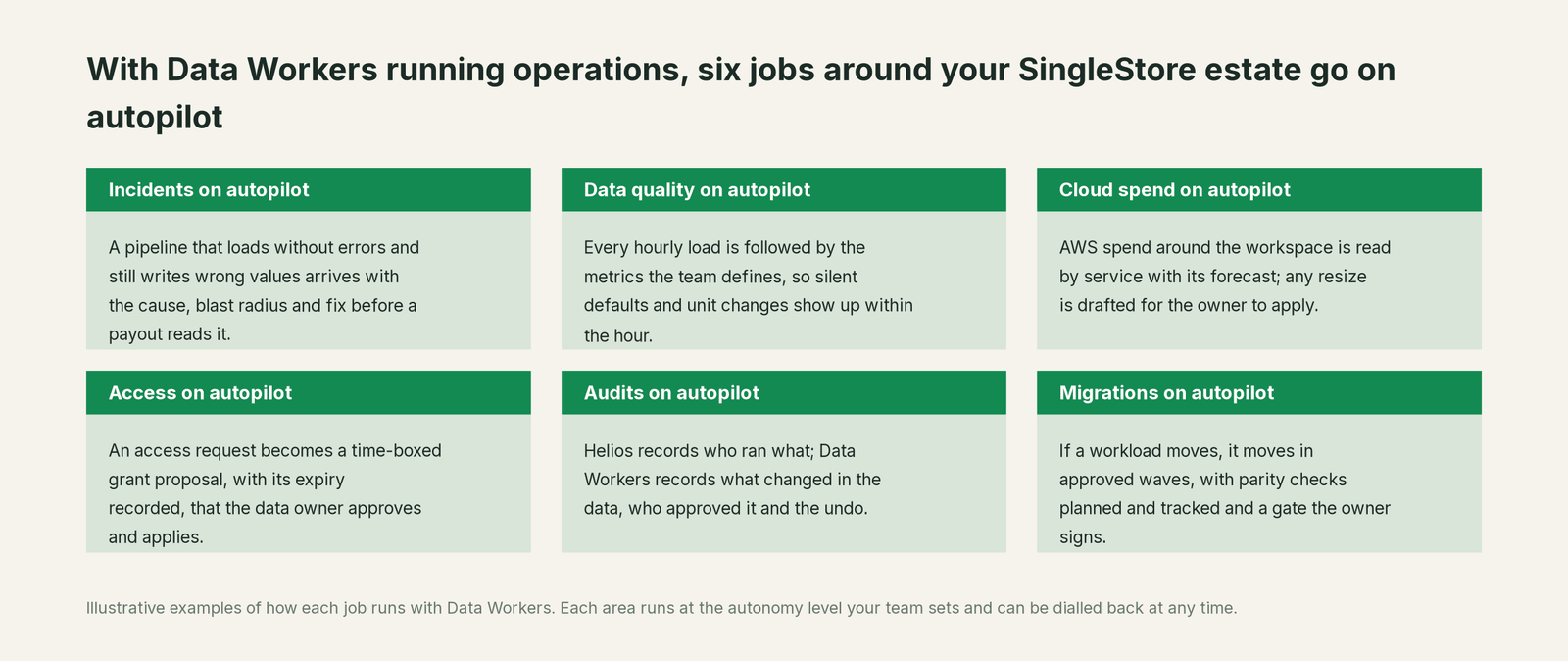
- •The database stops being the first suspect. A wrong number from a clean batch arrives with its upstream cause, so nobody asks the platform team to prove the workspace innocent.
- •Money gets a guard. When a payout or pricing job is about to read a table that just went wrong, the hold is recommended first.
- •Producers, data and business owners share one record. The same receipt in Spellbook Data Catalog (in preview), linked from the Opsgenie alert.
- •Silent defaults become visible. Each approved fix adds a fact to the context graph, so the next change of that shape is recognised faster.
Data Workers is the agentic data platform for the whole lifecycle, so one record covers the release, the pipeline, the view and the payout (what is an agentic data platform, Data Workers vs data observability).
Keep SingleStore, or consolidate?
Keep SingleStore if you love it; Data Workers works with it from day one. Many teams consolidate once Data Workers runs that slice too.
Teams that keep SingleStore consolidate the tooling around it: hand-written "did the load make sense" checks, a separate observability tool on event tables, and "replay the topic" runbooks. See you're on ClickHouse and you're on Vertica for sibling engines.
Building on the SingleStore MCP Server and a coding agent instead? Running SQL is the easy part; context, approvals, undo and receipts are the work. See build it ourselves with Claude Code and MCP servers.
The case for your CFO
The outcome. A wrong value in a live table is caught within the hour and corrected before anyone pays out on it: here, no night of underpaid airport drivers.
The risk story. At L0 and L1 agents only read; on SingleStore your assistant uses a SELECT-only user your platform team can revoke. At L2 agents propose and a named person approves; an unanswered request expires and escalates, never auto-grants. At L3 they act on reversible changes inside the domains you open; L4 is a later choice per domain. No agent can promote its own work, and an org-wide stop halts all autonomous dispatch. Every change carries a receipt with its approver, blast radius and undo.
Why now. Live apps act on fresh data within seconds, so a silent bad load reaches drivers, customers and payouts faster than any morning report.
The first win. L1 on the pipelines that feed money: earnings, payouts, pricing.
What stays the same. SingleStore, its pipelines and Analyst Domains, Dagster, Snowflake, dbt, Looker and the on-call rota. Zero migration to start; a move you choose runs in approved waves, with a design target of 4 to 8 weeks per migration instead of 6 to 12 months. See the ROI of agentic data operations.
The sentence for upstairs: "SingleStore keeps our apps fast; Data Workers makes sure the data behind them is right and gets problems fixed with our approval before we pay out on a wrong number."
Getting started
Start with a pilot. Pick the SingleStore tables behind pay, pricing or revenue, give Data Workers read access to the Dagster jobs and dbt project around them, record two or three metrics that define "right" after each load, and run at L1 for a few weeks. Then turn on L2 for one domain, and L3 for a narrow class once the receipts show the agents were right. The pilot path is on the pricing page, and the pilot is credited in full against the first year.
FAQ
How does Data Workers connect to SingleStore? Over its MCP server or API today, and through the systems around it: Dagster, Snowflake, dbt, Looker, Opsgenie and Slack connect natively, and your jobs record load metrics with monitor_metrics. Your assistant runs the SingleStore MCP Server with a SELECT-only user.
SingleStore has the Observability Agent and Analyst. Why add Data Workers? Both work inside SingleStore: one diagnoses workspace health, the other answers questions on live data. Data Workers covers the operations job across the estate: whether a load is right, what it reached, the fix, the approval and the receipt. Teams use all three.
Will Data Workers write to our SingleStore workspace? No. Pipeline changes arrive as a diff for the owner to merge and apply, replays as a plan the owner runs, and reruns queue through your orchestrator after approval. Your platform team keeps every role and credential.
Our pipelines show no errors. How would Data Workers know the data is wrong? Your team records the metrics that define "right" after each load with monitor_metrics, such as the share of zeros in a field or average value per product. A value outside its baseline opens an incident even when every batch loaded. Failing dbt tests count too.
Should we drop DEFAULT clauses or use SKIP ERRORS instead? It depends on the feed. A default keeps a live pipeline flowing when a field is legitimately absent; SKIP ... ERRORS discards offending rows, and SingleStore's docs set out the consequences of using IGNORE. Each choice trades one silent failure for another, which is why the metric after the load matters. An Iceberg pipeline gets the same metrics after each run. Data Workers proposes the guard that fits each pipeline and the owner decides.
Sources
- •SingleStore homepage (HTAP, Aura Intelligence, Context Engine), https://www.singlestore.com/ (checked Oct 3, 2026)
- •SingleStore Helios release notes (Analyst in June 2026 features with no "Preview Feature" label; Kinesis pipelines and mTLS in August 2026; Usage and Forecasting; Custom RBAC Roles), https://docs.singlestore.com/cloud/release-notes/ (checked Oct 3, 2026)
- •SingleStore blog, "Introducing Singlestore Analyst" (Sep 9, 2026), https://www.singlestore.com/blog/introducing-singlestore-analyst-question-to-insight-while-it-still-matters/ (checked Oct 3, 2026)
- •SingleStore documentation, Analyst and Domains (read-only database attachment recommended), https://docs.singlestore.com/cloud/ai/analyst/ (checked Oct 3, 2026)
- •SingleStore blog, "Introducing Observability Agent" (Sep 28, 2026; diagnoses only, runs under Helios RBAC), https://www.singlestore.com/blog/introducing-observability-agent-gets-you-from-symptom-to-cause-in-minutes/ (checked Oct 3, 2026)
- •SingleStore blog, "Introducing the Query Tuning Agent" (Sep 30, 2026, preview), https://www.singlestore.com/blog/introducing-the-query-tuning-agent/ (checked Oct 3, 2026)
- •SingleStore blog, "SingleStore Helios Achieves PCI DSS v4.0.1 Compliance" (Aug 3, 2026), https://www.singlestore.com/blog/cloud-database-pci-dss-compliance/ (checked Oct 3, 2026)
- •SingleStore documentation, SingleStore MCP Server, https://docs.singlestore.com/cloud/ai/singlestore-mcp-server/ (checked Oct 3, 2026)
- •SingleStore MCP Server repository (browser OAuth, run_sql, workspace tools), https://github.com/singlestore-labs/mcp-server-singlestore (checked Oct 3, 2026)
- •SingleStore documentation, Iceberg ingest ("This is a Preview feature"), https://docs.singlestore.com/cloud/load-data/data-sources/iceberg-ingest/ (checked Oct 3, 2026)
- •SingleStore documentation, loading JSON with subvalue mappings and DEFAULT, https://docs.singlestore.com/cloud/load-data/load-data-from-files/load-data-from-json-files/load-json-files-with-load-data/ (checked Oct 3, 2026)
- •SingleStore documentation, CREATE PIPELINE (OR REPLACE preserves offsets; REPLACE and SKIP options), https://docs.singlestore.com/cloud/reference/sql-reference/pipelines-commands/create-pipeline/ (checked Oct 3, 2026)
- •SingleStore documentation, ALTER PIPELINE SET OFFSETS, https://docs.singlestore.com/cloud/reference/sql-reference/pipelines-commands/alter-pipeline/ (checked Oct 3, 2026)
- •SingleStore documentation, LOAD DATA (SKIP ... ERRORS and IGNORE behaviour), https://docs.singlestore.com/cloud/reference/sql-reference/data-manipulation-language-dml/load-data/ (checked Oct 3, 2026)
- •SingleStore documentation, PIPELINES_ERRORS, https://docs.singlestore.com/cloud/reference/information-schema-reference/data-ingest/pipelines-errors/ (checked Oct 3, 2026)
- •Data Workers open-source repository (tool registrations), https://github.com/DataWorkersProject/dataworkers-claw-community (checked Oct 3, 2026)
- •Data Workers client setup guide, https://dataworkers.io/opensource-docs/client-setup/ (checked Oct 3, 2026)