You're on Paradime: Your Team Writes, Ships and Schedules dbt There. Data Workers Runs Operations Across the Estate When Production Breaks
Paradime is where your team writes, ships and schedules dbt with DinoAI and Bolt. Data Workers catches the green Bolt run that built wrong numbers, traces the cause across systems and fixes it behind approvals.
Your analytics engineers live in the Paradime Code IDE, with column-level lineage beside the dbt project and DinoAI writing models, tests and docs. Since September 30 the old lock icon is an approval-mode picker: Manual asks before editing files, running terminal commands or using integrations, Auto lets a reviewer model approve safe actions, and Full auto runs everything. Bolt runs the schedules, with Turbo CI on pull requests and Paradime State building only what changed. When a run fails, Bolt self-healing hands it to a DinoAI agent that diagnoses the failure and opens a pull request for review. Radar sets Snowflake budgets and alerts, and the Paradime MCP server lets Claude, Cursor or ChatGPT reach the workspace with your own role. Paradime calls itself "Cursor for Data", and for dbt it earns the name.
The incidents that cost the most on Paradime are the ones where nothing failed. Bolt shows green, every test passed, self-healing had no failure to heal, and a number the business uses is wrong because something changed outside the project. Data Workers watches what the models produce, traces a bad number to its cause in whatever system holds it, proposes the fix to the person who owns it and, once your engineer reruns the models in Paradime, proves the result.
Key takeaways
- •Paradime keeps its job. The Code IDE, DinoAI, Bolt, Turbo CI and Radar stay put. Data Workers works on what the runs produce and the systems around them.
- •Green runs get checked too. Volume, distribution and freshness checks on the models Bolt builds turn a passing run with wrong numbers into an incident the same night.
- •Connected over Paradime's API today. Data Workers reads the dbt artifacts each Bolt run produces with its native dbt reading; after approval, your engineer triggers the rerun in Paradime and Data Workers verifies the numbers.
- •Fixes land where each owner works. Model changes arrive as a diff for the owner to merge in Paradime; changes in other systems go to their owners; every step leaves a receipt.
- •Autonomy is set per domain. Start at L1 observe, move to L2 propose, and let a narrow class of steps reach L3 act reversibly once the record supports it.
Paradime is where your dbt gets written, shipped and scheduled. Data Workers runs operations across the estate when production breaks.
Paradime does its job end to end inside the project. The operations work starts elsewhere: noticing a number is wrong while Bolt is green, finding the change in another team's system that caused it, sizing the damage, agreeing a fix with each owner and proving the number. Here is one night with both in place. This is an illustrative example.
| Time | System | What happens |
|---|---|---|
| Tue 16:20 | Databricks (Unity Catalog) | As part of a PII rollout, the governance team applies a column mask to main.raw_hubspot.contacts.email. Members of pii_readers see the address; everyone else sees a SHA-256 hash. Paradime's production service principal is not in the group |
| 22:00 | HubSpot + Airbyte | Airbyte syncs the day's HubSpot contacts into Databricks: 1,846 new leads, a normal day |
| Wed 02:00 | Paradime Bolt | The nightly_marketing schedule runs dbt build. The incremental model fct_lead_attribution joins HubSpot contacts to Snowplow web sessions on lower(email). The HubSpot side is now a hash and the Snowplow side plain text, so every new lead falls to direct / unattributed |
| 02:14 | Paradime Bolt | Every test passes: lead_id is unique and not null, and direct is an accepted channel. The run succeeds, so self-healing, which fires on failures, has nothing to do |
| 02:20 | Data Workers | The nightly check on fct_lead_attribution shows paid-campaign attribution at 2% for Tuesday, against a 28-day band of 57% to 65%. Lead volume is normal |
| 02:24 | Data Workers | Data Workers narrows the cause: the run succeeded, the model's SQL is unchanged, and the drop is confined to new leads joining on email, so the break sits upstream in contacts.email. Blast radius through the dbt manifest and the team's context-graph note: fct_lead_attribution, mart_campaign_roi and the Lightdash dashboard behind the paid_media_weekly exposure that the 10:00 budget meeting uses |
| 02:26 | Slack | Data Workers sends the incident to the marketing analytics model owner and asks the governance owner what changed on contacts |
| 07:50 | Slack | The governance owner replies: the mask went on at 16:20, and it stays |
| 08:05 | Spellbook | The owner reviews the proposal: a diff to stg_snowplow__sessions that hashes the normalized email the same way the mask does, and a join on the hashed key, so attribution works without anyone reading raw addresses. She approves |
| 08:30 | Paradime Code IDE + Bolt | The analytics engineer applies the diff with DinoAI in Manual mode; Turbo CI and the DinoAI GitHub Action review pass, and she merges. From her own MCP client she triggers the rerun with Paradime's trigger_bolt_schedule_run_with_overrides (dbt build --select fct_lead_attribution+ --full-refresh). Bolt labels it "MCP: Trigger Bolt run with overrides" and finishes at 09:02 |
| 09:06 | Data Workers + HubSpot | Data Workers verifies: paid attribution for Tuesday is 60.4%, inside the band, and lead counts per campaign match HubSpot's records, read over its API. It writes the receipt and posts the resolution in Slack |
| 10:00 | Lightdash | The budget meeting reallocates paid media spend on verified attribution |
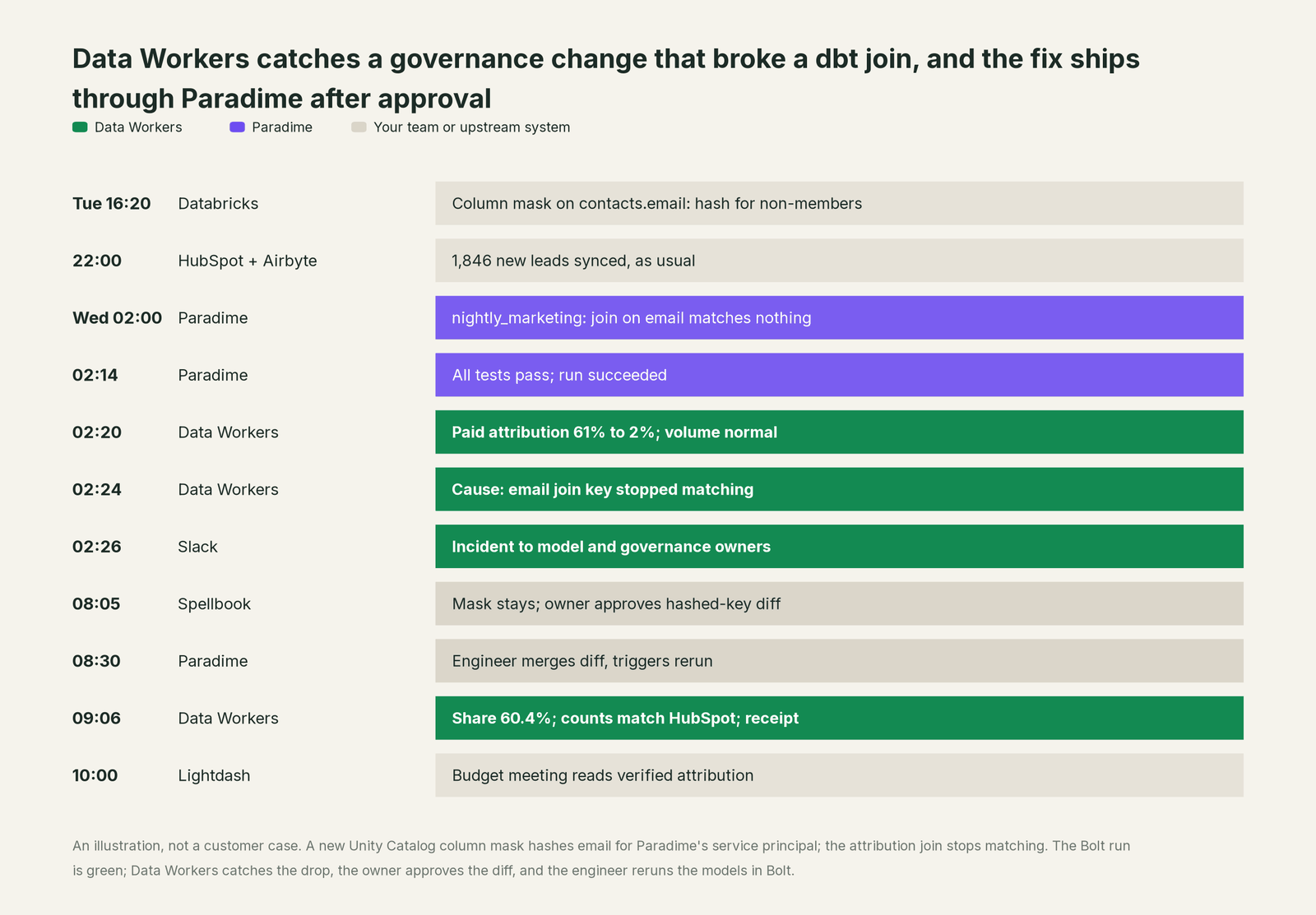
Every part of Paradime did its job, and so did the governance team: masking email was the right call. The break lived in the gap between two correct changes owned by two teams, and surfaced only as a distribution shift in one column. Data Workers watches for that gap across systems and runs the incident until the number is right.
| Job | What Paradime does | What Data Workers does |
|---|---|---|
| Writing | Code IDE with DinoAI in Manual, Auto or Full auto approval mode, column lineage in the editor | Reads the dbt manifest as part of one context graph that also covers ingestion, governance and BI |
| Shipping | Turbo CI, Lineage Diff and the DinoAI GitHub Action review each pull request | Proposes model fixes as a diff for the owner to merge in Paradime, with the evidence behind them |
| Running | Bolt schedules, Paradime State and self-healing on failed runs | Checks the data each run builds, so a green run with wrong numbers still raises an incident |
| Diagnosing | DinoAI investigates failures inside the workspace | Diagnoses across systems: the Databricks source, the HubSpot and Snowplow inputs, the Lightdash consumer |
| Rerunning | Runs the schedule; overrides are gated to roles that can create schedules | Hands the approved rerun to your engineer in Paradime, then verifies the numbers it builds |
| The record | Bolt run history, audit logs and the Git log | A receipt: cause, diff, approver, run, verification and undo, in Spellbook and the audit trail |
Why doesn't Paradime just do this itself?
Because Paradime is built to make dbt development and runs fast and safe, and its unit is the dbt project and the Bolt schedule. DinoAI is very good inside that scope: it reads your models, queries the warehouse, writes the change and, with self-healing, opens a pull request when a run fails. The approval modes answer the right question, how much an agent may do in your repo before a person looks; even in Auto, edits to dbt_project.yml, profiles.yml and CI config go to review.
The incident above sits outside that scope by design. The cause was a governance change in Databricks, the inputs came from HubSpot and Snowplow, and the consumer was a Lightdash dashboard. Nothing in the project was broken, so a project-scoped agent had nothing to heal. Owning that incident means watching data that passed its tests, holding context about systems Paradime does not own, routing each fix to its owner, keeping an undo and answering for changes across tools. That is a different product with a different liability, and it is the product Data Workers is. For how that holds up in production, read is it safe to let AI agents change production data.
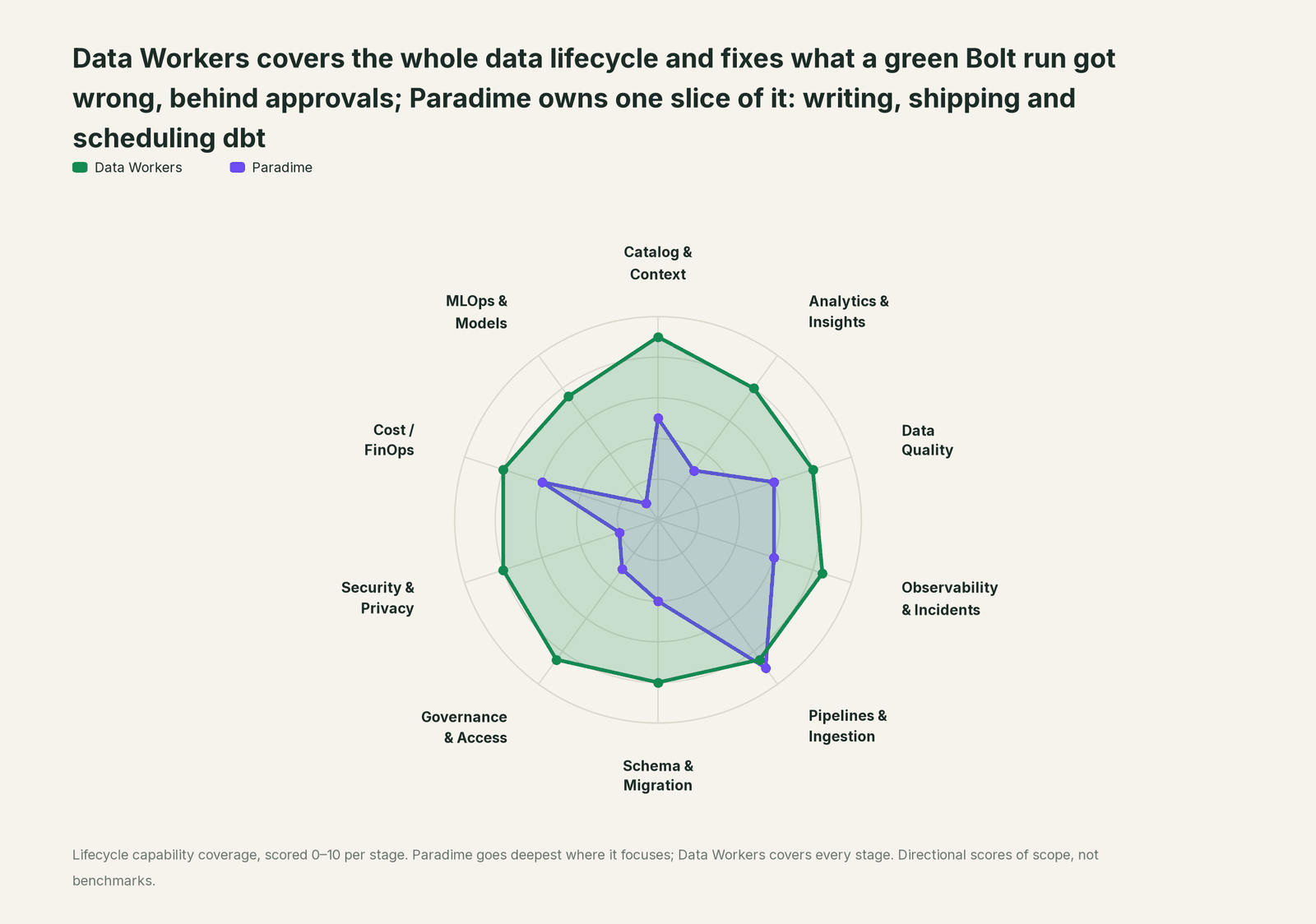
Every tool owns a slice. Data Workers covers the whole lifecycle
Paradime owns writing, shipping and scheduling dbt. Around it sit ingestion, a governed warehouse, an event pipeline, BI and a pager. Each point tool adds another console, contract and handoff. Data Workers covers the whole lifecycle with one context, one approval flow and one audit trail, and builds on the Paradime workspace already there.
| Stage | Data Workers | Paradime | Why we scored it this way |
|---|---|---|---|
| Catalog & Context | 9 | 5 | The rebuilt Catalog holds every dbt and integration asset with column-level lineage. Data Workers keeps one governed context graph across ingestion, the warehouse, governance and BI. |
| Analytics & Insights | 8 | 3 | DinoAI answers questions by querying the warehouse, and BI tools are imported into the Catalog. Data Workers answers data questions from governed definitions with lineage behind every number. |
| Data Quality | 8 | 6 | dbt tests run in every Bolt run and DinoAI writes more of them. Data Workers adds volume and distribution checks that span sources, models and consumers. |
| Observability & Incidents | 8.5 | 6 | Bolt alerts, Radar data alerts and self-healing that opens a PR when a run fails. Data Workers diagnoses the incident across systems, including runs that passed with wrong data. |
| Pipelines & Ingestion | 8.5 | 9 | Paradime's home stage: the Code IDE, Bolt schedules, Turbo CI, Paradime State and dbt Cloud import. Data Workers verifies what each Bolt run builds and hands approved reruns to your engineers. |
| Schema & Migration | 8 | 4 | Column lineage in the editor and Lineage Diff show a change's impact inside the project. Data Workers catches changes at the source first and plans migrations in waves. |
| Governance & Access | 8.5 | 3 | Workspace roles, the MCP override permission and audit logs govern Paradime itself. Data Workers routes every data change to a named approver. |
| Security & Privacy | 8 | 2 | Paradime protects your dbt code and warehouse credentials; it does not classify warehouse data. Data Workers' pull request review flags new columns whose names or annotations look sensitive, and leaves a receipt on every data change. |
| Cost / FinOps | 8 | 6 | Radar adds Snowflake budgets, usage groups, custom alerts and per-query cost. Data Workers attributes Snowflake credits to the dbt model behind them and drafts the fix. |
| MLOps & Models | 7.5 | 1 | Not Paradime's job: it builds feature tables but does not watch models. Data Workers keeps the data under your models fresh and correct. |
How Paradime and Data Workers work together
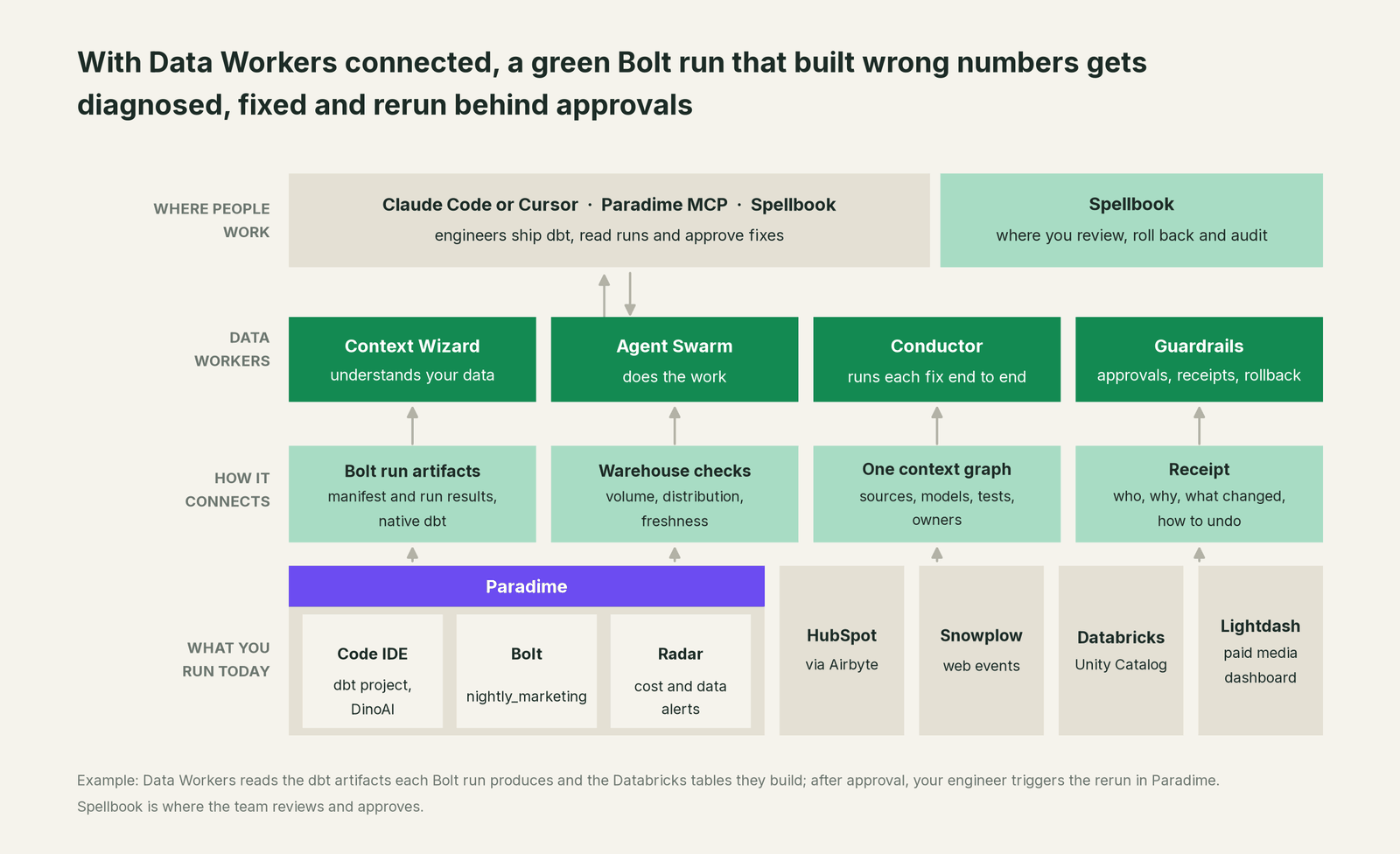
Paradime connects over its API or MCP server today. The manifest.json and run_results.json each Bolt run produces, which Paradime's API and Python SDK expose, feed Data Workers' native dbt reading: models, sources and tests join the same context graph as the Unity Catalog grants and the BI assets downstream. Reruns stay in Paradime: after the owner approves, your engineer triggers the run from Bolt or her MCP client, under Paradime's own permissions. The dbt side of the wiring is in Data Workers + dbt.
Engineers can run Paradime's MCP server and the Data Workers agents side by side in one client: Paradime's answers "what is in the project and what ran", Data Workers' answers "what did that run do to the data, and what's the fix". Paradime's server signs in with browser OAuth and runs every call with your role. The Data Workers side follows the documented client setup: clone the open-source repo and add each agent's start-agent.sh entry to your client.
# Example: Paradime's MCP server plus Data Workers agents in Claude Code
# Paradime MCP server (URL from Settings > MCP Access); run /mcp, pick paradime, Authenticate
claude mcp add paradime --transport http https://mcp-<region>.paradime.io/company/<company-token>/mcp

# Data Workers agents, from a clone of the open-source repo
claude mcp add --scope user dw-incidents -- "$(pwd)/start-agent.sh" dw-incidents
claude mcp add --scope user dw-quality -- "$(pwd)/start-agent.sh" dw-quality
claude mcp add --scope user dw-catalog -- "$(pwd)/start-agent.sh" dw-context-catalog
claude mcp add --scope user dw-connectors -- "$(pwd)/start-agent.sh" dw-connectors
List the tools with your client's own command (/mcp in Claude Code). In this incident: monitor_metrics catches the attribution drop; diagnose_incident narrows the cause; blast_radius_analysis (dw-context-catalog) maps what it reached; list_dbt_models and get_dbt_model_lineage (dw-connectors) read the project; after the engineer's rerun, remediate (dw-incidents) re-checks the quality assertions and escalates any failure to a person. The rerun itself is Paradime's tool, called by the engineer.
In production the agents run in your infrastructure with the warehouse credentials and model key. Your data stays in your systems; the hosted Conductor sees workflow metadata only. More in where does our data go.
One incident, L0 to L4, set per domain:

- •L0 manual. The paid media lead spots the collapse at the 10:00 meeting; an engineer finds the mask by mid-afternoon.
- •L1 observe. Data Workers flags the drop at 02:20 with the likely cause and blast radius. Nothing changes; the morning starts from the answer.
- •L2 propose. Data Workers proposes the diff and the rerun. Nothing reaches production until the named owner approves; an unanswered request expires and escalates, never auto-grants.
- •L3 act reversibly. For classes with a clean record, Data Workers takes the reversible steps it runs itself: re-checking the output after every Bolt run and closing the incident when the numbers hold. The rerun stays with your engineer in Paradime.
- •L4 autonomous. For a scoped domain with a long clean record, Data Workers handles its side end to end, from detection to verified close, and pages a person only when a check fails. Model changes and Bolt reruns still go through your team in Paradime.
Who sets those levels: who owns the agents, how approvals work for AI data agents and autonomy levels L0 to L4 explained.
What changes for your team
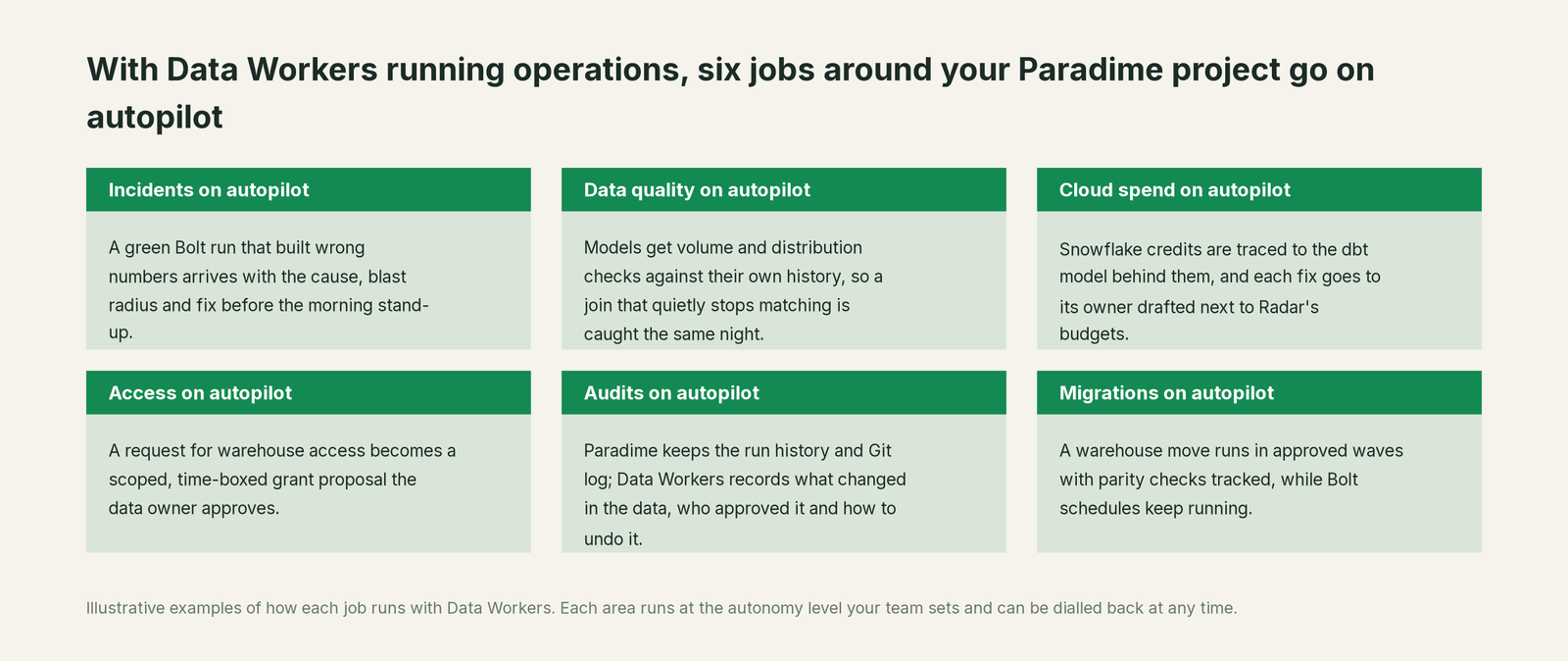
Paradime keeps dbt fast to write, ship and run. Data Workers takes the operations work around it.
- •On-call starts from a cause. The cause, blast radius and proposed diff wait in one place.
- •Changes in other teams' systems stop being silent. A governance mask, a CRM property change or a new event schema shows up as a data effect, tied to the models it touched.
- •Passing tests get a second look. A distribution that moved is a signal, even when tests pass.
- •Governance and analytics share one record. Both teams see the same incident and receipt in Spellbook Data Catalog (in preview), so the fix respects the policy instead of working around it.
For more, see AI agents for root cause analysis on dbt test failures and reducing data on-call burden with AI agents.
Keep Paradime, or consolidate?
Keep Paradime if you love it; Data Workers works with it from day one. Many teams consolidate once Data Workers runs that slice too.
For most Paradime teams the answer is keep it: the Code IDE and Bolt are where your analytics engineers are fastest. What teams consolidate is the tooling around the runs: a separate observability tool watching the warehouse, scripts that compare model output to source systems, and runbooks that say "rerun and check the dashboard". Data Workers covers those with one context and one approval flow. If your estate also runs dbt elsewhere, see you're on dbt; for orchestration around it, you're on Airflow and you're on Dagster. Native connectors are listed on the integrations page.
Weighing a build on Paradime's MCP server and a coding agent? Read build it ourselves with Claude Code and MCP servers: connecting servers is the easy part.
The case for your CFO
The outcome. The numbers your Paradime project builds are right more often. When a change anywhere in the estate makes them wrong, it is caught the same night and corrected before the business uses them, with a record of how it was checked.
The risk story. At L0 and L1, agents only read. At L2 they propose and a named person approves; an unanswered request expires and escalates, never auto-grants. At L3 they act on reversible changes inside the domains you open; L4 is a later choice per domain. Model changes go to their owner as a diff; reruns stay with your engineers. No agent can promote its own work, and an org-wide stop halts all autonomous dispatch. Every change carries a receipt: what changed, who approved it, the blast radius and how to undo it.
Why now. Agents write more dbt, faster, while governance teams roll out masks and policies. More change from more directions means more green runs with wrong numbers. Paradime answers whether the project built; someone has to own whether the output is right.
The first win. L1 on the models behind marketing and finance: every Bolt run gets its output checked, and a distribution shift becomes a diagnosed incident by morning. For the numbers, see the ROI of agentic data operations.
What stays the same. Paradime, your dbt project, Bolt schedules and DinoAI agents, your warehouse and its governance, and your on-call rota.
The sentence for upstairs: "Paradime is where we build and run our dbt; Data Workers checks what it produces across every system and gets it fixed with our approval when something upstream breaks it, so the budget meeting sees the right number."
Getting started
Start with a pilot. Pick the Bolt schedules that feed the numbers leaders read, give Data Workers read access to their dbt artifacts and warehouse tables, and run at L1 for a few weeks. Then turn on L2 for one domain, and move a narrow class of steps to L3 once the receipts show the agents were right. The pilot path is on the pricing page, and the pilot is credited in full against the first year.
FAQ
How does Data Workers connect to Paradime? Paradime connects over its API or MCP server today. The dbt artifacts each Bolt run produces feed Data Workers' native dbt reading, so models, sources and tests join one context graph with your warehouse and BI.
Bolt already has self-healing. What does Data Workers add? Self-healing covers failed runs: a DinoAI agent diagnoses the failure and opens a pull request. Data Workers covers runs that succeeded with wrong data, and causes outside the project, such as a governance change, a source system change or a late sync, then verifies the number against the source afterwards.
Will Data Workers change our dbt project, schedules or DinoAI settings? No. Model changes arrive as a diff for the owner to merge in Paradime. Schedules, agents, approval modes and Radar budgets stay with your team, and your engineers trigger reruns under Paradime's own permissions.
Does Data Workers open pull requests in our repo? Fixes arrive as a diff for the owner to merge, often applied in the Code IDE as in the incident above. The one path where Data Workers opens a pull request itself is its dbt write-back to GitHub, for dbt changes such as docs, which your team turns on per deployment.
Does it replace Radar for Snowflake cost? Keep Radar for budgets and alerts. Data Workers attributes Snowflake credits to the dbt model behind them and drafts the fix for the owner, inside the same approval flow as every other change.
Sources
- •Paradime, homepage: "Cursor for Data"; DinoAI "builds, runs, and fixes your data pipelines"; Bolt with built-in CI/CD and dbt Cloud import, https://www.paradime.io/ (checked Oct 3, 2026)
- •Paradime changelog overview (v6.17.0, Sept 30, 2026), https://docs.paradime.io/changelog/overview (checked Oct 3, 2026)
- •Paradime changelog, "Choose how much DinoAI asks before it acts" (approval modes, Sept 30, 2026), https://docs.paradime.io/changelog/2026-09-30/approval-modes (checked Oct 3, 2026)
- •Paradime changelog, "Use your MCP servers in the Code IDE copilot" and "Paradime State now covers snapshots and full refreshes" (Sept 30, 2026), https://docs.paradime.io/changelog/2026-09-30/mcp-in-the-copilot, https://docs.paradime.io/changelog/2026-09-30/paradime-state-update (checked Oct 3, 2026)
- •Paradime changelog, "Paradime State: build only what changed", "Connect your own MCP servers to DinoAI agents" and "Review pull requests with the DinoAI GitHub Action" (Sept 28, 2026), https://docs.paradime.io/changelog/2026-09-28/paradime-state, https://docs.paradime.io/changelog/2026-09-28/custom-mcp-servers, https://docs.paradime.io/changelog/2026-09-28/dinoai-github-action (checked Oct 3, 2026)
- •Paradime changelog, "Self-healing needs an agent, not a Slack channel" (Sept 22, 2026), https://docs.paradime.io/changelog/2026-09-22/self-healing-without-slack, and Self-Healing settings for a Bolt schedule, https://docs.paradime.io/products/bolt/creating-schedules/self-healing (checked Oct 3, 2026)
- •Paradime changelog, "Radar cost controls: budgets, usage groups, custom alerts" (Sept 9, 2026), https://docs.paradime.io/changelog/2026-09-09/radar-cost-controls (checked Oct 3, 2026)
- •Paradime changelog, "Overriding a Bolt run over MCP now needs its own permission" (Sept 9, 2026), https://docs.paradime.io/changelog/2026-09-09/mcp-bolt-trigger-rights (checked Oct 3, 2026)
- •Paradime docs, Paradime MCP server (OAuth, Settings > MCP Access, role-scoped calls), https://docs.paradime.io/products/dino-ai/mcp-server/index, and Claude Code setup, https://docs.paradime.io/products/dino-ai/mcp-server/claude-code (checked Oct 3, 2026)
- •Paradime docs, GraphQL API (Bolt API) and Python SDK Bolt module (fetch dbt artifacts from Bolt runs), https://docs.paradime.io/developers/graphql-api/index, https://docs.paradime.io/developers/python-sdk/modules/bolt (checked Oct 3, 2026)
- •Paradime docs, DinoAI tools reference (warehouses including Databricks), https://docs.paradime.io/products/dino-ai/programmable-agents/tools-reference, and Lightdash integration, https://docs.paradime.io/integrations/lightdash (checked Oct 3, 2026)
- •Data Workers open-source repository (tool registrations in dw-incidents, dw-quality, dw-context-catalog, dw-connectors), https://github.com/DataWorkersProject/dataworkers-claw-community (checked Oct 3, 2026)
- •Data Workers client setup guide, https://dataworkers.io/opensource-docs/client-setup/ (checked Oct 3, 2026)