You're on Matia: One Platform Moves and Watches Your Data. Data Workers Owns the Fix Across Everything Around It
Matia unifies ETL, reverse ETL, observability and catalog, and Matia MCP is GA. Data Workers works the incident across dbt, orchestration, apps and tickets, behind approvals.
Your team chose Matia to stop running four tools. ETL integrations pull from 100+ sources into Snowflake, BigQuery, Databricks or Redshift on an interval or a cron, each with a schema change setting and a Schema changes tab. Reverse ETL integrations run a SQL model against the warehouse and write it to Salesforce, HubSpot, Braze or your own Postgres in Mirror, Upsert or Update only mode. Every table in an enabled schema gets a freshness and a row count monitor, custom monitors cover the columns that matter, and column-level lineage runs from source to dbt model to dashboard. Since September 15, 2026, Matia MCP (GA) lets Claude and other assistants ask why an integration failed, walk lineage, preview the impact of a change and, where your Matia roles allow, trigger an integration sync or toggle a monitor.
That is a lot of one data path in one place, and Matia does it well. Most estates also have parts no single vendor runs: the dbt project in GitHub, the orchestrator that builds it, the application database your reverse ETL writes to, the ticket queue and the people who approve changes. When an incident starts in Matia and ends in one of those, someone has to find the cause, hold what would spread it, get the fix approved and prove the result. Data Workers does that work.
Key takeaways
- •Matia keeps its job. Integrations, reverse ETL models, monitors, the catalog and Matia MCP stay with your team.
- •Detection is where Data Workers starts. Matia's monitors and lineage see a drop and what sits downstream; Data Workers names the cause, sizes the damage, proposes the hold and the fix, and verifies the result.
- •Fixes land where the cause lives. A dbt diff for the model owner to merge, a rerun queued through Prefect, Airflow or Dagster, a hold the owner applies by disabling the integration in Matia. Each step goes to a named person and leaves a receipt.
- •Connected over Matia's API or MCP server today. Data Workers reads the landed tables natively in the warehouse, with Matia MCP in the same client.
- •Autonomy is set per domain. Start at L1 observe, move to L2 propose, and open L3 act reversibly for narrow classes once the record earns it.
Matia is your one platform for moving and watching data. Data Workers owns the fix across everything around it.
Matia's job is to move data in, send modeled data out, and tell you when a table looks wrong and what depends on it. The job after the alert is different: work out why, wherever the cause sits; stop the damage reaching customers; get the change approved by its owner; rebuild in order; and leave a record anyone can audit. Here is one night at a fleet-management software company. This is an illustrative example.
| Time | System | What happens |
|---|---|---|
| Mon 17:30 | Recurly | Billing ops launches the Fleet Ops bundle and moves 640 accounts from the standalone route-opt add-on to fleet-ops-bundle, which includes route optimization, driver scorecards and fuel reports |
| 18:00 | Matia + Snowflake | The hourly Recurly integration lands the changed subscription add-ons in Snowflake. No table or column changed, so the Schema changes tab stays empty. The sync succeeds |
| 22:00 | Prefect + dbt | Prefect's nightly flow runs dbt build. dim_account_features inner-joins add-ons to the seed addon_feature_map, which has no row for fleet-ops-bundle, so the 640 accounts lose their route optimization row. Every dbt test passes |
| 22:12 | Data Workers + Snowflake | The row-count baseline Data Workers keeps on dim_account_features flags 3,480 rows against a 30-day norm of 4,120. Data Workers opens an incident |
| 22:15 | Matia | Matia's row count monitor on the same table goes to alerting and posts to the data team's Slack channel; its lineage shows the reverse ETL integration downstream |
| 22:19 | Data Workers | Diagnosis: every missing row belongs to an account whose route-opt add-on became fleet-ops-bundle in the 18:00 load, and the seed has no mapping for the new code. Blast radius: the Matia reverse ETL integration features_to_app, in Mirror mode on a 06:00 cron, which would delete route optimization for 640 customers in the app's PostgreSQL account_features table, and the Looker "Add-on attach" Explore |
| 22:21 | Jira SM + Slack | Data Workers opens a Jira Service Management ticket with the diagnosis and sends the first approval request to the on-call data engineer in Slack: hold features_to_app until the fix is verified |
| 22:34 | Spellbook | She reviews the evidence and approves the hold |
| 22:37 | Matia | In Claude, she asks Matia MCP to preview the impact of pausing the integration, then disables features_to_app in Matia |
| Tue 06:00 | Matia + PostgreSQL | The 06:00 reverse ETL run does not fire. Every customer keeps its features |
| 08:10 | Spellbook | The RevOps data owner reviews the remaining proposals: a dbt diff that adds the bundle's three features to addon_feature_map, turns the inner join into a left join and adds a test that every active add-on code is mapped; and a run plan (merge, rebuild, verify, resume). She approves both |
| 08:22 | GitHub | She merges the dbt diff |
| 08:26 | Data Workers + Prefect | Data Workers queues the approved dbt rebuild through Prefect |
| 08:44 | Data Workers + Snowflake | Data Workers verifies: route optimization is back for all 640 accounts, the bundle's two new features add 1,280 rows, and the owner reports the mapping test passing |
| 08:50 | Matia | The owner re-enables features_to_app and runs it. The Status tab shows 1,280 changed records, all successful, none rejected or invalid |
| 09:00 | Data Workers + PostgreSQL | Data Workers reads account_features in the app database: all 640 accounts carry route optimization, driver scorecards and fuel reports. The receipt is complete |
| 09:05 | Jira SM | The on-call engineer resolves the ticket, which links the receipt: cause, approvals, runs, checks passed and the undo |
| 10:00 | Looker | Customer success reviews bundle attach on verified numbers |
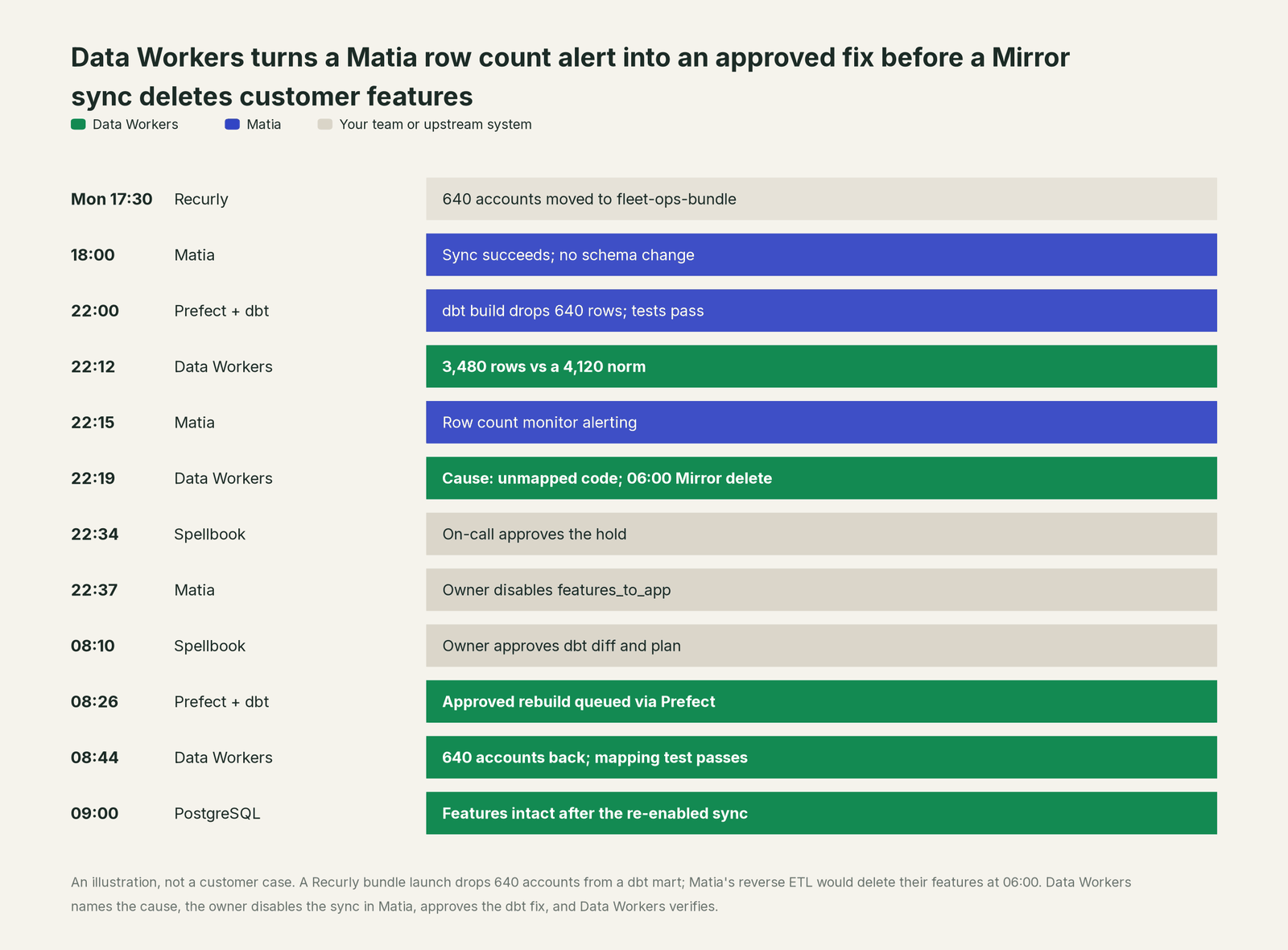
Matia did its job at every step: it landed every Recurly change faithfully, its row count monitor caught the drop, and its lineage showed the reverse ETL downstream. The fix sat elsewhere: in a dbt seed in GitHub, a Prefect rebuild, and the decision to hold a Mirror sync whose next run would have deleted features customers pay for.
| Job | What Matia does | What Data Workers does |
|---|---|---|
| The move | Runs ETL integrations from 100+ sources and reverse ETL to operational tools, with triggers, sync modes and schema change settings | Reads what the integrations land, natively in the warehouse; connects to Matia over its API or MCP server |
| The signal | Freshness, row count and custom monitors, schema change detection and alerts to Slack, Teams or PagerDuty | Checks the landed and modeled tables too, and turns a signal into an incident with an owner |
| The diagnosis | Lineage from source to dbt model to dashboard, monitor evidence and integration run details, in the UI or through Matia MCP | Joins the landed rows, the dbt project, the orchestrator and the consumers into one cause, with the blast radius across systems from different vendors |
| The fix | Runs whatever integrations, models and settings the team configures | Proposes the hold, the dbt diff and the run plan to named owners; queues approved reruns through your orchestrator |
| The activation | Sends model results out in Mirror, Upsert or Update only mode and reports successful, rejected and invalid records | Flags a model that would send or delete the wrong thing before the sync window, and proposes the hold |
| The proof | Run history, monitor changelog and audit logs inside Matia | Re-checks the tables and writes a receipt: what changed, who approved it, how it was checked, how to undo it |
Why doesn't Matia just do this itself?
Because Matia's design is one platform for one data path, and it draws its lines carefully. Matia MCP's tool reference lists three write tools: trigger an integration sync, enable or disable a monitor, and update tags, certificates, descriptions or an issue's status. Matia's docs are candid about the gating: the confirmation prompt is "a signal to your client, not something Matia enforces," and "Permissions do" the real work. That is the right scope for a tool whose writes stay inside its own workspace.
The fix in this incident was not inside Matia's workspace. It was a seed file in a dbt repository, a rebuild in Prefect, a hold decision with customer impact and a ticket in Jira. Changing those means knowing who owns each one, scoping the blast radius, routing approvals to named people, recording an undo and carrying liability in tools Matia does not run. And whether a new billing code should map to three features is a business rule in a seed file, outside any monitor.
That is what Data Workers is: a context graph of every table, model, job and consumer across vendors, with approvals and receipts built in. More in is it safe to let AI agents change production data.
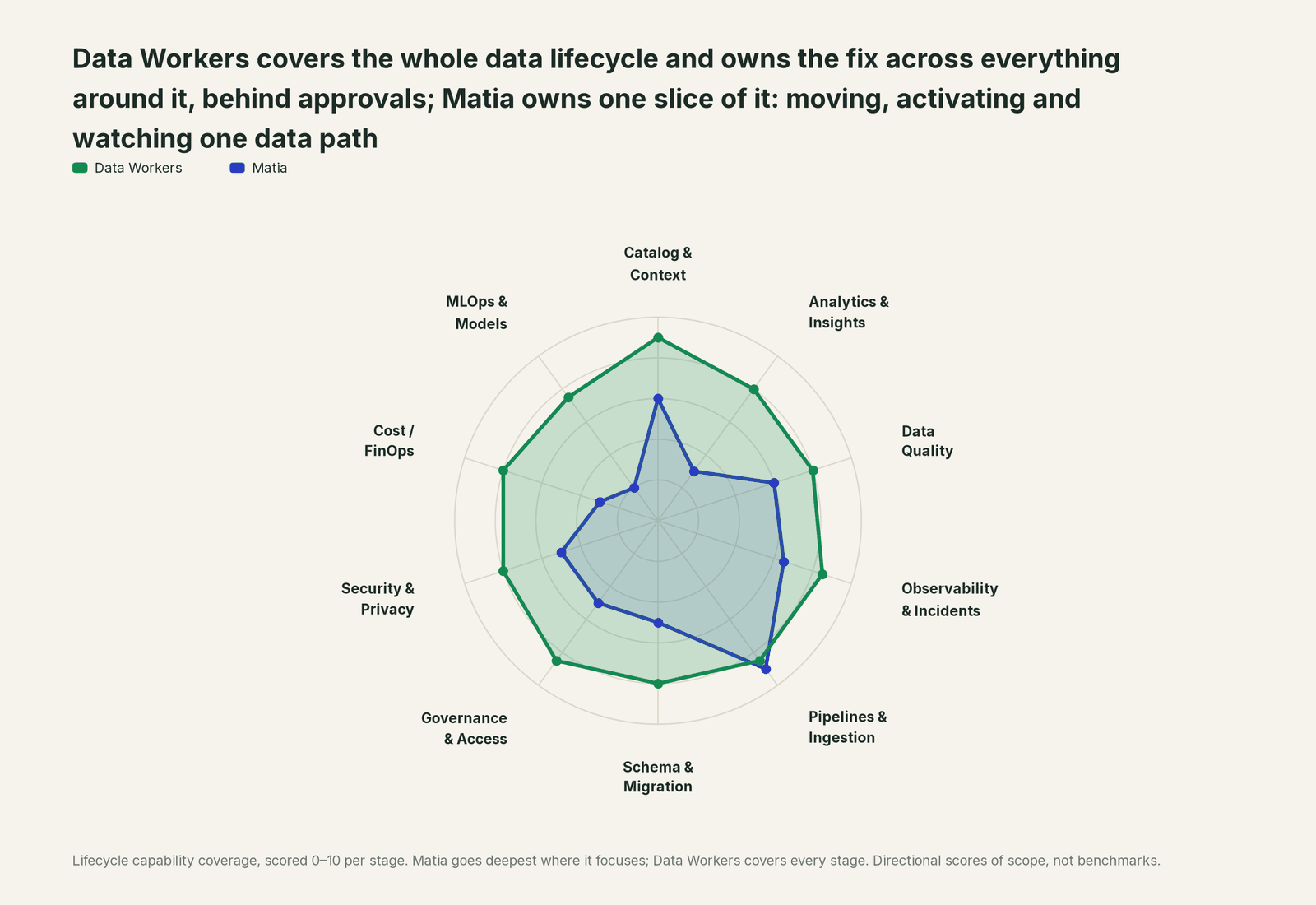
Every tool owns a slice. Data Workers covers the whole lifecycle
Each point tool adds another console, contract and handoff. Matia already folds four of those into one, which is real progress. Data Workers covers the whole lifecycle with one context, one approval flow and one audit trail.
| Stage | Data Workers | Matia | Why we scored it this way |
|---|---|---|---|
| Catalog & Context | 9 | 6 | A built-in catalog with search, tags, owners, certificates and column-level operational lineage across Matia, dbt and BI. Data Workers keeps one governed context graph across every platform, including the ones Matia does not run. |
| Analytics & Insights | 8 | 3 | Not Matia's job: it feeds BI and traces lineage into Power BI, Tableau, Hex and others. Data Workers answers data questions from governed definitions with lineage behind every number. |
| Data Quality | 8 | 6 | Auto freshness and row count monitors plus custom SQL, nullness, uniqueness and numeric monitors. Data Workers adds checks on landed and modeled tables and turns a failure into a diagnosed incident. |
| Observability & Incidents | 8.5 | 6.5 | Monitors, alert routing, lineage for root cause and impact, and Matia MCP diagnosis of failed runs. Data Workers works the incident after detection: cause, hold, approved fix, verification. |
| Pipelines & Ingestion | 8.5 | 9 | Matia's home stage: ETL from 100+ sources with CDC, the fastest sync tier on Enterprise, post-run dbt Cloud jobs and reverse ETL in four sync modes. Data Workers plans reruns and holds for the owner. |
| Schema & Migration | 8 | 5 | Detects added, removed and retyped columns per integration and previews the impact of a schema change. Data Workers traces the change through dbt, apps and BI and proposes migrations with rollback SQL. |
| Governance & Access | 8.5 | 5 | RBAC with viewer, editor and admin roles per area, SSO and audit logs; MCP tools follow your Matia roles. Data Workers routes every data change to a named approver across systems. |
| Security & Privacy | 8 | 5 | Column blocking and hashing, AWS PrivateLink, and MCP tools that never return connector credentials. Data Workers leaves a receipt on every data change. |
| Cost / FinOps | 8 | 3 | ETL priced on monthly active rows, with performance tracking; spend management is not Matia's job. Data Workers attributes Snowflake spend to the dbt model behind it through query tags. |
| MLOps & Models | 7.5 | 2 | Matia positions clean, contextualized data for AI. Data Workers keeps the data under models and agents healthy. |
How Matia and Data Workers work together
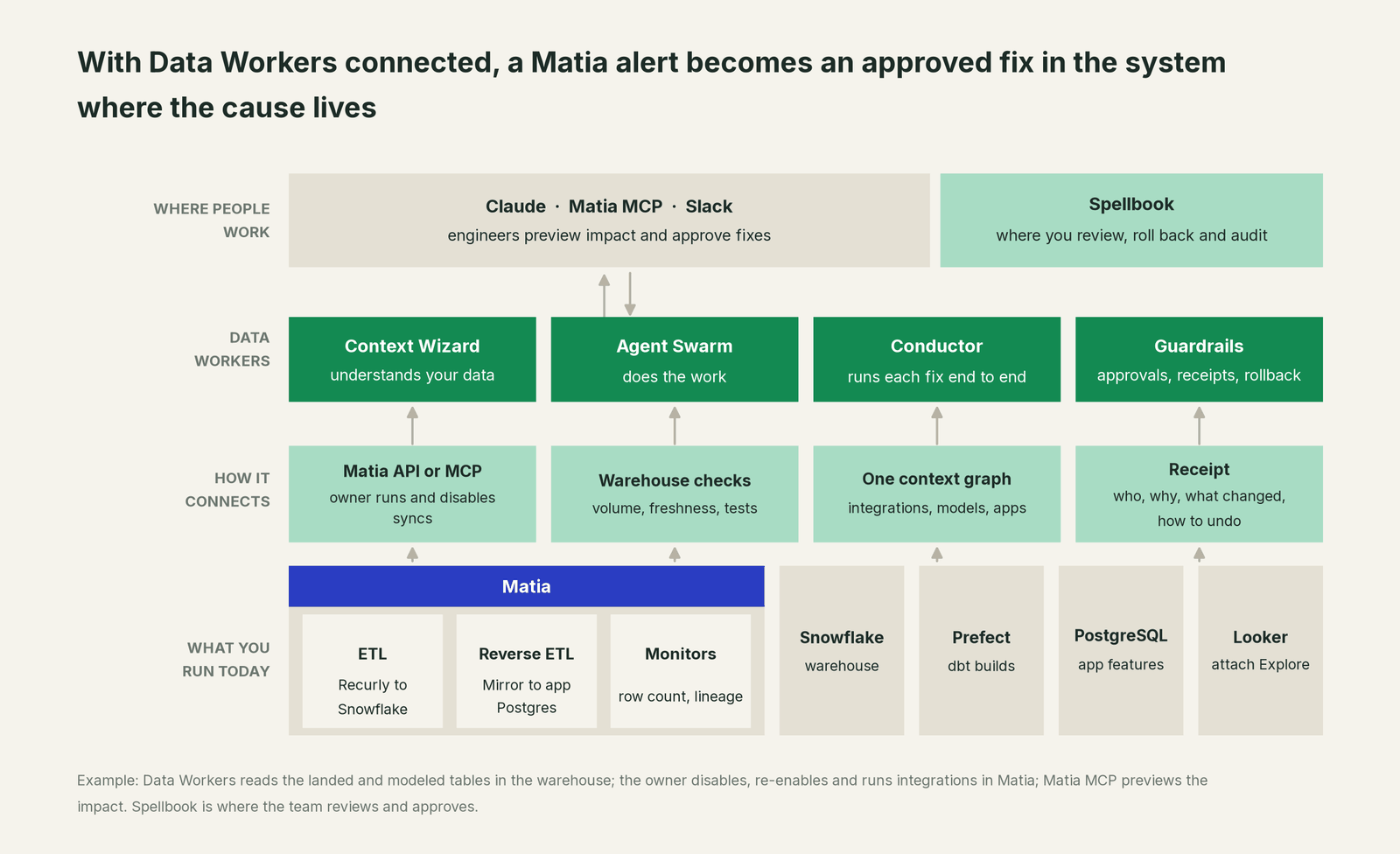
Data Workers connects to Matia over its API or MCP server today, and to Recurly over its API. What it needs sits in the warehouse Matia writes to, which Data Workers reads natively, along with the dbt project. Data Workers never runs, pauses or resumes a Matia integration: it proposes the hold for the owner to apply in Matia and the fix for the owner to merge where the cause lives. The rest of this incident runs on native connections: Snowflake, dbt, Prefect, GitHub, PostgreSQL, Looker (read), Jira Service Management and Slack, among 50+ connectors.
Matia MCP and the Data Workers agents run side by side in one client. Matia MCP is a registered Claude connector and a remote server for other clients, signs you in with OAuth and acts with your Matia roles. Give that account read-only Matia roles and the write tools never appear. The Data Workers side follows the documented client setup: clone the open-source repo and add each agent's start-agent.sh entry.
# Example: Matia MCP plus Data Workers agents in Claude Code
# Matia MCP (remote, OAuth sign-in on first tool call)
claude mcp add --transport http matia https://api.matia.io/mcp

# Data Workers agents, from a clone of the open-source repo
claude mcp add --scope user dw-incidents -- "$(pwd)/start-agent.sh" dw-incidents
claude mcp add --scope user dw-quality -- "$(pwd)/start-agent.sh" dw-quality
claude mcp add --scope user dw-catalog -- "$(pwd)/start-agent.sh" dw-context-catalog
claude mcp add --scope user dw-connectors -- "$(pwd)/start-agent.sh" dw-connectors
List the tools with your client's own command (/mcp in Claude Code). In this incident: monitor_metrics (dw-incidents) keeps the mart's row-count baseline and flags the drop; diagnose_incident names the cause; blast_radius_analysis and trace_cross_platform_lineage (dw-context-catalog) map what the missing rows reach; trigger_prefect_flow (dw-connectors) queues the approved rebuild as a flow run on the dbt deployment; remediate re-checks the quality assertions after the rebuild and escalates any failure to a person. run_quality_check (dw-quality) adds nulls, uniqueness on id columns and a minimum row count on Snowflake and BigQuery; a percentage drop like this one comes from the monitor_metrics baseline. On the Matia side, "Preview change impact" and "Get reverse-ETL records" cover the owner's part.
In production the agents run in your infrastructure and hold the warehouse credentials and model key. Your data stays in your systems; the hosted Conductor sees workflow metadata only. More in where does our data go.
One incident, L0 to L4, set per domain:

- •L0 manual. Fleet managers who lost route optimization file tickets Tuesday morning; an engineer traces it to the seed by noon.
- •L1 observe. Data Workers flags the drop at 22:12 with the cause and the 06:00 blast radius. Nothing changes.
- •L2 propose. Data Workers proposes the hold, the dbt diff and the run plan; nothing moves until the named owner approves.
- •L3 act reversibly. For a class with a clean record, Data Workers queues the rebuilds itself and sends any failed check to a person. Disabling, re-enabling and running integrations stay with the owner in Matia.
- •L4 autonomous. For a scoped domain, Data Workers checks every mart a reverse ETL integration reads before its sync window.
Who sets those levels: who owns the agents, how approvals work for AI data agents and autonomy levels L0 to L4 explained.
What changes for your team
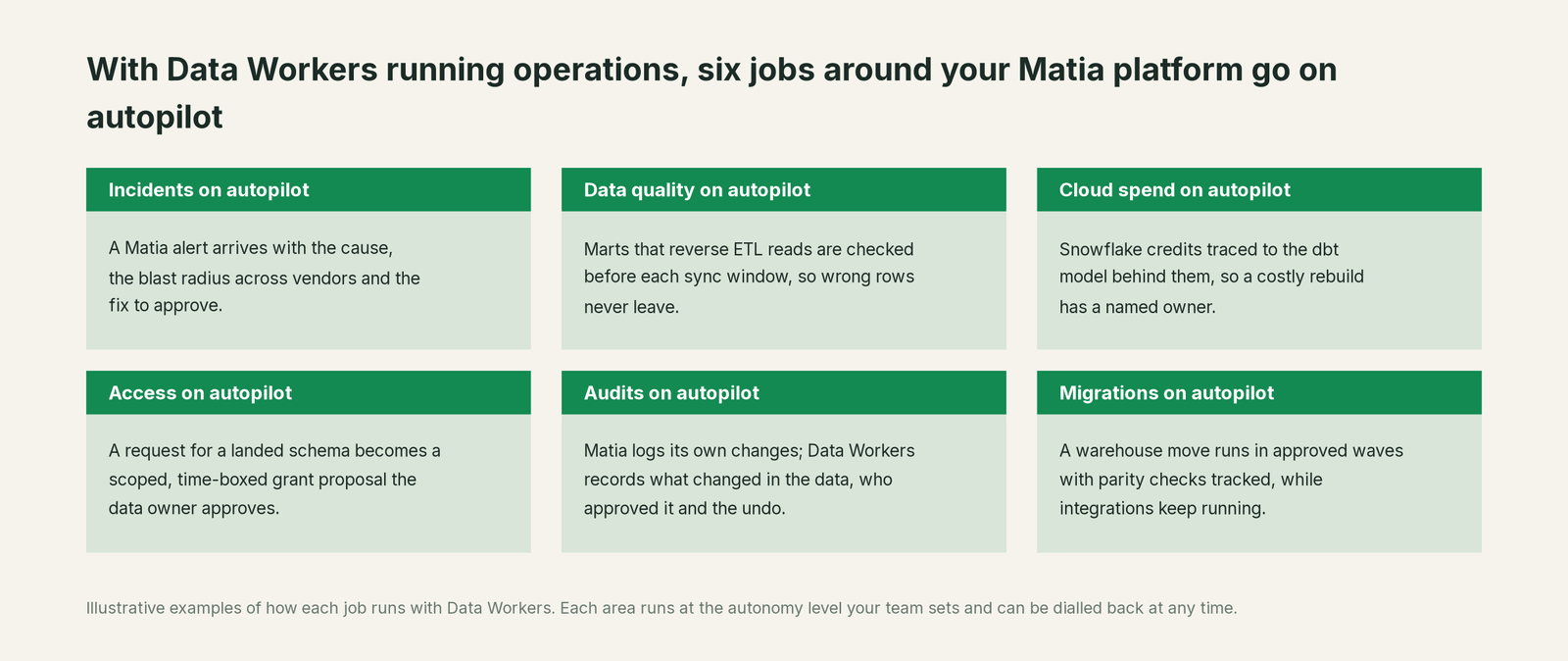
- •An alert arrives with a cause. Matia's monitor says the table dropped; the Data Workers incident says why, what it would reach and what to approve.
- •Reverse ETL gets a guard. A model that would send wrong values or delete records in Mirror mode is flagged before its sync window, with the hold proposed.
- •Fixes outside Matia have a path. A dbt seed, an orchestrator run or an app table gets a named owner, an approval and a receipt.
- •One record for data, RevOps and support. The same incident and receipt in Spellbook Data Catalog (in preview), linked from the Jira ticket.
For how Data Workers differs from the monitors and the catalog you already have in Matia, see Data Workers vs data observability and Data Workers vs a data catalog.
Keep Matia, or consolidate?
Keep Matia if you love it; Data Workers works with it from day one. Many teams consolidate once Data Workers runs that slice too.
For most Matia teams the answer is keep it: you already consolidated ingestion, activation, monitoring and catalog onto one bill. What Data Workers removes is the work between tools that no single vendor owns: the hand-traced path from an alert to a dbt seed, the "pause it and tell RevOps" runbook, and the spreadsheet of who approved what. If part of your estate still runs on another mover, see you're on Fivetran; for the activation side, you're on Hightouch; and if Prefect builds your models, you're on Prefect. One incident record spans them, and every integration Data Workers supports lists what it reads and what it can change.
Weighing a build on Matia MCP and a coding agent? Read build it ourselves with Claude Code and MCP servers.
The case for your CFO
The outcome. When a billing, CRM or product change flows through Matia and breaks a model that feeds customers or revenue, it is caught the same evening and fixed with approval before customers feel it.
The risk story. At L0 and L1, agents only read. At L2 they propose and a named person approves; an unanswered request expires and escalates, never auto-grants. At L3 they act on reversible changes inside the domains you open; L4 is a later choice. Matia integrations stay with the owner. No agent can promote its own work, and an org-wide stop halts all autonomous dispatch. Every change carries a receipt: what changed, who approved it, the blast radius and the undo.
Why now. Matia MCP went GA on September 15, 2026, so assistants can now trigger syncs and toggle monitors with a person's role. That makes the approval trail around data changes worth getting right now.
The first win. L1 on the marts your reverse ETL integrations read: a change that would push or delete the wrong records becomes a diagnosed incident before the sync window.
What stays the same. Nothing migrates: Matia, your dbt project, your orchestrator, your warehouse and your on-call rota. For the numbers, see the ROI of agentic data operations.
The sentence for upstairs: "Matia moves and watches our data; Data Workers fixes what breaks across the rest of the stack, with our approval, before customers or revenue feel it."
Getting started
Start with a pilot. Pick the Matia integrations and reverse ETL models that touch customers or revenue, give Data Workers read access to the schemas and marts involved, and run at L1 for a few weeks next to Matia's monitors. Then turn on L2 for one domain, and open L3 for a narrow class once the receipts show the agents were right. The pilot path is on the pricing page, and the pilot is credited in full against the first year.
FAQ
How does Data Workers connect to Matia? Over Matia's API or MCP server today, with Matia MCP in the same client. Data Workers reads the landed and modeled tables natively in your warehouse, and the dbt project, orchestrator and consumers through its own connectors.
Matia already has observability and lineage. Why add Data Workers? Matia tells you a table looks wrong and what depends on it, inside the data path it runs. Data Workers does the work after that: the cause in whichever system holds it, the hold, the approved fix, the ordered rerun, verification and the receipt.
Will Data Workers run, pause or resume our Matia integrations? No. Integrations, reverse ETL runs and monitor settings stay with the owner, in the Matia UI, the REST API or Matia MCP. Data Workers proposes the hold or rerun with the reason and queues approved downstream builds through your orchestrator.
Should we let assistants use Matia MCP's write tools? Matia designed them with care: three write tools, gated by your Matia roles and flagged to the client before they run. For integrations that feed customers or revenue, give assistants read-only roles or keep a person on every write.
Our reverse ETL runs in Mirror mode. What does Data Workers check? The marts those models read, before the sync window: a row-count baseline, freshness and the tests you set, plus lineage to the destination. A model that would drop rows, and so delete records in the destination, raises an incident with a proposed hold.
We also run Fivetran or Airbyte for some sources. Does that change anything? No. Data Workers reads what every mover lands in the warehouse, so one incident record covers them all. See you're on Airbyte.
Sources
- •Matia, homepage ("The Unified DataOps Platform for Data & Eng Teams"; "100+ sources"), https://www.matia.io (checked Oct 3, 2026)
- •Matia, "Are You Bolting Your Data Platform Together? Matia MCP Isn't" (Matia MCP generally available, Sep 15, 2026), https://www.matia.io/blog/matia-mcp (checked Oct 3, 2026)
- •Matia, August 2026 product updates (published Sep 11, 2026: Power BI and Hex lineage, new sources), https://www.matia.io/blog/product-updates-matia-august-2026 (checked Oct 3, 2026)
- •Matia, Data Observability product page, https://www.matia.io/product/data-observability, and Data Catalog product page, https://www.matia.io/product/data-catalog (checked Oct 3, 2026)
- •Matia, pricing (RBAC, SSO, column hashing, AWS PrivateLink, sync times by plan), https://www.matia.io/pricing (checked Oct 3, 2026)
- •Matia docs, Products overview, https://docs.matia.io/docs/platform/products/index.md (checked Oct 3, 2026)
- •Matia docs, Configuring integrations (triggers, sync modes, schema changes, post-run dbt Cloud jobs), https://docs.matia.io/docs/platform/products/etl/configuring-integrations.md, and Manage schema changes, https://docs.matia.io/docs/guides/etl-manage-schema-changes.md (checked Oct 3, 2026)
- •Matia docs, How reverse ETL works, https://docs.matia.io/docs/platform/products/reverse-etl/how-reverse-etl-works.md, and Sync modes and destinations (Mirror deletes records no longer in the model), https://docs.matia.io/docs/platform/products/reverse-etl/sync-modes-and-destinations.md (checked Oct 3, 2026)
- •Matia docs, Monitor types, https://docs.matia.io/docs/platform/products/observability/monitor-types.md, and Observability and lineage, https://docs.matia.io/docs/platform/products/observability/observability-and-lineage.md (checked Oct 3, 2026)
- •Matia docs, Matia MCP overview, https://docs.matia.io/docs/mcp/index.md, Tool reference, https://docs.matia.io/docs/mcp/tools-reference.md, Getting started, https://docs.matia.io/docs/mcp/getting-started.md, Authentication and access management, https://docs.matia.io/docs/mcp/authentication-and-access-management.md, and Security and responsible use, https://docs.matia.io/docs/mcp/security-and-responsible-use.md (checked Oct 3, 2026)
- •Matia docs, Roles and Permissions (Editor roles enable or disable integrations), https://docs.matia.io/docs/platform/products/admin/users-permissions/permissions.md, and Notification integrations (Slack, Webhook, Microsoft Teams, PagerDuty), https://docs.matia.io/docs/platform/products/admin/notification-integrations.md (checked Oct 3, 2026)
- •Matia docs, Recurly source connector, https://docs.matia.io/docs/connectors/etl/applications/recurly/index.md, and PostgreSQL reverse ETL destination, https://docs.matia.io/docs/connectors/reverse-etl/postgres-retl/index.md (checked Oct 3, 2026)
- •Data Workers open-source repository, https://github.com/DataWorkersProject/dataworkers-claw-community (checked Oct 3, 2026)
- •Data Workers client setup guide, https://dataworkers.io/opensource-docs/client-setup/ (checked Oct 3, 2026)