You're on Mage: Your Team Builds and Runs Pipelines in Blocks. Data Workers Does the Operations Work When the Output Goes Wrong
Mage builds, runs and self-heals your pipelines. Data Workers catches the run that stayed green while its output went wrong, fixes the cause behind approvals and verifies the numbers.
Your team builds pipelines one block at a time: a data loader pulls from a source, a transformer reshapes the frame, a data exporter writes it out, and you see each block's output before you wire the next. Batch pipelines run on schedules, webhook triggers and sensors; streaming pipelines read Kafka, Kinesis or a MySQL, PostgreSQL or SQL Server CDC feed; dbt blocks run your models in the same graph. On Mage Pro, AI Sidekick builds pipelines from a prompt, explains a failed run, fixes the broken block and retries the incomplete work on the original run. Mage calls these self-healing pipelines that "diagnose failures, apply safe fixes, and recover automatically", and its newest pitch is "describe the workflow" and let Mage build and run it. Mage ships steadily: Mage Pro releases landed every month or two this year, the latest on September 17, 2026. Mage is where your team builds and runs pipelines in notebook-style blocks. Data Workers does the operations work when a pipeline's output goes wrong, behind approvals.
Self-healing works on runs that fail. The expensive Mage incident is the one where nothing fails: the stream keeps running, the schedule shows green, and the warehouse is quietly short. Data Workers watches the tables your pipelines write, traces a wrong number to its cause, proposes the fix to the owner and checks the result against the data.
Key takeaways
- •Mage keeps its job. Blocks, triggers, Sidekick and self-healing stay where your team built them. Data Workers works on what the runs deliver.
- •Green runs get checked too. Volume and null checks on the tables your pipelines write, dead-letter tables included, turn a quiet shortfall into an incident the same night.
- •Connected over Mage's API and MCP today. Engineers run Mage's
mage-agentMCP server next to the Data Workers agents in one client, and Data Workers checks the tables the pipelines write. - •Every fix goes through a named person. Schema changes arrive with their rollback, data replays arrive with expected row counts, and the owner approves and applies them, each with a receipt.
- •Autonomy is set per domain. Start at L1 observe, move to L2 propose, and widen to L3 act reversibly for narrow classes once the record supports it.
Mage is the pipeline workbench. Data Workers is the on-call engineer for what lands downstream.
Mage does what a pipeline platform should: it runs each block in order, streams records through without stopping, retries what failed and keeps every run and log. The operations work around a bad outcome is different: notice the data is wrong while every run is green, connect it to a release in another team's database, size the damage, change the table safely, put the missing rows back, rebuild and prove the numbers. Here is one night with both in place. This is an illustrative example.
| Time | System | What happens |
|---|---|---|
| Tue 14:05 | MySQL | The checkout team ships a release that sells digital gift cards. Gift-card orders now write NULL into orders.shipping_country, which was always filled before |
| 14:06 | Mage Pro + MySQL CDC | The orders_cdc_to_bq streaming pipeline reads the binlog change events as usual. Its transformer block passes them on to the BigQuery exporter |
| 14:06 | Mage Pro + BigQuery | The BigQuery table marks shipping_country as REQUIRED. The Storage Write API rejects every gift-card row, and the sink writes those rows to analytics.orders_dlq. As designed, the pipeline continues. Every other order lands in analytics.orders |
| Wed 02:00 | Mage Pro + dbt | The scheduled finance_daily batch pipeline runs its dbt block and rebuilds fct_daily_gmv from analytics.orders. Every block completes |
| 02:20 | Data Workers + BigQuery | The volume check, row counts read from BigQuery and scored against each table's own baseline, puts Tuesday's orders in analytics.orders 9% under. The same check on analytics.orders_dlq jumps from zero to 3,912 rows since 14:06, every one with the same failure reason |
| 02:27 | Data Workers + team's assistant | Diagnosis: a REQUIRED column now receives NULLs from the source. The on-call's assistant reads the Mage run history over Mage's MCP server: the stream was healthy throughout. Blast radius from the dbt manifest and the team's context-graph note: fct_daily_gmv, two finance models and the Lightdash "Daily GMV" dashboard |
| 02:29 | Opsgenie + Slack | Data Workers raises an Opsgenie alert on the data service with the diagnosis, and sends the approval request to the orders pipeline owner in Slack |
| 08:05 | Spellbook + BigQuery | The owner reviews two drafted changes in Spellbook: relax shipping_country to NULLABLE, with its rollback step, and a replay of the 3,912 parked orders from orders_dlq into analytics.orders, guarded on order_id, with expected row counts. She approves and applies both in BigQuery |
| 08:20 | Mage Pro + mage-agent | From the same Claude Code session, the engineer on call reruns finance_daily with mage-agent's run_pipeline. Mage records the run complete at 08:36 |
| 08:41 | Data Workers + BigQuery | Data Workers verifies: every order_id from the dead-letter table is present once in analytics.orders, Tuesday's count sits inside its baseline, no new rows have reached orders_dlq since the change, and fct_daily_gmv now includes gift cards |
| 08:43 | Opsgenie | Data Workers closes the alert with a link to the receipt |
| 09:00 | Lightdash | Finance opens the Daily GMV dashboard on verified numbers |
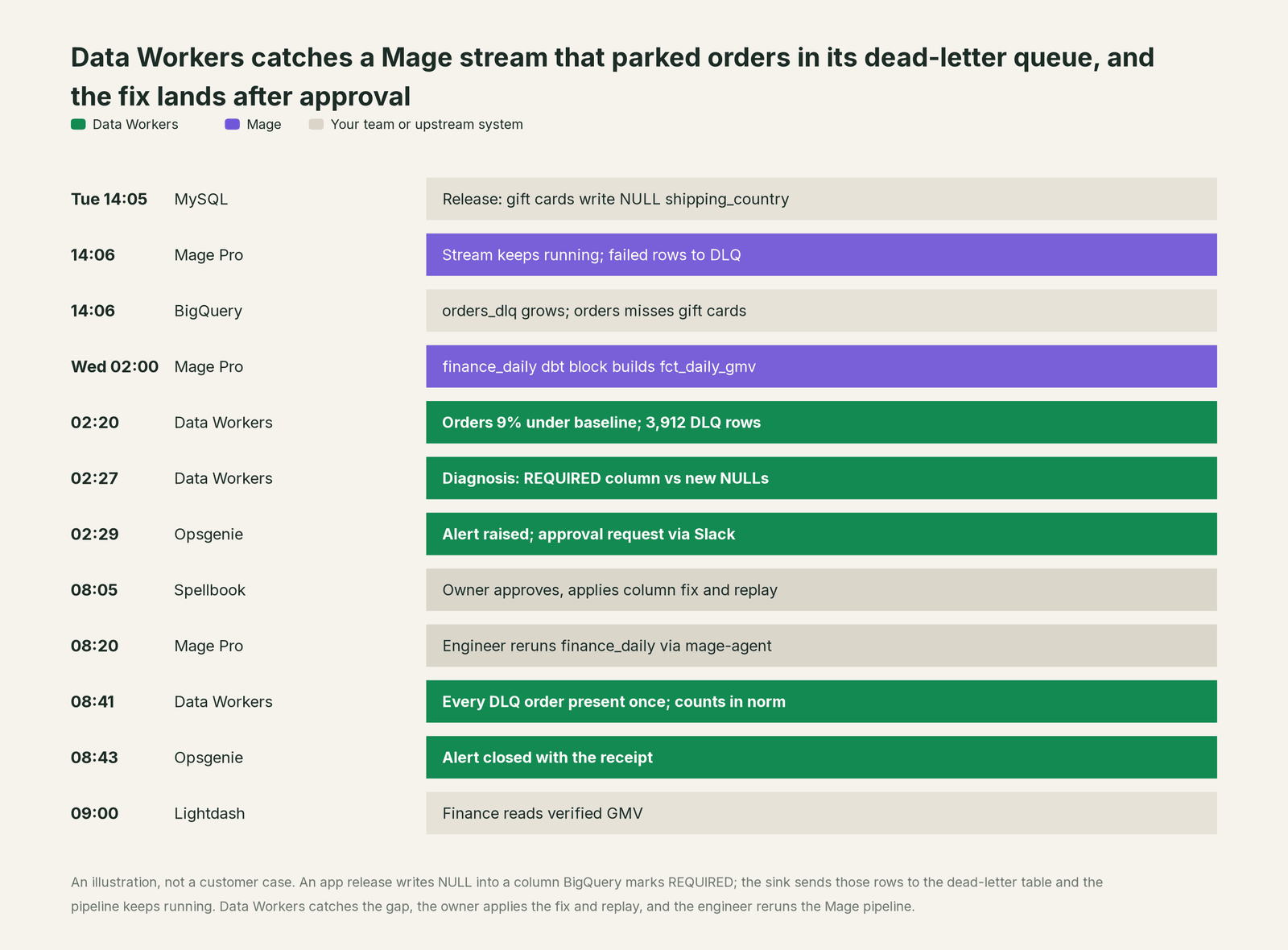
Every part of Mage did its job. Mage's BigQuery streaming docs describe this behaviour: rows with nulls in REQUIRED columns fail, go to a dead-letter destination, and "if failed rows are successfully written to the dead-letter destination, the pipeline continues." That is the right call for a stream: one bad record should not stop every good one. It also means nothing failed, so there was nothing for self-healing to heal. The gap spanned a release in MySQL, a column mode in BigQuery and a number in Lightdash, and Data Workers looks across all three.
| Job | What Mage does | What Data Workers does |
|---|---|---|
| The run | Runs the streaming and batch pipelines, block by block, on triggers and schedules | Reads pipeline and block runs over the Mage Pro API to place the incident in time |
| The signal | Streaming health, run status, block tests and validations inside the pipeline | Checks the data itself: volume, nulls and freshness on the tables the pipeline writes, plus the dead-letter table, so a green run with missing rows still raises an incident |
| The diagnosis | Sidekick explains failed runs from logs and block statuses | Joins the dead-letter failure reason, the source change and dbt lineage into one cause, with the blast radius across models and dashboards |
| The fix | Self-healing applies safe fixes to failed blocks inside the project | Drafts the column change with its rollback and the replay with expected row counts, for the owner to approve and apply |
| The rerun | Runs whatever the engineer triggers, from the UI, the API or mage-agent | Names the pipeline to rerun and the order, then reads the run's outcome |
| The proof | Keeps run history and logs | Verifies against the parked rows and the norm, and writes a receipt: what changed, who approved it, how it was checked, how to undo it |
Why doesn't Mage just do this itself?
Because Mage is built to make pipelines easy to build and reliable to run. Its unit is the pipeline run and the block run: whether a block raised, what it printed, what it returned. It doesn't own the checkout database where the release shipped, the column modes another team set in BigQuery, or the finance dashboard that reads the result. That boundary is sensible: a block can run any Python or SQL against any system, so Mage leaves the meaning of those writes to the people who built them.
Mage's AI follows the same scope, and it is good work. Sidekick works from the page you are on, the project and its runs, and Mage's docs ask you to review mutating changes in Mage. The mage-agent MCP server, announced May 12, 2026 for Mage Pro, lets Claude Code, Cursor or Codex list, create, update and run pipelines and blocks through the Mage Pro REST API, signed in as the user. Both act on Mage objects, inside Mage.
Changing a warehouse table's schema, replaying parked rows into production and choosing what to rebuild in what order is a different product with a different liability. It needs a context graph of every source, table, model and dashboard, blast-radius scoping, approvals that name a person, a recorded undo and receipts an auditor can read. That is the product Data Workers is. For how that holds up in production, read is it safe to let AI agents change production data.
Every tool owns a slice. Data Workers covers the whole lifecycle
Mage owns building and running pipelines in blocks. Around it sit a source database, a warehouse, dbt, BI, a pager and a catalog. Each point tool adds another console, contract and handoff. Data Workers covers the whole lifecycle with one context, one approval flow and one audit trail, and builds on the Mage pipelines already there.
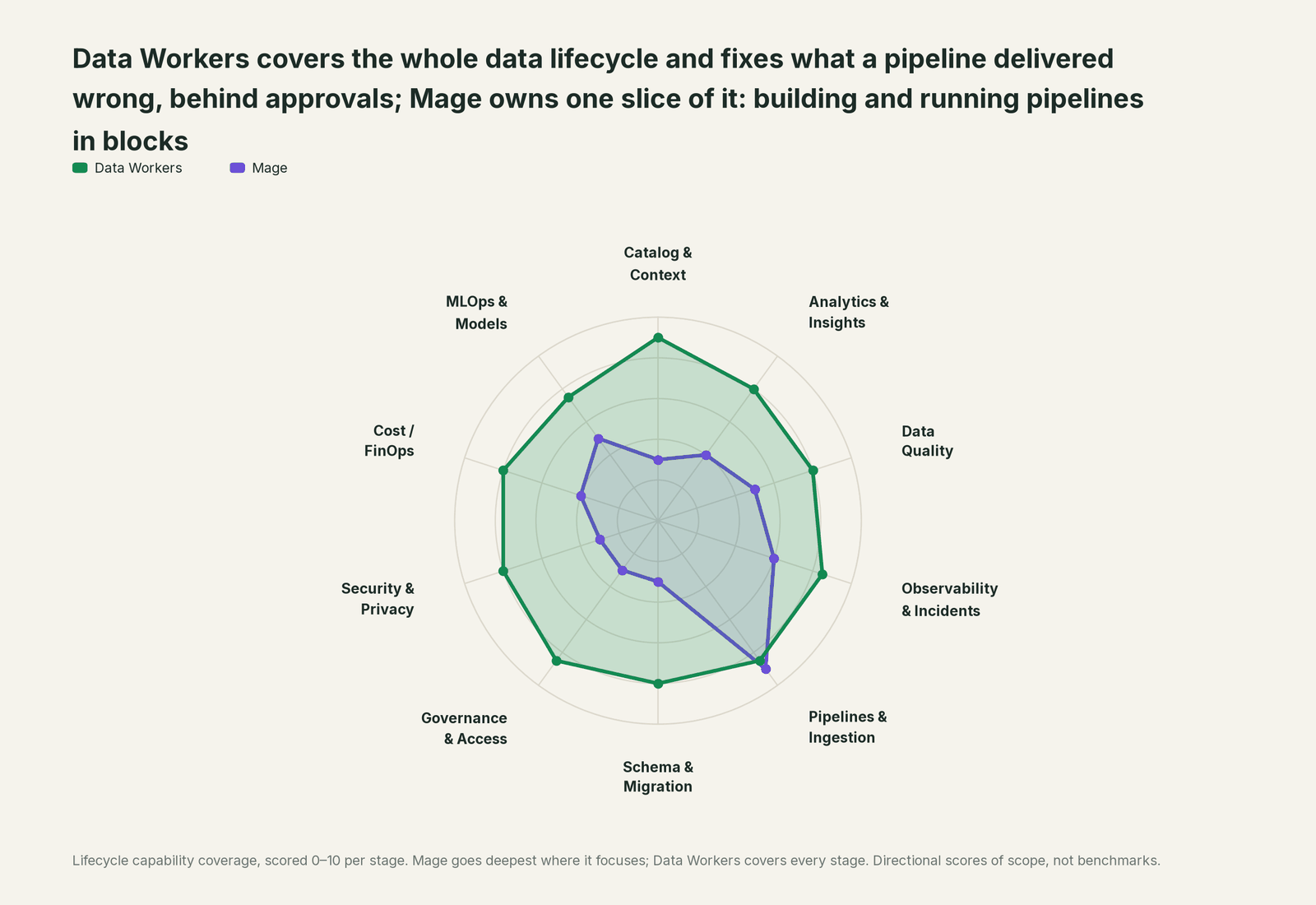
| Stage | Data Workers | Mage | Why we scored it this way |
|---|---|---|---|
| Catalog & Context | 9 | 3 | Lineage between pipelines and blocks on the Team plan; it is not a catalog. Data Workers keeps one governed context graph of tables, models, dashboards and owners. |
| Analytics & Insights | 8 | 4 | Sidekick turns block outputs and warehouse queries into charts and dashboards inside Mage. Data Workers answers data questions from governed definitions with lineage behind every number. |
| Data Quality | 8 | 5 | Data validations, block tests, freshness and schema checks run inside pipelines. Data Workers checks the tables pipelines write, including what a stream routed to its dead-letter queue. |
| Observability & Incidents | 8.5 | 6 | Monitoring dashboards, streaming health and Sidekick run debugging explain a run. Data Workers diagnoses the data incident across systems, fixes the cause and verifies it. |
| Pipelines & Ingestion | 8.5 | 9 | Mage's home stage: batch, streaming and integration pipelines, CDC sources, dbt blocks, triggers, backfills and self-healing retries. Data Workers reads run outcomes and the data they land. |
| Schema & Migration | 8 | 3 | CDC sources track source schema changes and the sink casts to the table schema. Data Workers catches the change, scores its blast radius and generates the migration with rollback SQL. |
| Governance & Access | 8.5 | 3 | Workspaces, roles and review before production govern who changes pipelines. Data Workers routes every data change to a named approver. |
| Security & Privacy | 8 | 3 | Sidekick redacts sensitive fields in tool responses, and Pro runs in your cloud or on-prem. Data Workers leaves a receipt on every data change. |
| Cost / FinOps | 8 | 4 | Per-pipeline CPU and memory monitoring and code optimization keep runs lean. Data Workers traces Snowflake credits to the dbt model and sums BigQuery spend from the Jobs API. |
| MLOps & Models | 7.5 | 5 | AI blocks and custom training and inference resources fit ML work in pipelines. Data Workers keeps the data under those models healthy. |
How Mage and Data Workers work together
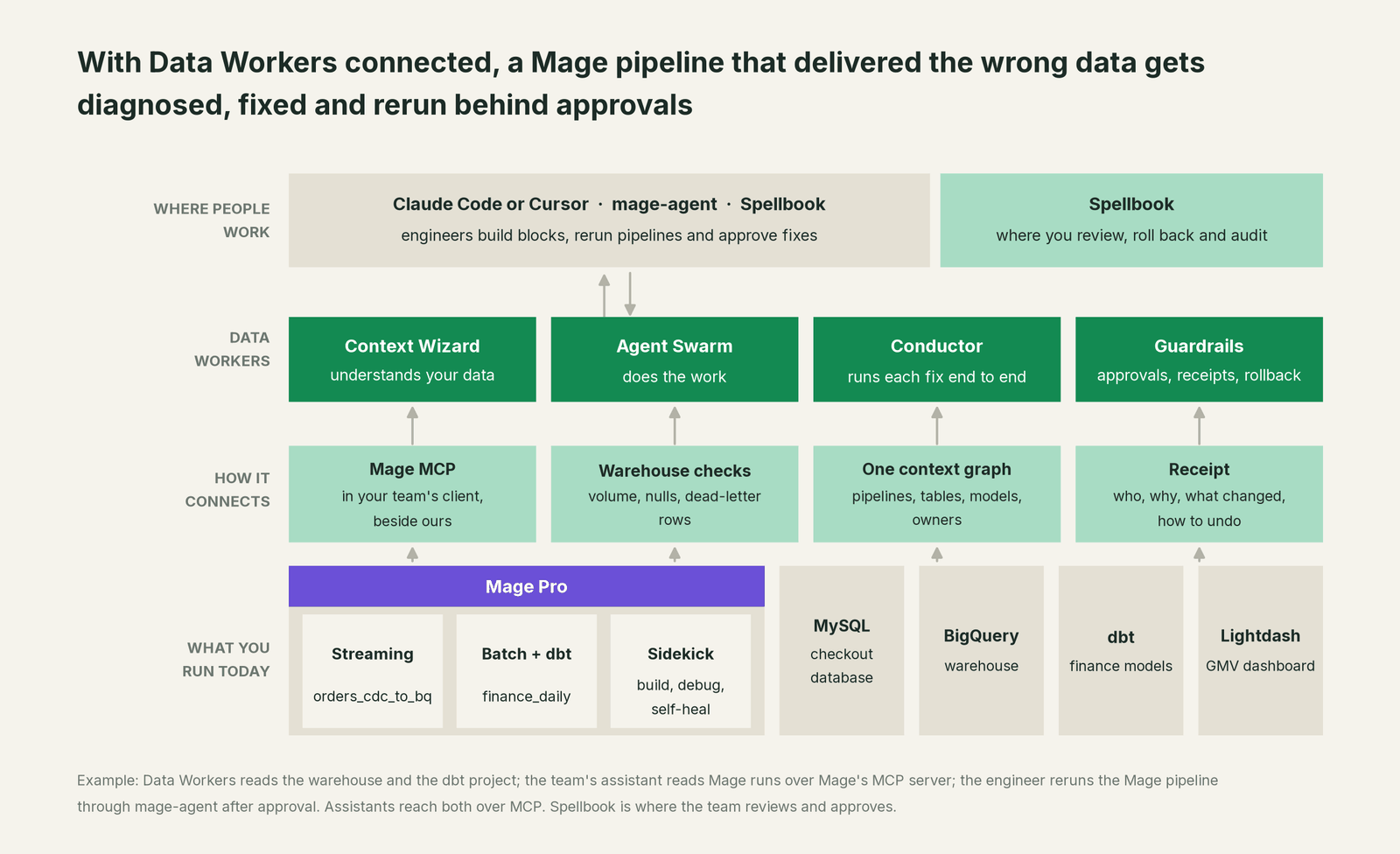
Mage connects over its REST API and MCP server today: your team's assistant reads pipelines and their runs side by side with Data Workers, so an incident timeline shows exactly which runs touched the data. Around Mage, the connections are native: BigQuery, Snowflake, Databricks and PostgreSQL for checks, the dbt project your dbt blocks run (manifest and run results) for lineage, Opsgenie and PagerDuty for alerts, and Slack or email for approval requests. MySQL and Lightdash connect over their APIs or MCP servers today. Data Workers makes no changes inside Mage; reruns happen there, by the engineer, after the approval.
Engineers run mage-agent and the Data Workers agents side by side in one coding agent. mage-agent answers "what is in this pipeline, and run it"; Data Workers answers "what did it do to the data, and what's the fix". The Data Workers side follows the documented client setup: clone the open-source repo and add each agent's start-agent.sh entry to your client. mage-agent follows Mage's own install and login steps.
# Example: Mage's MCP server plus Data Workers agents in Claude Code
# mage-agent (Mage Pro), after `mage-agent login` to your cluster
claude mcp add mage-agent -- mage-agent mcp

# Data Workers agents, from a clone of the open-source repo
claude mcp add --scope user dw-incidents -- "$(pwd)/start-agent.sh" dw-incidents
claude mcp add --scope user dw-quality -- "$(pwd)/start-agent.sh" dw-quality
claude mcp add --scope user dw-schema -- "$(pwd)/start-agent.sh" dw-schema
claude mcp add --scope user dw-catalog -- "$(pwd)/start-agent.sh" dw-context-catalog
List the tools with your client's own command (/mcp in Claude Code). In this incident: run_quality_check (dw-quality) reads row counts and nulls from BigQuery and monitor_metrics (dw-incidents) scores them against the baseline; diagnose_incident names the cause; blast_radius_analysis and trace_cross_platform_lineage (dw-context-catalog) map what the gap reached; remediate re-checks the quality assertions after the fix and escalates any failure to a person. When a source adds, drops, renames or retypes a column, generate_migration (dw-schema) writes the forward and rollback SQL. explain_table gives the next engineer the table's definition, lineage and trust score; get_incident_history shows its past incidents.
In production the agents run in your infrastructure and hold the warehouse credentials and model key. Your data stays in your systems; the hosted Conductor sees workflow metadata only. More in where does our data go.
One incident, L0 to L4, set per domain:

- •L0 manual. Finance asks on Thursday why gift-card revenue is missing. An engineer finds the stream green and the dead-letter table an hour later.
- •L1 observe. Data Workers flags the shortfall at 02:20 with the cause and the blast radius. Nothing changes.
- •L2 propose. Data Workers proposes the column change and the replay. Nothing reaches production until the named owner approves; an unanswered request expires and escalates, never auto-grants.
- •L3 act reversibly. For classes with a clean record, Data Workers takes the reversible steps it runs itself: re-checking every table after each run and closing the incident when the numbers hold. Schema changes, replays and Mage reruns stay with your team.
- •L4 autonomous. For a scoped domain, Data Workers sees dead-letter rows soon after the release lands, and the drafted fix waits for the owner before the finance schedule fires.
Who sets those levels: who owns the agents, how approvals work for AI data agents and autonomy levels L0 to L4 explained.
What changes for your team
Mage gives a lean team a fast way to build and run pipelines. Data Workers takes the operations work after: watching what pipelines deliver and running the incident when a delivery is wrong.
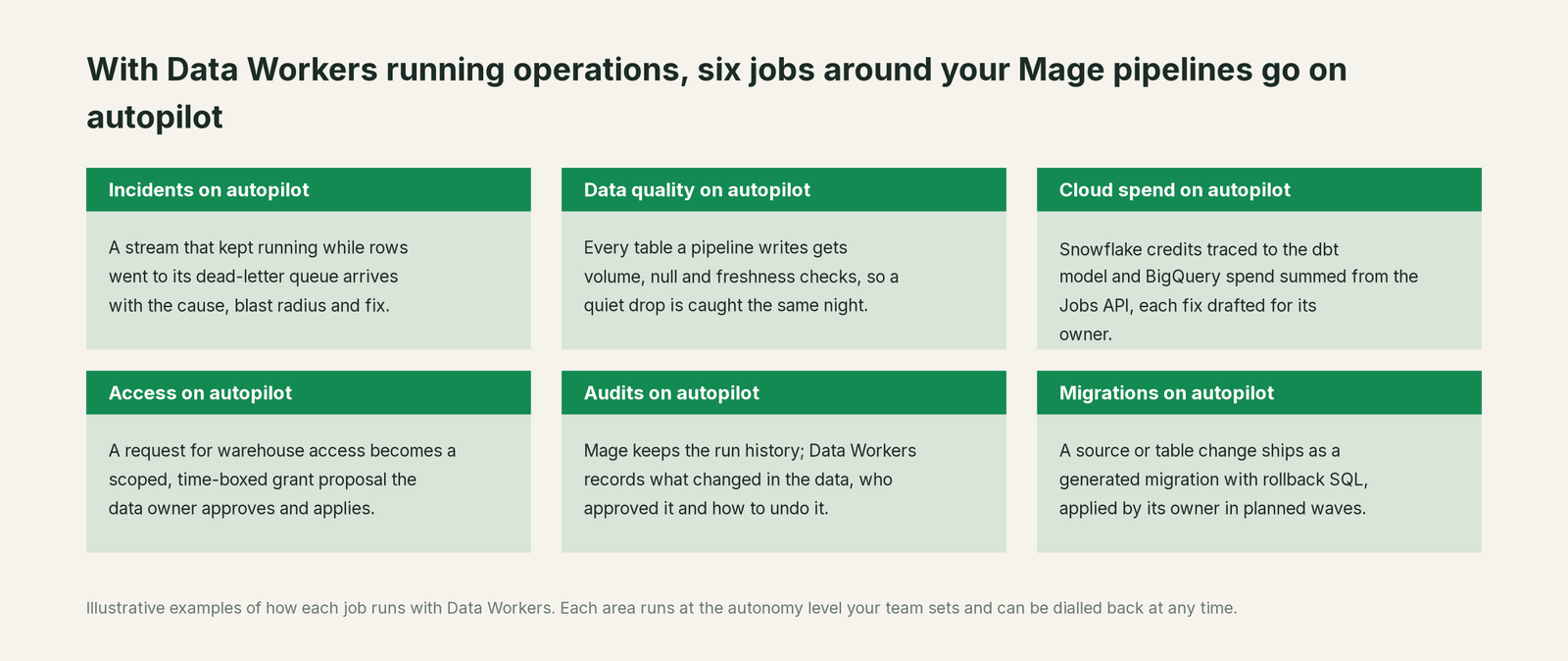
- •On-call starts from a cause. The engineer finds the source change, the parked rows, the damage and the proposed fix in one place, before opening a block.
- •Dead-letter tables stop being a blind spot. Rows a stream parked are counted and explained the same night, tied to the upstream release that caused them and the dashboards they feed.
- •Data and app teams share one record. The team that owns the stream and the team that owns the finance numbers see the same incident and receipt in Spellbook Data Catalog (in preview).
Side by side: Data Workers vs Mage AI. From a coding agent: Claude Code with Mage AI pipelines.
Keep Mage, or consolidate?
Keep Mage if you love it; Data Workers works with it from day one. Many teams consolidate once Data Workers runs that slice too.
For most Mage teams the answer is keep it. Your blocks are code your engineers wrote and tested one cell at a time, and Mage runs them well. What teams consolidate is the tooling around the runs: a separate observability product, row-count scripts after loads, a weekly sweep of the dead-letter table and runbooks that say "rerun and check the dashboard". If parts of your estate run on other orchestrators, the same operations layer covers them: see you're on Airflow and you're on Dagster, and for the dbt side of every fix here, you're on dbt.
Weighing a build on mage-agent and a coding agent? Read build it ourselves with Claude Code and MCP servers: connecting servers is the easy part; the context graph, approvals, undo and receipts are the work.
The case for your CFO
The outcome. Revenue and order numbers built by Mage pipelines are right more often. When a pipeline delivers short or wrong data, it is caught the same night and corrected before the business opens, with a record of how it was checked.
The risk story. At L0 and L1, agents only read. At L2 they propose and a named person approves; an unanswered request expires and escalates, never auto-grants. L3 covers reversible steps inside the domains you open; L4 is a later choice per domain. Schema changes and data replays go to the owner to apply. No agent can promote its own work, and an org-wide stop halts all autonomous dispatch. Every change carries a receipt: what changed, who approved it, the blast radius and how to undo it. Nothing migrates.
Why now. Sidekick and mage-agent mean your team builds pipelines faster than ever, and streams now carry the numbers finance reads each morning. More pipelines means more green runs delivering the wrong thing. Mage tells you a run finished; someone has to own whether the output is right.
The first win. L1 on the pipelines that feed finance: every output checked, dead-letter rows counted and explained, a shortfall diagnosed by morning.
What stays the same. Mage, your blocks, triggers and Sidekick, your dbt project, warehouse and on-call rota. For the numbers, see the ROI of agentic data operations.
The pilot path. Start with a pilot (pricing); the pilot is credited in full against the first year.
The sentence for upstairs: "Mage runs our pipelines; Data Workers checks what they deliver and fixes it with our approval when a run gets it wrong, so finance sees the right number."
Getting started
Start with a pilot. Pick the Mage pipelines that feed the numbers leaders read, give Data Workers a Mage Pro API key and read access to the tables they write, dead-letter tables included, and run at L1 for a few weeks: every incident arrives with a cause and a blast radius. Then turn on L2 for one domain, and widen to L3 for narrow, reversible classes once the receipts show the agents were right. The pilot path is on the pricing page, and the pilot is credited in full against the first year.
FAQ
Does Data Workers have a native Mage connector? Mage connects over its REST API and Mage's mage-agent MCP server today, where your team's assistant reads pipelines and their runs side by side with Data Workers. The systems around Mage in a typical estate, such as BigQuery, Snowflake, PostgreSQL, dbt, Opsgenie and Slack, connect natively.
Mage already has self-healing pipelines and AI Sidekick. What does Data Workers add? Those cover the run: why a block failed, how to fix it, how to retry it. Data Workers covers what the run delivered: whether the rows are all there and correct, what a gap reached downstream, how to fix the cause where it lives, and the proof afterwards. It matters most when no run failed at all.
Will Data Workers change our pipelines, our BigQuery schema or our data itself? No. Data Workers makes no changes inside Mage: it names the pipeline to rerun, and your engineer reruns it in Mage or through mage-agent. Block code changes arrive as a diff for the owner to merge. Schema changes and dead-letter replays arrive drafted, with their rollback and expected row counts, for the owner to approve and apply. Then Data Workers verifies the result and records it.
Does this work with Mage OSS as well as Mage Pro? Yes. The checks, diagnosis and receipts work on the tables any Mage pipeline writes, and your team reads runs over the API or MCP server your instance exposes. mage-agent, Sidekick, CDC sources and stateful streaming are Mage Pro features.
Sources
- •Mage, homepage: "Mage AI is an AI data engineering platform that runs production pipelines, checks data quality, fixes failures, and optimizes performance"; self-healing pipelines, https://www.mage.ai/ (checked Oct 3, 2026)
- •Mage, product updates (Mage Pro releases Jan 15, Feb 26, Apr 23, Jun 17, Jul 15, Aug 10 and Sep 17, 2026), https://www.mage.ai/updates, and Mage Pro release notes, September 17, 2026 (AI Sidekick, streaming health observability), https://www.mage.ai/updates/2026-09-17-release-notes (checked Oct 3, 2026)
- •Mage, pricing and plan features (data validations, freshness checks, schema checks, lineage), https://www.mage.ai/pricing (checked Oct 3, 2026)
- •Mage docs, Mage Pro (managed, private and hybrid cloud; Pro-only features), https://docs.mage.ai/production/mage/pro (checked Oct 3, 2026)
- •Mage docs, AI Sidekick (debug runs and self-heal failures; safety and control), https://docs.mage.ai/ai/sidekick/index (checked Oct 3, 2026)
- •Mage docs, AI Blocks (agent mode), https://docs.mage.ai/ai/blocks (checked Oct 3, 2026)
- •Mage docs, mage-agent introduction, MCP tools, IDE integration and authentication, https://docs.mage.ai/agent/introduction, https://docs.mage.ai/agent/mcp-tools, https://docs.mage.ai/agent/ide-integration, https://docs.mage.ai/agent/authentication; Mage blog, "Meet mage-agent" (May 12, 2026), https://www.mage.ai/blog/build-data-pipelines-with-your-ai-coding-assistant-meet-mage-agent; PyPI mage-agent 0.2.0 (May 27, 2026), https://pypi.org/project/mage-agent/ (checked Oct 3, 2026)
- •Mage docs, BigQuery streaming destination (Storage Write API, REQUIRED fields, dead-letter queue, "the pipeline continues"), https://docs.mage.ai/guides/streaming/destinations/bigquery (checked Oct 3, 2026)
- •Mage docs, MySQL CDC streaming source, https://docs.mage.ai/guides/streaming/sources/mysql-cdc (checked Oct 3, 2026)
- •Mage, "Automate your workflow" outcome page ("Describe the workflow. Mage builds it, runs it on autopilot"), https://www.mage.ai/solutions/outcomes/automate (checked Oct 3, 2026)
- •Mage docs, API overview, https://docs.mage.ai/extensibility/api-reference/overview (checked Oct 3, 2026)
- •Mage OSS releases (0.9.79, Jan 21, 2026), https://github.com/mage-ai/mage-ai/releases (checked Oct 3, 2026)
- •Data Workers open-source repository (tool registrations in dw-incidents, dw-quality, dw-schema, dw-context-catalog), https://github.com/DataWorkersProject/dataworkers-claw-community (checked Oct 3, 2026)
- •Data Workers client setup guide, https://dataworkers.io/opensource-docs/client-setup/ (checked Oct 3, 2026)