You're on Amazon Neptune: Keep Your AWS Knowledge Graph True, From the Redshift Feed to the GraphRAG Answer
Already on Amazon Neptune? Data Workers brings your graph's model in as governed context and keeps the Redshift, Glue and S3 feeds behind it true, with approvals and receipts.
Your team runs its knowledge graph on AWS. Accounts, devices, customers and documents live in a Neptune Database cluster as a property graph you query with openCypher or Gremlin, or as RDF you query with SPARQL. A nightly job turns Redshift tables into node and relationship files in S3, and the Neptune bulk loader reads them in. Neptune Analytics runs PageRank, Louvain and vector similarity search in memory. Amazon Bedrock Knowledge Bases builds GraphRAG on Neptune Analytics from documents in S3, generally available since March 2025. With the AWS Labs Neptune MCP server, Claude Code, Kiro or Cursor can read the graph's schema and run queries. Neptune holds the graph. Data Workers keeps it true: Data Context Wizard brings the graph's model in as context with provenance, joins it to lineage, quality and usage across Redshift, Glue, dbt and Airflow, and when a feed breaks or a definition drifts, Data Workers proposes and carries the fix with an approval and a receipt.
A graph is only as good as the files the loader reads. A changed key in a dbt model reaches Neptune through S3, and every algorithm and agent answers from whatever landed. That seam is the job this guide covers. For Data Workers across every AWS service, read Data Workers on AWS.
Key takeaways
- •Neptune keeps its job. Neptune Database, Neptune Analytics, Bedrock GraphRAG and your bulk loads stay exactly as they are. Data Workers works next to them from day one.
- •The graph's model becomes governed context. Data Context Wizard reads labels, relationship types and the IDs each load writes, and puts them next to Redshift lineage, quality, usage and a named owner.
- •Feeds are checked before the loader runs. Upstream key changes, schema changes and stale exports are caught in Redshift and S3, traced to the graph and fixed before the nightly load.
- •Reads stay read-only by IAM. Your team's assistant queries Neptune through the AWS Labs MCP server, side by side with Data Workers, under a role that holds
neptune-db:ReadDataViaQueryonly. Approved fixes land in dbt, the Glue export and the load DAG, with a blast radius, an approver and a rollback path. - •Start with a pilot. One graph, read-only, with its feeds watched; then one fix class in one domain, on the ladder from L0 manual to L4 autonomous.
Neptune holds the graph. Data Workers keeps it true.
Neptune is a strong, fully managed home for connected data on AWS: "a purpose-built, high-performance graph database engine" optimized for "storing billions of relationships and querying the graph with milliseconds latency", with up to 15 read replicas and continuous backup to S3. The bulk loader ingests Gremlin CSV, openCypher CSV and four RDF formats from S3. Neptune Analytics runs "over 25 optimized graph algorithms and variants", including vector similarity search for RAG and knowledge-graph-backed chatbots. Engine 1.4.8.0 (July 27, 2026) added a property graph schema API and native RDF export to S3.
Around the graph sits everything that decides whether it is right: the sources, DMS, the Redshift models, the Glue job that writes the load files, the Airflow DAG that starts the loader and the semantic layer that defines the terms. Data Workers covers that side with one context, one approval flow and one audit trail. Neptune is where your relationships live. Data Context Wizard is where every agent reads them, next to lineage, quality and usage, with a named owner on every fact.
Here is a night with Data Workers next to an identity graph used for fraud work. This is an illustration, not a customer case.
| Time | System | What happens |
|---|---|---|
| 16:20 | dbt on Redshift | A pull request adds session_id to the surrogate key of fct_account_device; the unique and not_null tests pass, because the new keys are unique and present |
| 01:00 | Airflow on MWAA | The nightly DAG runs dbt and fct_account_device rebuilds in Redshift |
| 01:40 | AWS Glue | The export job writes openCypher relationship files to S3, using the model's key as each relationship's :ID |
| 01:45 | Data Workers | It compares tonight's relationship IDs with the IDs already loaded: 1.2 million account-device links now carry new IDs for the same account and device pairs |
| 01:50 | Neptune Database | The on-call's assistant reads the graph model over the Neptune MCP server and hands it to Data Workers: USED_DEVICE relationships link Account to Device, keyed by the export's IDs |
| 02:05 | Airflow on MWAA | Data Workers opens an incident and proposes holding the 03:00 load task, plus a dbt diff that restores the key to the account and device pair and keeps session_id as a property, with its blast radius: one dbt model, one Glue export, one load task, two graphs |
| 02:20 | Spellbook | The on-call graph owner reviews the diff and the impact and approves; dbt CI passes |
| 02:50 | AWS Glue | dbt rebuilds the model and Glue re-exports the files with stable relationship IDs |
| 03:10 | Neptune Database | The bulk loader runs; every relationship ID matches an existing relationship and no duplicates are created |
| 03:30 | Neptune Database | Data Workers verifies the export tables against last night's numbers, the on-call's assistant confirms relationship counts and device degrees with read-only openCypher, and Data Workers writes the receipt |
| 06:00 | Neptune Analytics | The analytics graph reloads from the Neptune Database endpoint for the day's algorithms |
| 09:00 | Fraud analyst | An analyst asks a Bedrock agent which devices are shared across the most accounts; the answer is right |
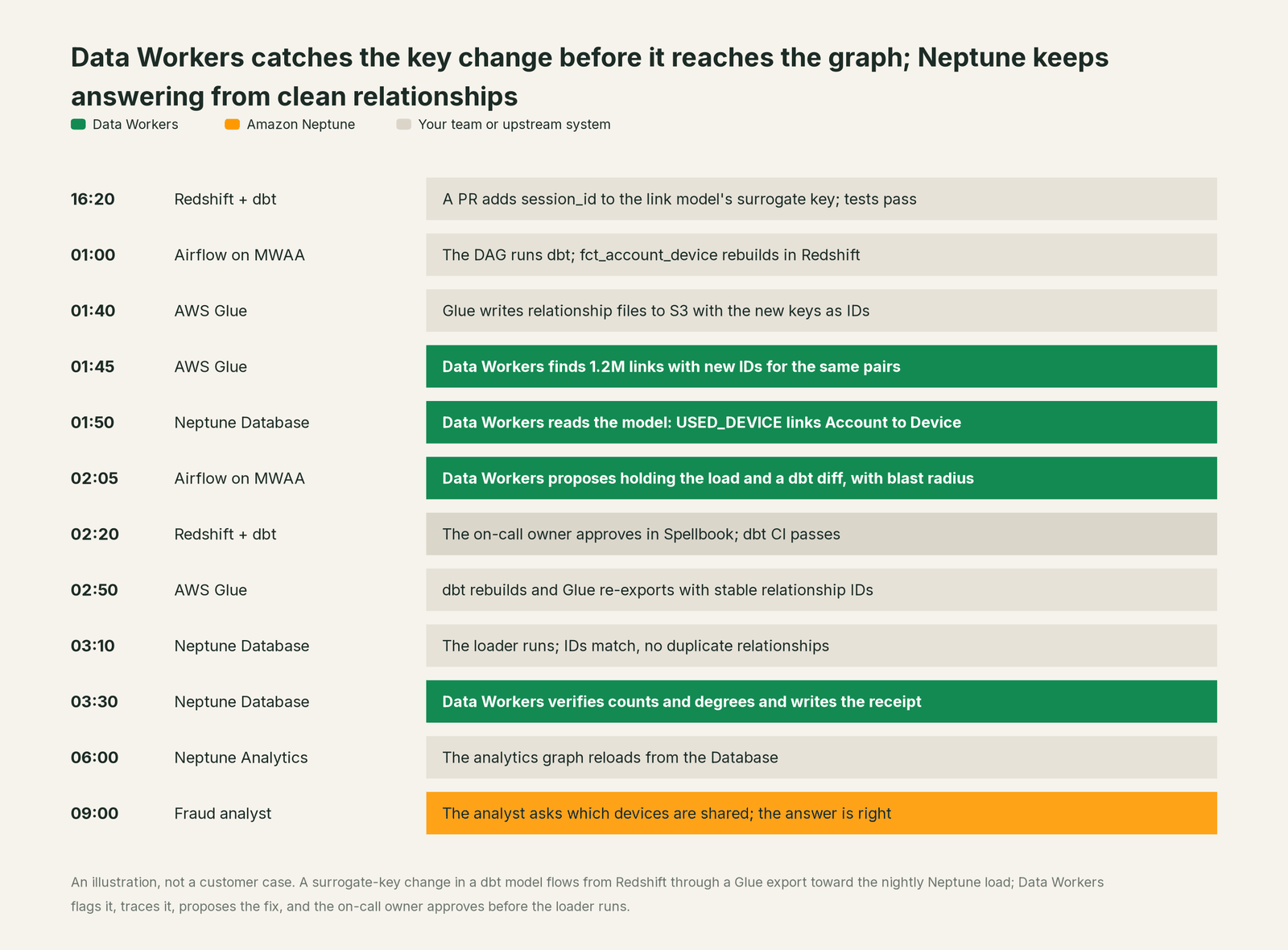
Without that check, the loader would have done what its documentation says: relationship IDs "should be unique across all relationship files in current and previous loads", so 1.2 million new IDs mean 1.2 million new relationships next to the old ones. The Degree algorithm would have counted every shared device twice, and nobody could have seen why from the graph alone. The fix was upstream, in dbt, after an owner's approval.
| Job | What Neptune does | What Data Workers does |
|---|---|---|
| The model | Stores property graphs and RDF graphs, queried with openCypher, Gremlin and SPARQL | Reads the model as context and joins it to Redshift lineage, quality, usage and owners |
| The questions | Answers traversals, runs graph algorithms and vector search, and backs GraphRAG in Bedrock Knowledge Bases | Makes sure the data and definitions behind those answers are correct and current |
| The feed | Bulk-loads the node and relationship files your jobs write to S3 | Watches the Redshift tables, the Glue export and the IDs it writes, and catches breaks before the load |
| The break | Loads what the files say, as documented | Detects the upstream change and traces it across dbt, Redshift, Glue and Airflow to the graph |
| The fix | Runs the loads and queries your team approves | Proposes the change with its blast radius, routes it to a named owner, lands it in dbt and the load pipeline |
| The proof | Holds the graph state after the load and reports each load job's status | Verifies counts and degrees after the reload and writes a receipt with the cause, diff, approver and rollback |
| The meaning | Holds labels, relationship types and RDF vocabularies | Keeps business definitions consistent across the graph, the semantic layer and the catalog, with conflicts routed to an owner |
Why doesn't Neptune just do this itself?
Because Neptune is a managed database service built for every kind of AWS customer, and its job is to store, load and query graphs reliably at scale. The systems that feed it, dbt, Redshift, Glue and Airflow, are yours, and changing them is a different product with a different liability.
Neptune draws that line clearly and sensibly. The bulk loader is precise about IDs: by default it "does not update property values of an existing node or relationship in the database if it encounters load data having the ID of the existing node or relationship", and without explicit relationship IDs "the loader has no way of detecting duplicate relationships". It loads what your pipeline gives it. The AWS Labs Neptune MCP server says plainly that it "will run any query sent to it, which could include both mutating and read-only actions", and leaves the guard to IAM, where Neptune separates ReadDataViaQuery from WriteDataViaQuery and DeleteDataViaQuery. That is the right design for a database: precise primitives, with policy left to the customer under the shared responsibility model.
Data Workers is the product on the other side of that line. It knows what a change upstream will do to tonight's load, routes the fix to the owner, applies it reversibly through the pipelines you already run, verifies the graph afterwards and keeps the record.
Every tool owns a slice. Data Workers covers the whole lifecycle
Neptune owns one slice of the data lifecycle on AWS: storing, traversing and analyzing graphs, and the GraphRAG built on them. Each point tool adds another console, contract and handoff. Data Workers covers the whole lifecycle with one context, one approval flow and one audit trail, and builds on the graph you already run.
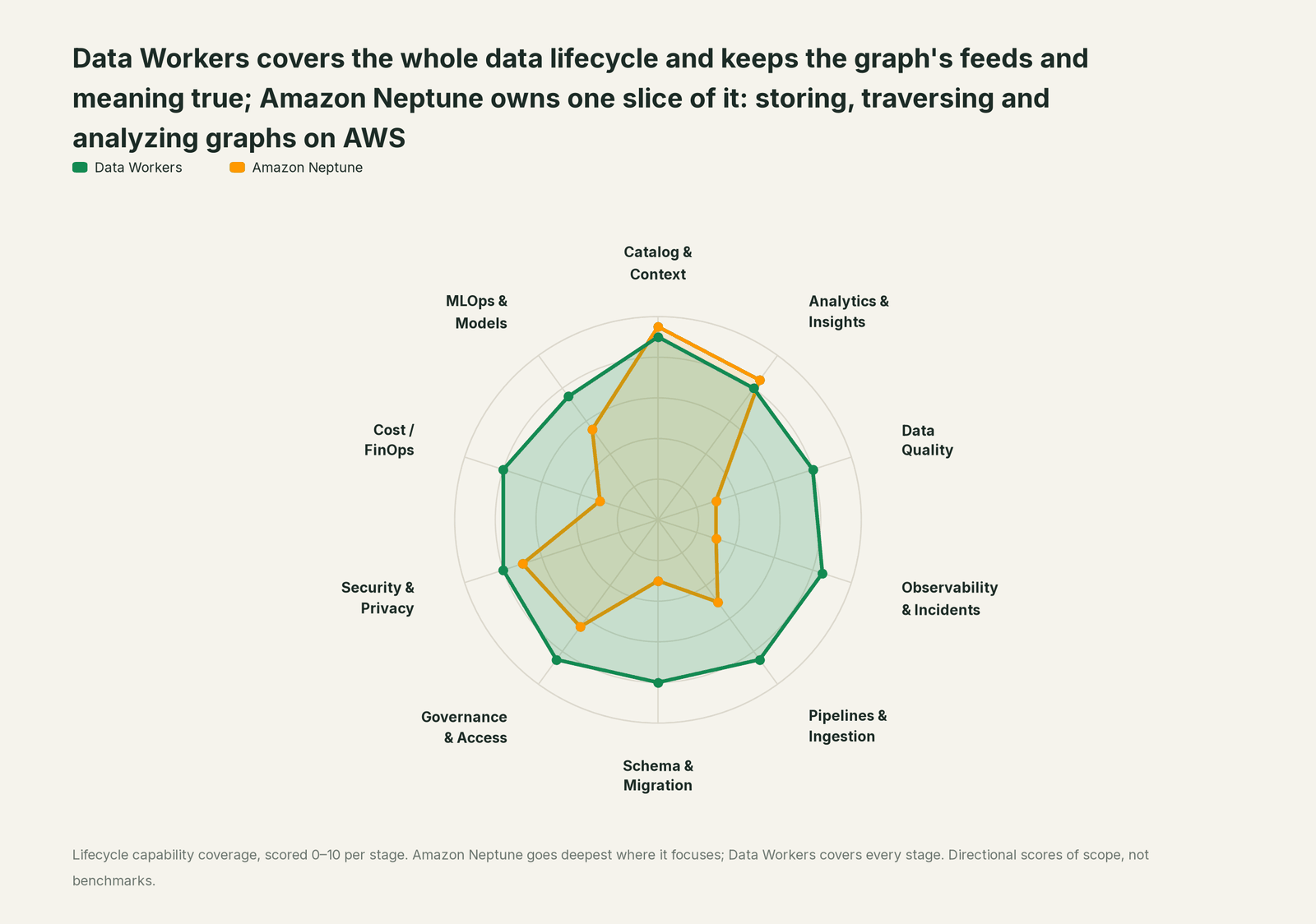
| Stage | Data Workers | Amazon Neptune | Why we scored it this way |
|---|---|---|---|
| Catalog & Context | 9 | 9.5 | Neptune's home stage: property graphs with Gremlin and openCypher and RDF graphs with SPARQL, plus GraphRAG through Bedrock Knowledge Bases on Neptune Analytics. Data Workers brings the graph's model in as context with provenance, next to lineage, quality and usage. |
| Analytics & Insights | 8 | 8.5 | Neptune's other home stage: Neptune Analytics runs more than 25 graph algorithms in memory, from PageRank and Louvain to vector similarity search. Data Workers' Insights agent answers through governed metric definitions. |
| Data Quality | 8 | 3 | Neptune loads what the files say and keeps IDs unique by design. Data Workers checks the Redshift tables and S3 exports that feed it and repairs breaks before the load. |
| Observability & Incidents | 8.5 | 3 | CloudWatch reports on the health of the cluster and the status of each load job. Data Workers detects a bad feed, traces it across systems, fixes it and verifies the graph after the reload. |
| Pipelines & Ingestion | 8.5 | 5 | The bulk loader ingests Gremlin CSV, openCypher CSV and RDF from S3 at scale, and Neptune Analytics loads from S3 or a Neptune Database. Data Workers builds, reruns and backfills the jobs that write those files, with approvals. |
| Schema & Migration | 8 | 3 | Graphs are schema-flexible by design, and the loader takes whatever columns the files carry. Data Workers detects upstream schema and key changes and assesses their impact on every export and load before they land. |
| Governance & Access | 8.5 | 6.5 | IAM data-plane actions separate reading, writing, deleting and loading, down to the query language. Data Workers proposes and applies grants across your data platforms by policy. |
| Security & Privacy | 8 | 7 | VPC isolation, KMS encryption, IAM authentication and CloudTrail are strong for the graph itself. Data Workers flags sensitive column names in pull request review and proposes masking for the owner. |
| Cost / FinOps | 8 | 3 | AWS bills instances, storage and Analytics memory, and reports them in Cost Explorer. Data Workers traces Snowflake credits to the dbt model behind them and drafts the fix for its owner. |
| MLOps & Models | 7.5 | 5.5 | Neptune ML and vector search in Neptune Analytics put graph signals into models and RAG. Data Workers keeps the data under your models healthy and connects to MLflow and W&B. |
How Neptune and Data Workers work together
Your engineers and agents stay where they are: Claude Code, Kiro or Cursor for openCypher, Gremlin and dbt; Bedrock agents and Knowledge Bases for GraphRAG. Spellbook Data Catalog (in preview) is where the data team looks: each proposed change, its blast radius, its approver and its rollback. Between them run four layers: Data Context Wizard keeps one governed context graph, the Data-Agents Swarm does the work with more than 20 specialist agents, the Autonomous Data-Conductor runs each fix end to end (detect, diagnose, fix, review, verify, remember), and per-domain guardrails hold approvals, receipts and rollback.
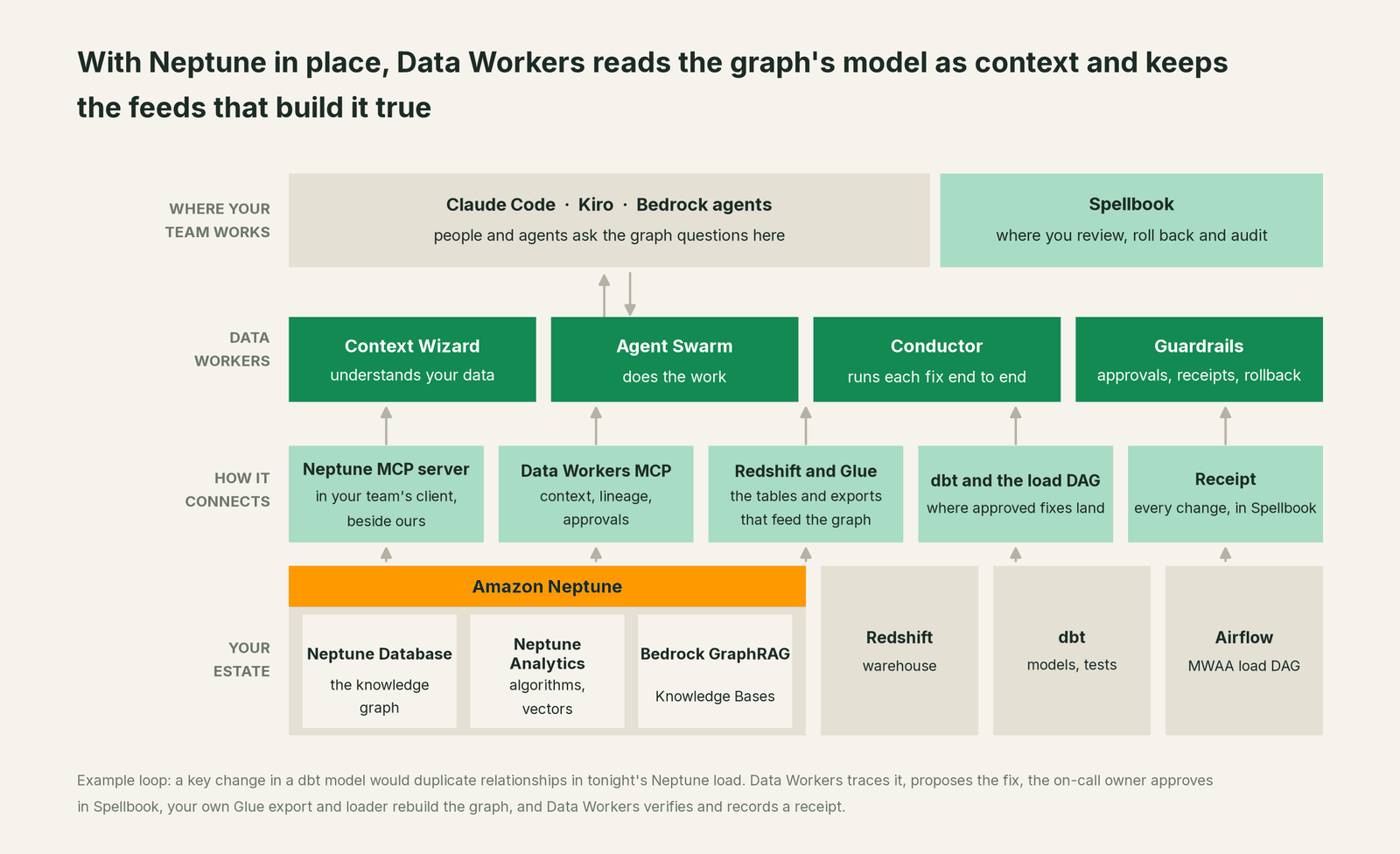
What Context Wizard does with your graph. It reads the graph's schema (node labels, relationship types and property keys) and the IDs each load writes, and records them as context with provenance: where each fact came from, when it was observed and who owns it. It joins that to lineage, so USED_DEVICE traces back through the Glue export and fct_account_device in Redshift to the tables DMS replicates. The Glue Data Catalog and Lake Formation connect over the AWS API or MCP server, and Redshift over the Redshift Data API or the Redshift MCP server, today, as the AWS guide describes. Every agent gets one governed view through tools like explain_table. When the graph's idea of an "active account" disagrees with your semantic layer's, the conflict goes to a named owner, and nothing becomes authoritative without a named person's approval.
Setup over MCP today. Data Workers connects to Neptune over the AWS Labs Neptune MCP server (awslabs.amazon-neptune-mcp-server, version 1.1.1), alongside its own agents in the same client. The Neptune server exposes get_graph_status, get_graph_schema, run_opencypher_query and run_gremlin_query, and takes a neptune-db:// endpoint for Neptune Database or a neptune-graph:// identifier for Neptune Analytics. Run it under an AWS profile whose role allows neptune-db:ReadDataViaQuery and nothing that writes, from a host that can reach the cluster inside your VPC. Data Workers' agents come from the open-source repository: clone it and add start-agent.sh entries to your client config, as the client setup docs show.
// Example: .mcp.json for Claude Code (Cursor and Kiro use the same mcpServers shape)
{
  "mcpServers": {
    "neptune": {
      "command": "uvx",
      "args": ["awslabs.amazon-neptune-mcp-server@latest"],
      "env": {
        "NEPTUNE_ENDPOINT": "neptune-db://<your-cluster-endpoint>",
        "AWS_PROFILE": "neptune-graph-reader",
        "AWS_REGION": "us-east-1",
        "FASTMCP_LOG_LEVEL": "ERROR"
      }
    },
    "dw-context-catalog": {
      "command": "/path/to/dataworkers-claw-community/start-agent.sh",
      "args": ["dw-context-catalog"]
    },
    "dw-schema": {
      "command": "/path/to/dataworkers-claw-community/start-agent.sh",
      "args": ["dw-schema"]
    },
    "dw-quality": {
      "command": "/path/to/dataworkers-claw-community/start-agent.sh",
      "args": ["dw-quality"]
    }
  }
}
List the tools in your client with its own command (for example /mcp in Claude Code). An engineer can then ask "what feeds USED_DEVICE, and is it safe to load tonight?" and get the graph schema from Neptune, lineage from trace_cross_platform_lineage, the latest change to fct_account_device from the dbt manifest, and its open incidents from get_incident_history, in one answer. blast_radius_analysis shows what else a change to that model would touch.
Where writes go. Fixes land where your team already reviews change: a dbt diff for the owner to merge, the Glue export job or the load DAG. Your loader writes to Neptune as it does today, under the IAM role you gave it, after the owner approves: reviewed changes, run by a known job, logged in CloudTrail.
What about Bedrock GraphRAG? Bedrock Knowledge Bases builds its GraphRAG graph on Neptune Analytics, fully managed, from an S3 data source (the only source type GraphRAG supports). Answers rest on which documents land in that bucket and whether they are current, so Data Workers watches it like any other feed: lateness against a recorded baseline, ownership and lineage for the prefixes your knowledge base reads.
One request, L0 to L4. The autonomy ladder is set per domain.

- •L0 manual. Data Workers is connected but not acting.
- •L1 observe. Data Workers watches the tables, exports and IDs that feed the graph and flags breaks before the load, with cause, lineage and owners. Nothing changes.
- •L2 propose. Data Workers drafts the dbt diff or the export change with its blast radius, and proposes holding the load. The graph owner approves in Spellbook before anything runs.
- •L3 act reversibly. For change classes with a proven record, such as rerunning a failed export for affected partitions, Data Workers applies the change, verifies counts and IDs, and can roll it back.
- •L4 autonomous. For a scoped, trusted class like late feeds into one graph, Data Workers fixes and verifies on its own and posts the receipt for review.
For the safety model behind each step, read is it safe to let AI agents change production data; for where data and credentials live, read where does our data go.
The same pattern holds for every source of meaning: see the hub, bring your own context, and the guides for Neo4j, TigerGraph and Memgraph. Our explainer on semantic layer vs knowledge graph for LLM grounding covers that choice, and the reference stack for data engineering on AWS covers the services around the graph.
What changes for your team
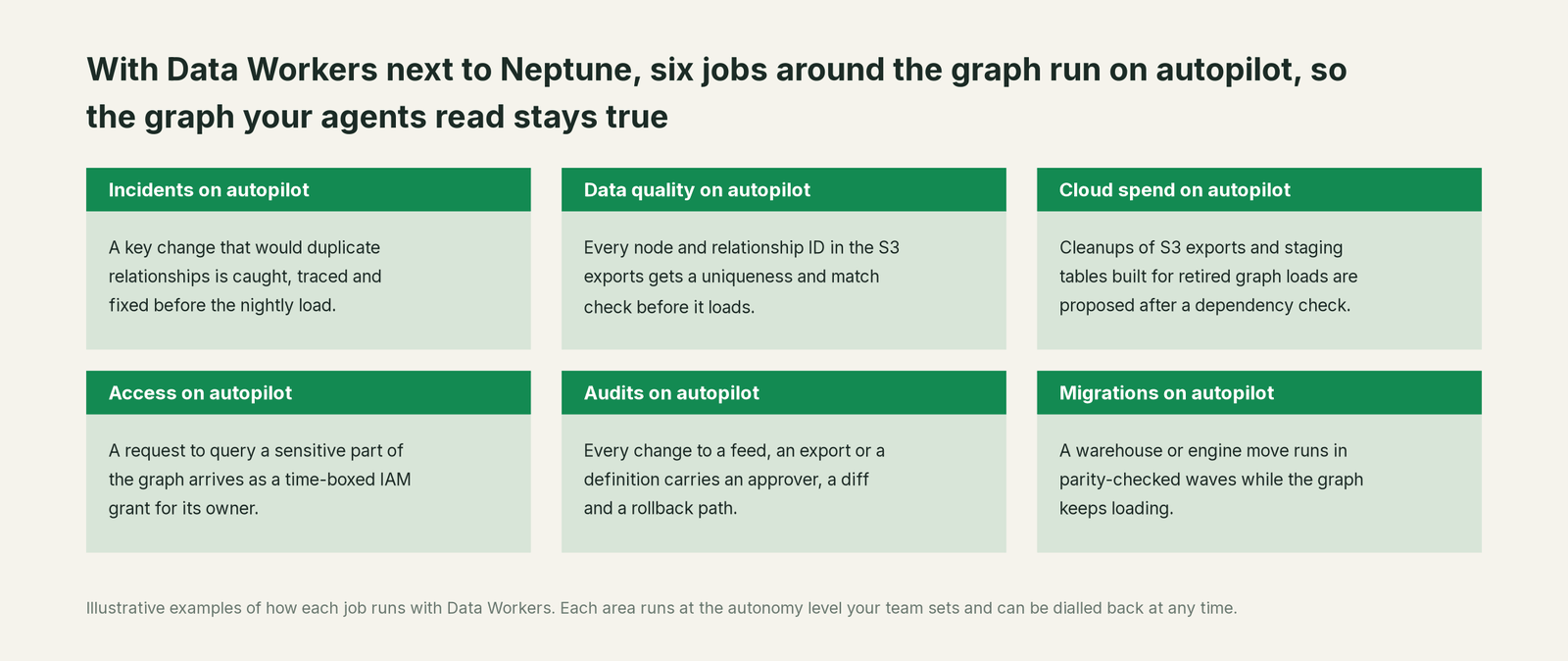
Graph teams spend much of the week on work that isn't graph work: chasing a jumped relationship count, reading loader error logs, rebuilding after a bad load. With Data Workers next to Neptune, those jobs run on autopilot at the level you set.
- •Incidents. A key or schema change that would duplicate relationships or orphan nodes is caught, traced and fixed before the nightly load, not discovered from a wrong fraud score or GraphRAG answer.
- •Data quality. Every node and relationship ID in the S3 exports gets uniqueness and match-rate checks against what is already loaded, so the loader never has to absorb a break that started upstream.
- •Cloud spend. Cleanups of S3 exports and staging tables built for retired graph loads are proposed to the owner after a dependency check.
- •Access. A request to query a sensitive part of the graph, such as customer or payment relationships, arrives as a time-boxed IAM grant proposal for its owner, with the policy that justifies it.
- •Audits. Every change to a feed, an export or a definition carries an approver, a diff, the verification and a rollback path, so "where did this relationship come from?" has an answer.
- •Migrations. When the warehouse under the graph moves, the feeds move in parity-checked waves while the graph keeps loading.
The graph team gets its week back for modeling, new domains and the GraphRAG work only it can do.
Keep Neptune, or consolidate?
Keep Neptune if you love it; Data Workers works with it from day one. Many teams consolidate once Data Workers runs that slice too.
For most teams on AWS, the answer is to keep Neptune: the graph model, the queries, the algorithms and the Bedrock GraphRAG belong there, inside your account and IAM boundary. What teams consolidate is the tooling around the graph: a homegrown script that diffs node counts after each load, a separate check on the export files, a spreadsheet that maps graph labels to Redshift tables. Data Workers runs those jobs with one context, one approval flow and one audit trail, on the models you already use in Amazon Bedrock if you choose. If you are weighing building this layer yourself on the Neptune MCP server and AgentCore, read build it ourselves with Claude Code and MCP servers: the connection is the easy part; the cross-system context, approvals and rollback are the product.
The case for your CFO
The outcome: the knowledge graph the company paid to build gives answers people can act on. Fraud rings, device sharing, supplier risk and GraphRAG answers all rest on the data that feeds Neptune, and Data Workers keeps it right every night.
The risk story is plain. Agents read the graph under an IAM role that can only read. Every change Data Workers proposes shows its blast radius, goes to a named approver, lands through the pipelines your team already runs, is verified after the reload and leaves a receipt: who approved it, what it touched and how to undo it. Calls show up in CloudTrail like any other principal's. Autonomy is set per domain from L0 manual to L4 autonomous and can be dialled back at any time. Zero migration: Neptune, Redshift, Glue, dbt and your load jobs stay in your AWS accounts.
Why now: agents and GraphRAG read the graph directly, so a bad load reaches everyone who asks. The first win is one graph with its feeds watched, read-only, so the next upstream key change is caught before the loader runs. What stays the same: your graph model, queries, clusters, Analytics graphs, IAM policies and review process. For the numbers, see the ROI of agentic data operations.
The sentence to repeat upstairs: "Our graph is only as good as what feeds it; Data Workers keeps the feed and the meaning right, and fixes it with an approval and a receipt."
Getting started
Start with a pilot. Pick one graph that agents or analysts already rely on, such as the identity graph behind fraud work or the knowledge graph behind a Bedrock agent, connect the Neptune MCP server under a read-only role next to Data Workers, and let Data Workers watch its Redshift tables, Glue exports and loads for a few weeks before enabling the first fix class. The pilot path and plans are on the pricing page, and the pilot is credited in full against the first year.
FAQ
Does Data Workers write to our Neptune cluster? Your team's assistant reads the graph through the AWS Labs Neptune MCP server under a role that allows neptune-db:ReadDataViaQuery only; Data Workers' agents never call it. Approved fixes land in dbt, the Glue export or the load DAG, and your bulk loader writes to Neptune as it does today, after the graph owner approves in Spellbook.
The Neptune MCP server can run writes. How do we keep it read-only? With IAM. The server runs any query it is sent, and Neptune's data-plane actions separate reading from writing and deleting. Give the server's profile a role with ReadDataViaQuery and no write or delete actions, and you can also restrict it by query language with the neptune-db:QueryLanguage condition key.
Does this work with Neptune Analytics as well as Neptune Database? Yes. The MCP server takes a neptune-graph:// identifier for Neptune Analytics. Data Workers reads either engine's schema and watches what each analytics graph loads from.
We use RDF and SPARQL. Does that change anything? The loading path is the same: RDF files in S3, read by the bulk loader. Data Workers watches the jobs that produce those files and the IRIs they mint, catches changes before the load, and records each vocabulary's owner and provenance next to lineage.
How does lineage reach from the graph back to the source? Context Wizard records which Redshift tables and columns, Glue jobs and S3 prefixes feed each label and relationship type, and joins that to lineage across dbt, DMS and the source systems. trace_cross_platform_lineage follows a graph property back to the field it came from.
Does this replace Neptune Analytics or Bedrock GraphRAG? No. They stay where your graph analytics and GraphRAG run; Data Workers keeps the data, documents and definitions under them correct and current.
Sources
- •AWS, What is Amazon Neptune?, https://docs.aws.amazon.com/neptune/latest/userguide/intro.html (checked Oct 2, 2026)
- •AWS, Engine releases for Amazon Neptune (1.4.8.0, July 27, 2026), https://docs.aws.amazon.com/neptune/latest/userguide/engine-releases.html (checked Oct 2, 2026)
- •AWS, Amazon Neptune Engine version 1.4.8.0 (2026-07-27): property graph schema, native RDF export, https://docs.aws.amazon.com/neptune/latest/userguide/engine-releases-1.4.8.0.html (checked Oct 2, 2026)
- •AWS, Using the Amazon Neptune bulk loader to ingest data, https://docs.aws.amazon.com/neptune/latest/userguide/bulk-load.html (checked Oct 2, 2026)
- •AWS, Neptune Loader Command (openCypher duplicate handling), https://docs.aws.amazon.com/neptune/latest/userguide/load-api-reference-load.html (checked Oct 2, 2026)
- •AWS, Load format for openCypher data, https://docs.aws.amazon.com/neptune/latest/userguide/bulk-load-tutorial-format-opencypher.html (checked Oct 2, 2026)
- •AWS, IAM actions for data access in Amazon Neptune, https://docs.aws.amazon.com/neptune/latest/userguide/iam-dp-actions.html (checked Oct 2, 2026)
- •AWS, What is Neptune Analytics?, https://docs.aws.amazon.com/neptune-analytics/latest/userguide/what-is-neptune-analytics.html (checked Oct 2, 2026)
- •AWS, Neptune Analytics algorithms, https://docs.aws.amazon.com/neptune-analytics/latest/userguide/algorithms.html (checked Oct 2, 2026)
- •AWS, Build a knowledge base with Amazon Neptune Analytics graphs (Bedrock GraphRAG), https://docs.aws.amazon.com/bedrock/latest/userguide/knowledge-base-build-graphs.html (checked Oct 2, 2026)
- •AWS What's New, Amazon Bedrock Knowledge Bases supports GraphRAG now generally available (Mar 7, 2025), https://aws.amazon.com/about-aws/whats-new/2025/03/amazon-bedrock-knowledge-bases-graphrag-generally-available/ (checked Oct 2, 2026)
- •AWS Labs, Amazon Neptune MCP Server (awslabs.amazon-neptune-mcp-server 1.1.1), https://github.com/awslabs/mcp/tree/main/src/amazon-neptune-mcp-server (checked Oct 2, 2026)
- •Data Workers, Client setup (open-source docs), https://dataworkers.io/opensource-docs/client-setup/ (checked Oct 2, 2026)
- •Data Workers open-source repository, agent tools and start-agent.sh, https://github.com/DataWorkersProject/dataworkers-claw-community (checked Oct 2, 2026)