Member experience data, run by agents
Call center, digital, claims and survey data never line up on one member, so outreach targets the wrong people. Here is how Data Workers runs it instead.
Key takeaways
- •The problem today. Call center, digital, claims and survey data never line up on one member, so outreach targets the wrong people.
- •What changes. Agents resolve member identity across systems and keep one governed member view for service teams and agents.
- •What stays with your people. Changes to identity rules: they decide who receives outreach.
- •The result. Service teams and AI agents see the same member.
The problem today
Call center, digital, claims and survey data never line up on one member, so outreach targets the wrong people.
What changes with Data Workers
Agents resolve member identity across systems and keep one governed member view for service teams and agents.
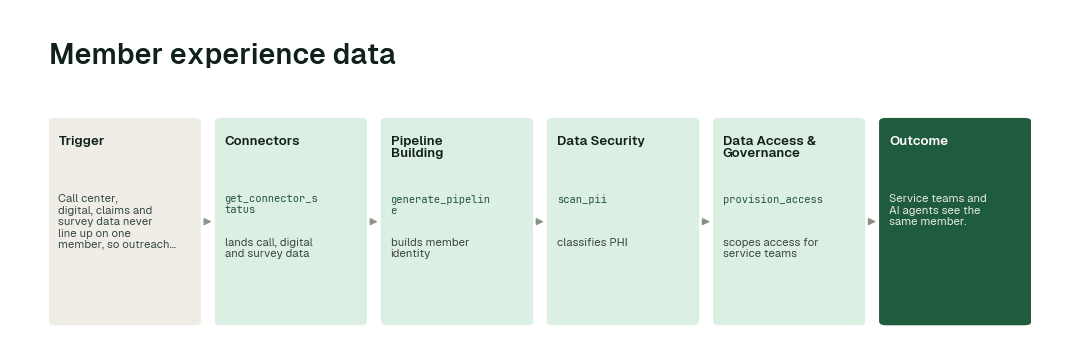
The workflow, step by step
- 1.The Connectors agent calls
get_connector_statusand lands call, digital and survey data. - 2.The Pipeline Building agent calls
generate_pipelineand builds member identity. - 3.The Data Security agent calls
scan_piiand classifies PHI. - 4.The Data Access & Governance agent calls
provision_accessand scopes access for service teams.
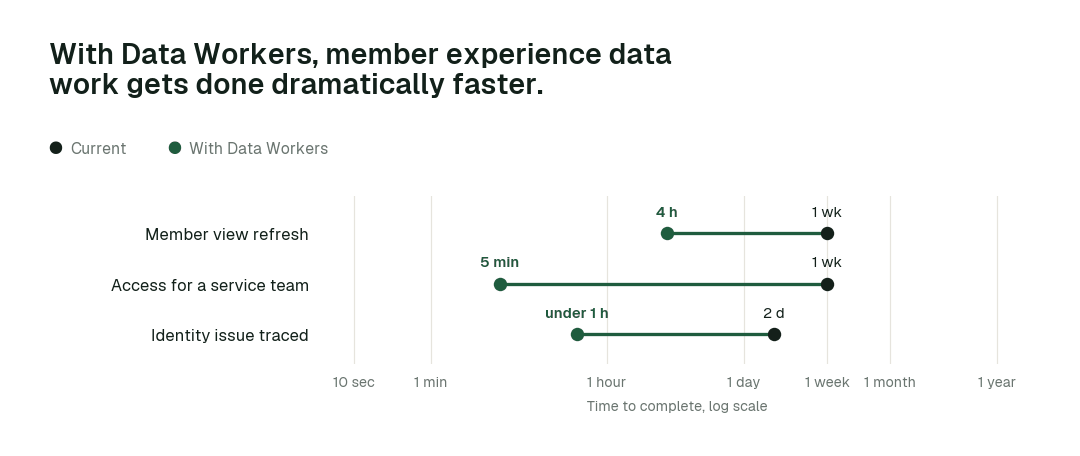
The impact metrics we move
- •Member view refresh: from about a week to 4 h
- •Access for a service team: from about a week to 5 min
- •Identity issue traced: from about 2 days to under 1 h
What goes on autopilot
- •Member identity is maintained across systems, so outreach reaches the right person.
- •PHI is classified on arrival, so service data stays compliant.
Where your people stay in charge
Changes to identity rules always go to a named approver, because they decide who receives outreach. Everything starts at L1, observing only, and autonomy rises only on evidence.
The pilot
- •Scope. Member identity across two systems.
- •First week. Agents run at L1, observing only, and show the fixes they would have made, with receipts.
- •By week two. The routine work above runs on its own; anything sensitive stays with a named approver.
- •At day 30. We review the impact metrics against your baseline:
- •Member view refresh: from about a week to 4 h
- •Access for a service team: from about a week to 5 min
- •Identity issue traced: from about 2 days to under 1 h
- •Cost. Start with a pilot ($7,500 one-time, credited in full against the first year). Scale is from $1,000 a month and Enterprise from $3,000 a month, billed annually, with unlimited seats, no usage meter and no markup on model spend. See pricing.