Audit logging for data access, run by agents
Every audit cycle asks who accessed which data and what changed it, and the answers sit in warehouse history, identity logs and now agent activity, each with its own format and retention. Here is how Data Workers keeps them in one tamper-evident record and compiles the evidence for your SOC 2 and ISO 27001 auditors.
Key takeaways
- •The problem today. Who accessed which data lives in warehouse history, identity logs and BI tools, and what AI agents changed often lives nowhere. Every audit request becomes a manual export and join.
- •What changes. Agents read access and query history from each warehouse and set it beside a tamper-evident trail of every agent action, then compile the evidence pack an auditor asks for.
- •What stays with your people. Access exceptions and anything that changes what is logged or kept go to a named approver. The auditor decides what the evidence satisfies.
- •The result. An auditor's sample request is answered from one record in hours, not assembled over weeks.
The problem today
SOC 2 and ISO 27001 auditors ask the same questions each cycle: who could reach this data, who did, and what changed it. The answers are spread across systems. Snowflake's ACCESS_HISTORY view records the tables and columns each query touched, but only for the last 365 days and only on Enterprise Edition; Databricks and BigQuery keep their own history in their own shape. Identity logs, BI tool logs and orchestrator run history add three more formats, each with its own owner.
Someone on the platform team exports these at quarter end, joins them by hand and hopes the window still exists. AI agents widen the gap. An assistant that ran a query or altered a table rarely leaves a record tied to an approval. Our notes on what to record for MCP audit logging and audit trail requirements for data agents cover the requirements. For the security and observability telemetry team this is a log-source problem; for the data platform team it is an evidence problem.
What changes with Data Workers
Agents treat audit evidence as a data product for the data platform and governance teams that own it. They read query and access history from each warehouse, read-only, and check every access against policy and the entitlement that was granted. Every Data Workers agent action already leaves a tamper-evident audit trail: what was asked, who approved it, what ran and the result. The two sit side by side, so one question covers both people and agents.
For an auditor's request the agents compile an evidence pack per control and the auditor samples from it. As we explain in how Data Workers helps with SOX, HIPAA, GDPR and the EU AI Act, the platform supplies controls and evidence, not a compliance conclusion. The SOC 2 guide for data platforms shows where this fits, and agent observability covers watching the agents themselves. Finance-side SOX requests follow the audit and controls workflow.
The workflow, step by step
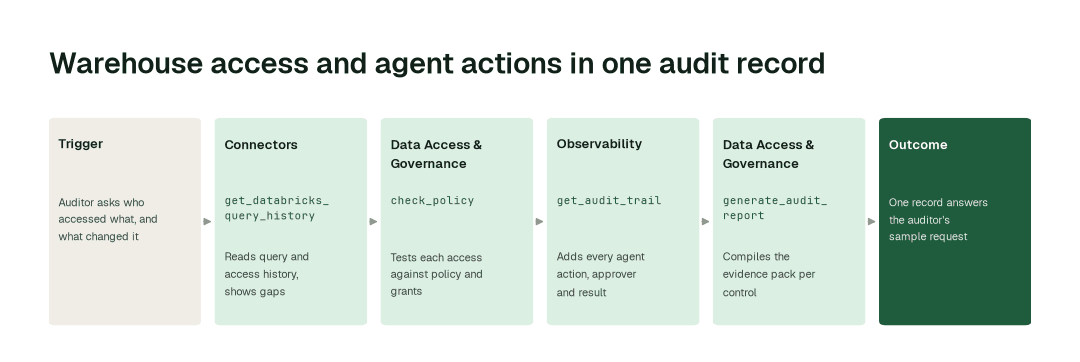
- 1.The Connectors agent calls
get_databricks_query_historyand reads query and access history from each warehouse, showing where history is missing. - 2.The Data Access & Governance agent calls
check_policyand tests each access against policy and granted entitlement, listing access outside either. - 3.The Observability agent calls
get_audit_trailand adds every agent action with its approver, what ran and the result. - 4.The Data Access & Governance agent calls
generate_audit_reportand compiles the evidence pack for the control the auditor named.
The impact metrics we move
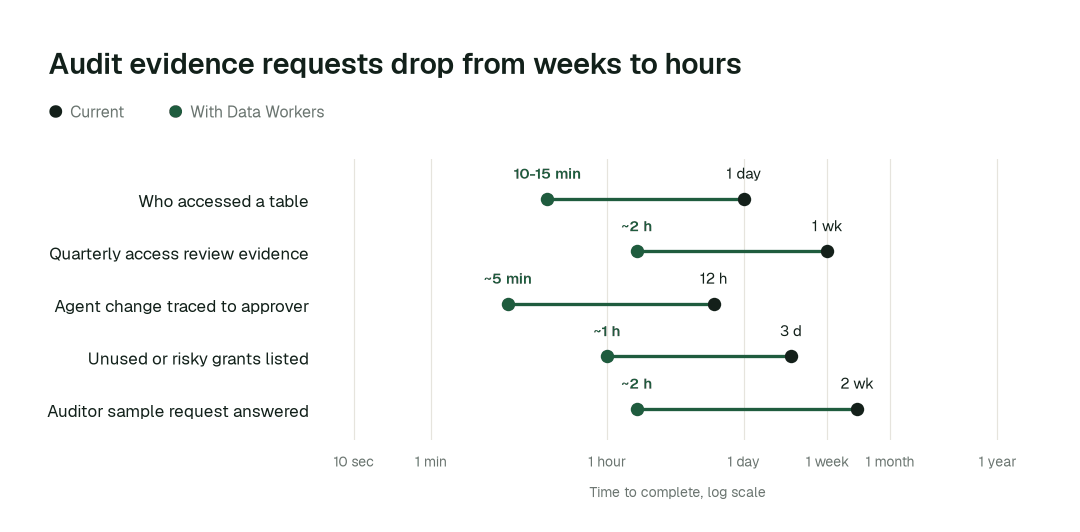
- •Who accessed a table in the audit window: from about a day to 10-15 min
- •Quarterly access review evidence: from about a week to ~2 h
- •Agent change traced to its approver: from about half a day to ~5 min
- •Unused or out-of-policy grants listed: from about 3 days to ~1 h
- •Auditor sample request answered: from about 2 weeks to ~2 h
What goes on autopilot
- •Access history is checked on a schedule, so a grant nobody used or a source that went silent surfaces before the audit.
- •Every agent action is recorded as it happens, so the evidence exists before anyone asks for it.
Where your people stay in charge
Access exceptions go to the data owner as a proposal to keep or revoke, and nothing is revoked without a named approver. Changes to what is logged, for how long, or to the scope of an evidence pack go to the security lead. Everything starts at L1, observing only, and autonomy rises only on evidence.
The pilot
- •Scope. Access evidence for one warehouse and one control family, such as access to production tables holding sensitive data, plus agent actions, at L2.
- •First week. Agents run at L1, observing only, and show the evidence pack they would have compiled, with receipts.
- •By week two. The routine checks above run on their own; anything touching a grant stays with a named approver.
- •At day 30. We review the impact metrics against your baseline:
- •Who accessed a table in the audit window: from about a day to 10-15 min
- •Quarterly access review evidence: from about a week to ~2 h
- •Agent change traced to its approver: from about half a day to ~5 min
- •Unused or out-of-policy grants listed: from about 3 days to ~1 h
- •Unused or out-of-policy grants listed: from about 3 days to ~1 h
- •Auditor sample request answered: from about 2 weeks to ~2 h
- •Cost. Start with a pilot ($7,500 one-time, credited in full against the first year). Scale is from $1,000 a month and Enterprise from $3,000 a month, billed annually, with unlimited seats, no usage meter and no markup on model spend. See pricing.