You're on Salesforce Data 360 (formerly Data Cloud): Keep Every Insight and Segment True to the Warehouse Behind It
Data 360 unifies CRM and warehouse data into profiles, insights and segments. Data Workers traces Zero Copy lineage, catches drift and fixes it with approvals.
Your customer data comes together in Salesforce Data 360 (formerly Data Cloud). Data streams bring in CRM and engagement data, and Zero Copy reads your Snowflake, Databricks, Google BigQuery and AWS data in place. Identity resolution builds unified profiles, calculated insights score lifetime value and propensity to buy, segments decide who gets which journey, and activation sends them to Marketing Cloud, ads and Agentforce. Semantic models name the numbers, the Agent Context Engine turns records and documents into business context for agents, and the Data 360 MCP Server (Summer '26 release notes, available since July 2026) lets Claude Code, Cursor, ChatGPT and other MCP clients query profiles, manage calculated insights and trigger segmentation, on the user's own Salesforce permissions. Data 360 is where your customer meaning lives. Data Context Wizard is where every agent reads it, next to warehouse lineage, quality and usage, with a named owner on every fact, and Data Workers fixes drift on the warehouse side with approvals and receipts.
A lifetime value insight is only as right as the revenue column it reads, and that column lives in a dbt project owned by your analytics engineers. When its definition changes for a good reason, the insight and every segment built on it move overnight. This guide covers that seam.
Key takeaways
- •Data 360 keeps its job. Data streams, identity resolution, calculated insights, segments and activation stay where they are. Data Workers works on the warehouse and pipelines Data 360 reads, from day one.
- •Zero Copy lineage becomes one picture. Data Context Wizard joins insights and segments to the dbt models, ingestion jobs and sources behind them.
- •Drift is caught before activation. A changed definition, shifted distribution or schema change is flagged with its blast radius before the next refresh or publish.
- •Fixes land where they belong. Warehouse fixes land as a dbt diff for the owner to merge; Data 360 changes go to its admin as a proposal. Every approval names a person and leaves a receipt.
- •Start with one segment. Pick one activated segment, watch everything under it read-only, then enable the first fix class on the ladder from L0 manual to L4 autonomous.
Data 360 is where your customer meaning lives. Data Workers keeps it true to the warehouse.
Data 360 is built to unify and act. It knows who the customer is, which calculated insights describe them and which segments they belong to, and it reads warehouse tables in place. Salesforce describes Data 360 Headless as extending "trusted business context to any agent, app, or surface beyond Salesforce." Upstream sit Stripe, Airbyte or Debezium, dbt models on Databricks or Snowflake, and the people who own each definition. Data Workers covers that side with one context, one approval flow and one audit trail.
Here is a Tuesday night with Data Workers next to Data 360. This is an illustration, not a customer case.
| Time | System | What happens |
|---|---|---|
| 16:10 | dbt (GitHub) | A pull request changes fct_account_revenue.revenue_12m to net of refunds and credits. It is correct for finance, and finance approves it |
| 21:30 | Stripe + Airbyte | The evening sync lands the day's refunds and credits in Databricks |
| 22:00 | Databricks | The scheduled job builds the dbt models; every test passes, because the new values are valid |
| 22:20 | Data Workers | Detects a shift in revenue_12m across 41,000 accounts and links it to the 16:10 change |
| 22:24 | Data 360 | The CRM admin's assistant reads the Data 360 side over its MCP server and hands it to Data Workers: the table reaches Data 360 through Zero Copy Delta Sharing, the Customer Lifetime Value calculated insight reads revenue_12m, and the VIP Loyalty segment filters on lifetime value above 5,000. 2,140 of 11,800 members would drop out |
| 22:30 | Data Workers | Records the conflict: finance's revenue now means net, the segment's threshold was set on gross. Both owners are named |
| 22:40 | Spellbook | Data Workers proposes two changes with their blast radius: a dbt diff that adds revenue_12m_gross next to the net column, and a proposal for the Data 360 admin to repoint the insight to it |
| 23:05 | Spellbook | The revenue model owner approves the dbt change; the segment owner in marketing operations confirms VIP stays on gross revenue |
| 23:30 | Databricks + dbt | CI passes and the rebuild adds revenue_12m_gross; Data Workers checks it matches Monday's values for every account |
| 23:45 | Data 360 | The Data 360 admin repoints the calculated insight in Data 360 and refreshes it |
| 05:30 | Data Workers | Verifies the segment: 11,790 members against 11,800 on Monday, the difference being 10 real changes. Writes the receipt |
| 06:00 | Marketing Cloud | The loyalty journey activates to the right customers |
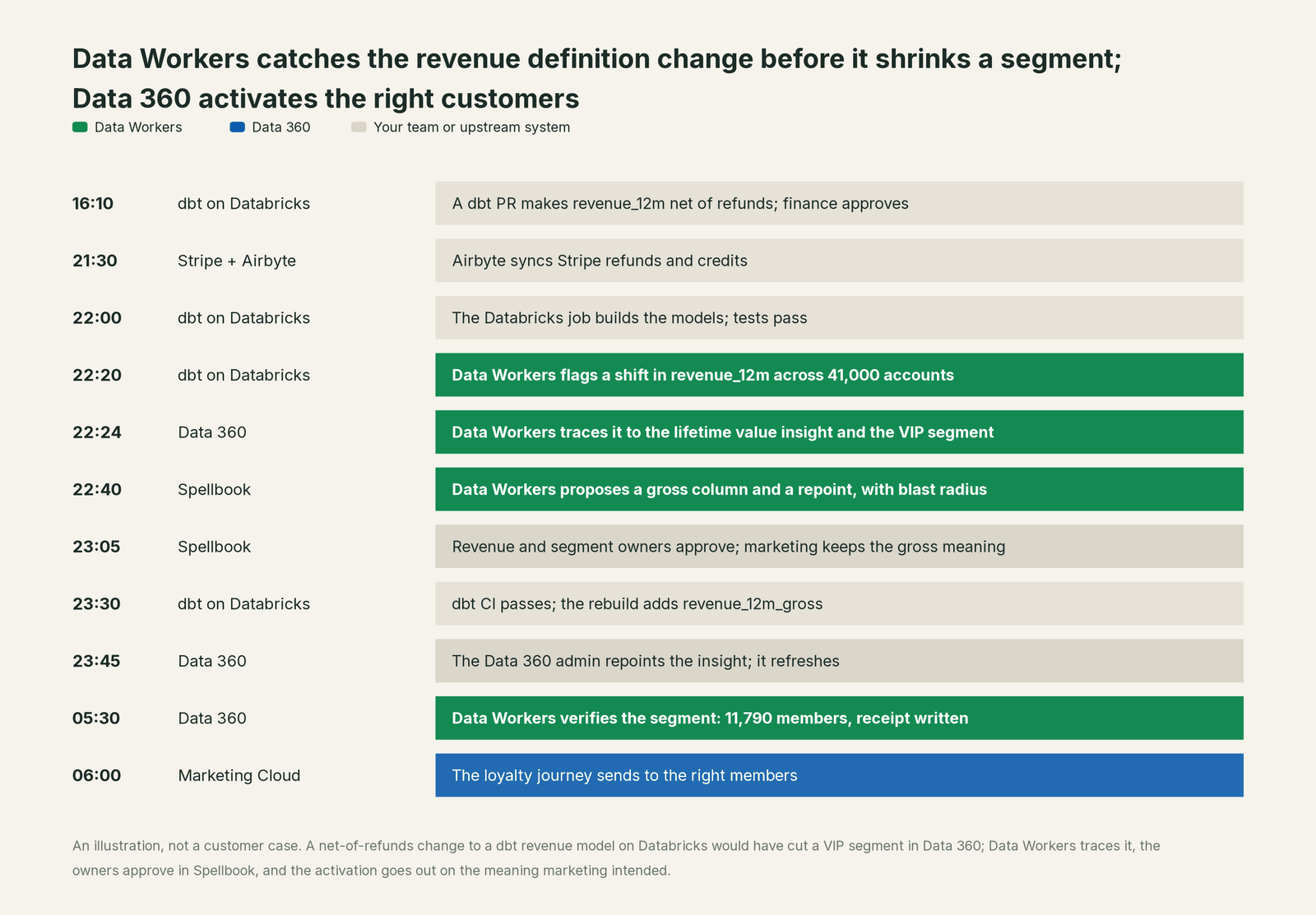
Nothing was broken in the usual sense. Finance made the right change, dbt's tests passed and Data 360 read exactly what the warehouse held. One word, revenue, now meant two things to two teams, and a segment sat on the seam. Data Workers saw both sides, named both owners and landed each fix in the system its owner runs.
| Job | What Data 360 does | What Data Workers does |
|---|---|---|
| The customer | Resolves identities into unified profiles across CRM, engagement and warehouse data | Keeps the warehouse tables behind those profiles correct and current |
| The meaning | Holds calculated insights, segments and semantic models in Salesforce's metadata | Reads them as context with provenance and joins them to warehouse lineage, quality, usage and owners |
| The feed | Reads warehouse tables through Zero Copy and brings in data streams through 200+ connectors | Watches the dbt models, ingestion jobs and sources that feed those tables |
| The drift | Refreshes insights and segments from what it reads | Detects definition, distribution and schema changes upstream and traces them to every insight and segment |
| The fix | Runs the changes your Data 360 admin makes | Proposes warehouse fixes as a diff for the owner to merge and sends Data 360 changes to the admin as a proposal, each with a named approver |
| The proof | Keeps refresh history for data graphs and calculated insights | Verifies segment counts and values after the fix and writes a receipt with cause, diff, approver and rollback |
Why doesn't Data 360 just do this itself?
Because Salesforce built Data 360 to unify customer data and put it to work across Salesforce, and its design is right for that job. Zero Copy reads your warehouse in place, deliberately, so your data team keeps ownership of those tables. The dbt project, the connectors, the Databricks jobs and the people who approve a change to revenue sit outside Salesforce, by design.
Repairing that side is a different product. A fix to fct_account_revenue needs to know which calculated insights, segments, Tableau dashboards, finance reports and machine learning features read it. It needs the model owner's approval, a rollback path, a before-and-after check and a receipt that ties the change to its cause, plus someone to carry the responsibility for changes inside tools Salesforce doesn't run. The Data 360 MCP Server draws a sensible line: it "uses your Salesforce permissions for any actions that agents take on your behalf." Salesforce governs what happens inside Salesforce and leaves your warehouse to the team that owns it.
Focus matters too: a Data 360 admin should be thinking about customers, not about which dbt pull request merged at 16:10.
Every tool owns a slice. Data Workers covers the whole lifecycle
Data 360 owns one slice of the data lifecycle outright: unified customer profiles, the insights computed on them and the segments that act on them. Each point tool adds another console, another contract and another handoff. Data Workers covers the whole lifecycle with one context, one approval flow and one audit trail, and builds on the Data 360 you already run.
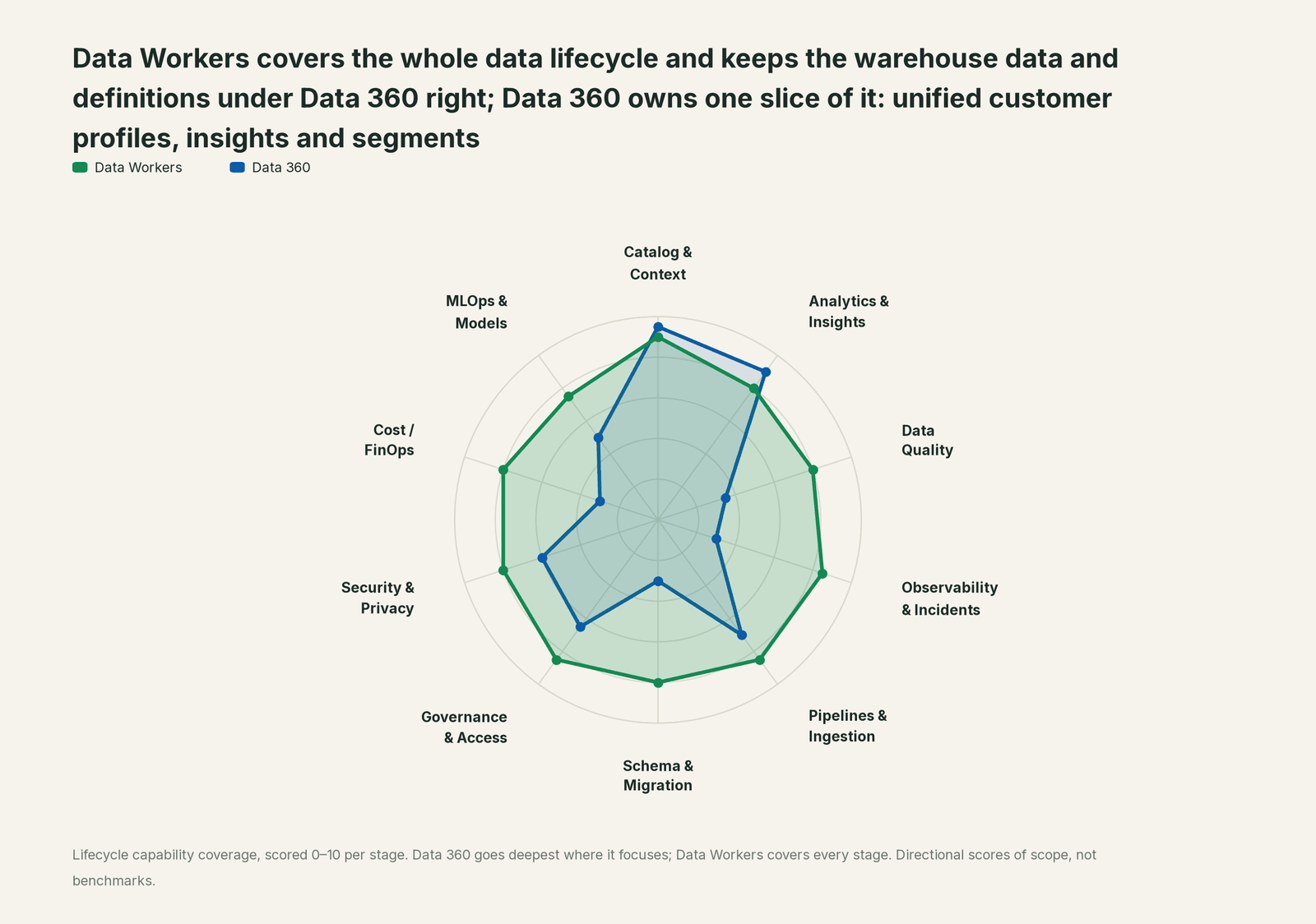
| Stage | Data Workers | Data 360 | Why we scored it this way |
|---|---|---|---|
| Catalog & Context | 9 | 9.5 | Data 360's home stage: unified profiles, identity resolution, data graphs and semantic models turn CRM and warehouse data into customer context that every Salesforce app and agent reads. Data Workers brings that context in next to warehouse lineage, quality and owners. |
| Analytics & Insights | 8 | 9 | Data 360's other home stage: calculated insights such as lifetime value and engagement scores, segments and Tableau Semantics answer who the customer is and who to act on. Data Workers answers from governed definitions with lineage behind every number. |
| Data Quality | 8 | 3.5 | Salesforce lists data quality and classification in its governance layer for AI, and dbt tests stay in the warehouse. Data Workers watches the values and distributions feeding each calculated insight and repairs breaks upstream. |
| Observability & Incidents | 8.5 | 3 | Data 360 shows refresh history for data graphs and calculated insight object history (Beta). Data Workers detects a drifted input upstream, traces it into insights and segments, fixes and verifies it. |
| Pipelines & Ingestion | 8.5 | 7 | Strong ingestion: 200+ connectors, MuleSoft, and Zero Copy to Snowflake, Databricks, Google BigQuery and AWS. Data Workers builds, reruns and backfills the warehouse pipelines behind those tables, with approvals. |
| Schema & Migration | 8 | 3 | Data 360 maps incoming fields into data model objects. Data Workers catches upstream schema and definition changes before they reach a mapping, with blast radius to every insight and segment. |
| Governance & Access | 8.5 | 6.5 | Strong over its own estate: data spaces and data governance policies, now extended to external users. Data Workers proposes and applies least-privilege grants on the warehouse side. |
| Security & Privacy | 8 | 6 | The Einstein Trust Layer and Salesforce permissions wrap agent access, and the Data 360 MCP Server acts on the user's permissions. Data Workers flags sensitive column names in pull request review and leaves a receipt on every change. |
| Cost / FinOps | 8 | 3 | Consumption credits are tracked in Salesforce. Data Workers traces Snowflake credits to the dbt model behind them and drafts the fix for its owner. |
| MLOps & Models | 7.5 | 5 | Predictive insights can be added to semantic models (Beta). Data Workers keeps the data under your models healthy and connects to MLflow and W&B. |
How Data 360 and Data Workers work together
People and agents stay where they work: Agentforce and Slack for the business, Claude Code or Cursor for the data team. Spellbook Data Catalog (in preview) is where the data team looks: each proposed change with its blast radius, approver and rollback. Underneath: Data Context Wizard keeps one governed context graph across Data 360, Databricks or Snowflake, dbt and ingestion; the Data-Agents Swarm does the work with more than 20 specialist agents; the Autonomous Data-Conductor runs each fix end to end (detect, diagnose, fix, review, verify, remember); and per-domain guardrails hold approvals and rollback.
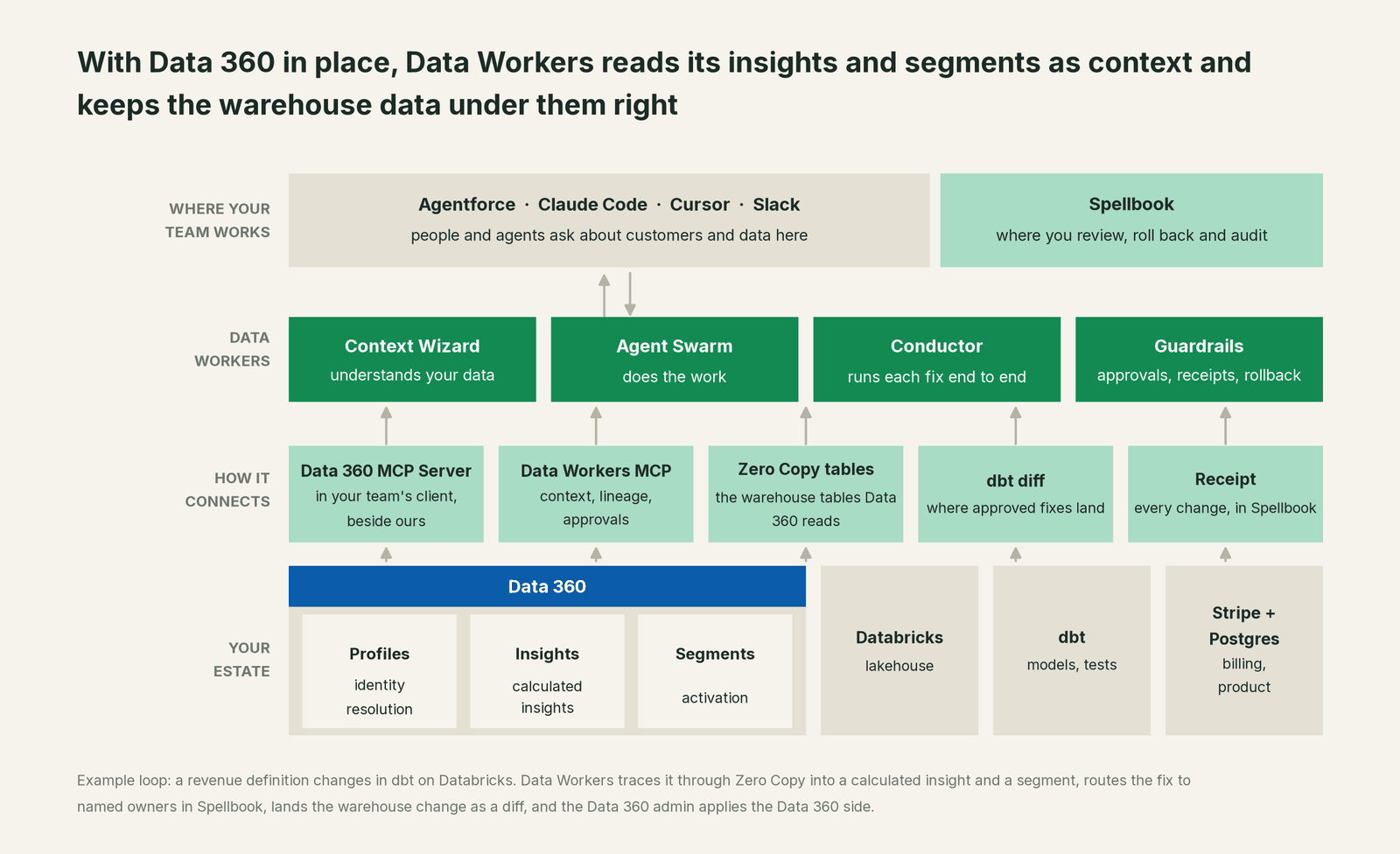
What Context Wizard does with Data 360. Data Workers connects to Data 360 over its MCP server or API today. Context Wizard reads which streams and Zero Copy tables feed which data model objects, which insights read which fields and which segments filter on them, recording each fact with source, time and owner. It joins that to the lineage it traces across Databricks, Snowflake, BigQuery, dbt, Airbyte, Fivetran and Debezium, so trace_cross_platform_lineage follows the VIP segment back through the lifetime value insight and fct_account_revenue to Stripe. When Data 360 and the warehouse disagree on a metric, the conflict goes to a named owner, and agents see both candidates and their sources until the owner decides.
Setup over MCP today. Two servers, side by side in one client. Data Workers' agents are MCP servers from the open-source repository: clone it and add start-agent.sh entries to your client config, as the client setup docs show. The Data 360 MCP Server connects through an external client app in your org with the refresh_token, mcp_api and cdp_api scopes and acts on the connecting user's Salesforce permissions. Connect it as an integration user that can read profiles, insights and segments but not change them.
Example: one client, two MCP servers
Data 360 MCP Server
  Auth:        external client app in your Salesforce org
               (scopes: refresh_token, mcp_api, cdp_api)
  User:        a read-only integration user for Data 360
  Used for:    data streams, calculated insights, segments
Data Workers (from the open-source repository)
  Agents:      dw-context-catalog, dw-schema, dw-quality, dw-incidents
  Config:      one start-agent.sh entry per agent in the client config
  Read first:  search_across_platforms, trace_cross_platform_lineage,
               explain_table, resolve_metric, get_incident_history,
               get_quality_score
  Later:       assess_impact, blast_radius_analysis,
               diagnose_incident, remediate (one domain at a time)
List the tools in your client with its own command (for example /mcp in Claude Code). With both connected, an analytics engineer can ask "what feeds the VIP Loyalty segment, and did anything under it change tonight?" and get the insight and filter from Data 360, plus lineage, the latest run_quality_check and get_quality_score results on fct_account_revenue and open incidents from Data Workers, in one answer.
To call Data Workers from Agentforce, the Salesforce Agentforce guide covers registering it in the Salesforce API Catalog. Data Workers on Snowflake and Data Workers on Databricks cover the tables behind Zero Copy.
Where writes go. Warehouse fixes land where your team already reviews change: a dbt diff for the owner to merge, an ingestion job change, a backfill on Databricks or Snowflake. Changes inside Data 360, such as repointing a calculated insight, go to the Data 360 admin as a proposal with the evidence attached. Data 360's own model stays with the people who run it, by design.
One request, L0 to L4. The request: "Why did the VIP segment shrink overnight?" The autonomy ladder is set per domain.

- •L0 manual. A marketing operations lead files a ticket and an analytics engineer traces the segment back by hand.
- •L1 observe. Data Workers answers with lineage: the segment filters on the lifetime value insight, which reads
revenue_12m, whose definition changed at 16:10. Nothing changes. - •L2 propose. Data Workers drafts the dbt diff and the Data 360 proposal with their blast radius. Nothing runs until the owners approve in Spellbook and CI passes.
- •L3 act reversibly. For proven change classes, such as backfilling a late Stripe sync before the insight refresh, Data Workers applies the change with the undo recorded first and verifies segment counts; a failed check goes to a named person.
- •L4 autonomous. For a scoped domain like freshness of the tables behind activated segments, Data Workers fixes overnight and posts the receipt for review.
For the safety model, read is it safe to let AI agents change production data; for where data and credentials live, where does our data go.
The same pattern holds for every source of meaning: see bring your own context and the guides on SAP Business Data Cloud, Palantir Ontology and Glean.
What changes for your team
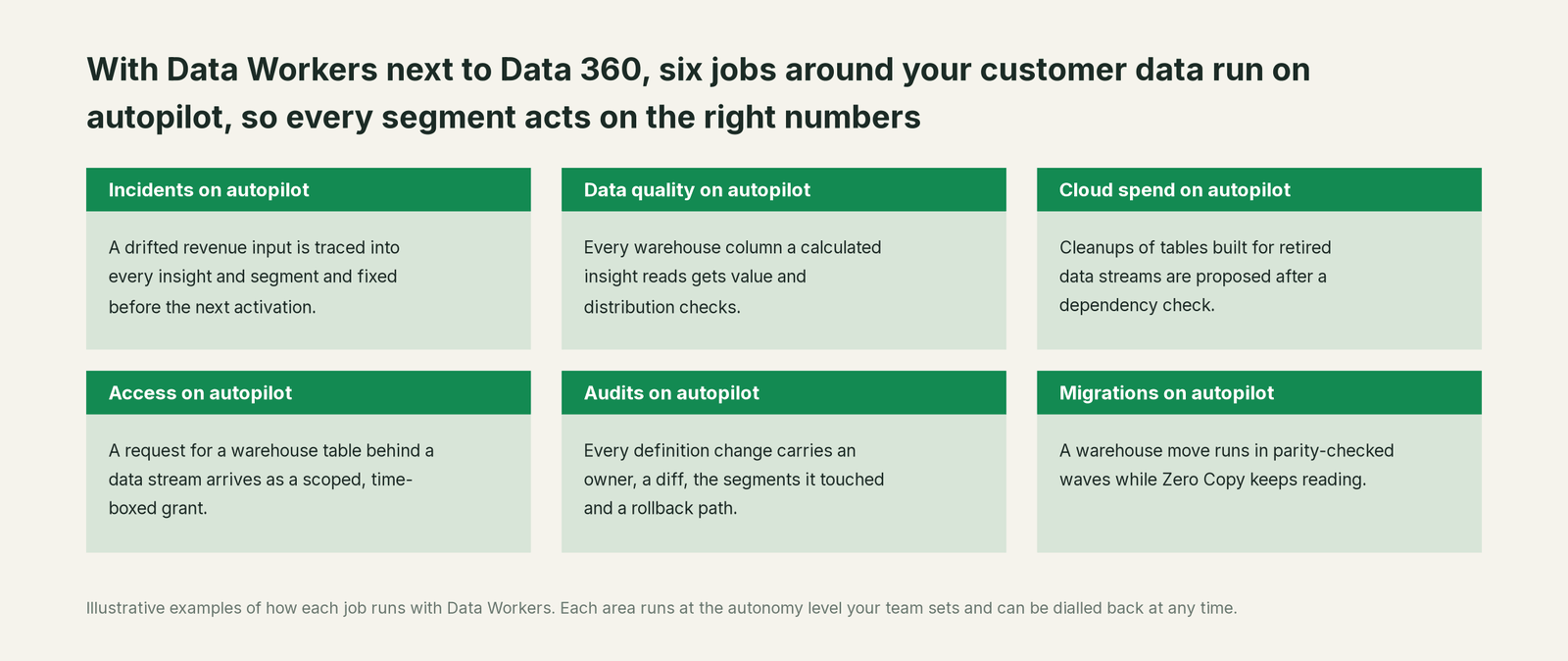
Data 360 teams spend much of the week reconciling a segment count that jumped or an insight that disagrees with finance. With Data Workers next to it, those jobs run on autopilot at the level you set.
- •Incidents. A drifted input, failed sync or renamed column is traced into every insight and segment and fixed before the next activation.
- •Data quality. Every warehouse column a calculated insight reads gets value, null and distribution checks.
- •Cloud spend. Cleanups of tables and dbt models built for retired data streams are proposed to the owner after a dependency check.
- •Access. A request for a warehouse table behind a data stream arrives as a scoped, time-boxed grant proposal for its owner.
- •Audits. Every definition change carries an owner, a diff, the segments it touched and a rollback path, so "why did this customer get that offer?" has an answer.
- •Migrations. A warehouse move runs in parity-checked waves while Zero Copy keeps reading the same tables.
Data 360 admins get their week back for identity rules, new insights and the segments the business is waiting for.
Keep Data 360, or consolidate?
Keep Data 360 if you love it; Data Workers works with it from day one. Many teams consolidate once Data Workers runs that slice too.
For Salesforce customers the answer is almost always to keep it: Data 360 runs profiles, insights and activation on the metadata, permissions and Trust Layer your admins trust. What teams consolidate is the tooling around it: a warehouse observability tool, a data-quality tool, a spreadsheet mapping segments to dbt models and the scripts that compare counts. If you are weighing building this layer yourself on the Data 360 MCP Server, read build it ourselves with Claude Code and MCP servers first: the connection is the easy part; the cross-system context, approvals and rollback are the work.
The case for your CFO
The outcome: the company invested in Data 360 so every team and agent acts on one view of the customer. Data Workers keeps the warehouse numbers under that view correct, current and explained, so every offer and agent answer goes to the right customer.
The risk story is plain. Data Workers reads Data 360 with a read-only integration user. Every proposed change shows its blast radius, goes to a named approver, lands through your normal review flow or the Data 360 admin, is verified after the refresh and leaves a receipt: who approved it, what it touched and how to undo it. Autonomy is set per domain from L0 manual to L4 autonomous and can be dialled back at any time. Zero migration: Data 360, Zero Copy, Databricks or Snowflake, dbt and your ingestion stay where they are.
Why now: agents can now manage calculated insights and trigger segmentation over the Data 360 MCP Server, so a definition change reaches customers faster than any weekly review. The first win is one activated segment watched read-only, so the next upstream change is caught before the activation. What stays the same: your Data 360 configuration, Salesforce permissions, warehouse permissions and your dbt review process. For the numbers, see the ROI of agentic data operations. Start with a pilot (pricing); the pilot is credited in full against the first year.
The sentence to repeat upstairs: "Data 360 is our view of the customer; Data Workers keeps the warehouse numbers under it right, and fixes them with an approval and a receipt when they drift."
Getting started
Start with a pilot. Pick one activated segment that matters, connect the Data 360 MCP Server read-only next to Data Workers, and let Data Workers watch the insights, Zero Copy tables and dbt models under it for a few weeks before enabling the first fix class. The pilot path and plans are on the pricing page, and the pilot is credited in full against the first year.
FAQ
Does Data Workers write to Data 360? Your team's assistant reads Data 360 over its MCP server with a read-only integration user, side by side with Data Workers. Changes inside Data 360, such as repointing a calculated insight, go to your Data 360 admin as a proposal with the evidence. Warehouse fixes land as dbt diffs or pipeline changes your owners approve in Spellbook.
Zero Copy means no pipelines into Salesforce. Why does the warehouse side still matter? Zero Copy reads your warehouse tables in place, so Data 360 reads whatever they hold. A changed revenue definition, a late sync or a renamed column moves every insight and segment built on that table. Keeping those tables right is the job Data Workers does.
How does lineage reach from a segment back to the source? Context Wizard records which Zero Copy tables and fields each data model object, calculated insight and segment reads, and joins that to its lineage across dbt, ingestion and sources. trace_cross_platform_lineage follows a segment back to the Stripe or Postgres field it depends on.
What happens when Data 360 and the warehouse disagree on a metric? The conflict goes to the named owners on both sides; agents see both definitions and their sources until the owners decide, and the decision is recorded. Often each meaning gets its own named column, as in the example above.
We already use Agentforce. Is this the same setup? It is the same Data Workers deployment. Agentforce calls Data Workers through an MCP server registered in the Salesforce API Catalog, as the Agentforce guide shows. This guide covers insights and segments; that one covers agent actions.
Does this work if our Zero Copy tables are in Snowflake, Databricks or BigQuery? Yes. Data Workers connects directly to Snowflake, Databricks and BigQuery, and to dbt, Airbyte, Fivetran and Debezium, where most breaks under Data 360 start.
Sources
- •Salesforce, Data 360 (formerly Data Cloud): Zero Copy, identity resolution, calculated insights, Data 360 Headless, pricing, https://www.salesforce.com/data/ (checked Oct 2, 2026)
- •Salesforce, Data 360 Connectivity (200+ connectors, Zero Copy), https://www.salesforce.com/data/connectivity/ (checked Oct 2, 2026)
- •Salesforce Help, Summer '26 release notes: Connect Agents Using Data 360 MCP Server (available starting in July 2026; Developer, Enterprise, Performance and Unlimited editions), https://help.salesforce.com/s/articleView?id=release-notes.rn_cdp_2026_summer_data_360_mcp_server.htm&release=262&type=5 (checked Oct 2, 2026)
- •Salesforce Help, Summer '26 release notes: Use the Snowflake Zero-Copy V2 Connector for Enhanced Data Sharing, https://help.salesforce.com/s/articleView?id=release-notes.rn_cdp_2026_summer_snowflake_v2.htm&release=262&type=5 (checked Oct 2, 2026)
- •Salesforce Help, Summer '26 release notes: Govern and Secure Data 360 and the Data 360 feature index (semantic models, calculated insight object history, segments, data governance policies), https://help.salesforce.com/s/articleView?id=release-notes.rn_data_govern_secure.htm&release=262&type=5 (checked Oct 2, 2026)
- •Salesforce, Tableau Next (Tableau Semantics, the semantic layer integrated into Data 360), https://www.salesforce.com/analytics/tableau-next/ (checked Oct 2, 2026)
- •Salesforce News, Five Big Ideas Coming Out of Dreamforce 2026 (trusted governance "covers data quality, classification, and policy enforcement"; Sept 24, 2026), https://www.salesforce.com/news/stories/five-dreamforce-2026-takeaways/ (checked Oct 2, 2026)
- •Data Workers, Client setup (open-source docs), https://dataworkers.io/opensource-docs/client-setup/ (checked Oct 2, 2026)
- •Data Workers open-source repository (tool registrations in dw-context-catalog, dw-schema, dw-quality, dw-incidents), https://github.com/DataWorkersProject/dataworkers-claw-community (checked Oct 2, 2026)