Snowflake Data Quality Alerts to the Autonomous Data-Conductor: Route Failed DMF Expectations to a Verified Fix
Wire failed Snowflake DMF expectations into the Autonomous Data-Conductor: the expectation status view, a serverless alert, Slack notifications, and one run to a verified fix.
Your team has attached data metric functions to the tables that matter: DUPLICATE_COUNT on primary keys, NULL_PERCENT on revenue columns, FRESHNESS across the marts schema, each with an expectation. When one fails, Snowflake records the violation and posts it to Slack, Teams or PagerDuty. Then a person opens Snowsight, works out which dbt model or Airflow DAG run caused it, writes the fix and checks the table again.
The DMF expectation is the alarm, and Snowflake's notification integration pages the person. The Autonomous Data-Conductor is the first responder: it picks up the same violation, traces the cause, proposes the fix to a named approver, re-runs the check and leaves a receipt. This guide wires the two over Data Workers' Snowflake connection today, with one run end to end. For choosing between them, read Snowflake data quality (DMFs) vs the Autonomous Data-Conductor.
Key takeaways
- •Your DMFs and notifications stay as they are. Snowflake keeps running the checks and paging people.
- •The Conductor reads violations over SQL.
SNOWFLAKE.LOCAL.DATA_QUALITY_MONITORING_EXPECTATION_STATUShas one row per evaluation, withexpectation_violated. A serverless Snowflake alert copies new violations into a queue table Data Workers reads. - •Every fix goes to a named approver. Data Workers proposes a dbt diff or an Airflow rerun; your on-call engineer approves it.
- •Verification is the DMF itself. The fix isn't closed until the check passes again and the downstream number matches its source.
- •Every run leaves a receipt: the violation, the cause, the change, the approver and the checks.
What this connects
On the Snowflake side, three documented surfaces, all Enterprise Edition. The expectation status view holds every evaluation that carries an expectation: table, metric, value, expectation name and expression, and expectation_violated (TRUE when violated, NULL when the evaluation failed). Reading it takes the SNOWFLAKE.DATA_QUALITY_MONITORING_VIEWER application role. Snowflake alerts (CREATE ALERT) run a SQL condition on a schedule and take a SQL action, serverless when you leave out the warehouse. Notification integrations send failed expectations and anomalies to email or a webhook, and Snowflake documents webhooks for Slack, Microsoft Teams, PagerDuty, Jira and ServiceNow only. So people get paged by webhook, and Data Workers reads the violation from Snowflake directly.
On the Data Workers side: the Snowflake connector, which runs SQL under a role you grant, and the agents the Conductor directs. The insights agent reads the queue table and the status view with read-only SQL, behind a fail-closed guard that rejects any statement it can't prove is read-only. The quality agent profiles tables and runs checks. The incidents agent diagnoses, traces root cause through lineage, re-checks live state before acting and records the timeline. Data Workers is the agentic data platform that runs the whole data lifecycle, so the same loop reaches dbt and Airflow, where most fixes land. The approver sees the incident in Spellbook Data Catalog (in preview). For the wider estate, see what Data Workers adds on Snowflake.
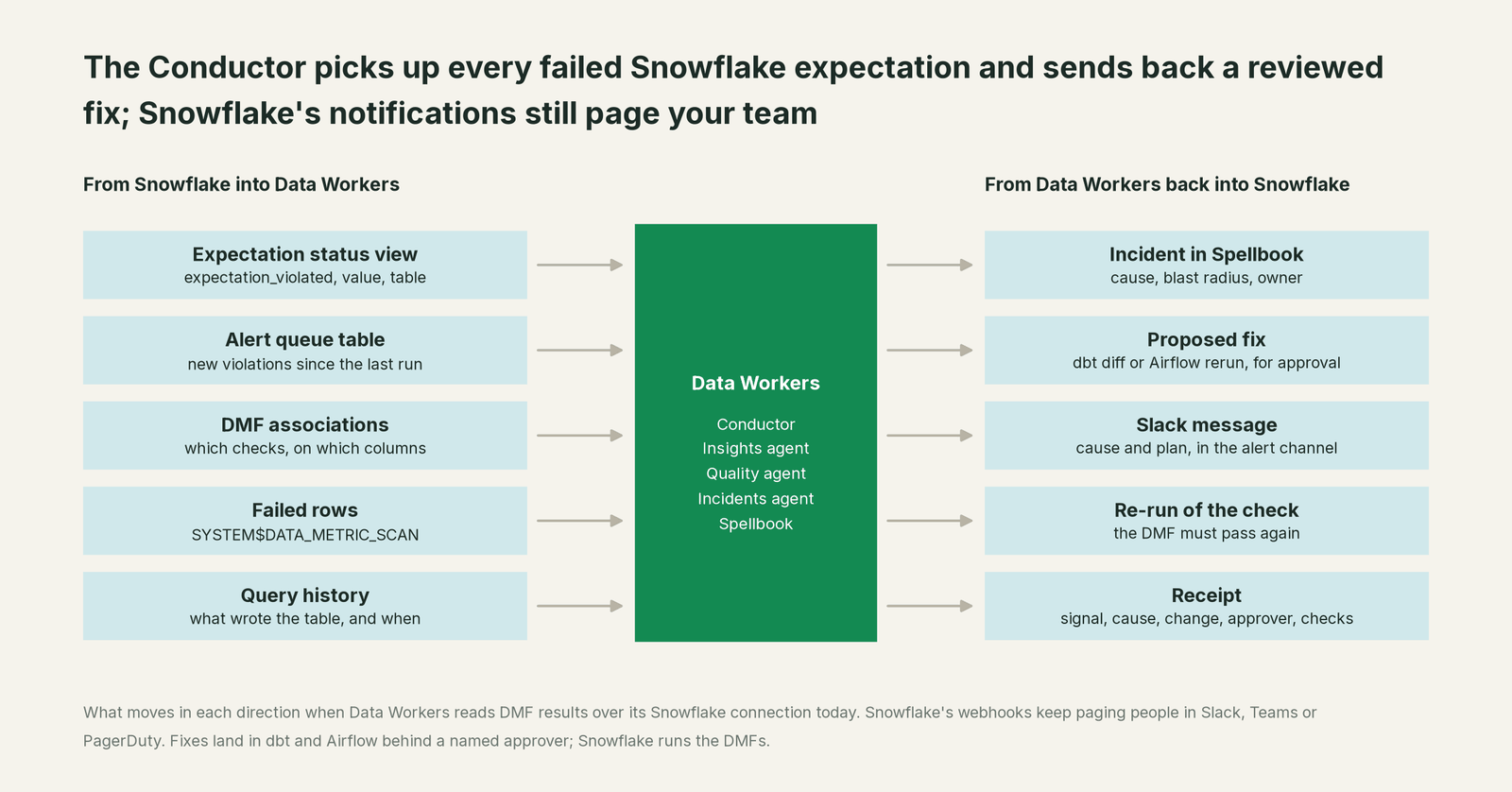
What moves in each direction
| From Snowflake into Data Workers | From Data Workers back to Snowflake and your team |
|---|---|
Expectation status rows: table, metric, value, expectation, expectation_violated | An incident in Spellbook with cause, blast radius and owner |
| The alert queue table: new violations since the last run | A proposed fix: dbt diff or Airflow rerun, for approval |
| DMF associations: which checks run on which columns | A Slack message in the alert channel with the cause and the plan |
Failed rows from SYSTEM$DATA_METRIC_SCAN | A re-run of the same DMF after the fix |
| Query history: what wrote the table, and when | A receipt for every run |
Prerequisites
- •Enterprise Edition, with DMFs and expectations on the tables you want covered.
- •A role that owns the routing alert and the queue table, for example
DQ_ROUTER, withEXECUTE ALERTandEXECUTE MANAGED ALERTon the account, USAGE on the database and schema,CREATE ALERTandCREATE TABLEon the schema, and the viewer application role. - •A read role for Data Workers, for example
DW_DQ_READER, with USAGE on theDW_OPSdatabase and schema, SELECT on the queue table, the viewer application role and SELECT on the monitored tables, so it can call the same system DMF to verify a fix. All users have USAGE on system DMFs. - •A notification integration for people, if you don't have one yet. The database owner needs
MANAGE DATA QUALITYand USAGE on it. - •dbt and Airflow access for the fix path: Data Workers' dbt connector, and Airflow credentials for the connectors agent, which triggers and reads DAG runs.
Setup
Example (Snowflake SQL; names are placeholders, adjust to your account):
-- 1. The check: a system DMF with an expectation
ALTER TABLE ANALYTICS.MARTS.FCT_SUBSCRIPTIONS
  SET DATA_METRIC_SCHEDULE = 'TRIGGER_ON_CHANGES';
ALTER TABLE ANALYTICS.MARTS.FCT_SUBSCRIPTIONS
  ADD DATA METRIC FUNCTION SNOWFLAKE.CORE.DUPLICATE_COUNT ON (SUBSCRIPTION_ID)
    EXPECTATION no_duplicate_subscriptions (VALUE = 0);

-- 2. People: Snowflake's own notification, database-wide
ALTER DATABASE ANALYTICS SET DATA_QUALITY_MONITORING_SETTINGS = $$
  notification:
    enabled: TRUE
    integrations:
      - DQ_SLACK_INT
    cooldown_hours: 4
    metadata_included: TRUE
$$;

-- 3. The Conductor: a serverless alert copies new violations to a queue table
GRANT APPLICATION ROLE SNOWFLAKE.DATA_QUALITY_MONITORING_VIEWER TO ROLE DQ_ROUTER;
GRANT APPLICATION ROLE SNOWFLAKE.DATA_QUALITY_MONITORING_VIEWER TO ROLE DW_DQ_READER;

CREATE TABLE IF NOT EXISTS DW_OPS.DQ.DMF_VIOLATIONS (
  measurement_time TIMESTAMP_LTZ, table_database VARCHAR, table_schema VARCHAR,
  table_name VARCHAR, metric_name VARCHAR, argument_names ARRAY,
  expectation_id VARCHAR, expectation_name VARCHAR,
  expectation_expression VARCHAR, value VARIANT);
GRANT SELECT ON TABLE DW_OPS.DQ.DMF_VIOLATIONS TO ROLE DW_DQ_READER;

CREATE OR REPLACE ALERT DW_OPS.DQ.ROUTE_DMF_VIOLATIONS
  SCHEDULE = '5 minute'
  IF (EXISTS (
    SELECT s.measurement_time, s.table_database, s.table_schema, s.table_name,
           s.metric_name, s.argument_names, s.expectation_id, s.expectation_name,
           s.expectation_expression, s.value
    FROM SNOWFLAKE.LOCAL.DATA_QUALITY_MONITORING_EXPECTATION_STATUS s
    WHERE s.expectation_violated
      AND s.measurement_time > DATEADD('hour', -1, SNOWFLAKE.ALERT.SCHEDULED_TIME())
      AND NOT EXISTS (SELECT 1 FROM DW_OPS.DQ.DMF_VIOLATIONS q
                      WHERE q.expectation_id = s.expectation_id
                        AND q.measurement_time = s.measurement_time)))
  THEN
    INSERT INTO DW_OPS.DQ.DMF_VIOLATIONS
      SELECT * FROM TABLE(RESULT_SCAN(SNOWFLAKE.ALERT.GET_CONDITION_QUERY_UUID()));

ALTER ALERT DW_OPS.DQ.ROUTE_DMF_VIOLATIONS RESUME;
The one-hour lookback with the NOT EXISTS guard catches late-landing results and never queues one twice. Alerts are created suspended, so the last line matters, and a serverless alert bills credits for the compute each run uses, so match its schedule to your DMFs. You can also skip the alert and have the Conductor poll the view with the same query; the queue table adds a durable record inside Snowflake.
Then point Data Workers at it. Its agents are MCP servers, registered in the client your team already uses (Claude Code, Codex or Cursor).
Example (.mcp.json for Claude Code; values are placeholders):
{
  "mcpServers": {
    "dw-insights": {
      "command": "npx",
      "args": ["-y", "@data-workers/dw-insights"],
      "env": {
        "SNOWFLAKE_ACCOUNT": "<account>",
        "SNOWFLAKE_USER": "DW_SERVICE",
        "SNOWFLAKE_PASSWORD": "${SNOWFLAKE_PASSWORD}",
        "SNOWFLAKE_WAREHOUSE": "DQ_XS",
        "SNOWFLAKE_DATABASE": "DW_OPS"
      }
    },
    "dw-quality": { "command": "npx", "args": ["-y", "@data-workers/dw-quality"] },
    "dw-incidents": { "command": "npx", "args": ["-y", "@data-workers/dw-incidents"] },
    "dw-connectors": { "command": "npx", "args": ["-y", "@data-workers/dw-connectors"] },
    "dw-conductor": { "command": "npx", "args": ["-y", "@data-workers/dw-conductor"] }
  }
}
Give DW_SERVICE the DW_DQ_READER role as its default, and pass the same SNOWFLAKE_* values to dw-quality so its checks run on the live table. Then ask in plain words: "Watch DW_OPS.DQ.DMF_VIOLATIONS. For each new row, open an incident, find the cause and propose a fix to the on-call engineer." Every domain starts at L1, observe.
One run, end to end
Here is a run most teams on Snowflake, dbt and Airflow will recognize. It's an illustrative example. Six systems are involved: GitHub, Airflow, Snowflake, Slack, Spellbook and Looker.
| Time | System | What happens | Who decides |
|---|---|---|---|
| 17:40 | GitHub | A pull request changes the incremental model fct_subscriptions so its unique_key becomes [subscription_id, plan_code]. It merges. | An engineer |
| 02:00 | Airflow | The nightly DAG run builds the model. Every plan upgrade now inserts a new row instead of updating the old one. | Airflow |
| 02:14 | Snowflake | DUPLICATE_COUNT on SUBSCRIPTION_ID returns 412. The no_duplicate_subscriptions expectation is violated. | Snowflake |
| 02:15 | Slack | Snowflake's webhook posts the failure to #data-quality. | Snowflake |
| 02:20 | Snowflake | The routing alert copies the violation into the queue table. | Snowflake |
| 02:21 | Snowflake | Data Workers reads the row, opens an incident and pulls failed rows with SYSTEM$DATA_METRIC_SCAN: every duplicate is an upgraded subscription. | Data Workers, read-only |
| 02:34 | GitHub | Root cause traced through lineage and query history to the 17:40 change. Blast radius: MRR and churn models, one Looker dashboard. Data Workers drafts a dbt diff restoring the key, plus a full-refresh run, and posts the cause and plan to #data-quality. | Data Workers proposes |
| 07:05 | Spellbook, GitHub | The on-call engineer reviews the incident, approves the plan and merges the change. | The on-call engineer |
| 07:12 | Airflow | Data Workers checks the incident is still live, then triggers a full-refresh DAG run of the model and its children. | Data Workers, approved |
| 07:48 | Snowflake | Data Workers calls DUPLICATE_COUNT on the table: 0. The next scheduled evaluation agrees. MRR matches the billing source. Receipt saved. | Data Workers, read-only |
| 08:30 | Looker | The MRR review opens on correct numbers. | Finance |
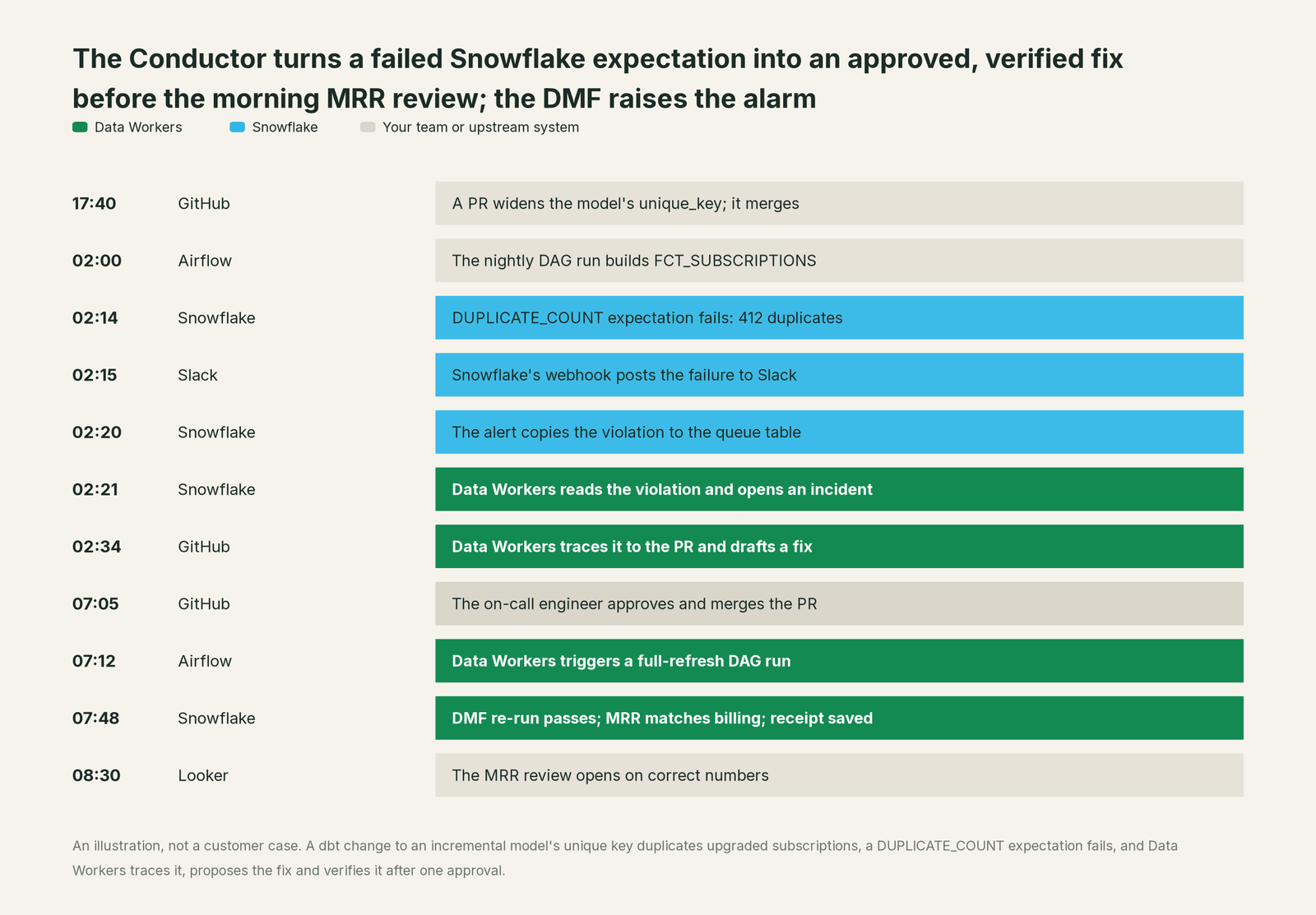
Inside Snowflake only the rebuilt table changed. The fix landed where the cause was, in the dbt project, through your own review.
The receipt. Every run ends with a record you can hand to an auditor or a post-mortem:
| Field | Value in this run |
|---|---|
| Signal | no_duplicate_subscriptions on ANALYTICS.MARTS.FCT_SUBSCRIPTIONS, value 412, measured 02:14 |
| Cause | unique_key change in the 17:40 pull request; upgraded subscriptions inserted twice |
| Blast radius | Two models downstream, one Looker dashboard |
| Change | dbt change restoring unique_key, merged by the engineer; full-refresh DAG run at 07:12 |
| Approver | The on-call analytics engineer, 07:05 |
| Checks | DUPLICATE_COUNT = 0; scheduled DMF passed; MRR matched billing |
| Undo | Revert the commit and rerun the DAG |
Why doesn't Snowflake just do this itself?
Snowflake built data quality monitoring to measure tables where they live and tell the right people fast, and for that job the design is right. Notifications go to a fixed list of trusted destinations with a cooldown so on-call isn't flooded. Snowflake's fixing guide leaves the DML to you, a sensible line for a warehouse to draw.
The fix in this run lived in a dbt repository and an Airflow DAG. Changing those means knowing the lineage outside Snowflake, routing the change to the right approver, rolling it back if it misbehaves and taking responsibility for systems Snowflake doesn't run. That cross-system loop, with an approval on every write and a receipt on every run, is the product Data Workers is.
Next autonomy step
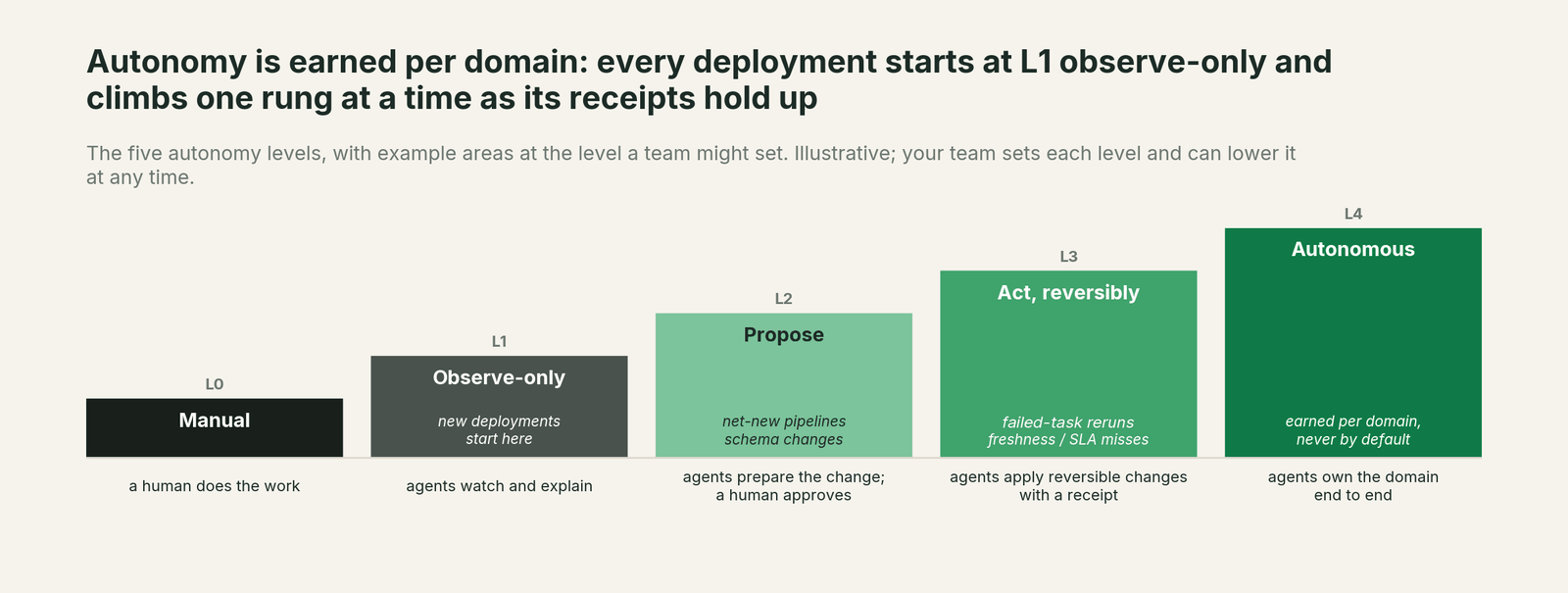
The ladder runs L0 manual, L1 observe, L2 propose, L3 act reversibly, L4 autonomous, set per domain. Start the subscriptions domain at L1: Data Workers reads violations, opens incidents and posts the cause, and changes nothing. Once the diagnoses hold up, move to L2: every fix arrives as a proposal like the one above. L3 suits the reversible, repeatable classes, such as rerunning a DAG after a late source or backfilling a freshness gap, where the DMF re-run proves the result. Model changes can stay at L2 as long as you like. For SLAs worth setting first, see data quality SLA examples, and for the tool landscape, AI tools for data quality monitoring on Snowflake.
The case for your CFO
The outcome. Failed checks stop being tickets that wait for morning. They become closed incidents, with the number right before the business opens the dashboard.
The risk story. At L1 Data Workers only reads Snowflake's results and reports. At L2 it drafts fixes and a named engineer approves each one. At L3 it acts only where the change can be undone, in the domains you choose. No agent approves its own work, each change is checked against live state before it runs, and every receipt names the signal, cause, change, approver and checks. Nothing migrates; your data stays in Snowflake.
Why now. You already pay for DMFs in serverless credits. Every violation that sits unread is a check you paid for and didn't act on.
The first win. One schema's expectations routed to the Conductor at L2, with the first incidents closed and receipted in the first weeks of a pilot.
What stays the same. Your DMFs, expectations, notifications, dbt project, Airflow DAGs and roles.
The pilot path. Start with a pilot on one domain. The pilot is credited in full against the first year.
One sentence for upstairs: "Snowflake's checks still page us; Data Workers picks up every failed expectation, proposes the fix, a named engineer approves it, and the check goes green with a receipt."
FAQ
Can Snowflake's webhook call Data Workers directly? Snowflake sends webhooks to Slack, Teams, PagerDuty, Jira and ServiceNow. Keep those for people. Data Workers reads the violation from the expectation status view or the queue table over its Snowflake connection.
Does Data Workers need write access to Snowflake? Not for this loop. It reads results and calls the DMF to verify. Fixes go through dbt and Airflow behind approval.
Will this double our alerts? No. Snowflake's notification still goes out once per cooldown. Data Workers adds one message per incident, with the cause and the plan, in the same channel.
What does the routing alert cost? It's a serverless alert, billed in credits for the compute each run uses. A schedule matched to your DMF schedule keeps it small, or skip it and poll the view.
What about anomaly detection? Volume and freshness anomaly detection (on ROW_COUNT and FRESHNESS) is in open preview. Anomaly results have their own view, SNOWFLAKE.LOCAL.DATA_QUALITY_MONITORING_ANOMALY_DETECTION_STATUS, and the same alert pattern routes them to the queue table.
Sources
Snowflake capabilities, checked October 2, 2026: data quality notifications (settings, integrations, cooldown, privileges, Enterprise Edition), webhook notifications (supported destinations), expectations (syntax, violation records), DATA_QUALITY_MONITORING_EXPECTATION_STATUS (columns, application roles), DATA_QUALITY_MONITORING_RESULTS, viewing DMF results, data quality access control (USAGE on system DMFs), Snowflake alerts (CREATE ALERT, serverless, RESULT_SCAN, privileges), anomaly detection (open preview, anomaly status view), SYSTEM$DATA_METRIC_SCAN (supported system DMFs incl. DUPLICATE_COUNT), fixing data quality issues and the data quality introduction (serverless billing). Product names and statuses change quickly; if we've got something wrong, tell us and we'll fix it.