Genie MCP Server: Connect Genie One and Genie Agents to Data Workers in Both Directions
Wire Genie One and Genie Agents to Data Workers over MCP: Chat in Genie calls Data Workers about a broken number, and Data Workers fixes it behind approval and leaves a receipt.
Your business users already ask Genie One about the numbers. A sales VP types "why did EMEA win rate fall?", Genie One resolves "win rate" through the Genie Ontology, the Sales pipeline Genie Agent writes the SQL, and a chart comes back. Genie One is where people ask. When the number itself is wrong, someone has to find out why and fix it across dbt, Airflow, Fivetran and Databricks. Genie One is where people ask. Data Workers is the crew that makes the answer right, and the two talk over MCP in both directions.
This how-to connects them over MCP today. A Genie One user's question that reveals a broken number reaches Data Workers as an external MCP server, carrying Genie's governed answer with it, and Data Workers fixes it behind a named engineer's approval and leaves a receipt. Going the other way, the engineer's coding agent holds Genie's MCP server and Data Workers' agents side by side, asks Genie for the governed number and hands it to Data Workers.
Key takeaways
- •Two directions, both over MCP. Chat in Genie calls Data Workers as an external MCP server through Unity Gateway. An engineer's coding agent, or an orchestration step, asks a Genie Agent over its managed MCP server and hands the governed answer to Data Workers.
- •Genie answers; Data Workers changes. Genie's MCP servers serve natural-language analytics. Every change in this loop happens in Data Workers, behind approval.
- •Unity Catalog permissions apply on every Genie call. Data Workers acts on the asker's identity and its own scoped service principal.
- •Approval stays in Data Workers. A fix returns
approval_requiredand waits for a named engineer in Spellbook Data Catalog. - •Every run leaves a receipt, including the Genie answer that opened it and the checks that closed it.
What it connects
On the Databricks side, three things, under their current names. Genie One (formerly Databricks One) is the business-user entry point, GA since June 2026. Genie Agents (formerly Genie Spaces) are the domain-specific chat environments that analysts curate with tables, metric views, example SQL and instructions. Databricks ships managed MCP servers for both, described as natural-language analytics across the workspace (Genie One) or scoped to one Genie Agent. Databricks' September 25, 2026 release notes announce the Genie One MCP server as generally available as the MCP Service system.ai.genie_one_mcp in Unity Gateway, with the older Beta endpoint sunsetting on October 31, 2026; the managed MCP servers page (last updated September 21) still lists the managed servers, Genie Agent included, as Public Preview. Check your workspace's release status before you standardize on either. Going the other way, Databricks' external MCP docs list Chat in Genie, Genie Code and AI Playground as surfaces that use external MCP servers registered through Unity Catalog HTTP connections.
On the Data Workers side: the agents of the Data-Agents Swarm, each an MCP server serving streamable HTTP at /mcp. The Incident Debugging agent is the natural first one to expose to Genie. The Autonomous Data-Conductor sequences multi-step fixes, and Data Context Wizard holds one governed context across Unity Catalog, dbt, Airflow, Fivetran and the rest of the estate. Data Workers works with Genie over MCP today: Genie calls Data Workers' agents through Unity Gateway, the same coding agent or orchestration step that calls Data Workers can call Genie's managed MCP server, and Data Workers reads Unity Catalog directly through its Databricks connector. For the wider picture, see Data Workers on Databricks and our guide to the Databricks MCP servers. Engineers who route agents through a Supervisor Agent can follow Data Workers agents as Agent Bricks Supervisor tools.
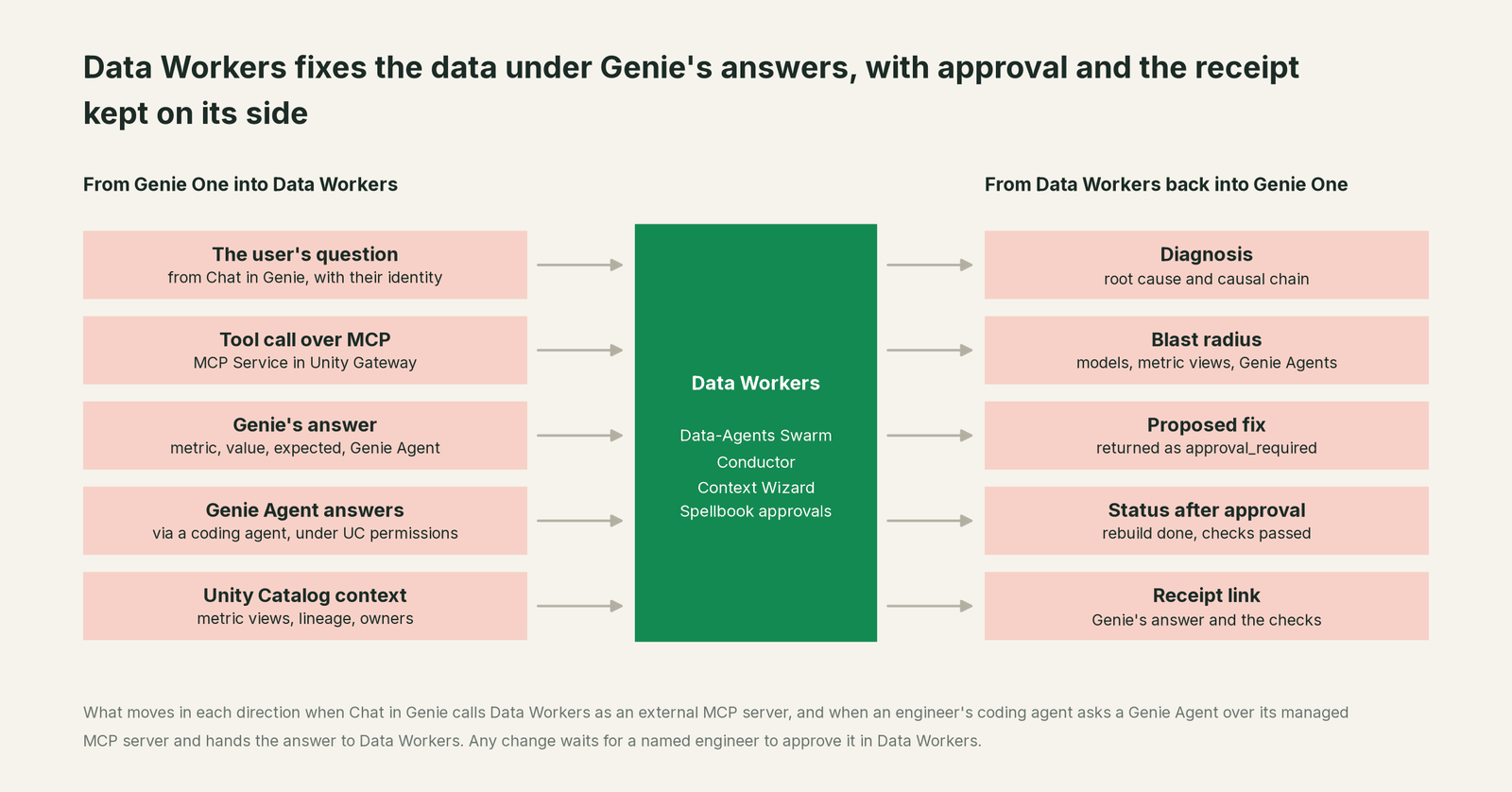
What moves in each direction
| From Genie into Data Workers | From Data Workers back to Genie |
|---|---|
| The user's question from Chat in Genie, with their identity | A diagnosis: root cause and causal chain |
| A tool call through the Data Workers MCP Service in Unity Gateway | The blast radius: dbt models, metric views, Genie Agents, dashboards |
| Genie's governed answer as tool arguments: metric, value, expected value, Genie Agent | A proposed fix, returned as approval_required with an approval id |
| Genie Agent answers fetched by an engineer's coding agent over MCP, under UC permissions | Status after approval: rebuild done, checks passed |
| Unity Catalog context: imported metric views and the grants Data Workers' Databricks connector reads | A receipt link with the Genie answer that opened the incident and the checks that closed it |
Prerequisites
- •A Genie Agent your users already trust, such as Sales pipeline, built on Unity Catalog tables and a metric view, and Genie One turned on for those users.
- •A workspace in a region with Model Serving, which Databricks requires for external MCP servers.
- •Genie access for the caller of direction one: the engineer's own OAuth login for a coding agent, or a service principal for an orchestration step, with access to the Genie Agent and its tables. The OAuth scope is
geniefor a Genie Agent server andai-gatewayfor the Genie One server. Databricks positions OAuth for production and personal access tokens for development and testing. - •A Databricks service principal for Data Workers' connector with read access to Unity Catalog grants on the securables your incidents touch.
- •Data Workers serving the Incident Debugging agent over HTTPS with its remote transport in OAuth mode, so it checks every token's signature, issuer and audience.
- •Data Workers connected to the systems your incidents cross: Unity Catalog through its Databricks connector, plus dbt, Airflow and Fivetran, each read-only to start.
- •Two separate lists: who gets EXECUTE on the Data Workers MCP Service in Databricks, and who may approve changes in Data Workers.
Setup
Three steps: give the engineer's coding agent both MCP servers, serve Data Workers to Unity Gateway, and register it as an MCP Service that Chat in Genie can call. Hostnames, IDs and secret names below are placeholders.
# Example: connecting Genie and Data Workers in both directions

# 1. Direction one. The coding agent's MCP config (Claude Code .mcp.json, Cursor, Codex):
#    the Genie Agent server next to the Data Workers agents
{
  "mcpServers": {
    "genie-sales-pipeline": {
      "type": "streamable-http",
      "url": "https://<workspace-hostname>/api/2.0/mcp/genie/<genie_space_id>",
      "headers": { "Authorization": "Bearer ${DATABRICKS_OAUTH_TOKEN}" }
    },
    "dw-incidents": { "command": "./start-agent.sh", "args": ["dw-incidents"] }
  }
}
# DATABRICKS_OAUTH_TOKEN: the engineer's OAuth token (scope: genie). The ug CLI can manage it.

# 2. Direction two. Serve the Incident Debugging agent over streamable HTTP
#    DW_TRANSPORT=http  ->  https://dw-incidents.example.com/mcp

-- 3. Unity Catalog HTTP connection (Databricks SQL). Create it at the schema level;
--    choose per-user OAuth in Catalog Explorer for Chat in Genie
CREATE CONNECTION dw_incidents TYPE HTTP
OPTIONS (
  host 'https://dw-incidents.example.com',
  port '443',
  base_path '/mcp',
  bearer_token secret('data-workers', 'incidents-token')
);

# Register it as an MCP Service (UI or REST), exposing only the tools you choose
POST /api/2.1/unity-catalog/mcp-services?parent=schemas/ops.integrations&mcp_service_id=dw_incidents
{ "config": { "source_connection": { "name": "connections/ops.integrations.dw_incidents" },
              "include_tool_selectors": ["diagnose_incident", "get_root_cause",
                                         "get_incident_timeline", "remediate"] } }

-- Give the sales team EXECUTE on the MCP Service, plus USE CATALOG and USE SCHEMA.
The bearer token above keeps the example short. For Chat in Genie, prefer the per-user OAuth option on the HTTP connection (set it in Catalog Explorer), so each call carries the identity of the person who asked and Data Workers records it. Grant end users EXECUTE on the MCP Service, never USE CONNECTION, so they can't reach the server around your tool selection. Databricks records every MCP Service invocation in system tables, which gives your platform team a second audit trail next to the Data Workers receipt.
Two details matter more than the configuration. First, Genie decides what the governed answer is: every Genie call runs under the caller's Unity Catalog permissions, and the answer reaches Data Workers as tool input it can trace and check. Second, scope what Data Workers can do on the Data Workers side. The Incident Debugging agent has no approve tool, and the domain's autonomy level decides whether remediate runs, waits for approval or is refused.
A worked run, end to end
This is an illustration, not a customer case. On Tuesday at 15:40 an analytics engineer merges a tidy-up to stg_opportunities that lowercases stage names. The model is incremental, so only new rows change. Overnight, Fivetran lands Tuesday's closed Salesforce deals and the Airflow DAG run sales_daily builds fct_opportunities. The pipeline_metrics metric view counts win_rate where stage equals Closed Won, so the new closed_won rows drop out.
| Time | System | What happens | Who decides |
|---|---|---|---|
| Tue 15:40 | dbt | stg_opportunities change merges; new stages land lowercase | Upstream |
| Wed 01:30 | Fivetran | The Salesforce sync lands Tuesday's closed deals | Upstream |
| Wed 02:00 | Airflow | sales_daily builds fct_opportunities incrementally | Upstream |
| Thu 08:05 | Genie One | The EMEA sales VP asks why win rate fell to 9%; Chat in Genie calls diagnose_incident | Genie routes |
| 08:06 | Databricks | Genie hands over the Sales pipeline Genie Agent's answer as the anomaly signal: win_rate 9%, expected near 30% | Read-only |
| 08:07 | dbt, Unity Catalog | Traces win_rate to fct_opportunities to the Tuesday change: 212 closed-won deals now read closed_won | Read-only |
| 08:08 | Genie One | Answers: a data change, not a sales drop; the fix returned approval_required | Waiting |
| 08:25 | Spellbook | The analytics engineer reviews the plan: restore the stage mapping and rebuild three days | A named engineer |
| 08:31 | Airflow, dbt | Data Workers runs the rebuild of the affected days after the engineer merges the one-line fix | Approved at 08:25 |
| 08:44 | Databricks | Counts match the Salesforce raw table; the engineer's coding agent asks the Genie Agent over MCP and gets 31% | Read-only checks |
| 08:46 | Genie One | The VP asks again and gets the right number | Genie routes |
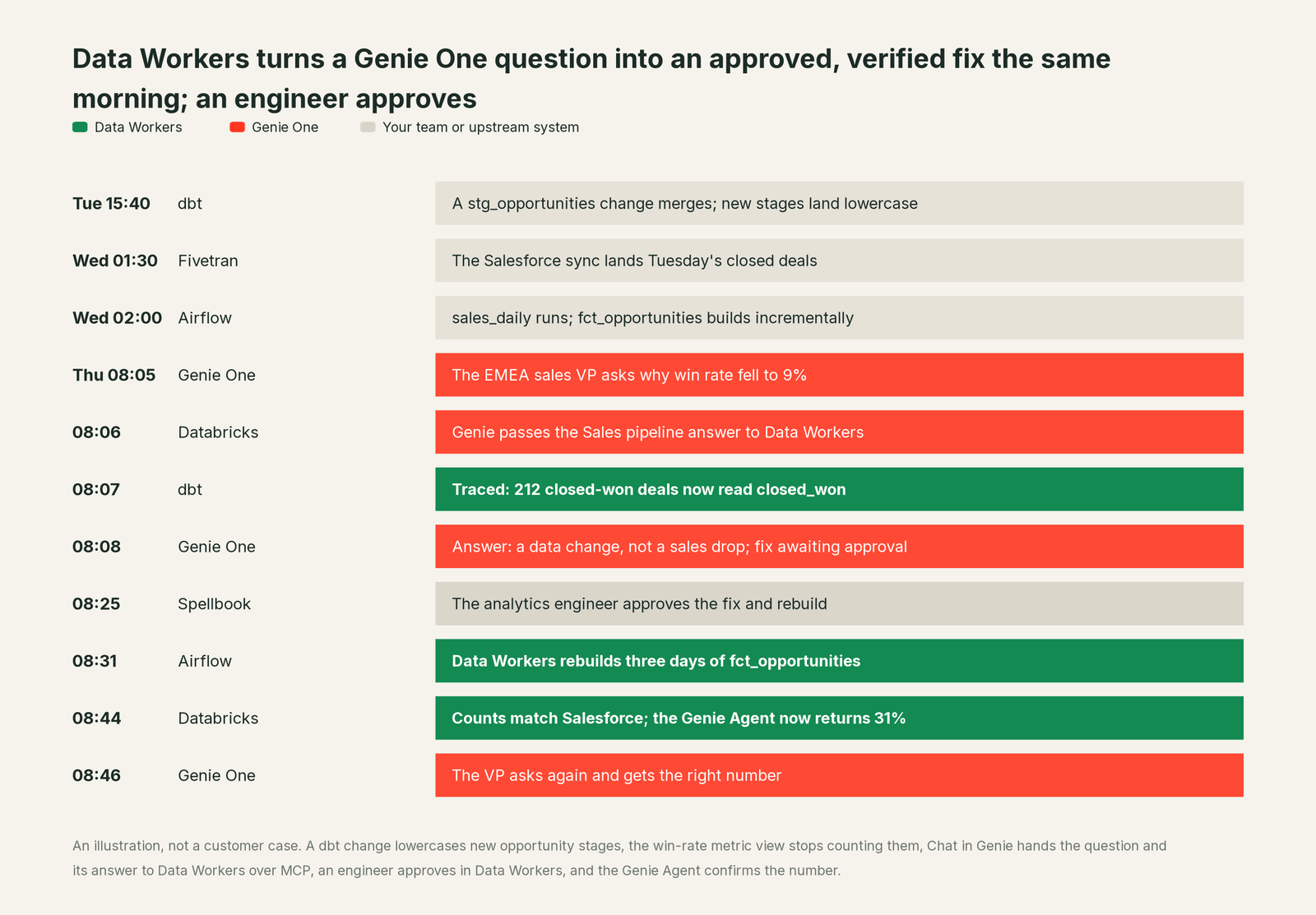
Genie never held the approval or wrote anything. The question arrived with the VP's identity and Genie's own answer as the anomaly signal, so Data Workers recorded who asked and what Genie said. When remediate ran with the backfill_data playbook and verification on, the sales domain's autonomy level required approval, so it returned approval_required with an approval id, and Genie passed that status to the VP. The approval happened in Spellbook Data Catalog (in preview), where a guard rejects any approver that is an agent. The last check used direction one: the engineer's coding agent asked the same Genie Agent the same question over its MCP server and compared the answer with the counts Data Workers had verified.
The receipt this run leaves. One tamper-evident record, hash-chained with the rest of the audit log:
- •Request: arrived over MCP through the
dw_incidentsMCP Service from Chat in Genie; the person who asked; tools called and their arguments. - •Cause: the causal chain from
win_rateinpipeline_metricsback to the Tuesday change instg_opportunities. - •Blast radius: two dbt models, one metric view, one Genie Agent, one dashboard.
- •Action: three days of
fct_opportunitiesrebuilt through the dbt job after the fix merged. - •Approver: the named engineer, with the time of approval.
- •Checks: the Genie answer that opened the incident (9%); closed-won counts against the Salesforce raw table after the rebuild.
- •Before and after values, and the rollback path.
Why doesn't Genie just do this itself?
Genie One is built to answer business questions well on governed data, and its design follows from that. Its MCP servers serve natural-language analytics, every answer runs under Unity Catalog permissions, and the Genie Ontology steers terms toward certified definitions. That is the right design for a product every business user can safely ask. Databricks also keeps operational repair in separate products: Genie Code helps an engineer in the workspace (Genie Code vs the Data-Agents Swarm), and Genie ZeroOps targets the Databricks side of incidents (Genie ZeroOps vs the Autonomous Data-Conductor).
Fixing the number in this run meant reading a dbt change, an Airflow DAG run and a Fivetran sync, then changing data with approval, rollback and a receipt. That is a different product category: blast-radius scoping across systems Databricks doesn't run, approvals tied to the change itself, and accountability for changes in tools Databricks doesn't own. Keeping that out of a business-user chat is a sound decision. It is the product Data Workers is, and Genie can call it like any other MCP server.
The next autonomy step
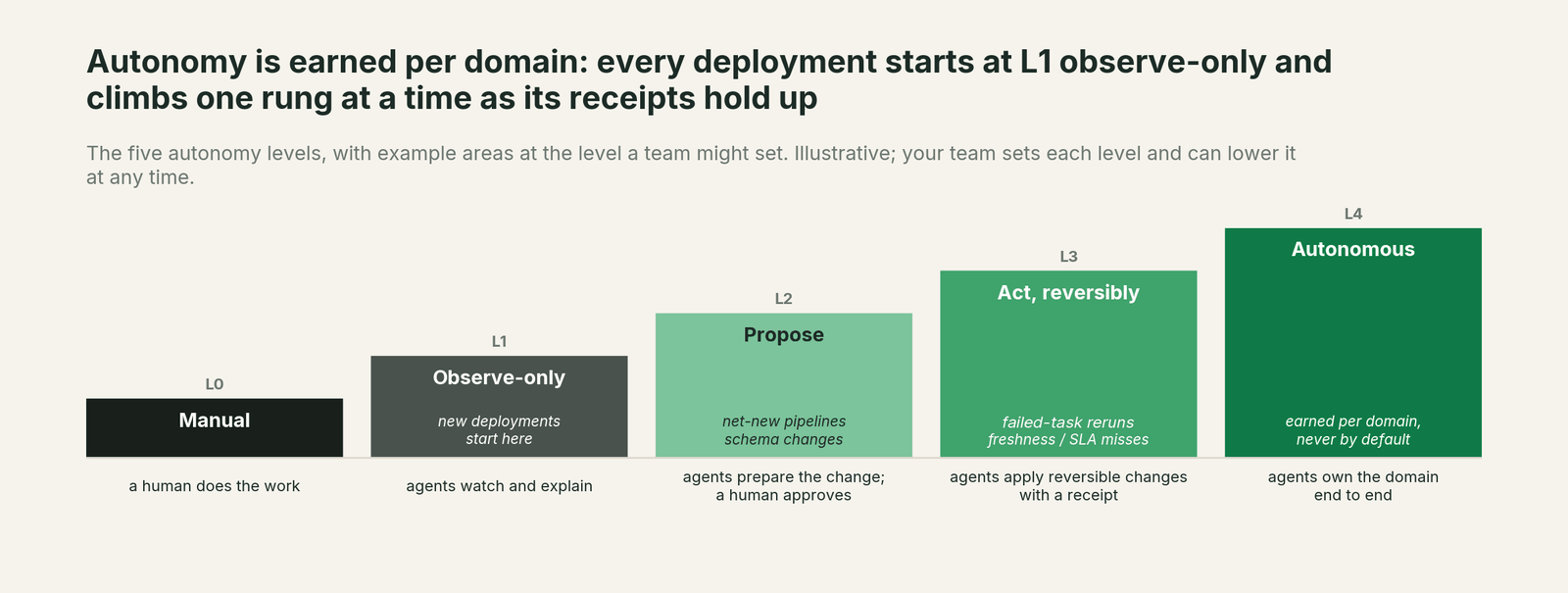
Start at observe: expose only diagnose_incident and get_root_cause to Chat in Genie, and give engineers' coding agents the Genie Agent server, so users get the cause next to the chart and nothing changes. Move to propose for one domain, as in the run above, so every fix waits for a named engineer. Once that domain's receipts show the same fix approved again and again (rebuilding recent days after an upstream change is a common first candidate), let that one playbook act reversibly with verification on, while schema and access changes stay at propose. Autonomy is set per domain in Data Workers, so the MCP Service, the grants and the Genie Agent don't change as you climb.
The case for your CFO
The outcome. When someone asks Genie One why a number moved, they get the cause and a fix in progress, instead of a forecast built on a wrong win rate. Fewer bad numbers reach a pipeline review or a board pack.
The risk story. Genie answers questions, and Unity Catalog permissions apply to every Genie call. At observe, Data Workers reads and explains. At propose, every change waits for a named engineer, and no agent can approve its own work. Acting levels are reversible and limited to domains you pick. Every change carries a receipt and a rollback path, and nothing migrates.
Why now. Databricks announced the Genie One MCP server as generally available on September 25, and Chat in Genie can call external MCP servers. Your business users are already asking Genie about the numbers. The answers should come with a fix and an audit trail.
The first win. Upstream changes that quietly bend a metric. Connect one Genie Agent and one domain in observe mode and see which answers would have become fixes.
What stays the same. Unity Catalog, Genie One, Genie Agents, metric views, the Genie Ontology, dbt, Airflow, Fivetran, and the people who approve changes.
The pilot path. Start with a pilot on one Genie Agent and one domain, observe first, then propose. The pilot is credited in full against the first year.
One sentence for upstairs: "Genie tells our people what the number says; Data Workers finds out why it's wrong and fixes it, and nothing changes until one of our engineers approves."
Sources
Databricks capabilities and statuses, current as of October 2, 2026: managed MCP servers (Genie One and Genie Agent servers, URL patterns, OAuth scopes, Public Preview label; updated September 21, 2026), September 2026 release notes (Genie One MCP server GA as system.ai.genie_one_mcp on September 25, 2026; Beta endpoint sunset October 31, 2026; Unity Gateway CLI September 22, 2026), connect MCP clients (OAuth for production, tokens for development, Unity Gateway CLI, ai-gateway scope; updated September 22, 2026), external MCP servers (Unity Catalog HTTP connections, per-user OAuth, Chat in Genie; updated September 11, 2026), register an MCP Service (streamable HTTP, REST registration, EXECUTE vs USE CONNECTION; updated September 30, 2026), govern an MCP Service (tool selectors, service policies in Beta; updated October 1, 2026), HTTP connections (CREATE CONNECTION syntax; updated September 30, 2026), MCP Services (EXECUTE grants, system tables), Genie One (formerly Databricks One; updated September 18, 2026), chat in Genie One (updated October 1, 2026), Genie Agents (formerly Genie Spaces; updated September 11, 2026), July 2026 release notes (Genie Spaces renamed Genie Agents) and the Genie One launch press release (June 16, 2026). Product names and statuses change quickly; if we've got something wrong, tell us and we'll fix it.