From AWS to an Autonomous Data Platform: A Stage-by-Stage Playbook
A practical path from a hands-on data team on AWS to an agentic enterprise: five autonomy levels across Redshift, Glue, S3 Tables and Lake Formation, what to turn on at each, and when to move up.
Our mission is to help traditional data teams and data platforms become agentic enterprises. This playbook is the practical version of that mission for teams whose estate runs on AWS: AWS is where your data lives and your analytics run, and Data Workers is the agentic data platform that runs the whole estate, AWS included.
Most AWS data teams today are a hands-on team with a lot of good services. Raw data lands in S3, more of it now as Iceberg tables in S3 Tables. Glue crawls it, catalogs it and runs the Spark jobs. Lake Formation decides who sees which columns. Redshift serves the warehouse, Athena and EMR handle the rest, and Step Functions or Airflow on MWAA hold the schedule together. SageMaker Unified Studio is becoming the place people work, with SageMaker Catalog for discovery and subscriptions and a Data Agent that writes SQL and notebook code on request.
AWS has added an assistant to almost every one of those services. The SageMaker Data Agent drafts a query that the user accepts or runs. The Spark troubleshooting agent for EMR explains a failed job and recommends code, read-only by design. SageMaker Catalog suggests descriptions and glossary terms that a person accepts or rejects. Bedrock AgentCore gives your developers the parts to build agents of their own. Each is good at its own service. The engineers are still the ones who notice the failed Glue job, trace it to the Aurora column that changed, rerun the load, work the access queue and explain the Redshift bill.
An autonomous data platform changes who does that work. Agents run the back office (access, pipelines, schema changes, catalog upkeep, cost, incidents and audit evidence) across Redshift, Glue, S3 Tables and Lake Formation, and across dbt, Airflow, Snowflake or Databricks and your BI tools when they're in the picture. People set the rules, approve what needs approving and handle the exceptions. You get there one domain at a time, moving up a ladder as the evidence builds.
The timing is good. AWS is pulling analytics into SageMaker Unified Studio, standardising tables on Iceberg in S3 Tables, and putting an API and an MCP server behind most of its services. The surface an agent platform needs to read and act across your estate is already there, so connecting and observing is a setup task.
Key takeaways
- •Five levels, set per domain. L0 manual, L1 observe, L2 propose, L3 act on reversible changes, L4 fully autonomous. Access requests can run at L3 while schema changes are still at L2.
- •IAM and Lake Formation stay the lock. Every agent acts with the roles and grants you give it, so nothing goes around your existing controls.
- •You move up on evidence, not faith. Every change leaves a tamper-evident receipt. A domain moves up when its receipts show the agents have been right, and it can be moved down at any time.
- •The first quarter is concrete. Connect and observe, then turn on proposals for access, failed loads and spend, then let the reversible fixes run on their own.
The five levels
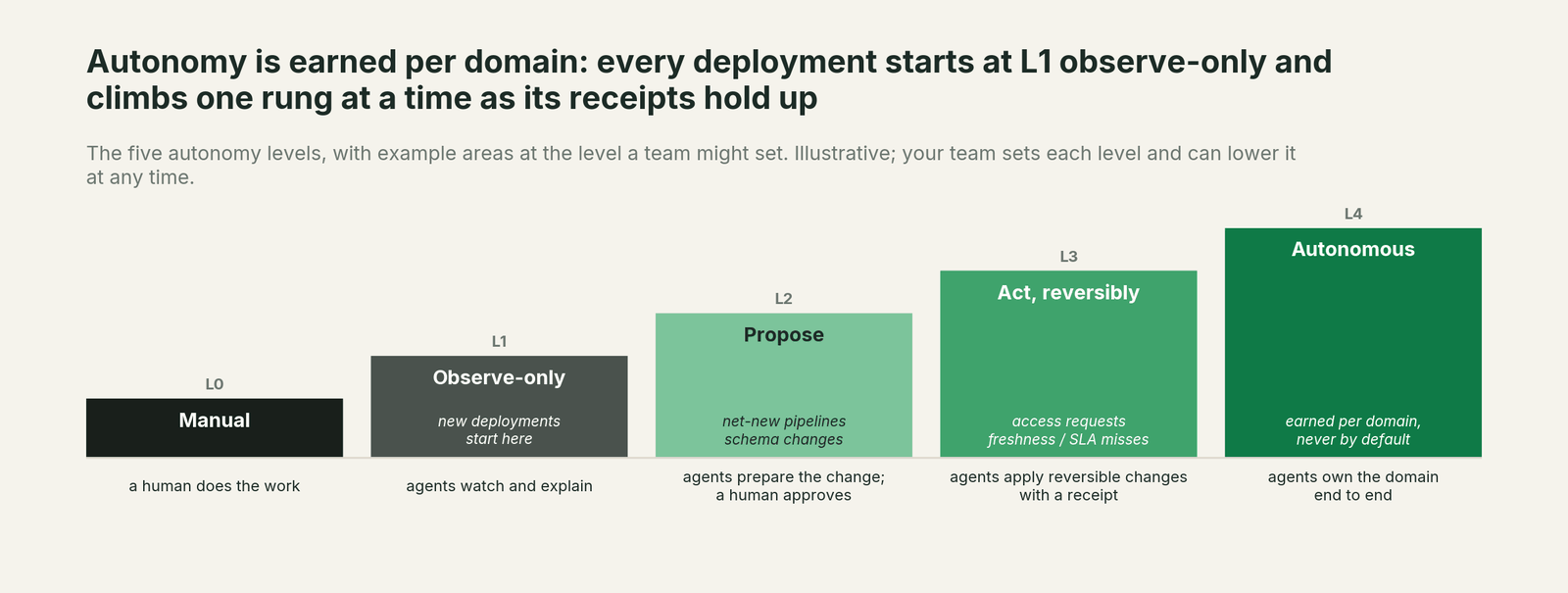
| Level | What agents do | What people do | Typical AWS domains at this level |
|---|---|---|---|
| L0 Manual | Nothing on their own. Assistants help a person who asks. | All of the work. | Where most AWS teams are today. |
| L1 Observe | Read the Glue Data Catalog, Lake Formation permissions and tags, Redshift system tables, Step Functions history and the AWS bill, build the context graph, and explain what's happening. | Read the explanations, correct the context. | Every domain on day one. |
| L2 Propose | Prepare the complete change: the Lake Formation grant, the rerun, the dbt or Glue job fix, the migration batch, with a blast-radius report. | Approve, steer, send back. | Schema changes, PII classification, catalog metadata. |
| L3 Act, reversibly | Apply changes that can be undone, inside a pre-approved blast radius, check the result and leave a receipt. | Review receipts; roll back if needed. | Access requests, failed loads, cost cleanup. |
| L4 Autonomous | Own the domain end to end: detect, fix, verify and remember. | Set policy; handle exceptions. | Earned per domain, never by default. |
What to turn on at each level
L1: Connect and observe.
Connect Data Workers to your AWS accounts with read-only roles, and to the tools around them: dbt, Airflow, a second warehouse if you have one, and Tableau, Looker or Amazon Quick (formerly QuickSight) (the BI service formerly called Amazon Quick). Data Workers reads the Glue Data Catalog and Lake Formation permissions and LF-tags directly, Step Functions executions, DMS replication tasks and Cost Explorer through their APIs, and Redshift over the Redshift Data API or MCP today. S3 Tables connect through their Iceberg REST endpoint or MCP today. Nothing moves and nothing is copied.
Two AWS settings make this level richer. Turn on the Redshift system tables integration with S3 Tables, so query, load and connection history is kept well past the seven days Redshift holds in the cluster. And register those tables in the Glue Data Catalog, which AWS requires before anything can query them.
Data Context Wizard builds one governed graph from all of it: Glue and SageMaker Catalog metadata, Lake Formation tags, Redshift query history, job runs, dbt and BI. Spellbook Data Catalog (in preview) turns that graph into asset pages your team can read and correct.
What you get right away: lineage that runs from an Aurora source through DMS, S3 and Glue into Redshift and the dashboard, the incident history that shows where problems really start, and a first map of who has access to what and where the AWS bill goes.
Move up when: your team trusts the graph. Owners and definitions are corrected, and the agents' account of last month's failed loads matches what your engineers found.
L2: Propose in three domains.
Pick three domains with high volume and clear rules. For most AWS teams that's access requests, failed loads, and cost cleanup.
- •Access requests. SageMaker Catalog subscription requests and Lake Formation tickets wait for a data owner by default. The Data Access & Governance agent and the Identity agent turn each one into a least-privilege, time-boxed grant scoped by LF-tag, with row and column filters where the policy calls for them, ready for the owner to approve.
- •Failed loads. A Glue job or Step Functions execution fails, or a Redshift COPY rejects rows. The Autonomous Data-Conductor and the Incident Debugging agent trace the failure to its cause, often an upstream change in another system, and propose the fix and the rerun.
- •Cost cleanup. The Cost Savings & Data Cleanup agent reads Cost Explorer and Redshift query history and proposes what to change: idle Serverless workgroups, tables nobody has queried in months, and orphaned S3 data, each with a dependency check.
Every proposal lands in the Spellbook inbox with its blast radius. People can also ask and approve from the coding agent they already use, whether that's Claude Code, Codex, Cursor or Kiro.
What you get: the toil arrives prepared. An access request arrives as a ready-to-approve grant. A failed load arrives with its root cause and a fix attached.
Move up when: a domain's proposals are approved as-is, week after week, with no reversals.
L3: Let the reversible work run.
For domains that pass, let agents apply reversible changes inside a blast radius you define: grants that expire, reruns and backfills, and archiving unused tables instead of dropping them. On AWS, every change goes through IAM and Lake Formation with the permissions you grant Data Workers, so the controls you already audit stay in force. A fix isn't done until the load reruns, the row counts and dbt tests check out and the dashboard number is right. Each change is reversible and leaves a tamper-evident receipt.
At the same time, move the next domains to L2:
- •Schema changes. The Schema Evolution agent sees an upstream change (a renamed column in Aurora, a new field in a Kafka topic) before the next Glue job or dbt run, and proposes the job and model changes. The Data Change Review agent checks them before they merge.
- •PII classification. Agents propose tags for new columns and the LF-tag policies that follow from them. The Lake Formation tag stays the enforcement point.
- •Catalog metadata. SageMaker Catalog can suggest descriptions and glossary terms, and a person still has to accept each one. Data Workers checks those suggestions against lineage, usage and the definitions in your other tools, and sends a reviewed batch to the owner.
What you get: the first real hours back. Most access tickets and failed-load alerts now close on their own, with a receipt your auditors can read.
Move up when: the reversal rate stays near zero and exceptions are rare and well understood.
L4: Autonomous, domain by domain.
A domain at L4 is owned end to end. The Conductor detects the problem, has the right agent fix it wherever it lives, confirms the downstream number is right, and records what happened so the next occurrence is faster. People set policy and handle what the agents escalate. You'll reach L4 in some domains within a few quarters. Net-new pipeline design and PII policy may stay at L2 for a long time, and that's fine.
This is also the right time for the migrations AWS keeps putting on your roadmap. The Data Migration agent plans reviewable waves for a Hive metastore or self-managed Iceberg tables moving into S3 Tables, for leftover Redshift Python UDFs moving to Lambda UDFs, or for an on-premises warehouse moving into Redshift. It proves parity with row counts, checksums and statistical profiles, and cuts over while the old system stays live. Each wave is one approval.
A first quarter on AWS
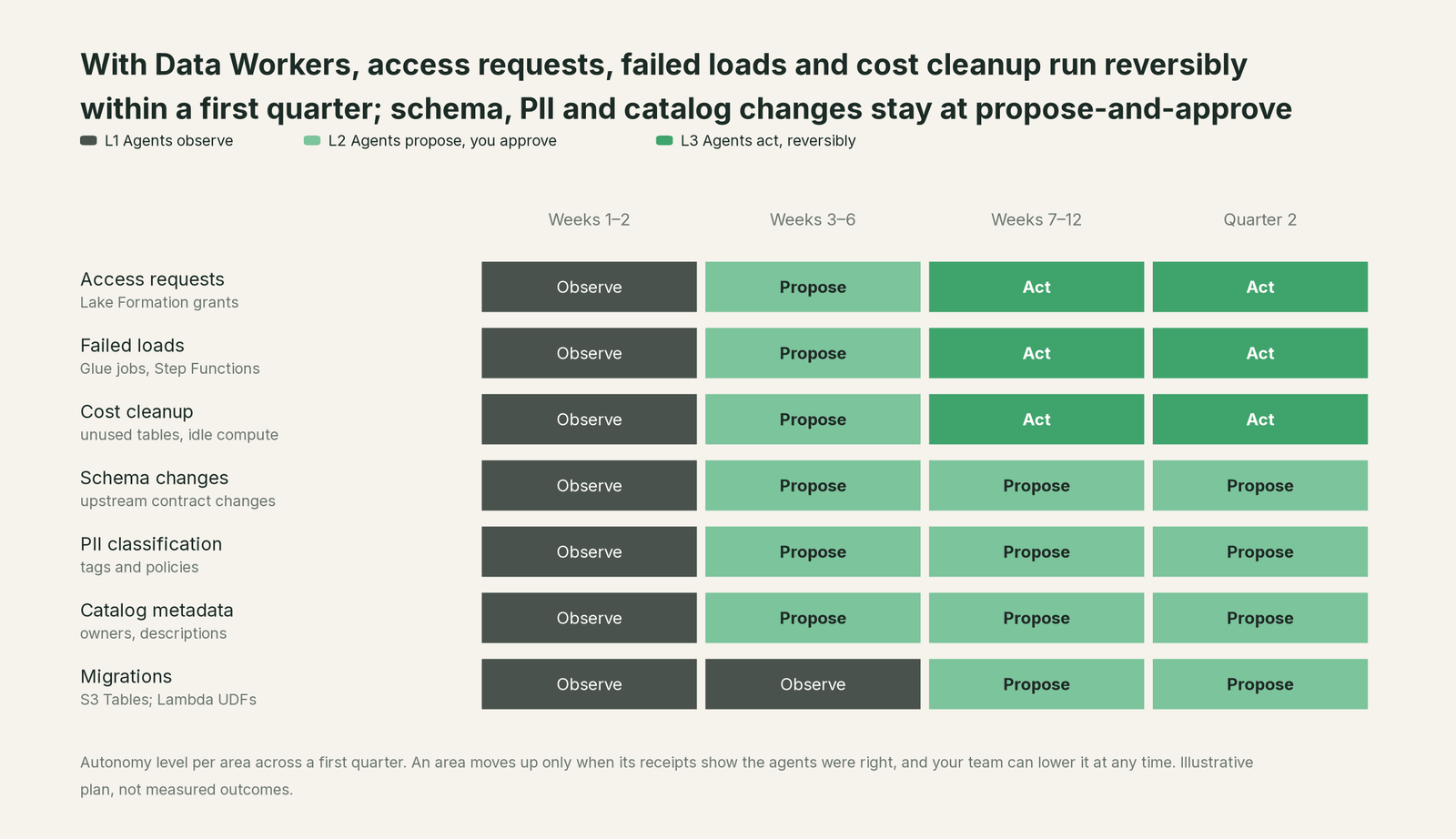
This is an illustrative plan, not a promise. Access requests, failed loads and cost cleanup reach reversible changes by the end of the first quarter. Schema changes, PII classification and catalog metadata spend the quarter at propose-and-approve. Migrations are planned in the first quarter and run in waves after it. The pace depends on how clean your context is and how much evidence each domain builds up.
How to measure progress
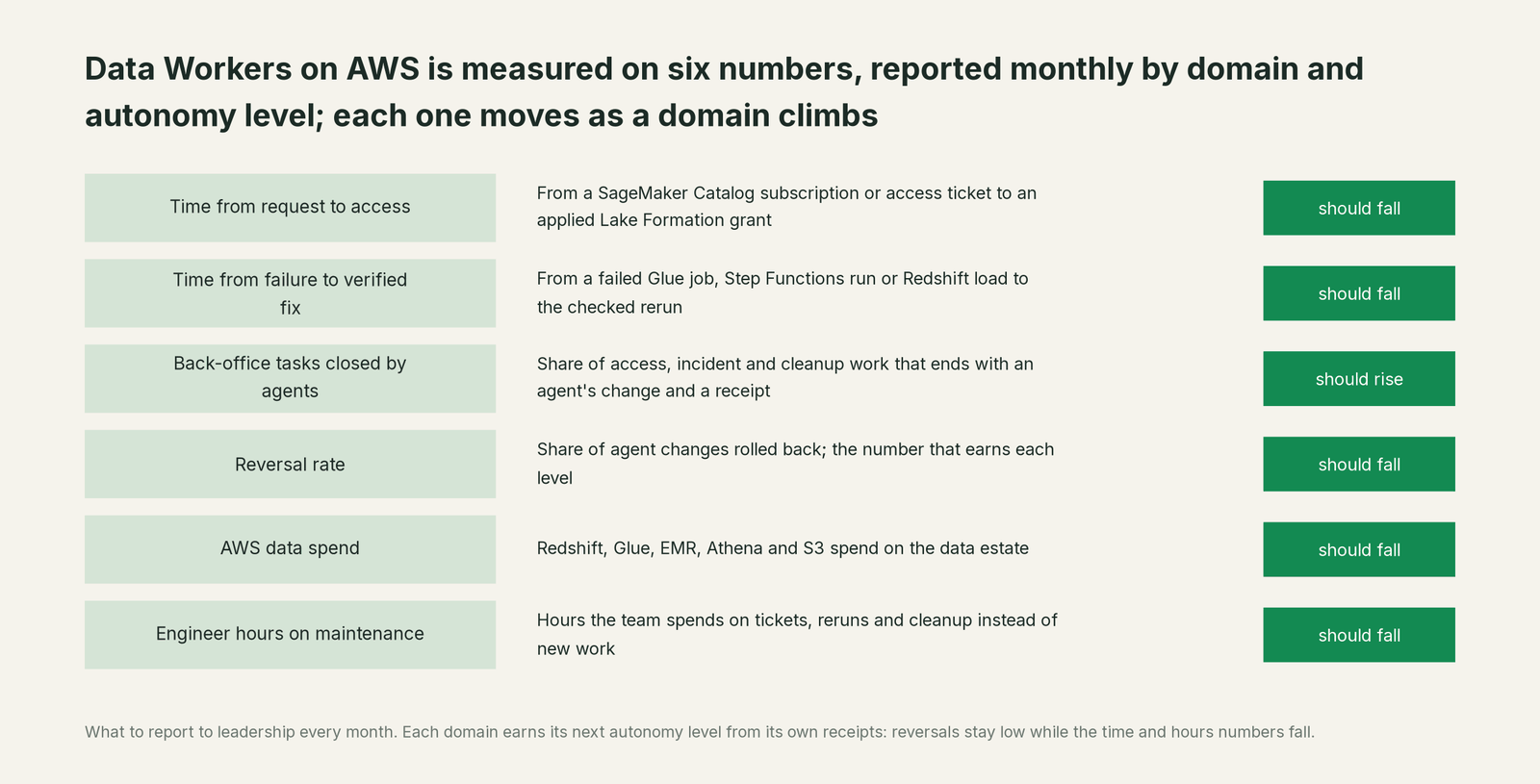
Report these to your leadership every month, by domain and level:
- •Time from request to access. From the SageMaker Catalog subscription or access ticket to an approved, applied Lake Formation grant. This is usually the first number to move.
- •Time from failure to verified fix. From the failed Glue job, Step Functions execution or Redshift load to the moment the rerun is checked and the dashboard is right.
- •Share of back-office tasks closed by agents. How many access requests, failed loads and cleanup items ended with an agent's change and a receipt, split by the level each domain runs at.
- •Reversal rate. The share of agent changes that were rolled back. This is the number that earns each level.
- •AWS data spend. Redshift, Glue, EMR, Athena and S3 month over month, with the changes that moved it.
- •Engineer hours on maintenance. The number the whole program exists to shrink.
Why doesn't AWS do this itself?
Because AWS's business is building blocks, and its AI is designed to help a person inside one service. The SageMaker Data Agent writes the notebook cell, Amazon Q writes the SQL, Glue Data Quality drafts the rules and SageMaker Catalog suggests the classification, and in each case a person reviews and runs the result. When you want agents that act, AWS gives you Bedrock AgentCore and the AWS MCP Server, and you build the agent, write its policies and own the outcome. That's the right design for a platform that serves every kind of customer.
Owning a change across Glue, Iceberg tables, Redshift, dbt and dashboards is a different product. It needs blast-radius scoping, approvals that vary by domain, rollback, a receipt for every change, context about systems AWS doesn't host, and responsibility for changes made in tools AWS doesn't run. That's the product Data Workers is.
What stays the same
- •IAM and Lake Formation stay the lock. Data Workers acts with the roles and grants you give it, inside your accounts, and never creates a second permission system. Its calls show up in CloudTrail like any other principal's.
- •Your AWS services keep doing their jobs. Redshift, Glue, S3 Tables, EMR and Athena run exactly as before. Nothing is migrated to get started, and no tables are copied out. Data Workers stores metadata and scrubbed facts about your data.
- •People keep the tools they like. Analysts keep SageMaker Unified Studio and its Data Agent. Business users keep Amazon Quick, and Spellbook adds one chat box across the estate, with Slack and Teams coming. Teams building on Bedrock AgentCore can add Data Workers' agents to AgentCore Gateway as MCP targets and call them as tools. Data Workers can also run on the models you already use in Amazon Bedrock.
- •Your engineers stay in charge. They set the levels, approve what needs approving, and can lower any domain's level at any time. No agent can approve its own work, and anything irreversible needs a named person's approval.
The case for your CFO
The outcome is a data team that spends its hours on new work while the back office runs itself: access granted the day it's asked for, failed loads fixed and checked before the business opens the dashboard, and AWS data spend that falls because the waste behind it is removed after a dependency check.
The risk story is short. Agents start read-only. They earn each level per domain on their own record, act only through the IAM roles and Lake Formation grants you give them, and leave a receipt on every change: who or what made it, why, what it touched and how to undo it. Their calls show up in CloudTrail like any other principal's. Anything irreversible needs a named person's approval. Nothing is migrated to start.
Why now: AWS is putting an assistant in every service and opening its APIs to agents through the AWS MCP Server, so the estate is connected enough for one platform to run it. The first win is usually access requests or failed loads, where the numbers move inside a quarter.
What stays the same: Redshift, Glue, S3, Lake Formation, Amazon Quick and the people who use them.
The path is a pilot. A forward-deployed engineer connects your estate and runs the first domains with your team, and the pilot is credited in full against the first year. See pricing for how it works.
The sentence to repeat upstairs: AWS gave every service its own assistant; Data Workers gives the estate one crew that fixes, approves and records the work across all of them.
FAQ
AWS already has agents. Why add Data Workers? AWS's agents each work inside one service and one person's session: the SageMaker Data Agent writes the query you run, the EMR troubleshooting agent explains a failed job without changing it, and SageMaker Catalog suggests metadata you accept. That's a sensible design for a service team. Data Workers owns the outcome across services and tools, with one approval flow and one audit trail.
Do agents get admin access to our AWS accounts? No. You create the roles. Data Workers starts read-only at L1, and at L2 and above it acts only inside the permissions and blast radius you define for each domain, through IAM and Lake Formation.
Does data leave our AWS accounts? Data Workers stores metadata and scrubbed facts about your data, not your tables. You can bring your own model, including models in Amazon Bedrock.
We're all-in on AWS. Is this still for us? Usually, yes. Even an AWS-only estate spans six or more services, each with its own console and assistant, and most also have dbt, Airflow or a BI tool outside AWS. The work between them is what Data Workers takes on.
How long until the first domain runs on its own? Most teams can plan for access requests and failed loads to run reversibly within a first quarter. The pace depends on how clean your context is and how much evidence each domain builds up.
Where to go next
- •For what AWS covers service by service, what Data Workers adds and how it connects, read Data Workers on AWS.
- •For the executive version, read the data leader's guide for AWS teams.
- •For the thinking behind the levels, read our thesis and the whitepaper Context Is Not All You Need.
Ready to start at L1? Start with a pilot. A forward-deployed engineer connects your AWS accounts and the tools around them and runs the first quarter with you. See pricing for how the pilot works.
Sources
- •AWS, Generate SQL with the Data Agent (SageMaker Unified Studio), checked Oct 2, 2026: https://docs.aws.amazon.com/sagemaker-unified-studio/latest/userguide/sql-query-data-agent.html
- •AWS, Getting started with the SageMaker Data Agent for Notebook, checked Oct 2, 2026: https://docs.aws.amazon.com/sagemaker-unified-studio/latest/userguide/data-agent-getting-started.html
- •AWS, Using machine learning and generative AI in SageMaker Unified Studio (AI metadata recommendations), checked Oct 2, 2026: https://docs.aws.amazon.com/sagemaker-unified-studio/latest/userguide/autodoc.html
- •AWS, Approve or reject a subscription request in SageMaker Unified Studio, checked Oct 2, 2026: https://docs.aws.amazon.com/sagemaker-unified-studio/latest/userguide/approve-reject-subscription-request.html
- •AWS, System table integration with S3 Tables (Amazon Redshift), checked Oct 2, 2026: https://docs.aws.amazon.com/redshift/latest/mgmt/system-table-s3-tables.html
- •AWS Big Data Blog, Amazon Redshift Python UDFs end of support after June 30, 2026, checked Oct 2, 2026: https://aws.amazon.com/blogs/big-data/amazon-redshift-python-user-defined-functions-will-reach-end-of-support-after-june-30-2026/
- •AWS, Amazon S3 Tables features, checked Oct 2, 2026: https://aws.amazon.com/s3/features/tables/
- •AWS What's New, Spark troubleshooting agent for Amazon EMR on EKS (July 10, 2026), checked Oct 2, 2026: https://aws.amazon.com/about-aws/whats-new/2026/07/amazon-emr-eks-spark-troubleshooting/
- •AWS, What is Amazon Bedrock AgentCore, checked Oct 2, 2026: https://docs.aws.amazon.com/bedrock-agentcore/latest/devguide/what-is-bedrock-agentcore.html
- •AWS, Amazon Q Developer (Kiro transition), checked Oct 2, 2026: https://aws.amazon.com/q/developer/
- •AWS, Amazon Quick, checked Oct 2, 2026: https://aws.amazon.com/quick/quicksight/